Compare commits
289 Commits
feat/plugi
...
394faa4328
| Author | SHA1 | Date | |
|---|---|---|---|
| 394faa4328 | |||
| 4e06d08106 | |||
| 3b0dca6467 | |||
| 24512c61e6 | |||
| cc4583e2cc | |||
| 1d64310607 | |||
| 6acec9fcb5 | |||
| 9d273fff83 | |||
| 76c1af6e7e | |||
| aa80088abc | |||
| 0ae627ca7c | |||
| 7732b11d37 | |||
| 81717dc84f | |||
| 11c408ce0f | |||
| c138406217 | |||
| 2a280aaa93 | |||
| 2f6eae9f2b | |||
| d0ff876ba2 | |||
| 7fe87e515b | |||
| 790110ba7e | |||
| 29e80ce296 | |||
| c244a308d7 | |||
| 7cde4fa138 | |||
| 1b7259d1c1 | |||
| 09ff812562 | |||
| e7c631d532 | |||
| eb345e3e1f | |||
| 8751944053 | |||
| 06573e37d7 | |||
| d740f4da44 | |||
| f24bd38ec7 | |||
| 45934baf0a | |||
| 4384ee53c5 | |||
| d89c326be5 | |||
| 2dccb4f871 | |||
| a9ddf3074e | |||
| db087bb184 | |||
| 5e9083041f | |||
| be0555d6bc | |||
| ea19dfcbe6 | |||
| fa55e32153 | |||
| f6b1f5c45a | |||
| 1f9a1822c9 | |||
| 63015c6bbc | |||
| 24b30df992 | |||
| 67b1003831 | |||
| 00d37bdaf0 | |||
| c5fcb1427e | |||
| 9118ebd662 | |||
| 19cdf47bed | |||
| 95bac94479 | |||
| 421a8934a7 | |||
| f7f45668d3 | |||
| c8e9a5b897 | |||
| a1bfa62796 | |||
| 64e11cbc3c | |||
| 15445aa13c | |||
| 52834047f2 | |||
| 76817675f1 | |||
| 2cce8f94c9 | |||
| 9b5f102d9f | |||
| 68de33165e | |||
| f56ad33366 | |||
| 35c63802b5 | |||
| 3458f6fe23 | |||
| 8f305033f7 | |||
| 4a18f1c418 | |||
| 373edb6d80 | |||
| 1c66e0e599 | |||
| 536e7720cb | |||
| 75eac4b1ce | |||
| 9ed0afee6b | |||
| f700473967 | |||
| 5fc0fd2a95 | |||
| 5f88c7ceac | |||
| 4c7ec65577 | |||
| 3e18299099 | |||
| 021be88880 | |||
| a479e81682 | |||
| c3e3012a94 | |||
| c9e9df3825 | |||
| 7ca2fa1bcc | |||
| 208c24682b | |||
| 316c784bde | |||
| 1467ae8a89 | |||
| 1881615860 | |||
| 0ea3afbe70 | |||
| 4f1d7f495a | |||
| 7c4ecb013e | |||
| ed5976a22c | |||
| d0462ca4b9 | |||
| eae3968465 | |||
| a734ccbb88 | |||
| 7444bb1140 | |||
| 6ef7e976cc | |||
| 31419e93a1 | |||
| 173132399e | |||
| ae703091d4 | |||
| 8daea722bd | |||
| 032dd1b215 | |||
| 885e2cef75 | |||
| 9296b10150 | |||
| 423c9ddb0e | |||
| 50eacdafde | |||
| d90cca7cef | |||
| 5347425327 | |||
| 28d93c7e75 | |||
| 5339212de9 | |||
| 73a1510de4 | |||
| 606f757699 | |||
| 342bf22f3f | |||
| d2ec73f796 | |||
| c9f597beec | |||
| e9a201ef01 | |||
| 77a89847cb | |||
| c14b7f4dbc | |||
| 64724bf48c | |||
| c9e160f2ef | |||
| 3a19cc638f | |||
| a2e8e74572 | |||
| ad96743fad | |||
| 95b1bd7678 | |||
| 94b6fb056f | |||
| a24fd71636 | |||
| 7d1b8f7e26 | |||
| 5753e120ba | |||
| f55a5bfbcb | |||
| 83b706d5be | |||
| b9e63bc9a9 | |||
| ef0c8748f7 | |||
| 430a2c4062 | |||
| f5bd35c71a | |||
| f958683f53 | |||
| 21a8abd5cf | |||
| 4b2da8244f | |||
| c571cd9137 | |||
| 8cf0e32184 | |||
| 1cbd0c5fe7 | |||
| 72a84ed9e2 | |||
| 58113fb109 | |||
| 25966bc1e2 | |||
| 3c93c07afd | |||
| 85a37b546c | |||
| 37a121c3de | |||
| 341b6540fa | |||
| 1d074e5a94 | |||
| 5a5d82eef8 | |||
| 43189e144a | |||
| fd11eadc19 | |||
| 1231ef0892 | |||
| a1e88d473b | |||
| d08f9a7366 | |||
| faa7b63aee | |||
| e440dd2773 | |||
| a02027e7c9 | |||
| 772b067202 | |||
| a3fd5df8e8 | |||
| bdc55c727a | |||
| 52e4522ed0 | |||
| d44b316c9a | |||
| 939768986c | |||
| 1e99f3cb20 | |||
| 2af79cf1dc | |||
| 5b225126f1 | |||
| 4abb979eab | |||
| 4a790b5aca | |||
| 9786b7141c | |||
| 4a7af49fea | |||
| 15a1de3a90 | |||
| 4687c3faa6 | |||
| 5c19be22d3 | |||
| feff8ea4d3 | |||
| 6abec8c7b7 | |||
| f9b3699bda | |||
| 8da1177bf3 | |||
| a85a044a9b | |||
| 5546791549 | |||
| c58e3603de | |||
| 178f3a7498 | |||
| 940584e1ea | |||
| 4037e9e2d7 | |||
| 4b2f6967dc | |||
| 79ef879b97 | |||
| 1df7462778 | |||
| 0bcdc615e3 | |||
| 5577fe17bb | |||
| 820ee2f848 | |||
| be8365c8cb | |||
| b1dd2442b8 | |||
| 9281d1d724 | |||
| 226bb46094 | |||
| 251289a340 | |||
| c22081c5e9 | |||
| cca82c7885 | |||
| e4ff49bade | |||
| ada4806493 | |||
| 3831de2849 | |||
| 0df529c4fd | |||
| 5c53d7f0e9 | |||
| ef2a0dc16e | |||
| 5ce420295b | |||
| 1d7f3d7626 | |||
| 9b0d2d5e01 | |||
| 27e3351b55 | |||
| de3e84aa4e | |||
| e48e822d07 | |||
| 8dc34ee435 | |||
| d8cd86361e | |||
| acf3f9ff37 | |||
| c27b08cccf | |||
| 9fc3c9f056 | |||
| 60d8eaf0eb | |||
| df6f983e83 | |||
| acf60f2a17 | |||
| f933d84cd1 | |||
| b794d1ceb0 | |||
| 259310a29d | |||
| 715eac5949 | |||
| c2936395d9 | |||
| 8762eacb3e | |||
| 3d535fd3e1 | |||
| ecdbe0bdc0 | |||
| c49aaf753c | |||
| 0f8674e1c7 | |||
| ef2159f1bd | |||
| b662d25c9c | |||
| 1ce1ed715c | |||
| 2587018405 | |||
| 28b75e8475 | |||
| 5287d483d8 | |||
| 16e91bd2c0 | |||
| e6b6bc3698 | |||
| d43cd610a0 | |||
| 842e5fb49b | |||
| 430581598b | |||
| 2d5b297171 | |||
| 023fdb66c3 | |||
| 42481cd314 | |||
| e77194628a | |||
| 2aff54de74 | |||
| 91fadf591f | |||
| 02b56a7031 | |||
| c42ebdfe59 | |||
| 3f0cc8ae29 | |||
| 0f458f6299 | |||
| d415d8ee4e | |||
| bd7a85b705 | |||
| 44bbcde5cf | |||
| f9c9fa1840 | |||
| 53e91fc5a0 | |||
| 4288607ee2 | |||
| d4d86df7de | |||
| 4b8d255207 | |||
| a5dba25a8e | |||
| 719d1396b0 | |||
| 5b6ac43e13 | |||
| f7c2d86a46 | |||
| 83db55c790 | |||
| 94d41c3da9 | |||
| 83f9e2f005 | |||
| 318d3964bd | |||
| 770da72ce3 | |||
| d4c726ea9c | |||
| 082ef923b2 | |||
| c050f0e167 | |||
| 3daa66ea01 | |||
| 9bdaf34471 | |||
| 5cb68652f9 | |||
| 9bfa774336 | |||
| 009da59d38 | |||
| 5ea5ddba6e | |||
| 25a8ea5aa4 | |||
| ef83016b7f | |||
| 2e6812d00d | |||
| b676846b2f | |||
| 9c787627a9 | |||
| 463eedf1dd | |||
| fb1156d24f | |||
| 0b4ec2ca6e | |||
| 10f0877a5e | |||
| 5c2ea0f15c | |||
| 6c5d470bad | |||
| c21ad95963 | |||
| 7c1f1fae07 | |||
| c61e29a41f | |||
| 703912bb5f | |||
| 8ad6a48e8f | |||
| ba75541dd6 | |||
| f87adab7be |

10
.gitignore
vendored
@ -3,3 +3,13 @@ dist
|
||||
node_modules
|
||||
.vscode-test/
|
||||
*.vsix
|
||||
|
||||
# waveform_trace 打包产物
|
||||
tools/waveform_trace/src/build/
|
||||
tools/waveform_trace/src/dist/
|
||||
tools/waveform_trace/src/*.spec
|
||||
|
||||
# Python 缓存
|
||||
__pycache__/
|
||||
*.pyc
|
||||
*.pyo
|
||||
|
||||
8
.idea/.gitignore
generated
vendored
Normal file
@ -0,0 +1,8 @@
|
||||
# Default ignored files
|
||||
/shelf/
|
||||
/workspace.xml
|
||||
# Editor-based HTTP Client requests
|
||||
/httpRequests/
|
||||
# Datasource local storage ignored files
|
||||
/dataSources/
|
||||
/dataSources.local.xml
|
||||
9
.idea/IC-Coder-Plugin.iml
generated
Normal file
@ -0,0 +1,9 @@
|
||||
<?xml version="1.0" encoding="UTF-8"?>
|
||||
<module type="JAVA_MODULE" version="4">
|
||||
<component name="NewModuleRootManager" inherit-compiler-output="true">
|
||||
<exclude-output />
|
||||
<content url="file://$MODULE_DIR$" />
|
||||
<orderEntry type="inheritedJdk" />
|
||||
<orderEntry type="sourceFolder" forTests="false" />
|
||||
</component>
|
||||
</module>
|
||||
16
.idea/codeStyles/Project.xml
generated
Normal file
@ -0,0 +1,16 @@
|
||||
<component name="ProjectCodeStyleConfiguration">
|
||||
<code_scheme name="Project" version="173">
|
||||
<JSCodeStyleSettings version="0">
|
||||
<option name="FORCE_SEMICOLON_STYLE" value="true" />
|
||||
</JSCodeStyleSettings>
|
||||
<JavaCodeStyleSettings>
|
||||
<option name="ENABLE_JAVADOC_FORMATTING" value="false" />
|
||||
</JavaCodeStyleSettings>
|
||||
<codeStyleSettings language="JavaScript">
|
||||
<option name="IF_BRACE_FORCE" value="3" />
|
||||
<option name="DOWHILE_BRACE_FORCE" value="3" />
|
||||
<option name="WHILE_BRACE_FORCE" value="3" />
|
||||
<option name="FOR_BRACE_FORCE" value="3" />
|
||||
</codeStyleSettings>
|
||||
</code_scheme>
|
||||
</component>
|
||||
5
.idea/codeStyles/codeStyleConfig.xml
generated
Normal file
@ -0,0 +1,5 @@
|
||||
<component name="ProjectCodeStyleConfiguration">
|
||||
<state>
|
||||
<option name="USE_PER_PROJECT_SETTINGS" value="true" />
|
||||
</state>
|
||||
</component>
|
||||
6
.idea/inspectionProfiles/Project_Default.xml
generated
Normal file
@ -0,0 +1,6 @@
|
||||
<component name="InspectionProjectProfileManager">
|
||||
<profile version="1.0">
|
||||
<option name="myName" value="Project Default" />
|
||||
<inspection_tool class="Eslint" enabled="true" level="WARNING" enabled_by_default="true" />
|
||||
</profile>
|
||||
</component>
|
||||
6
.idea/misc.xml
generated
Normal file
@ -0,0 +1,6 @@
|
||||
<?xml version="1.0" encoding="UTF-8"?>
|
||||
<project version="4">
|
||||
<component name="ProjectRootManager" version="2" languageLevel="JDK_25" default="true" project-jdk-name="openjdk-25" project-jdk-type="JavaSDK">
|
||||
<output url="file://$PROJECT_DIR$/out" />
|
||||
</component>
|
||||
</project>
|
||||
8
.idea/modules.xml
generated
Normal file
@ -0,0 +1,8 @@
|
||||
<?xml version="1.0" encoding="UTF-8"?>
|
||||
<project version="4">
|
||||
<component name="ProjectModuleManager">
|
||||
<modules>
|
||||
<module fileurl="file://$PROJECT_DIR$/.idea/IC-Coder-Plugin.iml" filepath="$PROJECT_DIR$/.idea/IC-Coder-Plugin.iml" />
|
||||
</modules>
|
||||
</component>
|
||||
</project>
|
||||
6
.idea/vcs.xml
generated
Normal file
@ -0,0 +1,6 @@
|
||||
<?xml version="1.0" encoding="UTF-8"?>
|
||||
<project version="4">
|
||||
<component name="VcsDirectoryMappings">
|
||||
<mapping directory="" vcs="Git" />
|
||||
</component>
|
||||
</project>
|
||||
2
.npmrc
@ -1 +1,3 @@
|
||||
enable-pre-post-scripts = true
|
||||
shamefully-hoist = true
|
||||
public-hoist-pattern[] = *
|
||||
4
.vscode/settings.json
vendored
@ -9,5 +9,7 @@
|
||||
"dist": true // set this to false to include "dist" folder in search results
|
||||
},
|
||||
// Turn off tsc task auto detection since we have the necessary tasks as npm scripts
|
||||
"typescript.tsc.autoDetect": "off"
|
||||
"typescript.tsc.autoDetect": "off",
|
||||
// IC Coder 后端服务地址
|
||||
"icCoder.backendUrl": "http://192.168.1.108:2233"
|
||||
}
|
||||
|
||||
33
.vscodeignore
Normal file
@ -0,0 +1,33 @@
|
||||
# 开发文件
|
||||
.vscode/**
|
||||
.vscode-test/**
|
||||
src/**
|
||||
.gitignore
|
||||
.yarnrc
|
||||
vsc-extension-quickstart.md
|
||||
**/tsconfig.json
|
||||
**/.eslintrc.json
|
||||
**/*.map
|
||||
**/*.ts
|
||||
|
||||
# 测试文件
|
||||
out/test/**
|
||||
|
||||
# 依赖
|
||||
node_modules/**
|
||||
|
||||
# 文档(避免中文文件名打包问题)
|
||||
docs/**
|
||||
CLAUDE.md
|
||||
|
||||
# 只排除 waveform_trace 的 src/dist 目录
|
||||
tools/waveform_trace/src/**
|
||||
tools/iverilog/examples/**
|
||||
tools/iverilog/INSTALL.md
|
||||
tools/iverilog/README.md
|
||||
tools/iverilog/DOWNLOAD_INSTRUCTIONS.md
|
||||
|
||||
|
||||
# Git 相关
|
||||
.git/**
|
||||
.github/**
|
||||
113
CHANGELOG.md
@ -1,9 +1,112 @@
|
||||
# Change Log
|
||||
# 更新日志
|
||||
|
||||
All notable changes to the "ic-coder" extension will be documented in this file.
|
||||
所有重要的项目变更都将记录在此文件中。
|
||||
|
||||
Check [Keep a Changelog](http://keepachangelog.com/) for recommendations on how to structure this file.
|
||||
## [1.13.5] - 2026-03-17
|
||||
|
||||
## [Unreleased]
|
||||
### 新增
|
||||
|
||||
- Initial release
|
||||
- 个人规则管理功能
|
||||
- 代码选择添加到对话(Ctrl+L / Cmd+L)
|
||||
|
||||
### 优化
|
||||
|
||||
- 消息处理模块重构
|
||||
- 提示信息优化
|
||||
|
||||
## [1.13.0] - 2026-03-15
|
||||
|
||||
### 新增
|
||||
|
||||
- Vivado 联动功能文档
|
||||
- 示例刷新按钮
|
||||
|
||||
### 优化
|
||||
|
||||
- 界面样式和交互体验
|
||||
|
||||
## [1.12.0] - 2026-03-12
|
||||
|
||||
### 新增
|
||||
|
||||
- 对话结束提示
|
||||
|
||||
### 优化
|
||||
|
||||
- 面板组件架构优化
|
||||
|
||||
## [1.11.0] - 2026-03-10
|
||||
|
||||
### 优化
|
||||
|
||||
- 代码选择交互优化
|
||||
|
||||
### 修复
|
||||
|
||||
- AI 提问输入问题
|
||||
- Windows 平台兼容性问题
|
||||
|
||||
## [1.0.12] - 2026-03-06
|
||||
|
||||
### 新增
|
||||
|
||||
- 支持 AskUserQuestion 多问题和多选功能
|
||||
|
||||
## [1.0.9] - 2026-03-04
|
||||
|
||||
### 优化
|
||||
|
||||
- 将工具折叠图标颜色从蓝色改为灰色
|
||||
- 统一使用蓝色主题色
|
||||
- 优化打包配置,排除重复的 exe 文件
|
||||
|
||||
### 修复
|
||||
|
||||
- 修复代码变更继续对话查找不到之前的代码变更信息的 bug
|
||||
- 修复对话展示两遍的问题
|
||||
|
||||
## [1.0.8] - 2026-03-03
|
||||
|
||||
### 新增
|
||||
|
||||
- 删除文件确认功能
|
||||
- 文件路径标签显示
|
||||
- 企业试用用户欢迎弹窗优化
|
||||
|
||||
### 修复
|
||||
|
||||
- 修复继续对话时消息覆盖问题
|
||||
- 修复试用用户欢迎弹窗显示逻辑
|
||||
- 修复企业试用用户仍弹出邀请码的问题
|
||||
- 修复登录过期点击重新登录失败的问题
|
||||
|
||||
## [1.0.7] - 2026-03-02
|
||||
|
||||
### 修复
|
||||
|
||||
- 修复 AI 响应内容重复显示问题
|
||||
|
||||
## [1.0.6] - 2026-03-02
|
||||
|
||||
### 新增
|
||||
|
||||
- Git Diff 功能:支持查看当前文件的 Git 差异对比
|
||||
|
||||
### 修复
|
||||
|
||||
- 修复添加上下文搜索选择文件不匹配的问题
|
||||
- 修复过期认证状态未清除导致重新登录失败的问题
|
||||
|
||||
## [1.0.4] - 2026-01-28
|
||||
|
||||
IC Coder插件端正式上线。
|
||||
|
||||
IC Coder 插件端是一个是一个自主式人工智能 Verilog 编码平台,可以将芯片设计与验证的效率提升至少20倍!
|
||||
|
||||
主要功能:
|
||||
|
||||
- 自动搭建电路架构:够根据自然语言描述的设计需求,自动生成完整的电路架构
|
||||
- AI自主仿真:IC Coder提供完全自动化的仿真验证流程,无需手动编写测试代码
|
||||
- AI自主代码迭代:实现了真正的自主式开发循环,能够持续优化代码直到满足设计要求
|
||||
- 随时可掌控:提供透明化的开发过程,让用户始终掌握AI的工作状态
|
||||
- 多层次安全保障:将数据安全和隐私保护作为核心设计原则,提供企业级的安全保障
|
||||
|
||||
90
CLAUDE.md
Normal file
@ -0,0 +1,90 @@
|
||||
# CLAUDE.md
|
||||
|
||||
This file provides guidance to Claude Code (claude.ai/code) when working with code in this repository.
|
||||
|
||||
## Project Overview
|
||||
|
||||
IC Coder Plugin 是一个 VS Code 扩展,为 Verilog/FPGA 开发提供智能辅助功能,包括代码生成、文件操作、iverilog 仿真和 VCD 波形查看。
|
||||
|
||||
## Build Commands
|
||||
|
||||
```bash
|
||||
# 安装依赖
|
||||
pnpm install
|
||||
|
||||
# 编译 (开发模式)
|
||||
pnpm run compile
|
||||
|
||||
# 监听模式编译
|
||||
pnpm run watch
|
||||
|
||||
# 生产环境打包
|
||||
pnpm run package
|
||||
|
||||
# 代码检查
|
||||
pnpm run lint
|
||||
|
||||
# 运行测试
|
||||
pnpm run test
|
||||
|
||||
# 编译测试文件
|
||||
pnpm run compile-tests
|
||||
```
|
||||
|
||||
## Development
|
||||
|
||||
- 按 F5 在 VS Code 中启动调试模式
|
||||
- 使用 webpack 打包,入口文件为 `src/extension.ts`
|
||||
- 输出目录为 `dist/`
|
||||
|
||||
## Architecture
|
||||
|
||||
```
|
||||
src/
|
||||
├── extension.ts # 插件入口,注册命令和视图
|
||||
├── panels/
|
||||
│ ├── ICHelperPanel.ts # 主聊天面板 (WebviewPanel)
|
||||
│ └── VCDViewerPanel.ts # VCD 波形查看器面板
|
||||
├── views/
|
||||
│ ├── ICViewProvider.ts # 侧边栏视图提供者
|
||||
│ └── webviewContent.ts # Webview HTML 内容 (大文件,使用搜索)
|
||||
├── utils/
|
||||
│ ├── messageHandler.ts # 消息处理核心逻辑 (大文件,使用搜索)
|
||||
│ ├── iverilogRunner.ts # iverilog 编译和仿真执行
|
||||
│ ├── chatHistoryManager.ts # 会话历史管理
|
||||
│ ├── createFiles.ts # 文件创建工具
|
||||
│ └── readFiles.ts # 文件读取工具
|
||||
├── types/
|
||||
│ └── chatHistory.ts # 消息类型定义 (LangChain4j 格式)
|
||||
└── test/ # 测试文件
|
||||
```
|
||||
|
||||
### Key Components
|
||||
|
||||
**消息流程**: Webview -> `onDidReceiveMessage` -> `messageHandler.ts` -> 后端处理 -> `panel.webview.postMessage` -> Webview
|
||||
|
||||
**消息类型** (`src/types/chatHistory.ts`):
|
||||
- `MessageType.SYSTEM` / `USER` / `AI` / `TOOL_EXECUTION_RESULT`
|
||||
- 兼容 LangChain4j 格式
|
||||
|
||||
**iverilog 集成** (`tools/iverilog/`):
|
||||
- 内置 Windows x64 版本的 iverilog/vvp
|
||||
- 通过 `IVERILOG_ROOT` 环境变量配置库路径
|
||||
- 支持命令: "生成 VCD"、"运行仿真"、"生成波形"
|
||||
|
||||
## VS Code Extension Points
|
||||
|
||||
- 命令: `ic-coder.openPanel`, `ic-coder.openChat`, `ic-coder.openVCDViewer`
|
||||
- 侧边栏视图: `ic-coder.mainView`
|
||||
- 激活事件: `onLanguage:verilog`, `onLanguage:vhdl`, `onStartupFinished`
|
||||
|
||||
## Dependencies
|
||||
|
||||
- `vcdrom`, `vcd-stream`, `waveql` - VCD 波形处理
|
||||
- `@wavedrom/doppler`, `onml` - 波形渲染
|
||||
- `iconv-lite` - 编码转换
|
||||
|
||||
## Notes
|
||||
|
||||
- `webviewContent.ts` 和 `messageHandler.ts` 文件较大,建议使用搜索而非完整读取
|
||||
- 当前仅支持 Windows 平台的 iverilog,其他平台需用户自行安装
|
||||
12
LICENSE
Normal file
@ -0,0 +1,12 @@
|
||||
Copyright (c) 2025 IC Coder Team. All rights reserved.
|
||||
|
||||
本软件及其相关文档文件(以下简称"软件")的版权归 IC Coder 所有。
|
||||
|
||||
未经版权所有者事先书面许可,不得以任何形式或方式(电子、机械、复印、录制或其他方式)
|
||||
复制、分发、传播、展示、修改或创建本软件的衍生作品。
|
||||
|
||||
本软件按"原样"提供,不提供任何明示或暗示的保证,包括但不限于适销性、特定用途适用性
|
||||
和非侵权性的保证。在任何情况下,作者或版权持有人均不对任何索赔、损害或其他责任负责,
|
||||
无论是在合同诉讼、侵权行为还是其他方面。
|
||||
|
||||
如需商业使用或获取许可,请联系:[pyjtkj@pyjtkj.com]
|
||||
93
README.md
@ -1,24 +1,87 @@
|
||||
# IC Coder Plugin
|
||||
## 什么是IC Coder
|
||||
|
||||
IC Coder 是一个面向 Verilog/FPGA 开发的智能辅助插件。
|
||||
IC Coder是一款**The Agentic AI Verilog Coding Platform(自主式人工智能 Verilog 编码平台)**。我们立志于用AI重塑芯片开发者的效率,将芯片设计与验证的效率提升至少20倍!让芯片开发者们,都能享受到AI发展所带来的科技福利!目标成为全球最好用的"LLM生成Verilog"的平台!
|
||||
|
||||
## 功能特性
|
||||
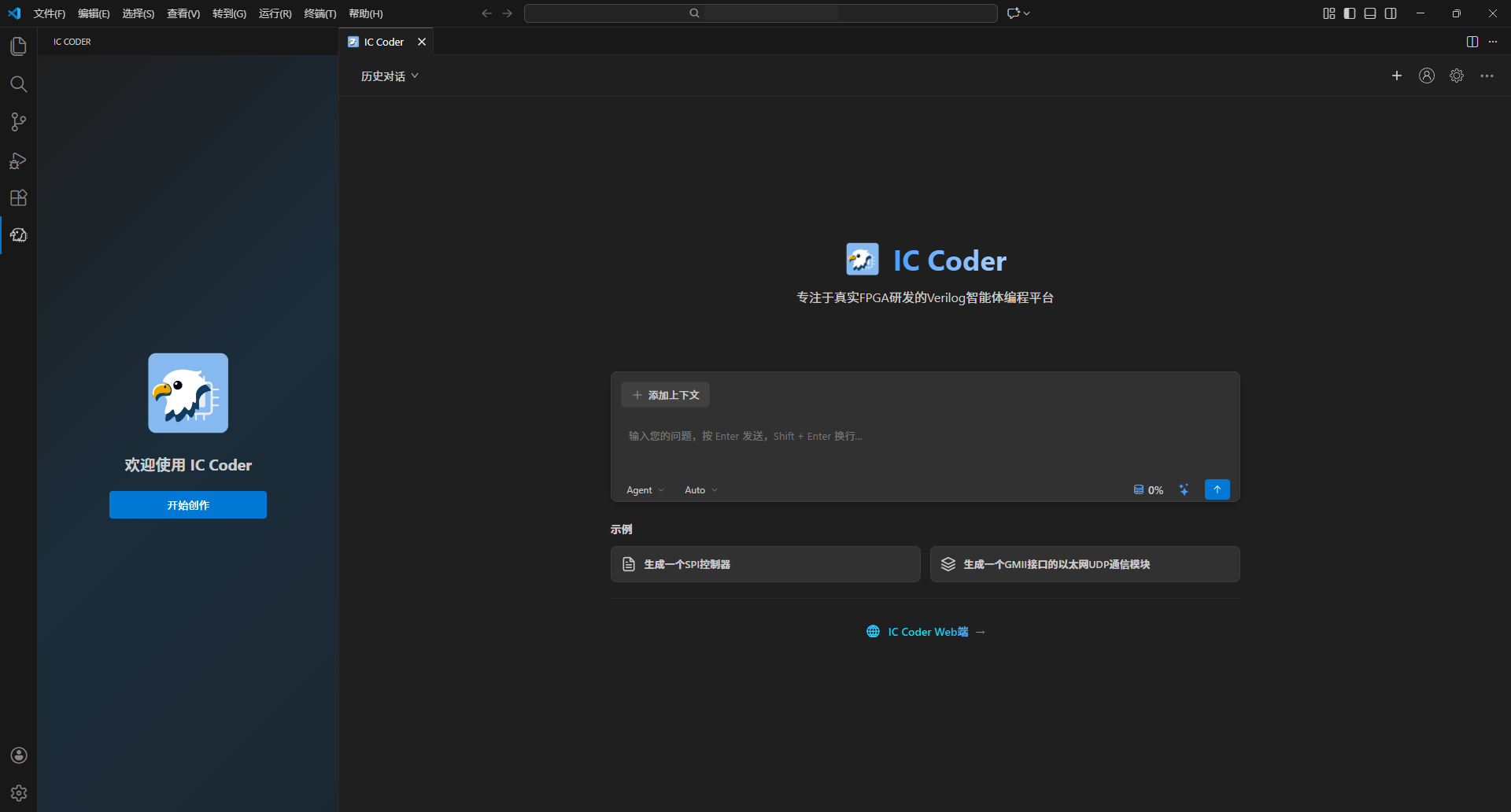
|
||||
|
||||
- Verilog 代码智能生成
|
||||
- 文件操作支持(创建、读取、修改、删除)
|
||||
- 集成 iverilog 仿真工具
|
||||
- VCD 波形文件生成
|
||||
- 智能对话助手
|
||||
### 核心技术架构
|
||||
|
||||
## 使用说明
|
||||
**我们采用全球顶尖的大语言模型**,加上自研的针对芯片设计领域深度优化的微调模型,为代码生成提供强大的AI能力支撑。
|
||||
|
||||
安装插件后,点击侧边栏的 IC Coder 图标即可开始使用。
|
||||
**核心技术栈**包括:
|
||||
|
||||
## 系统要求
|
||||
- **多智能体架构(Multi-Agent System)**:多个专业化AI智能体协同工作,分别负责架构设计、代码生成、验证测试等不同环节
|
||||
- **增强上下文引擎**:智能理解和管理大规模设计上下文,确保生成代码的一致性和准确性
|
||||
|
||||
- VS Code 1.107.0 或更高版本
|
||||
- 插件已内置 iverilog 工具(Windows 平台)
|
||||
这些技术共同支撑着从需求分析、架构设计、代码生成到验证调试的全流程智能化开发体验。
|
||||
|
||||
## 许可证
|
||||
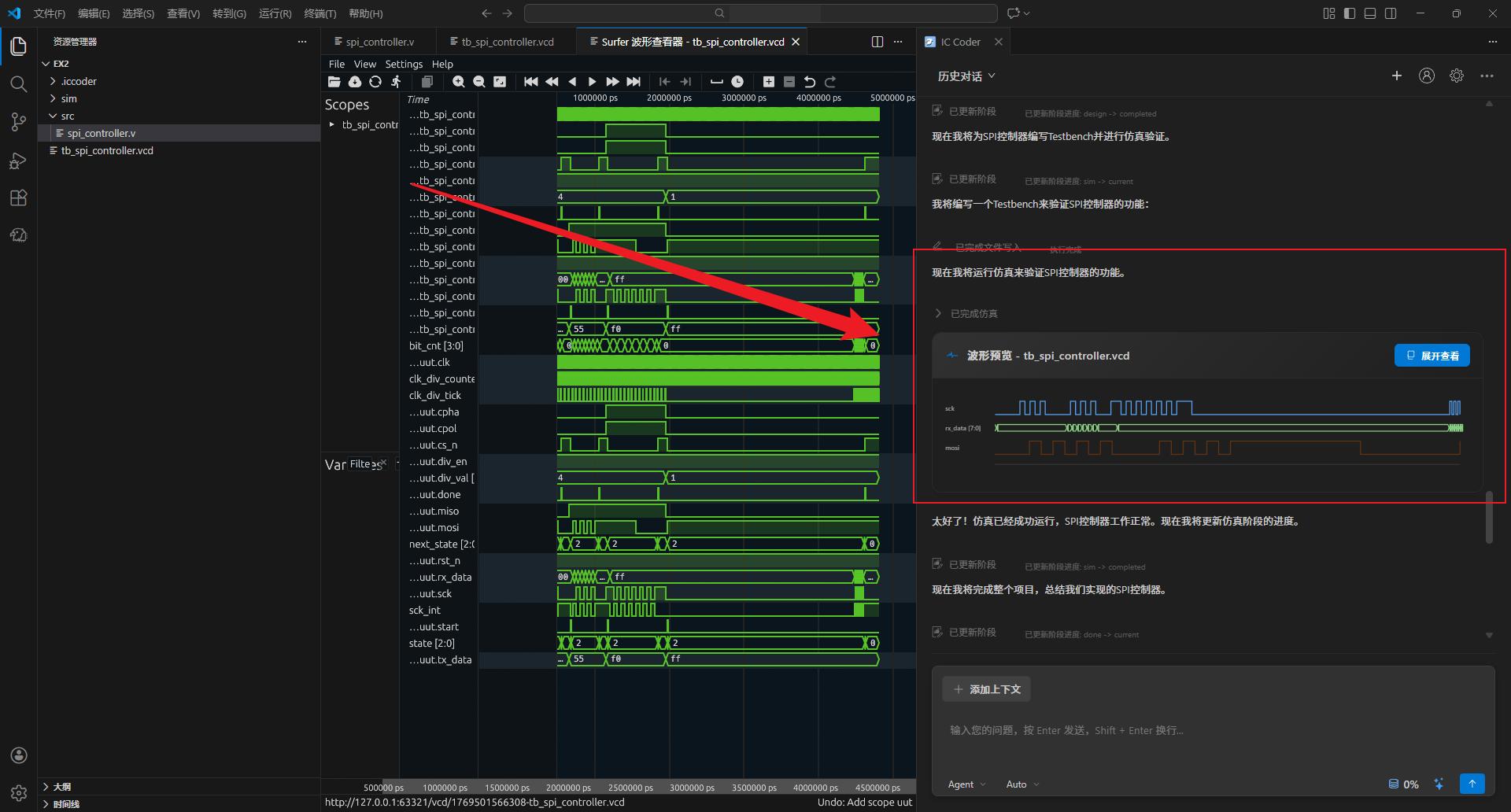
|
||||
|
||||
MIT
|
||||
## 自动搭建电路架构
|
||||
|
||||
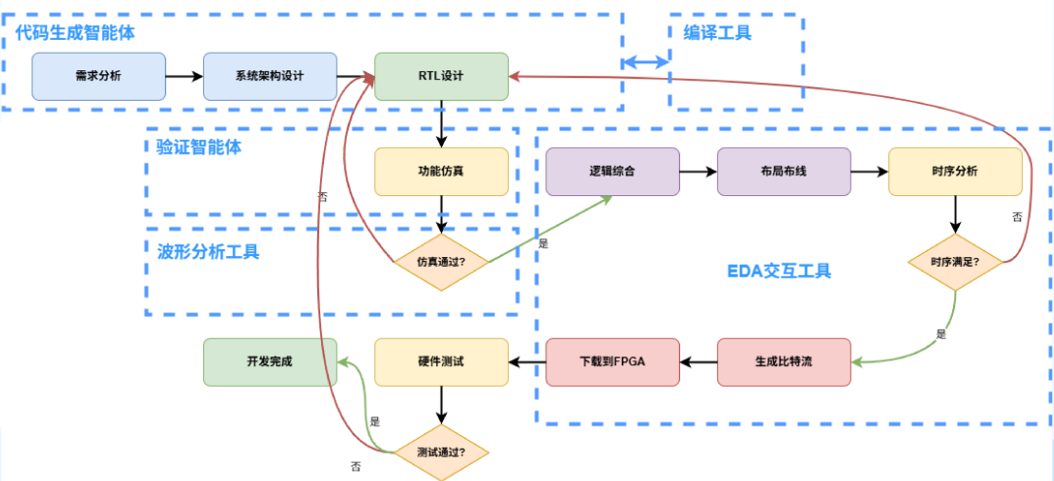
IC Coder能够根据自然语言描述的设计需求,自动生成完整的电路架构。系统会:
|
||||
|
||||
- **智能解析需求**:理解功能规格、性能指标、接口要求等设计约束
|
||||
- **自动模块划分**:根据功能将设计合理拆分为多个子模块,确保模块化和可复用性
|
||||
- **生成层次结构**:建立清晰的模块层次关系,自动处理模块间的信号连接
|
||||
- **结构化信号管理**:将所有电路信号关系进行结构化表示,包括数据流向、控制逻辑、时序关系等
|
||||
- **可视化展示**:以图形化方式展示整体架构,便于理解和审查设计方案
|
||||
|
||||
|
||||
|
||||
## AI自主仿真
|
||||
|
||||
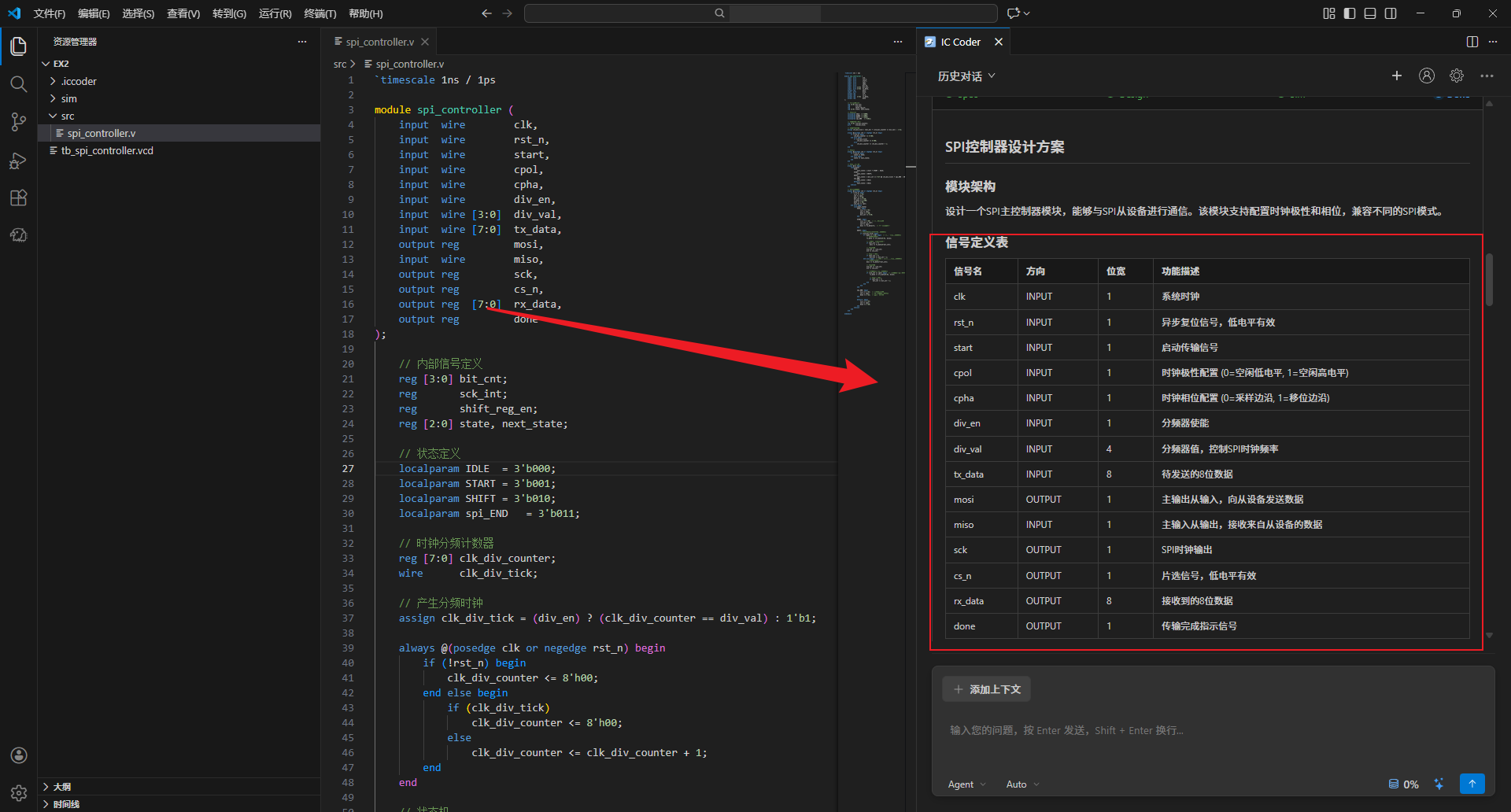
IC Coder提供完全自动化的仿真验证流程,无需手动编写测试代码:
|
||||
|
||||
- **智能Testbench生成**:根据设计模块自动生成完整的测试平台,包括激励生成、时钟复位、接口驱动等
|
||||
- **测试用例自动化**:根据设计规格自动生成覆盖各种场景的测试用例,包括正常功能、边界条件、异常情况等
|
||||
- **一键运行仿真**:自动调用集成仿真器执行仿真
|
||||
- **波形自动生成**:仿真完成后自动生成VCD、波形文件,便于后续分析
|
||||
- **实时进度反馈**:仿真过程中实时显示执行状态和日志信息
|
||||
|
||||
|
||||
|
||||
## AI自主代码迭代
|
||||
|
||||
IC Coder实现了真正的自主式开发循环,能够持续优化代码直到满足设计要求:
|
||||
|
||||
- **智能问题诊断**:根据波形分析结果,自动定位代码中的问题根源
|
||||
- **自动代码修复**:针对发现的问题自动生成修复方案并更新代码
|
||||
- **迭代验证循环**:修复后自动重新运行仿真和波形分析,验证问题是否解决
|
||||
- **持续优化**:如果仍存在问题,继续分析和修复,形成闭环迭代
|
||||
- **收敛保证**:智能判断迭代进展,避免无效循环,确保最终收敛到正确设计
|
||||
- **全程可追溯**:记录每次迭代的修改内容和验证结果,便于回溯和审查
|
||||
|
||||
这种自主迭代能力大幅减少了人工调试时间,让设计验证过程更加高效可靠。
|
||||
|
||||
## 随时可掌控
|
||||
|
||||
IC Coder提供透明化的开发过程,让用户始终掌握AI的工作状态:
|
||||
|
||||
- **实时流程展示**:可视化展示当前执行到哪个阶段(需求分析、架构设计、代码生成、仿真验证等)
|
||||
- **详细执行日志**:记录每一步操作的详细信息,包括AI的思考过程、决策依据、执行结果
|
||||
- **人机协同交互**:在关键决策点支持用户介入,可随时提供反馈、调整方向或修改参数
|
||||
- **进度实时追踪**:显示任务完成进度、预计剩余步骤,让开发过程更加可预期
|
||||
- **智能建议系统**:AI主动提供优化建议和替代方案,用户可选择采纳或自定义
|
||||
- **即时响应机制**:支持随时暂停、恢复或调整AI的工作流程
|
||||
|
||||
这种透明可控的设计理念,让AI开发不再是"黑盒",而是真正的智能协作伙伴。
|
||||
|
||||
## 多层次安全保障
|
||||
|
||||
IC Coder将数据安全和隐私保护作为核心设计原则,提供企业级的安全保障:
|
||||
|
||||
- **本地优先存储**:所有设计文件默认存储在本地,用户完全掌控自己的代码资产
|
||||
- **全链路加密传输**:与云端通信采用TLS/SSL加密,确保数据传输过程中不被窃取或篡改
|
||||
- **云端零存储策略**:云端服务器不保存用户的源代码,仅处理加密后的临时数据,处理完成后立即销毁
|
||||
- **定制化部署选项**:支持企业私有云或本地部署,满足高安全等级需求
|
||||
|
||||
真正做到了代码全链路加密传输、云端零存储,让芯片设计企业可以放心使用AI工具。
|
||||
|
||||
## 反馈
|
||||
|
||||
无论是想与我们深入交流还是遇到任何问题,欢迎您[进入社区](https://iccoder.com:888/community)与我们联系
|
||||
|
||||
## 服务条款和隐私协议
|
||||
|
||||
请阅读我们的[服务条款](https://iccoder.com:888/guides/legal/terms-of-service)和[隐私协议](https://iccoder.com:888/guides/legal/privacy-policy)了解更多细节。
|
||||
|
||||
261
docs/AskUserQuestion-API设计.md
Normal file
@ -0,0 +1,261 @@
|
||||
# AskUserQuestion 多选支持 - API 设计文档
|
||||
|
||||
## 问题描述
|
||||
|
||||
当前 AI 询问用户问题时存在以下问题:
|
||||
1. 后端返回的选项不准确
|
||||
2. 多个问题只给几个选项
|
||||
3. 不支持多选方式
|
||||
|
||||
## 需求
|
||||
|
||||
实现一个问题对应多个选项,支持多选的方式。
|
||||
|
||||
## 数据结构设计
|
||||
|
||||
### 后端返回格式
|
||||
|
||||
后端通过 SSE 的 `ask_user` 事件返回以下格式:
|
||||
|
||||
```json
|
||||
{
|
||||
"askId": "ask_1234567890",
|
||||
"questions": [
|
||||
{
|
||||
"question": "请确认 SPI 控制器的配置需求:工作模式?",
|
||||
"options": [
|
||||
"Master/8位/模式0/固定分频/需要CS",
|
||||
"Master/可配置位宽/可配置模式/需要CS",
|
||||
"Slave模式"
|
||||
],
|
||||
"multiSelect": false
|
||||
},
|
||||
{
|
||||
"question": "数据位宽?",
|
||||
"options": [
|
||||
"8位 还是其他?"
|
||||
],
|
||||
"multiSelect": false
|
||||
},
|
||||
{
|
||||
"question": "时钟极性和相位?",
|
||||
"options": [
|
||||
"CPOL=0/CPHA=0 (模式0) 还是其他模式?"
|
||||
],
|
||||
"multiSelect": false
|
||||
},
|
||||
{
|
||||
"question": "时钟分频?",
|
||||
"options": [
|
||||
"需要可配置的分频比吗?"
|
||||
],
|
||||
"multiSelect": false
|
||||
},
|
||||
{
|
||||
"question": "是否需要芯片选信号 (CS) 控制?",
|
||||
"options": [
|
||||
"是",
|
||||
"否"
|
||||
],
|
||||
"multiSelect": false
|
||||
}
|
||||
]
|
||||
}
|
||||
```
|
||||
|
||||
### 前端数据结构
|
||||
|
||||
#### 1. API 类型定义 (`src/types/api.ts`)
|
||||
|
||||
```typescript
|
||||
/** ask_user 事件数据 */
|
||||
export interface AskUserEvent {
|
||||
askId: string;
|
||||
questions: QuestionItem[];
|
||||
}
|
||||
|
||||
/** 单个问题项 */
|
||||
export interface QuestionItem {
|
||||
question: string;
|
||||
options: string[];
|
||||
multiSelect?: boolean; // 是否支持多选,默认 false
|
||||
}
|
||||
```
|
||||
|
||||
#### 2. MessageSegment 类型 (`src/services/dialogService.ts`)
|
||||
|
||||
```typescript
|
||||
export interface MessageSegment {
|
||||
type: "text" | "tool" | "question" | "agent" | "plan" | "progress";
|
||||
// ... 其他字段
|
||||
askId?: string;
|
||||
questions?: QuestionItem[]; // 改为问题数组
|
||||
}
|
||||
```
|
||||
|
||||
#### 3. 用户回答格式 (`src/types/api.ts`)
|
||||
|
||||
```typescript
|
||||
export interface AnswerRequest {
|
||||
taskId: string;
|
||||
askId: string;
|
||||
answers: {
|
||||
[questionIndex: number]: string[]; // 每个问题的答案数组(支持多选)
|
||||
};
|
||||
}
|
||||
```
|
||||
|
||||
## 前端实现要点
|
||||
|
||||
### 1. 显示多个问题
|
||||
|
||||
```typescript
|
||||
// 遍历 questions 数组,为每个问题生成 UI
|
||||
segment.questions?.forEach((q, index) => {
|
||||
// 显示问题标题
|
||||
// 显示选项(单选或多选)
|
||||
// 收集答案
|
||||
});
|
||||
```
|
||||
|
||||
### 2. 多选支持
|
||||
|
||||
```typescript
|
||||
if (q.multiSelect) {
|
||||
// 渲染复选框
|
||||
// 允许选择多个选项
|
||||
} else {
|
||||
// 渲染单选按钮
|
||||
// 只允许选择一个选项
|
||||
}
|
||||
```
|
||||
|
||||
### 3. 提交答案
|
||||
|
||||
```typescript
|
||||
const answers = {
|
||||
0: ["Master/8位/模式0/固定分频/需要CS"], // 第1个问题的答案
|
||||
1: ["8位 还是其他?"], // 第2个问题的答案
|
||||
2: ["CPOL=0/CPHA=0 (模式0) 还是其他模式?"], // 第3个问题的答案
|
||||
// ...
|
||||
};
|
||||
|
||||
vscode.postMessage({
|
||||
command: 'userAnswer',
|
||||
askId: 'ask_1234567890',
|
||||
answers: answers
|
||||
});
|
||||
```
|
||||
|
||||
## 后端需要做的修改
|
||||
|
||||
### 1. 修改 AskUserQuestion 工具的返回格式
|
||||
|
||||
从:
|
||||
```json
|
||||
{
|
||||
"askId": "xxx",
|
||||
"question": "单个问题",
|
||||
"options": ["选项1", "选项2"]
|
||||
}
|
||||
```
|
||||
|
||||
改为:
|
||||
```json
|
||||
{
|
||||
"askId": "xxx",
|
||||
"questions": [
|
||||
{
|
||||
"question": "问题1",
|
||||
"options": ["选项1", "选项2"],
|
||||
"multiSelect": false
|
||||
},
|
||||
{
|
||||
"question": "问题2",
|
||||
"options": ["选项A", "选项B", "选项C"],
|
||||
"multiSelect": true
|
||||
}
|
||||
]
|
||||
}
|
||||
```
|
||||
|
||||
### 2. 接收答案的格式
|
||||
|
||||
从:
|
||||
```json
|
||||
{
|
||||
"taskId": "xxx",
|
||||
"askId": "xxx",
|
||||
"selected": ["选项1"],
|
||||
"customInput": "自定义输入"
|
||||
}
|
||||
```
|
||||
|
||||
改为:
|
||||
```json
|
||||
{
|
||||
"taskId": "xxx",
|
||||
"askId": "xxx",
|
||||
"answers": {
|
||||
"0": ["选项1"], // 第1个问题的答案
|
||||
"1": ["选项A", "选项B"] // 第2个问题的答案(多选)
|
||||
}
|
||||
}
|
||||
```
|
||||
|
||||
## 示例场景
|
||||
|
||||
### 场景:SPI 控制器配置
|
||||
|
||||
**后端发送:**
|
||||
```json
|
||||
{
|
||||
"askId": "ask_spi_config",
|
||||
"questions": [
|
||||
{
|
||||
"question": "工作模式?",
|
||||
"options": [
|
||||
"Master/8位/模式0/固定分频/需要CS",
|
||||
"Master/可配置位宽/可配置模式/需要CS",
|
||||
"Slave模式"
|
||||
],
|
||||
"multiSelect": false
|
||||
},
|
||||
{
|
||||
"question": "需要哪些功能?",
|
||||
"options": [
|
||||
"可配置时钟分频",
|
||||
"可配置数据位宽",
|
||||
"支持多个CS",
|
||||
"DMA支持"
|
||||
],
|
||||
"multiSelect": true
|
||||
}
|
||||
]
|
||||
}
|
||||
```
|
||||
|
||||
**用户选择:**
|
||||
- 问题1:选择 "Master/8位/模式0/固定分频/需要CS"
|
||||
- 问题2:选择 "可配置时钟分频" 和 "可配置数据位宽"
|
||||
|
||||
**前端提交:**
|
||||
```json
|
||||
{
|
||||
"taskId": "task_xxx",
|
||||
"askId": "ask_spi_config",
|
||||
"answers": {
|
||||
"0": ["Master/8位/模式0/固定分频/需要CS"],
|
||||
"1": ["可配置时钟分频", "可配置数据位宽"]
|
||||
}
|
||||
}
|
||||
```
|
||||
|
||||
## 总结
|
||||
|
||||
这个设计方案:
|
||||
1. ✅ 支持多个问题
|
||||
2. ✅ 每个问题有多个选项
|
||||
3. ✅ 支持单选和多选
|
||||
4. ✅ 数据结构清晰,易于扩展
|
||||
5. ✅ 向后兼容(可以只有一个问题)
|
||||
392
docs/EDA联动功能需求文档.md
Normal file
@ -0,0 +1,392 @@
|
||||
# Vivado 联动功能需求文档
|
||||
|
||||
## 1. 项目背景
|
||||
|
||||
### 1.1 当前状态
|
||||
|
||||
IC Coder Plugin 目前支持:
|
||||
|
||||
- iverilog 仿真(内置 Windows 版本)
|
||||
- VCD 波形查看
|
||||
- Verilog 代码生成和文件操作
|
||||
|
||||
### 1.2 需求来源
|
||||
|
||||
用户需要在 VS Code 中直接调用本地 Vivado 工具,并将产出文件自动导入到项目中,完成从仿真到 FPGA 部署的完整流程。
|
||||
|
||||
### 1.3 Vivado 是什么?
|
||||
|
||||
**Vivado** 是 Xilinx(现 AMD)的 FPGA 开发工具,用于将 Verilog 代码部署到 FPGA 硬件:
|
||||
|
||||
- **综合(Synthesis)**:将 RTL 代码转换为门级网表
|
||||
- **实现(Implementation)**:布局布线,映射到具体 FPGA 芯片
|
||||
- **生成比特流(Bitstream)**:生成 .bit 配置文件用于烧录
|
||||
|
||||
**与 iverilog 的区别**:
|
||||
|
||||
- iverilog:只做**仿真验证**(软件层面验证逻辑)
|
||||
- Vivado:做**综合+实现+生成配置文件**(真正部署到硬件)
|
||||
|
||||
**典型开发流程**:
|
||||
|
||||
```
|
||||
编写 Verilog → iverilog 仿真验证 → Vivado 综合 → Vivado 实现 → 生成 .bit 文件 → 烧录到 FPGA
|
||||
```
|
||||
|
||||
## 2. 功能目标
|
||||
|
||||
### 2.1 核心目标
|
||||
|
||||
- **前端工具封装**:在插件前端实现 Vivado 调用的完整逻辑
|
||||
- **后端简化调用**:后端只需调用一个工具接口
|
||||
- **文件自动导入**:Vivado 执行完成后,自动将产出文件导入到项目
|
||||
- **流程可视化**:执行进度、日志实时显示
|
||||
|
||||
### 2.2 非功能目标
|
||||
|
||||
- 配置简单,用户友好
|
||||
- 执行过程可视化(进度、日志)
|
||||
- 错误处理完善,提示清晰
|
||||
|
||||
## 3. 功能详细需求
|
||||
|
||||
### 3.1 Vivado 支持的操作
|
||||
|
||||
#### 3.1.1 综合(Synthesis)
|
||||
|
||||
- **输入**:Verilog/VHDL 源文件、约束文件(.xdc)
|
||||
- **输出**:设计检查点(.dcp)、综合报告(.rpt)
|
||||
- **用途**:将 RTL 代码转换为门级网表,检查资源使用情况
|
||||
|
||||
#### 3.1.2 实现(Implementation)
|
||||
|
||||
- **输入**:综合后的 .dcp 文件
|
||||
- **输出**:实现后的 .dcp 文件、时序报告、布局布线报告
|
||||
- **用途**:完成布局布线,检查时序是否满足要求
|
||||
|
||||
#### 3.1.3 生成比特流(Generate Bitstream)
|
||||
|
||||
- **输入**:实现后的 .dcp 文件
|
||||
- **输出**:比特流文件(.bit)
|
||||
- **用途**:生成可烧录到 FPGA 的配置文件
|
||||
|
||||
### 3.2 配置管理
|
||||
|
||||
#### 3.2.1 配置项
|
||||
|
||||
```json
|
||||
{
|
||||
"vivado": {
|
||||
"enabled": true,
|
||||
"executablePath": "C:/Xilinx/Vivado/2023.1/bin/vivado.bat",
|
||||
"workingDir": "${workspaceFolder}/vivado_project",
|
||||
"part": "xc7a35tcpg236-1", // FPGA 型号
|
||||
"commands": {
|
||||
"synthesis": "vivado -mode batch -source synth.tcl",
|
||||
"implementation": "vivado -mode batch -source impl.tcl",
|
||||
"bitstream": "vivado -mode batch -source bitstream.tcl"
|
||||
},
|
||||
"outputFiles": {
|
||||
"synthesis": ["*.dcp", "*_synth.rpt"],
|
||||
"implementation": ["*.dcp", "*_timing.rpt", "*_utilization.rpt"],
|
||||
"bitstream": ["*.bit"]
|
||||
}
|
||||
}
|
||||
}
|
||||
```
|
||||
|
||||
#### 3.2.2 存储位置
|
||||
|
||||
- 全局配置:VS Code Settings(`settings.json`)
|
||||
- 项目配置:`.vscode/ic-coder-vivado.json`(优先级更高)
|
||||
|
||||
### 3.3 工具调用接口
|
||||
|
||||
#### 3.3.1 接口定义
|
||||
|
||||
```typescript
|
||||
interface VivadoToolRequest {
|
||||
command: string; // 命令类型:synthesis | implementation | bitstream
|
||||
parameters?: {
|
||||
topModule?: string; // 顶层模块名
|
||||
files?: string[]; // 输入文件列表
|
||||
part?: string; // FPGA 型号(可选,使用配置中的默认值)
|
||||
constraints?: string; // 约束文件路径(.xdc)
|
||||
outputDir?: string; // 输出目录
|
||||
};
|
||||
importOutput?: {
|
||||
enabled: boolean; // 是否自动导入
|
||||
targetDir: string; // 目标目录
|
||||
};
|
||||
}
|
||||
|
||||
interface VivadoToolResponse {
|
||||
success: boolean;
|
||||
command: string;
|
||||
executionTime: number; // 执行时间(毫秒)
|
||||
output: string; // 标准输出
|
||||
error?: string; // 错误信息
|
||||
importedFiles?: string[]; // 已导入的文件列表
|
||||
reports?: {
|
||||
// 报告摘要
|
||||
resources?: string; // 资源使用情况
|
||||
timing?: string; // 时序信息
|
||||
};
|
||||
}
|
||||
```
|
||||
|
||||
### 3.4 执行流程
|
||||
|
||||
#### 3.4.1 参数验证
|
||||
|
||||
- 检查 Vivado 是否已配置
|
||||
- 检查可执行文件是否存在
|
||||
- 检查输入文件是否存在
|
||||
- 检查工作目录是否存在
|
||||
|
||||
#### 3.4.2 TCL 脚本生成
|
||||
|
||||
根据命令类型自动生成 TCL 脚本:
|
||||
|
||||
**综合脚本示例(synth.tcl)**:
|
||||
|
||||
```tcl
|
||||
# 读取源文件
|
||||
read_verilog counter.v
|
||||
read_xdc constraints.xdc
|
||||
|
||||
# 设置顶层模块
|
||||
set_property top counter [current_fileset]
|
||||
|
||||
# 综合
|
||||
synth_design -part xc7a35tcpg236-1 -top counter
|
||||
|
||||
# 生成报告
|
||||
report_utilization -file utilization_synth.rpt
|
||||
report_timing -file timing_synth.rpt
|
||||
|
||||
# 保存检查点
|
||||
write_checkpoint -force counter_synth.dcp
|
||||
```
|
||||
|
||||
#### 3.4.3 命令执行
|
||||
|
||||
- 启动子进程执行 Vivado 命令
|
||||
- 实时捕获标准输出和错误输出
|
||||
- 向前端推送进度信息(解析日志中的进度标记)
|
||||
|
||||
#### 3.4.4 结果处理
|
||||
|
||||
- 检查执行结果(退出码)
|
||||
- 解析报告文件,提取关键信息(资源使用、时序)
|
||||
- 查找产出文件
|
||||
|
||||
#### 3.4.5 文件导入
|
||||
|
||||
- 根据配置的文件模式查找产出文件
|
||||
- 复制文件到目标目录
|
||||
- 通知用户导入结果
|
||||
|
||||
### 3.5 UI 交互
|
||||
|
||||
#### 3.5.1 配置界面
|
||||
|
||||
- 在设置页面添加 "Vivado 配置" 选项
|
||||
- 支持配置 Vivado 路径、FPGA 型号
|
||||
- 支持测试 Vivado 可用性(点击按钮测试)
|
||||
|
||||
#### 3.5.2 调用界面
|
||||
|
||||
- 在聊天面板中,AI 可以建议使用 Vivado
|
||||
- 用户确认后,显示执行进度对话框
|
||||
- 实时显示日志输出(可折叠)
|
||||
- 显示执行状态:准备中 → 执行中 → 完成/失败
|
||||
|
||||
#### 3.5.3 结果展示
|
||||
|
||||
- 执行成功:显示执行时间、资源使用、时序信息
|
||||
- 执行失败:显示错误信息、建议解决方案
|
||||
- 导入文件:高亮显示已导入的文件,支持点击打开报告
|
||||
|
||||
### 3.6 后端集成
|
||||
|
||||
#### 3.6.1 工具定义
|
||||
|
||||
后端在工具列表中添加 Vivado 工具:
|
||||
|
||||
```json
|
||||
{
|
||||
"name": "runVivado",
|
||||
"description": "调用 Vivado 执行综合、实现或生成比特流。使用前必须先询问用户芯片型号等必要参数。",
|
||||
"parameters": {
|
||||
"command": "命令类型(synthesis/implementation/bitstream)",
|
||||
"topModule": "顶层模块名",
|
||||
"files": "输入文件列表",
|
||||
"part": "FPGA 芯片型号(必须从用户获取)",
|
||||
"constraints": "约束文件路径(可选)"
|
||||
}
|
||||
}
|
||||
```
|
||||
|
||||
#### 3.6.2 后端交互流程
|
||||
|
||||
**关键点**:后端必须先收集必要参数,再调用工具
|
||||
|
||||
1. **用户发起请求**:"打开 Vivado" 或 "用 Vivado 综合"
|
||||
2. **后端识别意图**:需要调用 runVivado 工具
|
||||
3. **后端询问参数**:
|
||||
- FPGA 芯片型号(必须)
|
||||
- 约束文件(可选)
|
||||
- 确认顶层模块名
|
||||
4. **用户提供参数**
|
||||
5. **后端调用工具**:传递完整参数给前端
|
||||
6. **前端执行**:VivadoRunner 执行命令
|
||||
7. **返回结果**:后端接收结果并展示给用户
|
||||
|
||||
#### 3.6.3 调用示例(完整交互)
|
||||
|
||||
```
|
||||
用户:帮我用 Vivado 综合一下 counter.v
|
||||
|
||||
AI:好的,我将使用 Vivado 进行综合。请提供以下信息:
|
||||
1. FPGA 芯片型号(例如:xc7a35tcpg236-1)
|
||||
2. 是否有约束文件(.xdc)?
|
||||
|
||||
用户:xc7a35tcpg236-1,没有约束文件
|
||||
|
||||
AI:收到,开始综合...
|
||||
[调用工具] runVivado
|
||||
参数:
|
||||
- command: synthesis
|
||||
- topModule: counter
|
||||
- files: ["counter.v"]
|
||||
- part: "xc7a35tcpg236-1"
|
||||
|
||||
[执行中...]
|
||||
Vivado 综合完成!
|
||||
- 芯片型号:xc7a35tcpg236-1
|
||||
- 执行时间:45 秒
|
||||
- 资源使用:LUT: 32/20800 (0.15%), FF: 8/41600 (0.02%)
|
||||
- 产出文件:counter_synth.dcp, utilization_synth.rpt
|
||||
- 已自动导入到:vivado_output/
|
||||
```
|
||||
|
||||
## 4. 用户场景
|
||||
|
||||
### 4.1 场景一:单步综合
|
||||
|
||||
1. 用户编写完 Verilog 代码
|
||||
2. 在聊天中输入:"用 Vivado 综合一下 counter.v"
|
||||
3. AI 调用 `runVivado` 工具
|
||||
4. 插件执行 Vivado 综合
|
||||
5. 综合完成后,显示资源使用情况,自动导入报告文件
|
||||
|
||||
### 4.2 场景二:完整流程
|
||||
|
||||
1. 用户输入:"用 Vivado 跑完整个流程"
|
||||
2. AI 依次调用:
|
||||
- 综合(Synthesis)
|
||||
- 实现(Implementation)
|
||||
- 生成比特流(Bitstream)
|
||||
3. 每个步骤完成后显示结果
|
||||
4. 最终生成 .bit 文件,用户可以烧录到 FPGA
|
||||
|
||||
### 4.3 场景三:查看报告
|
||||
|
||||
1. Vivado 执行完成后
|
||||
2. 用户点击导入的报告文件
|
||||
3. 在编辑器中查看资源使用、时序分析等信息
|
||||
|
||||
## 5. 技术约束
|
||||
|
||||
### 5.1 平台兼容性
|
||||
|
||||
- Windows:支持 `.bat` 可执行文件
|
||||
- Linux:支持 shell 脚本
|
||||
- 路径分隔符自动适配
|
||||
|
||||
### 5.2 性能要求
|
||||
|
||||
- 命令执行不阻塞 UI
|
||||
- 综合时间可能较长(分钟级),需要进度提示
|
||||
- 日志输出实时更新,限制缓冲区大小
|
||||
|
||||
### 5.3 安全性
|
||||
|
||||
- 工作目录限制在项目范围内
|
||||
- 许可证路径不记录到日志
|
||||
|
||||
## 6. 验收标准
|
||||
|
||||
### 6.1 功能验收
|
||||
|
||||
- [ ] 用户可以配置 Vivado 路径和 FPGA 型号
|
||||
- [ ] AI 可以通过工具调用成功执行 Vivado 综合
|
||||
- [ ] 产出文件自动导入到指定目录
|
||||
- [ ] 执行过程有清晰的进度提示
|
||||
- [ ] 报告文件可以正常打开查看
|
||||
|
||||
### 6.2 性能验收
|
||||
|
||||
- [ ] 小型项目综合时间 < 1 分钟
|
||||
- [ ] UI 响应流畅,不卡顿
|
||||
- [ ] 日志输出实时更新(延迟 < 500ms)
|
||||
|
||||
### 6.3 用户体验验收
|
||||
|
||||
- [ ] 配置界面直观易用
|
||||
- [ ] 首次使用有引导提示
|
||||
- [ ] 错误提示清晰,有解决建议
|
||||
- [ ] 导入的文件可以直接打开查看
|
||||
|
||||
## 7. 风险和依赖
|
||||
|
||||
### 7.1 风险
|
||||
|
||||
- **Vivado 版本差异**:不同版本的命令行参数可能不同
|
||||
- **许可证问题**:Vivado 需要许可证才能运行
|
||||
- **路径问题**:Windows 路径中的空格和特殊字符
|
||||
- **执行时间长**:大型项目可能需要数十分钟
|
||||
|
||||
### 7.2 依赖
|
||||
|
||||
- 用户需要自行安装 Vivado
|
||||
- 用户需要配置正确的 Vivado 路径
|
||||
- 需要设置环境变量(如 `XILINX_VIVADO`)
|
||||
- 需要有效的 Vivado 许可证
|
||||
|
||||
## 8. 后续扩展
|
||||
|
||||
### 8.1 短期扩展
|
||||
|
||||
- 支持自定义 TCL 脚本模板
|
||||
- 支持批量处理多个设计
|
||||
- 支持时序约束编辑器
|
||||
|
||||
### 8.2 长期扩展
|
||||
|
||||
- 支持其他 FPGA 工具(Quartus)
|
||||
- 云端 Vivado 服务集成
|
||||
- 结果对比和版本管理
|
||||
- 性能分析和优化建议
|
||||
|
||||
---
|
||||
|
||||
## 附录
|
||||
|
||||
### A. Vivado 命令行参考
|
||||
|
||||
- 官方文档:https://docs.xilinx.com/
|
||||
- TCL 命令参考:UG835
|
||||
- 设计流程参考:UG892
|
||||
|
||||
### B. 术语表
|
||||
|
||||
- **RTL**:Register Transfer Level,寄存器传输级
|
||||
- **综合**:Synthesis,将 RTL 代码转换为门级网表
|
||||
- **实现**:Implementation,布局布线
|
||||
- **比特流**:Bitstream,FPGA 配置文件
|
||||
- **DCP**:Design Checkpoint,Vivado 设计检查点文件
|
||||
- **XDC**:Xilinx Design Constraints,约束文件
|
||||
- **LUT**:Look-Up Table,查找表(FPGA 基本逻辑单元)
|
||||
- **FF**:Flip-Flop,触发器
|
||||
409
docs/PUBLISH.md
Normal file
@ -0,0 +1,409 @@
|
||||
# IC Coder 插件发布流程文档
|
||||
|
||||
本文档详细说明如何将 IC Coder 插件发布到 VS Code 插件市场进行测试和正式发布。
|
||||
|
||||
## 目录
|
||||
|
||||
- [前置准备](#前置准备)
|
||||
- [账号配置](#账号配置)
|
||||
- [插件信息完善](#插件信息完善)
|
||||
- [打包与发布](#打包与发布)
|
||||
- [版本更新](#版本更新)
|
||||
- [常见问题](#常见问题)
|
||||
|
||||
---
|
||||
|
||||
## 前置准备
|
||||
|
||||
### 环境要求
|
||||
|
||||
- Node.js 和 pnpm 已安装
|
||||
- VS Code 1.80.0 或更高版本
|
||||
- 已安装 `@vscode/vsce` 工具(项目已包含)
|
||||
|
||||
### 检查清单
|
||||
|
||||
在发布前,请确保以下文件和配置已准备就绪:
|
||||
|
||||
- [x] `package.json` - 插件配置文件
|
||||
- [x] `README.md` - 插件说明文档
|
||||
- [x] `dist/` - 编译后的代码
|
||||
- [x] `media/` - 图标和资源文件
|
||||
- [ ] `CHANGELOG.md` - 版本更新日志(建议添加)
|
||||
- [x] `LICENSE` - 开源许可证(建议添加)
|
||||
|
||||
---
|
||||
|
||||
## 账号配置
|
||||
|
||||
### 1. 创建 Azure DevOps 账号
|
||||
|
||||
1. 访问 [Azure DevOps](https://dev.azure.com)
|
||||
2. 使用 Microsoft 账号注册或登录
|
||||
3. 创建一个组织(如果还没有)
|
||||
|
||||
### 2. 生成 Personal Access Token (PAT)
|
||||
|
||||
这是发布插件的关键凭证,请妥善保管。
|
||||
|
||||
**步骤:**
|
||||
|
||||
1. 登录 Azure DevOps
|
||||
2. 点击右上角用户图标 → **User settings** → **Personal access tokens**
|
||||
3. 点击 **New Token** 按钮
|
||||
4. 配置 Token 信息:
|
||||
- **Name**: `vscode-publisher`(或其他易识别的名称)
|
||||
- **Organization**: 选择 **All accessible organizations**
|
||||
- **Expiration**: 建议选择较长期限(如 90 天或自定义)
|
||||
- **Scopes**: 选择 **Custom defined**
|
||||
- 展开 **Marketplace**
|
||||
- 勾选 **Manage**(包含发布和管理权限)
|
||||
5. 点击 **Create** 生成 Token
|
||||
6. **重要**: 立即复制并保存 Token,页面关闭后将无法再次查看
|
||||
|
||||
**Token 示例格式:**
|
||||
|
||||
```
|
||||
CO03l8nmFBBTNPDg7lN9a9fYwDdgsRIDVDwTrx6Esggi6HnzmrMTJQQJ99BLACAAAAAAAAAAAAAGAZDOVVyT
|
||||
```
|
||||
|
||||
```
|
||||
//蔡工的token
|
||||
6CB3tOZPiwNi6rrOuFHMe6QzrVWBnajW5fJsNgCWu8jtERUCCRnJJQQJ99CAACAAAAAAAAAAAAASAZDO3FnY
|
||||
```
|
||||
|
||||
### 3. 创建发布者账号
|
||||
|
||||
发布者账号是你在 VS Code 市场的身份标识。
|
||||
|
||||
**步骤:**
|
||||
|
||||
1. 访问 [VS Code Marketplace 管理页面](https://marketplace.visualstudio.com/manage)
|
||||
2. 使用 Azure DevOps 账号登录
|
||||
3. 点击 **Create publisher** 按钮
|
||||
4. 填写发布者信息:
|
||||
- **ID**: `ICCoder`(必须与 package.json 中的 `publisher` 字段一致)
|
||||
- **Name**: `IC Coder`(显示名称,可自定义)
|
||||
- **Email**: 你的联系邮箱
|
||||
5. 点击 **Create** 完成创建
|
||||
|
||||
**注意事项:**
|
||||
|
||||
- Publisher ID 一旦创建无法修改
|
||||
- Publisher ID 必须全局唯一
|
||||
- 建议使用有意义且专业的 ID
|
||||
|
||||
---
|
||||
|
||||
## 插件信息完善
|
||||
|
||||
### 1. 完善 package.json
|
||||
|
||||
建议在 `package.json` 中添加以下字段以提升插件质量:
|
||||
|
||||
```json
|
||||
{
|
||||
"repository": {
|
||||
"type": "git",
|
||||
"url": "https://github.com/your-org/ic-coder.git"
|
||||
},
|
||||
"homepage": "https://github.com/your-org/ic-coder#readme",
|
||||
"bugs": {
|
||||
"url": "https://github.com/your-org/ic-coder/issues"
|
||||
},
|
||||
"license": "MIT"
|
||||
}
|
||||
```
|
||||
|
||||
### 2. 创建 CHANGELOG.md
|
||||
|
||||
版本更新日志帮助用户了解每个版本的变化。
|
||||
|
||||
**示例内容:**
|
||||
|
||||
```markdown
|
||||
# 更新日志
|
||||
|
||||
## [0.0.2] - 2025-12-29
|
||||
|
||||
### 新增
|
||||
|
||||
- 添加发送和暂停按钮功能
|
||||
- 添加一键优化按钮组件
|
||||
- 添加 Plan 开关组件
|
||||
- 添加模式选择器组件
|
||||
- 添加上下文压缩功能
|
||||
|
||||
### 改进
|
||||
|
||||
- 优化用户界面交互体验
|
||||
|
||||
## [0.0.1] - 2025-12-XX
|
||||
|
||||
### 新增
|
||||
|
||||
- 初始版本发布
|
||||
- Verilog 代码智能生成
|
||||
- 集成 iverilog 仿真工具
|
||||
- VCD 波形文件查看器
|
||||
```
|
||||
|
||||
### 3. 创建 LICENSE 文件
|
||||
|
||||
如果使用 MIT 许可证,创建 `LICENSE` 文件:
|
||||
|
||||
```
|
||||
MIT License
|
||||
|
||||
Copyright (c) 2025 IC Coder Team
|
||||
|
||||
Permission is hereby granted, free of charge, to any person obtaining a copy
|
||||
of this software and associated documentation files (the "Software"), to deal
|
||||
in the Software without restriction...
|
||||
```
|
||||
|
||||
### 4. 优化 README.md
|
||||
|
||||
确保 README 包含:
|
||||
|
||||
- 清晰的功能介绍
|
||||
- 使用截图或 GIF 演示
|
||||
- 详细的使用说明
|
||||
- 系统要求
|
||||
- 常见问题解答
|
||||
|
||||
---
|
||||
|
||||
## 打包与发布
|
||||
|
||||
### 方式一:命令行发布(推荐)
|
||||
|
||||
这是最便捷的发布方式,适合频繁更新。
|
||||
|
||||
**步骤:**
|
||||
|
||||
1. **登录发布者账号**
|
||||
|
||||
```bash
|
||||
pnpm vsce login ic-coder-team
|
||||
```
|
||||
|
||||
系统会提示输入 Personal Access Token,粘贴之前创建的 PAT。
|
||||
|
||||
2. **打包插件**
|
||||
|
||||
```bash
|
||||
# 执行生产环境构建
|
||||
pnpm run package
|
||||
|
||||
# 打包成 .vsix 文件
|
||||
pnpm vsce package
|
||||
```
|
||||
|
||||
这会生成 `ic-coder-plugin-0.0.2.vsix` 文件。
|
||||
|
||||
3. **发布到市场**
|
||||
|
||||
```bash
|
||||
pnpm vsce publish
|
||||
```
|
||||
|
||||
发布成功后会显示插件的市场链接。
|
||||
|
||||
**一键发布(跳过打包步骤):**
|
||||
|
||||
```bash
|
||||
# 直接发布当前版本
|
||||
pnpm vsce publish
|
||||
```
|
||||
|
||||
### 方式二:手动上传
|
||||
|
||||
适合首次发布或网络环境受限的情况。
|
||||
|
||||
**步骤:**
|
||||
|
||||
1. 本地打包插件:
|
||||
|
||||
```bash
|
||||
pnpm run package
|
||||
pnpm vsce package[pnpm vsce package --no-dependencies]
|
||||
```
|
||||
|
||||
2. 访问 [发布者管理页面](https://marketplace.visualstudio.com/manage/publishers/ic-coder-team)
|
||||
|
||||
3. 点击 **New extension** → **Visual Studio Code**
|
||||
|
||||
4. 上传 `ic-coder-plugin-0.0.2.vsix` 文件
|
||||
|
||||
5. 填写插件信息(如果需要)并提交
|
||||
|
||||
6. 等待审核通过
|
||||
|
||||
---
|
||||
|
||||
## 版本更新
|
||||
|
||||
### 自动更新版本号
|
||||
|
||||
使用 `vsce publish` 命令可以自动更新版本号并发布:
|
||||
|
||||
```bash
|
||||
# 补丁版本更新(0.0.2 → 0.0.3)
|
||||
pnpm vsce publish patch
|
||||
|
||||
# 次版本更新(0.0.2 → 0.1.0)
|
||||
pnpm vsce publish minor
|
||||
|
||||
# 主版本更新(0.0.2 → 1.0.0)
|
||||
pnpm vsce publish major
|
||||
```
|
||||
|
||||
### 手动指定版本
|
||||
|
||||
```bash
|
||||
# 发布指定版本
|
||||
npx vsce publish --packagePath iccoder-1.0.7.vsix
|
||||
```
|
||||
|
||||
### 更新流程建议
|
||||
|
||||
1. 修改代码并测试
|
||||
2. 更新 `CHANGELOG.md` 记录变更
|
||||
3. 提交代码到 Git
|
||||
4. 执行发布命令
|
||||
5. 验证市场上的插件是否正常
|
||||
|
||||
## 更新流程
|
||||
|
||||
1. 修改版本号
|
||||
|
||||
手动修改 修改package.json文件
|
||||
|
||||
命令修改
|
||||
|
||||
```bash
|
||||
#补丁版本 (1.0.0 -> 1.0.1)
|
||||
pnpm version patch
|
||||
|
||||
#次要版本 (1.0.0 -> 1.1.0)
|
||||
pnpm version minor
|
||||
|
||||
#主要版本 (1.0.0 -> 2.0.0)
|
||||
pnpm version major
|
||||
```
|
||||
|
||||
2. 打包
|
||||
|
||||
```bash
|
||||
#先编译
|
||||
pnpm run compile
|
||||
|
||||
#中间build
|
||||
pnpm run build
|
||||
|
||||
#后打包成.vsix
|
||||
pnpm vsce package --no-dependencies
|
||||
```
|
||||
|
||||
3. 手动上传/命令上传
|
||||
- https://marketplace.visualstudio.com/ 在这个里面手动上传 更新就选择update
|
||||
- 命令上传:vsce publish
|
||||
|
||||
---
|
||||
|
||||
## 常见问题
|
||||
|
||||
### 1. 发布失败:Authentication failed
|
||||
|
||||
**原因:** PAT Token 无效或过期
|
||||
|
||||
**解决方案:**
|
||||
|
||||
- 重新生成 PAT Token
|
||||
- 重新登录:`pnpm vsce login ic-coder-team`
|
||||
|
||||
### 2. 发布失败:Publisher not found
|
||||
|
||||
**原因:** Publisher ID 不存在或不匹配
|
||||
|
||||
**解决方案:**
|
||||
|
||||
- 检查 `package.json` 中的 `publisher` 字段
|
||||
- 确认已在市场创建对应的 Publisher
|
||||
|
||||
### 3. 打包失败:Missing files
|
||||
|
||||
**原因:** 必需文件缺失
|
||||
|
||||
**解决方案:**
|
||||
|
||||
- 确保 `dist/` 目录存在且包含编译后的代码
|
||||
- 运行 `pnpm run package` 重新构建
|
||||
|
||||
### 4. 插件审核被拒
|
||||
|
||||
**常见原因:**
|
||||
|
||||
- 插件名称或描述违反市场规则
|
||||
- 图标不符合要求(建议 128x128 PNG)
|
||||
- README 内容不完整
|
||||
|
||||
**解决方案:**
|
||||
|
||||
- 查看审核反馈邮件
|
||||
- 修改相关内容后重新发布
|
||||
|
||||
### 5. 如何撤回已发布的版本?
|
||||
|
||||
```bash
|
||||
# 取消发布指定版本
|
||||
pnpm vsce unpublish ic-coder-team.ic-coder-plugin@0.0.2
|
||||
|
||||
# 取消发布整个插件(慎用)
|
||||
pnpm vsce unpublish ic-coder-team.ic-coder-plugin
|
||||
```
|
||||
|
||||
### 6. 如何本地测试 .vsix 文件?
|
||||
|
||||
```bash
|
||||
# 在 VS Code 中安装本地 .vsix 文件
|
||||
code --install-extension ic-coder-plugin-0.0.2.vsix
|
||||
```
|
||||
|
||||
或者在 VS Code 中:
|
||||
|
||||
1. 打开扩展面板
|
||||
2. 点击 `...` 菜单
|
||||
3. 选择 **Install from VSIX...**
|
||||
4. 选择 `.vsix` 文件
|
||||
|
||||
---
|
||||
|
||||
## 发布检查清单
|
||||
|
||||
在正式发布前,请确认以下事项:
|
||||
|
||||
- [ ] 代码已充分测试,无明显 Bug
|
||||
- [ ] `package.json` 版本号已更新
|
||||
- [ ] `CHANGELOG.md` 已记录本次更新内容
|
||||
- [ ] README.md 内容完整且准确
|
||||
- [ ] 图标和资源文件正常显示
|
||||
- [ ] 已在本地安装测试 .vsix 文件
|
||||
- [ ] 已创建 Azure DevOps PAT Token
|
||||
- [ ] 已创建 VS Code Marketplace Publisher
|
||||
- [ ] 已执行 `pnpm run package` 构建生产版本
|
||||
|
||||
---
|
||||
|
||||
## 参考资源
|
||||
|
||||
- [VS Code 插件发布官方文档](https://code.visualstudio.com/api/working-with-extensions/publishing-extension)
|
||||
- [vsce 工具文档](https://github.com/microsoft/vscode-vsce)
|
||||
- [Azure DevOps 文档](https://docs.microsoft.com/en-us/azure/devops/)
|
||||
- [VS Code 插件市场](https://marketplace.visualstudio.com/)
|
||||
|
||||
---
|
||||
|
||||
**文档维护:** IC Coder Team
|
||||
**最后更新:** 2025-12-29
|
||||
804
docs/VSCode-Extension-API-Guide.md
Normal file
@ -0,0 +1,804 @@
|
||||
# VS Code Extension API 核心知识点
|
||||
|
||||
## 目录
|
||||
- [1. Extension 生命周期](#1-extension-生命周期) ⭐⭐⭐
|
||||
- [2. 激活事件 (Activation Events)](#2-激活事件-activation-events) ⭐⭐
|
||||
- [3. 命令系统 (Commands)](#3-命令系统-commands) ⭐⭐
|
||||
- [4. Webview API](#4-webview-api) ⭐⭐⭐⭐⭐ **面试重点**
|
||||
- [5. TreeView 和自定义视图](#5-treeview-和自定义视图) ⭐⭐
|
||||
- [6. 文件系统操作](#6-文件系统操作) ⭐⭐⭐
|
||||
- [7. 配置和存储](#7-配置和存储) ⭐⭐⭐⭐ **面试重点**
|
||||
- [8. 消息通知](#8-消息通知) ⭐
|
||||
- [9. 语言特性支持](#9-语言特性支持) ⭐
|
||||
- [10. 调试和诊断](#10-调试和诊断) ⭐
|
||||
|
||||
---
|
||||
|
||||
## 1. Extension 生命周期 ⭐⭐⭐
|
||||
|
||||
### 1.1 核心函数 🔥必考
|
||||
|
||||
```typescript
|
||||
// extension.ts
|
||||
import * as vscode from 'vscode';
|
||||
|
||||
// 插件激活时调用(只调用一次)
|
||||
export function activate(context: vscode.ExtensionContext) {
|
||||
console.log('Extension is now active!');
|
||||
|
||||
// 注册命令、视图、事件监听等
|
||||
// 使用 context.subscriptions 管理资源
|
||||
}
|
||||
|
||||
// 插件停用时调用(清理资源)
|
||||
export function deactivate() {
|
||||
console.log('Extension is deactivated');
|
||||
// 清理资源、关闭连接等
|
||||
}
|
||||
```
|
||||
|
||||
### 1.2 ExtensionContext 重要属性 🔥必考
|
||||
|
||||
```typescript
|
||||
interface ExtensionContext {
|
||||
// 插件订阅管理(自动清理)
|
||||
subscriptions: { dispose(): any }[];
|
||||
|
||||
// 工作区存储路径
|
||||
storageUri: vscode.Uri | undefined;
|
||||
globalStorageUri: vscode.Uri;
|
||||
|
||||
// 插件路径
|
||||
extensionUri: vscode.Uri;
|
||||
extensionPath: string;
|
||||
|
||||
// 状态存储
|
||||
workspaceState: Memento; // 工作区级别
|
||||
globalState: Memento; // 全局级别
|
||||
secrets: SecretStorage; // 敏感信息存储
|
||||
|
||||
// 环境变量
|
||||
environmentVariableCollection: EnvironmentVariableCollection;
|
||||
}
|
||||
```
|
||||
|
||||
### 1.3 资源管理最佳实践 🔥必考
|
||||
|
||||
```typescript
|
||||
export function activate(context: vscode.ExtensionContext) {
|
||||
// ✅ 推荐:使用 context.subscriptions 自动管理
|
||||
context.subscriptions.push(
|
||||
vscode.commands.registerCommand('extension.command', () => {})
|
||||
);
|
||||
|
||||
// ❌ 不推荐:手动管理容易忘记清理
|
||||
const disposable = vscode.commands.registerCommand('extension.command', () => {});
|
||||
// 需要在 deactivate 中手动调用 disposable.dispose()
|
||||
}
|
||||
```
|
||||
|
||||
---
|
||||
|
||||
## 2. 激活事件 (Activation Events) ⭐⭐
|
||||
|
||||
### 2.1 常用激活事件 📌重要
|
||||
|
||||
```json
|
||||
// package.json
|
||||
{
|
||||
"activationEvents": [
|
||||
// 启动时激活
|
||||
"onStartupFinished",
|
||||
|
||||
// 执行命令时激活
|
||||
"onCommand:extension.helloWorld",
|
||||
|
||||
// 打开特定语言文件时激活
|
||||
"onLanguage:javascript",
|
||||
"onLanguage:verilog",
|
||||
|
||||
// 打开特定文件类型时激活
|
||||
"onFileSystem:sftp",
|
||||
|
||||
// 打开特定视图时激活
|
||||
"onView:myCustomView",
|
||||
|
||||
// 调试时激活
|
||||
"onDebug",
|
||||
|
||||
// 打开特定 URI 时激活
|
||||
"onUri",
|
||||
|
||||
// Webview 恢复时激活
|
||||
"onWebviewPanel:myWebview",
|
||||
|
||||
// 任务执行时激活
|
||||
"onTaskType:npm"
|
||||
]
|
||||
}
|
||||
```
|
||||
|
||||
### 2.2 延迟激活策略 🔥必考
|
||||
|
||||
```typescript
|
||||
// ✅ 推荐:使用 onStartupFinished 延迟激活
|
||||
"activationEvents": ["onStartupFinished"]
|
||||
|
||||
// ❌ 不推荐:使用 * 会拖慢启动速度
|
||||
"activationEvents": ["*"]
|
||||
```
|
||||
|
||||
---
|
||||
|
||||
## 3. 命令系统 (Commands)
|
||||
|
||||
### 3.1 注册命令
|
||||
|
||||
```typescript
|
||||
// 注册简单命令
|
||||
const disposable = vscode.commands.registerCommand(
|
||||
'extension.helloWorld',
|
||||
() => {
|
||||
vscode.window.showInformationMessage('Hello World!');
|
||||
}
|
||||
);
|
||||
context.subscriptions.push(disposable);
|
||||
|
||||
// 注册带参数的命令
|
||||
vscode.commands.registerCommand(
|
||||
'extension.openFile',
|
||||
(filePath: string) => {
|
||||
vscode.workspace.openTextDocument(filePath).then(doc => {
|
||||
vscode.window.showTextDocument(doc);
|
||||
});
|
||||
}
|
||||
);
|
||||
```
|
||||
|
||||
### 3.2 执行命令
|
||||
|
||||
```typescript
|
||||
// 执行内置命令
|
||||
await vscode.commands.executeCommand('workbench.action.files.save');
|
||||
|
||||
// 执行自定义命令
|
||||
await vscode.commands.executeCommand('extension.openFile', '/path/to/file');
|
||||
|
||||
// 获取所有可用命令
|
||||
const commands = await vscode.commands.getCommands();
|
||||
```
|
||||
|
||||
### 3.3 常用内置命令
|
||||
|
||||
```typescript
|
||||
// 文件操作
|
||||
'workbench.action.files.save'
|
||||
'workbench.action.files.saveAll'
|
||||
'workbench.action.closeActiveEditor'
|
||||
|
||||
// 编辑器操作
|
||||
'editor.action.formatDocument'
|
||||
'editor.action.commentLine'
|
||||
'editor.action.selectAll'
|
||||
|
||||
// 窗口操作
|
||||
'workbench.action.toggleSidebarVisibility'
|
||||
'workbench.action.terminal.new'
|
||||
'workbench.action.quickOpen'
|
||||
|
||||
// Git 操作
|
||||
'git.commit'
|
||||
'git.push'
|
||||
'git.pull'
|
||||
```
|
||||
|
||||
---
|
||||
|
||||
## 4. Webview API ⭐⭐⭐⭐⭐ **面试重点**
|
||||
|
||||
### 4.1 创建 Webview Panel 🔥必考
|
||||
|
||||
```typescript
|
||||
const panel = vscode.window.createWebviewPanel(
|
||||
'myWebview', // viewType(唯一标识)
|
||||
'My Webview', // 标题
|
||||
vscode.ViewColumn.One, // 显示位置
|
||||
{
|
||||
enableScripts: true, // 启用 JavaScript
|
||||
retainContextWhenHidden: true, // 隐藏时保留状态
|
||||
localResourceRoots: [ // 允许访问的本地资源路径
|
||||
vscode.Uri.joinPath(context.extensionUri, 'media')
|
||||
]
|
||||
}
|
||||
);
|
||||
```
|
||||
|
||||
### 4.2 设置 Webview 内容
|
||||
|
||||
```typescript
|
||||
panel.webview.html = getWebviewContent();
|
||||
|
||||
function getWebviewContent() {
|
||||
return `<!DOCTYPE html>
|
||||
<html lang="en">
|
||||
<head>
|
||||
<meta charset="UTF-8">
|
||||
<meta name="viewport" content="width=device-width, initial-scale=1.0">
|
||||
<title>My Webview</title>
|
||||
</head>
|
||||
<body>
|
||||
<h1>Hello from Webview!</h1>
|
||||
<button onclick="sendMessage()">Send Message</button>
|
||||
|
||||
<script>
|
||||
const vscode = acquireVsCodeApi();
|
||||
|
||||
function sendMessage() {
|
||||
vscode.postMessage({
|
||||
command: 'alert',
|
||||
text: 'Hello from Webview!'
|
||||
});
|
||||
}
|
||||
|
||||
// 接收来自 Extension 的消息
|
||||
window.addEventListener('message', event => {
|
||||
const message = event.data;
|
||||
console.log('Received:', message);
|
||||
});
|
||||
</script>
|
||||
</body>
|
||||
</html>`;
|
||||
}
|
||||
```
|
||||
|
||||
### 4.3 Webview 消息通信 🔥必考(项目核心)
|
||||
|
||||
```typescript
|
||||
// Extension → Webview
|
||||
panel.webview.postMessage({
|
||||
command: 'update',
|
||||
data: 'some data'
|
||||
});
|
||||
|
||||
// Webview → Extension
|
||||
panel.webview.onDidReceiveMessage(
|
||||
message => {
|
||||
switch (message.command) {
|
||||
case 'alert':
|
||||
vscode.window.showInformationMessage(message.text);
|
||||
break;
|
||||
case 'getData':
|
||||
// 处理数据请求
|
||||
panel.webview.postMessage({
|
||||
command: 'dataResponse',
|
||||
data: fetchData()
|
||||
});
|
||||
break;
|
||||
}
|
||||
},
|
||||
undefined,
|
||||
context.subscriptions
|
||||
);
|
||||
```
|
||||
|
||||
### 4.4 Webview 生命周期管理 📌重要
|
||||
|
||||
```typescript
|
||||
// 监听 Webview 关闭事件
|
||||
panel.onDidDispose(
|
||||
() => {
|
||||
// 清理资源
|
||||
console.log('Webview disposed');
|
||||
},
|
||||
null,
|
||||
context.subscriptions
|
||||
);
|
||||
|
||||
// 监听 Webview 可见性变化
|
||||
panel.onDidChangeViewState(
|
||||
e => {
|
||||
if (e.webviewPanel.visible) {
|
||||
console.log('Webview is now visible');
|
||||
}
|
||||
},
|
||||
null,
|
||||
context.subscriptions
|
||||
);
|
||||
```
|
||||
|
||||
### 4.5 加载本地资源 📌重要
|
||||
|
||||
```typescript
|
||||
// 获取本地资源 URI
|
||||
const scriptUri = panel.webview.asWebviewUri(
|
||||
vscode.Uri.joinPath(context.extensionUri, 'media', 'script.js')
|
||||
);
|
||||
|
||||
const styleUri = panel.webview.asWebviewUri(
|
||||
vscode.Uri.joinPath(context.extensionUri, 'media', 'style.css')
|
||||
);
|
||||
|
||||
// 在 HTML 中使用
|
||||
const html = `
|
||||
<link href="${styleUri}" rel="stylesheet">
|
||||
<script src="${scriptUri}"></script>
|
||||
`;
|
||||
```
|
||||
|
||||
### 4.6 Webview 状态持久化 📌重要
|
||||
|
||||
```typescript
|
||||
// Webview 中保存状态
|
||||
const vscode = acquireVsCodeApi();
|
||||
const state = vscode.getState() || { count: 0 };
|
||||
|
||||
// 更新状态
|
||||
state.count++;
|
||||
vscode.setState(state);
|
||||
|
||||
// Extension 中序列化状态
|
||||
panel.webview.options = {
|
||||
enableScripts: true,
|
||||
retainContextWhenHidden: true
|
||||
};
|
||||
|
||||
// 恢复 Webview
|
||||
vscode.window.registerWebviewPanelSerializer('myWebview', {
|
||||
async deserializeWebviewPanel(webviewPanel, state) {
|
||||
webviewPanel.webview.html = getWebviewContent();
|
||||
// 恢复状态
|
||||
webviewPanel.webview.postMessage({ command: 'restore', state });
|
||||
}
|
||||
});
|
||||
```
|
||||
|
||||
---
|
||||
|
||||
## 5. TreeView 和自定义视图
|
||||
|
||||
### 5.1 创建 TreeView Provider
|
||||
|
||||
```typescript
|
||||
class MyTreeDataProvider implements vscode.TreeDataProvider<TreeItem> {
|
||||
private _onDidChangeTreeData = new vscode.EventEmitter<TreeItem | undefined>();
|
||||
readonly onDidChangeTreeData = this._onDidChangeTreeData.event;
|
||||
|
||||
refresh(): void {
|
||||
this._onDidChangeTreeData.fire(undefined);
|
||||
}
|
||||
|
||||
getTreeItem(element: TreeItem): vscode.TreeItem {
|
||||
return element;
|
||||
}
|
||||
|
||||
getChildren(element?: TreeItem): Thenable<TreeItem[]> {
|
||||
if (!element) {
|
||||
// 返回根节点
|
||||
return Promise.resolve([
|
||||
new TreeItem('Item 1', vscode.TreeItemCollapsibleState.None),
|
||||
new TreeItem('Item 2', vscode.TreeItemCollapsibleState.Collapsed)
|
||||
]);
|
||||
}
|
||||
// 返回子节点
|
||||
return Promise.resolve([]);
|
||||
}
|
||||
}
|
||||
|
||||
class TreeItem extends vscode.TreeItem {
|
||||
constructor(
|
||||
public readonly label: string,
|
||||
public readonly collapsibleState: vscode.TreeItemCollapsibleState
|
||||
) {
|
||||
super(label, collapsibleState);
|
||||
this.tooltip = `Tooltip for ${label}`;
|
||||
this.command = {
|
||||
command: 'extension.itemClicked',
|
||||
title: 'Click Item',
|
||||
arguments: [this]
|
||||
};
|
||||
}
|
||||
}
|
||||
```
|
||||
|
||||
### 5.2 注册 TreeView
|
||||
|
||||
```typescript
|
||||
const treeDataProvider = new MyTreeDataProvider();
|
||||
const treeView = vscode.window.createTreeView('myTreeView', {
|
||||
treeDataProvider,
|
||||
showCollapseAll: true
|
||||
});
|
||||
|
||||
context.subscriptions.push(treeView);
|
||||
|
||||
// 刷新视图
|
||||
treeDataProvider.refresh();
|
||||
```
|
||||
|
||||
### 5.3 WebviewView Provider(侧边栏 Webview)
|
||||
|
||||
```typescript
|
||||
class MyWebviewViewProvider implements vscode.WebviewViewProvider {
|
||||
resolveWebviewView(
|
||||
webviewView: vscode.WebviewView,
|
||||
context: vscode.WebviewViewResolveContext,
|
||||
token: vscode.CancellationToken
|
||||
) {
|
||||
webviewView.webview.options = {
|
||||
enableScripts: true
|
||||
};
|
||||
|
||||
webviewView.webview.html = getWebviewContent();
|
||||
|
||||
webviewView.webview.onDidReceiveMessage(message => {
|
||||
// 处理消息
|
||||
});
|
||||
}
|
||||
}
|
||||
|
||||
// 注册
|
||||
vscode.window.registerWebviewViewProvider(
|
||||
'myWebviewView',
|
||||
new MyWebviewViewProvider()
|
||||
);
|
||||
```
|
||||
|
||||
---
|
||||
|
||||
## 6. 文件系统操作 ⭐⭐⭐
|
||||
|
||||
### 6.1 读取文件 📌重要
|
||||
|
||||
```typescript
|
||||
// 读取文本文件
|
||||
const uri = vscode.Uri.file('/path/to/file.txt');
|
||||
const content = await vscode.workspace.fs.readFile(uri);
|
||||
const text = Buffer.from(content).toString('utf8');
|
||||
|
||||
// 使用 TextDocument API
|
||||
const document = await vscode.workspace.openTextDocument(uri);
|
||||
const text = document.getText();
|
||||
```
|
||||
|
||||
### 6.2 写入文件
|
||||
|
||||
```typescript
|
||||
// 写入文件
|
||||
const uri = vscode.Uri.file('/path/to/file.txt');
|
||||
const content = Buffer.from('Hello World', 'utf8');
|
||||
await vscode.workspace.fs.writeFile(uri, content);
|
||||
|
||||
// 使用 WorkspaceEdit
|
||||
const edit = new vscode.WorkspaceEdit();
|
||||
edit.createFile(uri, { overwrite: true });
|
||||
edit.insert(uri, new vscode.Position(0, 0), 'Hello World');
|
||||
await vscode.workspace.applyEdit(edit);
|
||||
```
|
||||
|
||||
### 6.3 文件监听
|
||||
|
||||
```typescript
|
||||
// 监听文件变化
|
||||
const watcher = vscode.workspace.createFileSystemWatcher('**/*.js');
|
||||
|
||||
watcher.onDidCreate(uri => {
|
||||
console.log('File created:', uri.fsPath);
|
||||
});
|
||||
|
||||
watcher.onDidChange(uri => {
|
||||
console.log('File changed:', uri.fsPath);
|
||||
});
|
||||
|
||||
watcher.onDidDelete(uri => {
|
||||
console.log('File deleted:', uri.fsPath);
|
||||
});
|
||||
|
||||
context.subscriptions.push(watcher);
|
||||
```
|
||||
|
||||
### 6.4 工作区操作
|
||||
|
||||
```typescript
|
||||
// 获取工作区文件夹
|
||||
const workspaceFolders = vscode.workspace.workspaceFolders;
|
||||
if (workspaceFolders) {
|
||||
const rootPath = workspaceFolders[0].uri.fsPath;
|
||||
}
|
||||
|
||||
// 查找文件
|
||||
const files = await vscode.workspace.findFiles(
|
||||
'**/*.ts', // include pattern
|
||||
'**/node_modules/**' // exclude pattern
|
||||
);
|
||||
|
||||
// 打开文件
|
||||
const document = await vscode.workspace.openTextDocument(uri);
|
||||
await vscode.window.showTextDocument(document);
|
||||
```
|
||||
|
||||
---
|
||||
|
||||
## 7. 配置和存储 ⭐⭐⭐⭐ **面试重点**
|
||||
|
||||
### 7.1 读取配置 📌重要
|
||||
|
||||
```typescript
|
||||
// 读取配置
|
||||
const config = vscode.workspace.getConfiguration('myExtension');
|
||||
const value = config.get<string>('settingName', 'defaultValue');
|
||||
|
||||
// 监听配置变化
|
||||
vscode.workspace.onDidChangeConfiguration(e => {
|
||||
if (e.affectsConfiguration('myExtension.settingName')) {
|
||||
console.log('Configuration changed');
|
||||
}
|
||||
});
|
||||
```
|
||||
|
||||
### 7.2 更新配置
|
||||
|
||||
```typescript
|
||||
const config = vscode.workspace.getConfiguration('myExtension');
|
||||
|
||||
// 更新用户配置(全局)
|
||||
await config.update('settingName', 'newValue', vscode.ConfigurationTarget.Global);
|
||||
|
||||
// 更新工作区配置
|
||||
await config.update('settingName', 'newValue', vscode.ConfigurationTarget.Workspace);
|
||||
```
|
||||
|
||||
### 7.3 状态存储 🔥必考
|
||||
|
||||
```typescript
|
||||
// 工作区状态(仅当前工作区)
|
||||
await context.workspaceState.update('key', 'value');
|
||||
const value = context.workspaceState.get('key');
|
||||
|
||||
// 全局状态(跨工作区)
|
||||
await context.globalState.update('key', 'value');
|
||||
const value = context.globalState.get('key');
|
||||
|
||||
// 存储对象
|
||||
await context.globalState.update('userData', { name: 'John', age: 30 });
|
||||
```
|
||||
|
||||
### 7.4 敏感信息存储 🔥必考(Token 管理)
|
||||
|
||||
```typescript
|
||||
// 存储密码、Token 等敏感信息
|
||||
await context.secrets.store('apiToken', 'secret-token-value');
|
||||
|
||||
// 读取
|
||||
const token = await context.secrets.get('apiToken');
|
||||
|
||||
// 删除
|
||||
await context.secrets.delete('apiToken');
|
||||
|
||||
// 监听变化
|
||||
context.secrets.onDidChange(e => {
|
||||
console.log('Secret changed:', e.key);
|
||||
});
|
||||
```
|
||||
|
||||
---
|
||||
|
||||
## 8. 消息通知
|
||||
|
||||
### 8.1 信息提示
|
||||
|
||||
```typescript
|
||||
// 普通信息
|
||||
vscode.window.showInformationMessage('Operation completed!');
|
||||
|
||||
// 警告
|
||||
vscode.window.showWarningMessage('This action may cause issues');
|
||||
|
||||
// 错误
|
||||
vscode.window.showErrorMessage('Operation failed!');
|
||||
```
|
||||
|
||||
### 8.2 带按钮的提示
|
||||
|
||||
```typescript
|
||||
const result = await vscode.window.showInformationMessage(
|
||||
'Do you want to continue?',
|
||||
'Yes',
|
||||
'No',
|
||||
'Cancel'
|
||||
);
|
||||
|
||||
if (result === 'Yes') {
|
||||
// 用户点击了 Yes
|
||||
}
|
||||
```
|
||||
|
||||
### 8.3 输入框
|
||||
|
||||
```typescript
|
||||
// 简单输入
|
||||
const input = await vscode.window.showInputBox({
|
||||
prompt: 'Enter your name',
|
||||
placeHolder: 'John Doe',
|
||||
validateInput: (value) => {
|
||||
return value.length < 3 ? 'Name too short' : null;
|
||||
}
|
||||
});
|
||||
|
||||
// 快速选择
|
||||
const selected = await vscode.window.showQuickPick(
|
||||
['Option 1', 'Option 2', 'Option 3'],
|
||||
{
|
||||
placeHolder: 'Select an option',
|
||||
canPickMany: false
|
||||
}
|
||||
);
|
||||
```
|
||||
|
||||
### 8.4 进度提示
|
||||
|
||||
```typescript
|
||||
await vscode.window.withProgress(
|
||||
{
|
||||
location: vscode.ProgressLocation.Notification,
|
||||
title: 'Processing...',
|
||||
cancellable: true
|
||||
},
|
||||
async (progress, token) => {
|
||||
token.onCancellationRequested(() => {
|
||||
console.log('User canceled');
|
||||
});
|
||||
|
||||
progress.report({ increment: 0, message: 'Starting...' });
|
||||
await doWork1();
|
||||
|
||||
progress.report({ increment: 50, message: 'Half done...' });
|
||||
await doWork2();
|
||||
|
||||
progress.report({ increment: 100, message: 'Complete!' });
|
||||
}
|
||||
);
|
||||
```
|
||||
|
||||
---
|
||||
|
||||
## 9. 语言特性支持
|
||||
|
||||
### 9.1 代码补全
|
||||
|
||||
```typescript
|
||||
const provider = vscode.languages.registerCompletionItemProvider(
|
||||
'javascript',
|
||||
{
|
||||
provideCompletionItems(document, position) {
|
||||
const item = new vscode.CompletionItem('myFunction');
|
||||
item.kind = vscode.CompletionItemKind.Function;
|
||||
item.detail = 'My custom function';
|
||||
item.documentation = 'This is a custom function';
|
||||
item.insertText = new vscode.SnippetString('myFunction($1)$0');
|
||||
|
||||
return [item];
|
||||
}
|
||||
},
|
||||
'.' // 触发字符
|
||||
);
|
||||
|
||||
context.subscriptions.push(provider);
|
||||
```
|
||||
|
||||
### 9.2 悬停提示
|
||||
|
||||
```typescript
|
||||
const provider = vscode.languages.registerHoverProvider('javascript', {
|
||||
provideHover(document, position) {
|
||||
const range = document.getWordRangeAtPosition(position);
|
||||
const word = document.getText(range);
|
||||
|
||||
return new vscode.Hover([
|
||||
`**${word}**`,
|
||||
'This is a hover tooltip'
|
||||
]);
|
||||
}
|
||||
});
|
||||
```
|
||||
|
||||
### 9.3 诊断(错误提示)
|
||||
|
||||
```typescript
|
||||
const diagnosticCollection = vscode.languages.createDiagnosticCollection('myExtension');
|
||||
context.subscriptions.push(diagnosticCollection);
|
||||
|
||||
function updateDiagnostics(document: vscode.TextDocument) {
|
||||
const diagnostics: vscode.Diagnostic[] = [];
|
||||
|
||||
const text = document.getText();
|
||||
const regex = /TODO/g;
|
||||
let match;
|
||||
|
||||
while ((match = regex.exec(text))) {
|
||||
const range = new vscode.Range(
|
||||
document.positionAt(match.index),
|
||||
document.positionAt(match.index + match[0].length)
|
||||
);
|
||||
|
||||
const diagnostic = new vscode.Diagnostic(
|
||||
range,
|
||||
'TODO found',
|
||||
vscode.DiagnosticSeverity.Warning
|
||||
);
|
||||
|
||||
diagnostics.push(diagnostic);
|
||||
}
|
||||
|
||||
diagnosticCollection.set(document.uri, diagnostics);
|
||||
}
|
||||
```
|
||||
|
||||
---
|
||||
|
||||
## 10. 调试和诊断
|
||||
|
||||
### 10.1 输出通道
|
||||
|
||||
```typescript
|
||||
const outputChannel = vscode.window.createOutputChannel('My Extension');
|
||||
context.subscriptions.push(outputChannel);
|
||||
|
||||
outputChannel.appendLine('Extension activated');
|
||||
outputChannel.show(); // 显示输出面板
|
||||
```
|
||||
|
||||
### 10.2 日志记录
|
||||
|
||||
```typescript
|
||||
// 使用 LogOutputChannel(带时间戳)
|
||||
const logger = vscode.window.createOutputChannel('My Extension', { log: true });
|
||||
|
||||
logger.trace('Trace message');
|
||||
logger.debug('Debug message');
|
||||
logger.info('Info message');
|
||||
logger.warn('Warning message');
|
||||
logger.error('Error message');
|
||||
```
|
||||
|
||||
### 10.3 错误处理
|
||||
|
||||
```typescript
|
||||
try {
|
||||
await riskyOperation();
|
||||
} catch (error) {
|
||||
if (error instanceof Error) {
|
||||
vscode.window.showErrorMessage(`Error: ${error.message}`);
|
||||
logger.error(error.stack || error.message);
|
||||
}
|
||||
}
|
||||
```
|
||||
|
||||
---
|
||||
|
||||
## 最佳实践总结
|
||||
|
||||
### ✅ 推荐做法
|
||||
|
||||
1. **资源管理**:所有 disposable 对象都放入 `context.subscriptions`
|
||||
2. **延迟激活**:使用 `onStartupFinished` 而不是 `*`
|
||||
3. **异步操作**:使用 `async/await` 处理异步操作
|
||||
4. **错误处理**:捕获异常并给用户友好提示
|
||||
5. **类型安全**:充分利用 TypeScript 类型系统
|
||||
6. **状态持久化**:使用 `globalState`/`workspaceState` 保存状态
|
||||
7. **敏感信息**:使用 `secrets` API 存储 Token、密码等
|
||||
|
||||
### ❌ 避免做法
|
||||
|
||||
1. 不要在 `activate` 中执行耗时操作
|
||||
2. 不要忘记清理资源(监听器、Webview 等)
|
||||
3. 不要在 Webview 中直接访问文件系统
|
||||
4. 不要在配置中存储敏感信息
|
||||
5. 不要阻塞主线程(使用 Worker 或异步操作)
|
||||
|
||||
---
|
||||
|
||||
## 参考资源
|
||||
|
||||
- [VS Code Extension API 官方文档](https://code.visualstudio.com/api)
|
||||
- [Extension Samples](https://github.com/microsoft/vscode-extension-samples)
|
||||
- [Extension Guidelines](https://code.visualstudio.com/api/references/extension-guidelines)
|
||||
637
docs/Vivado联动前后端对接文档.md
Normal file
@ -0,0 +1,637 @@
|
||||
# Vivado 联动前后端对接文档
|
||||
|
||||
## 1. 概述
|
||||
|
||||
本文档描述后端 AI 服务如何调用前端的 Vivado 工具,以及前端如何响应和返回结果。
|
||||
|
||||
### 1.1 调用流程
|
||||
|
||||
```
|
||||
后端 AI 服务
|
||||
↓ (1) 发送工具调用请求
|
||||
前端 Extension (MessageHandler)
|
||||
↓ (2) 解析请求,调用 VivadoRunner
|
||||
VivadoRunner
|
||||
↓ (3) 执行 Vivado,实时推送进度
|
||||
前端 Webview
|
||||
↓ (4) 显示进度和结果
|
||||
前端 Extension
|
||||
↓ (5) 返回执行结果给后端
|
||||
后端 AI 服务
|
||||
```
|
||||
|
||||
## 2. 工具定义(后端)
|
||||
|
||||
### 2.1 工具注册
|
||||
|
||||
后端需要在工具列表中注册 `runVivado` 工具:
|
||||
|
||||
```json
|
||||
{
|
||||
"name": "runVivado",
|
||||
"description": "调用本地 Vivado 工具执行 FPGA 综合、实现或生成比特流。用于将 Verilog 代码部署到 FPGA 硬件。使用前必须先询问用户必要的参数(如芯片型号、执行模式)。",
|
||||
"inputSchema": {
|
||||
"type": "object",
|
||||
"properties": {
|
||||
"command": {
|
||||
"type": "string",
|
||||
"enum": ["synthesis", "implementation", "bitstream"],
|
||||
"description": "要执行的命令类型:synthesis(综合)、implementation(实现)、bitstream(生成比特流)"
|
||||
},
|
||||
"topModule": {
|
||||
"type": "string",
|
||||
"description": "顶层模块名称"
|
||||
},
|
||||
"files": {
|
||||
"type": "array",
|
||||
"items": { "type": "string" },
|
||||
"description": "输入的 Verilog 文件路径列表"
|
||||
},
|
||||
"constraints": {
|
||||
"type": "string",
|
||||
"description": "约束文件路径(.xdc 文件),可选"
|
||||
},
|
||||
"part": {
|
||||
"type": "string",
|
||||
"description": "FPGA 芯片型号(如 xc7a35tcpg236-1),必须从用户处获取"
|
||||
},
|
||||
"mode": {
|
||||
"type": "string",
|
||||
"enum": ["batch", "gui"],
|
||||
"description": "执行模式:batch(后台批处理)、gui(打开图形界面),必须询问用户"
|
||||
}
|
||||
},
|
||||
"required": ["command", "topModule", "files", "part", "mode"]
|
||||
}
|
||||
}
|
||||
```
|
||||
|
||||
### 2.2 后端调用前的准备工作
|
||||
|
||||
**重要**:后端在调用 `runVivado` 工具前,必须先向用户询问必要参数:
|
||||
|
||||
1. **芯片型号(part)**:必须询问,例如 "xc7a35tcpg236-1"
|
||||
2. **执行模式(mode)**:必须询问用户选择
|
||||
- `batch`:后台批处理执行,自动完成
|
||||
- `gui`:打开 Vivado 图形界面,用户手动操作
|
||||
3. **顶层模块名**:可从文件名推断,但建议确认
|
||||
4. **约束文件**:询问是否有时序约束文件(.xdc)
|
||||
|
||||
**询问示例**:
|
||||
```
|
||||
AI: 我将使用 Vivado 进行综合。请提供以下信息:
|
||||
1. FPGA 芯片型号(例如:xc7a35tcpg236-1)
|
||||
2. 执行模式:
|
||||
- 批处理模式:后台自动执行,完成后返回结果
|
||||
- 图形界面:打开 Vivado GUI,您可以手动操作
|
||||
3. 是否有约束文件(.xdc)?
|
||||
|
||||
用户: xc7a35tcpg236-1,批处理模式,没有约束文件
|
||||
|
||||
AI: 好的,开始后台综合...
|
||||
[调用 runVivado 工具]
|
||||
```
|
||||
|
||||
### 2.3 调用示例
|
||||
|
||||
#### 示例 1:综合单个文件(批处理模式)
|
||||
|
||||
```json
|
||||
{
|
||||
"tool": "runVivado",
|
||||
"parameters": {
|
||||
"command": "synthesis",
|
||||
"topModule": "counter",
|
||||
"files": ["counter.v"],
|
||||
"part": "xc7a35tcpg236-1",
|
||||
"mode": "batch"
|
||||
}
|
||||
}
|
||||
```
|
||||
|
||||
#### 示例 2:综合带约束文件(图形界面模式)
|
||||
|
||||
```json
|
||||
{
|
||||
"tool": "runVivado",
|
||||
"parameters": {
|
||||
"command": "synthesis",
|
||||
"topModule": "uart_top",
|
||||
"files": ["uart_tx.v", "uart_rx.v", "uart_top.v"],
|
||||
"constraints": "constraints.xdc",
|
||||
"part": "xc7k325tffg900-2",
|
||||
"mode": "gui"
|
||||
}
|
||||
}
|
||||
```
|
||||
|
||||
#### 示例 3:实现(批处理模式)
|
||||
|
||||
```json
|
||||
{
|
||||
"tool": "runVivado",
|
||||
"parameters": {
|
||||
"command": "implementation",
|
||||
"topModule": "counter",
|
||||
"part": "xc7a35tcpg236-1",
|
||||
"mode": "batch"
|
||||
}
|
||||
}
|
||||
```
|
||||
|
||||
#### 示例 4:生成比特流(图形界面)
|
||||
|
||||
```json
|
||||
{
|
||||
"tool": "runVivado",
|
||||
"parameters": {
|
||||
"command": "bitstream",
|
||||
"topModule": "counter",
|
||||
"part": "xc7a35tcpg236-1",
|
||||
"mode": "gui"
|
||||
}
|
||||
}
|
||||
```
|
||||
|
||||
## 3. 前端接收和处理
|
||||
|
||||
### 3.1 后端如何控制前端
|
||||
|
||||
**核心机制**:后端通过调用 `runVivado` 工具来控制前端执行 Vivado 命令。
|
||||
|
||||
**控制流程**:
|
||||
1. 后端识别用户意图(如"打开 Vivado"、"开始仿真")
|
||||
2. 后端向用户询问必要参数(芯片型号等)
|
||||
3. 后端调用 `runVivado` 工具,传递参数
|
||||
4. 前端接收工具调用,执行相应操作
|
||||
5. 前端返回执行结果给后端
|
||||
6. 后端将结果展示给用户
|
||||
|
||||
**示例场景**:
|
||||
```
|
||||
用户输入:"打开 Vivado 进行综合"
|
||||
|
||||
后端处理:
|
||||
1. 识别意图 → 需要调用 runVivado 工具
|
||||
2. 检查参数 → 缺少芯片型号
|
||||
3. 询问用户 → "请提供 FPGA 芯片型号"
|
||||
4. 用户回复 → "xc7a35tcpg236-1"
|
||||
5. 调用工具 → runVivado({ command: "synthesis", part: "xc7a35tcpg236-1", ... })
|
||||
6. 前端执行 → VivadoRunner 启动 Vivado
|
||||
7. 返回结果 → { success: true, ... }
|
||||
8. 展示结果 → "综合完成,耗时 45 秒"
|
||||
```
|
||||
|
||||
### 3.2 MessageHandler 处理逻辑
|
||||
|
||||
前端在 `messageHandler.ts` 中添加工具处理:
|
||||
|
||||
```typescript
|
||||
// src/utils/messageHandler.ts
|
||||
|
||||
export async function handleToolExecution(
|
||||
panel: vscode.WebviewPanel,
|
||||
toolName: string,
|
||||
parameters: any
|
||||
): Promise<any> {
|
||||
|
||||
if (toolName === 'runVivado') {
|
||||
return await handleVivadoTool(panel, parameters);
|
||||
}
|
||||
|
||||
// 其他工具处理...
|
||||
}
|
||||
|
||||
async function handleVivadoTool(
|
||||
panel: vscode.WebviewPanel,
|
||||
parameters: any
|
||||
): Promise<VivadoToolResponse> {
|
||||
|
||||
const { command, topModule, files, constraints, part, mode } = parameters;
|
||||
|
||||
// 验证必需参数
|
||||
if (!part) {
|
||||
return {
|
||||
success: false,
|
||||
command,
|
||||
executionTime: 0,
|
||||
output: '',
|
||||
error: '缺少必需参数:芯片型号(part)。后端应该先询问用户。'
|
||||
};
|
||||
}
|
||||
|
||||
if (!mode) {
|
||||
return {
|
||||
success: false,
|
||||
command,
|
||||
executionTime: 0,
|
||||
output: '',
|
||||
error: '缺少必需参数:执行模式(mode)。后端应该询问用户选择 batch 或 gui。'
|
||||
};
|
||||
}
|
||||
|
||||
// 构建请求
|
||||
const request: VivadoToolRequest = {
|
||||
command,
|
||||
parameters: {
|
||||
topModule,
|
||||
files,
|
||||
constraints,
|
||||
part,
|
||||
mode
|
||||
},
|
||||
importOutput: {
|
||||
enabled: mode === 'batch', // 只有批处理模式才自动导入
|
||||
targetDir: path.join(
|
||||
vscode.workspace.workspaceFolders![0].uri.fsPath,
|
||||
'vivado_output'
|
||||
)
|
||||
}
|
||||
};
|
||||
|
||||
// 向前端发送开始消息
|
||||
panel.webview.postMessage({
|
||||
type: 'vivado-start',
|
||||
command
|
||||
});
|
||||
|
||||
// 执行 Vivado
|
||||
const response = await runVivado(request, (progress) => {
|
||||
// 实时推送进度到前端
|
||||
panel.webview.postMessage({
|
||||
type: 'vivado-progress',
|
||||
progress
|
||||
});
|
||||
});
|
||||
|
||||
// 向前端发送完成消息
|
||||
panel.webview.postMessage({
|
||||
type: 'vivado-complete',
|
||||
response
|
||||
});
|
||||
|
||||
// 返回结果给后端
|
||||
return response;
|
||||
}
|
||||
```
|
||||
|
||||
## 4. 响应格式
|
||||
|
||||
### 4.1 成功响应
|
||||
|
||||
```json
|
||||
{
|
||||
"success": true,
|
||||
"command": "synthesis",
|
||||
"executionTime": 45230,
|
||||
"output": "Vivado 执行日志...",
|
||||
"importedFiles": [
|
||||
"/path/to/vivado_output/counter_synth.dcp",
|
||||
"/path/to/vivado_output/counter_utilization_synth.rpt"
|
||||
],
|
||||
"reports": {
|
||||
"resources": "LUT: 32/20800 (0.15%)\nFF: 8/41600 (0.02%)",
|
||||
"timing": "WNS: 5.234ns, TNS: 0.000ns"
|
||||
}
|
||||
}
|
||||
```
|
||||
|
||||
### 4.2 失败响应
|
||||
|
||||
```json
|
||||
{
|
||||
"success": false,
|
||||
"command": "synthesis",
|
||||
"executionTime": 1250,
|
||||
"output": "部分执行日志...",
|
||||
"error": "ERROR: [Synth 8-439] module 'counter' not found"
|
||||
}
|
||||
```
|
||||
|
||||
## 5. 后端使用指南
|
||||
|
||||
### 5.1 AI 对话流程(完整版)
|
||||
|
||||
```
|
||||
用户:帮我用 Vivado 综合一下 counter.v
|
||||
|
||||
AI 分析:
|
||||
1. 用户想要综合 Verilog 文件
|
||||
2. 需要调用 runVivado 工具
|
||||
3. 命令类型是 synthesis
|
||||
4. 顶层模块名从文件名推断为 counter
|
||||
5. 输入文件是 counter.v
|
||||
6. ⚠️ 缺少必要参数:芯片型号
|
||||
|
||||
AI 回复用户:
|
||||
"好的,我将使用 Vivado 进行综合。请提供以下信息:
|
||||
1. FPGA 芯片型号(例如:xc7a35tcpg236-1、xc7k325tffg900-2)
|
||||
2. 是否有约束文件(.xdc)?"
|
||||
|
||||
用户:xc7a35tcpg236-1,没有约束文件
|
||||
|
||||
AI 调用工具:
|
||||
{
|
||||
"tool": "runVivado",
|
||||
"parameters": {
|
||||
"command": "synthesis",
|
||||
"topModule": "counter",
|
||||
"files": ["counter.v"],
|
||||
"part": "xc7a35tcpg236-1"
|
||||
}
|
||||
}
|
||||
|
||||
前端执行并返回结果
|
||||
|
||||
AI 回复用户:
|
||||
"Vivado 综合完成!
|
||||
- 执行时间:45.2 秒
|
||||
- 芯片型号:xc7a35tcpg236-1
|
||||
- 资源使用:LUT: 32/20800 (0.15%), FF: 8/41600 (0.02%)
|
||||
- 产出文件已导入到 vivado_output 目录"
|
||||
```
|
||||
|
||||
### 5.2 完整流程示例
|
||||
|
||||
```
|
||||
用户:用 Vivado 跑完整个流程
|
||||
|
||||
AI:好的,我将依次执行综合、实现和生成比特流。请提供:
|
||||
1. FPGA 芯片型号
|
||||
2. 顶层模块名
|
||||
3. 是否有约束文件
|
||||
|
||||
用户:xc7a35tcpg236-1,顶层模块是 counter,没有约束文件
|
||||
|
||||
AI:收到,开始执行...
|
||||
|
||||
步骤 1:综合
|
||||
[调用] runVivado { command: "synthesis", topModule: "counter", files: ["counter.v"], part: "xc7a35tcpg236-1" }
|
||||
[结果] 综合成功,耗时 45s
|
||||
|
||||
步骤 2:实现
|
||||
[调用] runVivado { command: "implementation", topModule: "counter", part: "xc7a35tcpg236-1" }
|
||||
[结果] 实现成功,耗时 120s,时序满足要求
|
||||
|
||||
步骤 3:生成比特流
|
||||
[调用] runVivado { command: "bitstream", topModule: "counter", part: "xc7a35tcpg236-1" }
|
||||
[结果] 比特流生成成功,文件:counter.bit
|
||||
|
||||
完成!所有文件已导入到 vivado_output 目录。
|
||||
```
|
||||
|
||||
## 6. 错误处理
|
||||
|
||||
### 6.1 常见错误
|
||||
|
||||
#### 错误 1:Vivado 未配置
|
||||
|
||||
```json
|
||||
{
|
||||
"success": false,
|
||||
"error": "Vivado 未配置,请在设置中配置 Vivado 路径"
|
||||
}
|
||||
```
|
||||
|
||||
**AI 应该回复**:
|
||||
"Vivado 尚未配置,请先在插件设置中配置 Vivado 的安装路径。"
|
||||
|
||||
#### 错误 2:文件不存在
|
||||
|
||||
```json
|
||||
{
|
||||
"success": false,
|
||||
"error": "输入文件不存在: counter.v"
|
||||
}
|
||||
```
|
||||
|
||||
**AI 应该回复**:
|
||||
"找不到文件 counter.v,请确认文件路径是否正确。"
|
||||
|
||||
#### 错误 3:综合失败
|
||||
|
||||
```json
|
||||
{
|
||||
"success": false,
|
||||
"error": "ERROR: [Synth 8-439] module 'counter' not found",
|
||||
"output": "详细日志..."
|
||||
}
|
||||
```
|
||||
|
||||
**AI 应该回复**:
|
||||
"综合失败,错误信息:找不到模块 'counter'。请检查:
|
||||
1. 模块名是否正确
|
||||
2. 文件中是否定义了该模块
|
||||
3. 是否有语法错误"
|
||||
|
||||
### 6.2 错误处理建议
|
||||
|
||||
后端收到 `success: false` 时:
|
||||
1. 提取 `error` 字段中的错误信息
|
||||
2. 分析错误类型(配置问题、文件问题、语法问题等)
|
||||
3. 给用户提供具体的解决建议
|
||||
4. 必要时可以查看 `output` 字段获取详细日志
|
||||
|
||||
## 7. 进度推送(可选)
|
||||
|
||||
前端会实时推送进度信息到 Webview,后端无需处理,但可以了解进度格式:
|
||||
|
||||
```json
|
||||
{
|
||||
"type": "vivado-progress",
|
||||
"progress": {
|
||||
"stage": "synthesis",
|
||||
"percentage": 45,
|
||||
"message": "正在综合模块 counter..."
|
||||
}
|
||||
}
|
||||
```
|
||||
|
||||
## 8. 测试建议
|
||||
|
||||
### 8.1 后端测试用例
|
||||
|
||||
```javascript
|
||||
// 测试用例 1:基本综合
|
||||
test('综合单个文件', async () => {
|
||||
const result = await callTool('runVivado', {
|
||||
command: 'synthesis',
|
||||
topModule: 'counter',
|
||||
files: ['counter.v']
|
||||
});
|
||||
|
||||
expect(result.success).toBe(true);
|
||||
expect(result.importedFiles.length).toBeGreaterThan(0);
|
||||
});
|
||||
|
||||
// 测试用例 2:错误处理
|
||||
test('文件不存在', async () => {
|
||||
const result = await callTool('runVivado', {
|
||||
command: 'synthesis',
|
||||
topModule: 'test',
|
||||
files: ['not_exist.v']
|
||||
});
|
||||
|
||||
expect(result.success).toBe(false);
|
||||
expect(result.error).toContain('不存在');
|
||||
});
|
||||
```
|
||||
|
||||
## 9. 注意事项
|
||||
|
||||
### 9.1 后端必须询问的参数
|
||||
|
||||
**关键要求**:后端在调用 `runVivado` 前,必须先向用户收集以下参数:
|
||||
|
||||
| 参数 | 是否必须 | 询问方式 | 示例 |
|
||||
|------|---------|---------|------|
|
||||
| part(芯片型号) | ✅ 必须 | 直接询问 | "请提供 FPGA 芯片型号(如 xc7a35tcpg236-1)" |
|
||||
| mode(执行模式) | ✅ 必须 | 提供选项 | "选择执行模式:1.批处理 2.图形界面" |
|
||||
| topModule | ✅ 必须 | 可推断或询问 | 从文件名推断,或询问"顶层模块名是什么?" |
|
||||
| files | ✅ 必须(综合时) | 可推断或询问 | 从当前文件或工作区推断 |
|
||||
| constraints | ❌ 可选 | 询问 | "是否有约束文件(.xdc)?" |
|
||||
|
||||
### 9.2 常见用户输入场景
|
||||
|
||||
#### 场景 1:用户说"打开 Vivado"
|
||||
```
|
||||
用户:打开 Vivado
|
||||
|
||||
后端分析:用户想使用 Vivado,但没有指定具体操作
|
||||
|
||||
后端回复:
|
||||
"好的,请问您想执行什么操作?
|
||||
1. 综合(Synthesis)- 将 Verilog 转换为门级网表
|
||||
2. 实现(Implementation)- 布局布线
|
||||
3. 生成比特流(Bitstream)- 生成 .bit 文件
|
||||
|
||||
另外,请提供:
|
||||
- FPGA 芯片型号(例如:xc7a35tcpg236-1)
|
||||
- 执行模式:批处理(后台自动)或 图形界面(手动操作)"
|
||||
```
|
||||
|
||||
#### 场景 2:用户说"开始仿真"
|
||||
```
|
||||
用户:开始仿真
|
||||
|
||||
后端分析:用户可能混淆了仿真和综合
|
||||
|
||||
后端回复:
|
||||
"您是想:
|
||||
1. 使用 iverilog 进行功能仿真(验证逻辑)
|
||||
2. 使用 Vivado 进行综合(部署到 FPGA)
|
||||
|
||||
请选择您需要的操作。"
|
||||
```
|
||||
|
||||
#### 场景 3:用户提供完整信息
|
||||
```
|
||||
用户:用 Vivado 综合 counter.v,芯片是 xc7a35tcpg236-1,批处理模式
|
||||
|
||||
后端分析:信息完整,可以直接调用
|
||||
|
||||
后端操作:
|
||||
[调用] runVivado({
|
||||
command: "synthesis",
|
||||
topModule: "counter",
|
||||
files: ["counter.v"],
|
||||
part: "xc7a35tcpg236-1",
|
||||
mode: "batch"
|
||||
})
|
||||
```
|
||||
|
||||
#### 场景 4:用户选择图形界面
|
||||
```
|
||||
用户:打开 Vivado 图形界面做综合
|
||||
|
||||
后端分析:用户明确要求 GUI 模式
|
||||
|
||||
后端询问:
|
||||
"好的,请提供:
|
||||
1. FPGA 芯片型号
|
||||
2. 顶层模块名"
|
||||
|
||||
用户:xc7a35tcpg236-1, counter
|
||||
|
||||
后端操作:
|
||||
[调用] runVivado({
|
||||
command: "synthesis",
|
||||
topModule: "counter",
|
||||
files: ["counter.v"],
|
||||
part: "xc7a35tcpg236-1",
|
||||
mode: "gui"
|
||||
})
|
||||
|
||||
前端执行:
|
||||
- 生成 TCL 脚本和项目文件
|
||||
- 执行: vivado counter_project.xpr (打开图形界面)
|
||||
- 返回: { success: true, message: "Vivado GUI 已启动" }
|
||||
|
||||
后端回复:
|
||||
"Vivado 图形界面已打开,您可以在界面中手动操作。"
|
||||
```
|
||||
|
||||
### 9.3 执行时间
|
||||
- 综合:小型设计 30s-2min,大型设计 5-30min
|
||||
- 实现:通常是综合时间的 2-3 倍
|
||||
- 生成比特流:通常 10-30s
|
||||
|
||||
后端应该设置合理的超时时间(建议 10 分钟)。
|
||||
|
||||
### 9.4 依赖关系
|
||||
- `implementation` 需要先执行 `synthesis`
|
||||
- `bitstream` 需要先执行 `implementation`
|
||||
|
||||
后端 AI 应该理解这个依赖关系,按顺序调用。
|
||||
|
||||
### 9.5 文件路径
|
||||
- 所有文件路径都是相对于工作区根目录
|
||||
- 前端会自动解析为绝对路径
|
||||
- 支持相对路径和绝对路径
|
||||
|
||||
## 10. 参数传递详细说明
|
||||
|
||||
### 10.1 必需参数
|
||||
|
||||
| 参数 | 类型 | 说明 | 获取方式 |
|
||||
|------|------|------|----------|
|
||||
| command | string | 命令类型 | 从用户意图推断 |
|
||||
| topModule | string | 顶层模块名 | 从文件名推断或询问用户 |
|
||||
| files | string[] | 源文件列表 | 从工作区查找或用户指定 |
|
||||
| part | string | 芯片型号 | **必须询问用户** |
|
||||
|
||||
### 10.2 可选参数
|
||||
|
||||
| 参数 | 类型 | 说明 | 默认值 |
|
||||
|------|------|------|--------|
|
||||
| constraints | string | 约束文件路径 | 无 |
|
||||
|
||||
### 10.3 参数验证规则
|
||||
|
||||
后端在调用前应验证:
|
||||
- `part` 格式正确(如 xc7a35tcpg236-1)
|
||||
- `files` 数组不为空
|
||||
- `topModule` 不为空
|
||||
- `command` 在枚举值内
|
||||
|
||||
## 11. 快速集成清单
|
||||
|
||||
后端开发者需要做的事情:
|
||||
|
||||
- [ ] 在工具列表中注册 `runVivado` 工具
|
||||
- [ ] **实现参数询问逻辑(芯片型号等)**
|
||||
- [ ] 实现工具调用逻辑(发送请求到前端)
|
||||
- [ ] 处理返回结果(success/error)
|
||||
- [ ] 实现错误处理和用户提示
|
||||
- [ ] 理解三个命令的依赖关系
|
||||
- [ ] 设置合理的超时时间(建议 10 分钟)
|
||||
- [ ] 编写测试用例
|
||||
|
||||
前端开发者需要做的事情:
|
||||
|
||||
- [ ] 实现 `handleVivadoTool` 函数
|
||||
- [ ] 集成 VivadoRunner
|
||||
- [ ] 实现进度推送
|
||||
- [ ] 实现结果展示
|
||||
- [ ] 处理各种错误情况
|
||||
- [ ] 验证传入的参数完整性
|
||||
923
docs/Vivado联动功能技术设计文档.md
Normal file
@ -0,0 +1,923 @@
|
||||
# Vivado 联动功能技术设计文档
|
||||
|
||||
## 1. 架构设计
|
||||
|
||||
### 1.1 整体架构
|
||||
|
||||
```
|
||||
┌─────────────────────────────────────────────────────────────┐
|
||||
│ 后端 AI 服务 │
|
||||
│ (调用 runVivado 工具) │
|
||||
└────────────────────────────┬────────────────────────────────┘
|
||||
│ 工具调用请求
|
||||
↓
|
||||
┌─────────────────────────────────────────────────────────────┐
|
||||
│ VS Code Extension │
|
||||
│ ┌──────────────────────────────────────────────────────┐ │
|
||||
│ │ ICHelperPanel (Webview) │ │
|
||||
│ │ - 接收后端工具调用 │ │
|
||||
│ │ - 显示执行进度和日志 │ │
|
||||
│ │ - 展示执行结果 │ │
|
||||
│ └──────────────────────────────────────────────────────┘ │
|
||||
│ ↓ │
|
||||
│ ┌──────────────────────────────────────────────────────┐ │
|
||||
│ │ VivadoRunner (utils/vivadoRunner.ts) │ │
|
||||
│ │ - 配置管理 │ │
|
||||
│ │ - TCL 脚本生成 │ │
|
||||
│ │ - 命令执行 │ │
|
||||
│ │ - 进度监控 │ │
|
||||
│ │ - 结果解析 │ │
|
||||
│ └──────────────────────────────────────────────────────┘ │
|
||||
│ ↓ │
|
||||
│ ┌──────────────────────────────────────────────────────┐ │
|
||||
│ │ FileImporter (utils/fileImporter.ts) │ │
|
||||
│ │ - 查找产出文件 │ │
|
||||
│ │ - 复制文件到目标目录 │ │
|
||||
│ │ - 通知文件变更 │ │
|
||||
│ └──────────────────────────────────────────────────────┘ │
|
||||
└─────────────────────────────────────────────────────────────┘
|
||||
↓
|
||||
┌─────────────────────────────────────────────────────────────┐
|
||||
│ 本地 Vivado 工具 │
|
||||
│ (通过子进程执行 TCL 脚本) │
|
||||
└─────────────────────────────────────────────────────────────┘
|
||||
```
|
||||
|
||||
### 1.2 模块职责
|
||||
|
||||
#### 1.2.1 VivadoRunner
|
||||
- 读取和验证 Vivado 配置
|
||||
- 根据命令类型生成 TCL 脚本
|
||||
- 启动子进程执行 Vivado
|
||||
- 实时捕获输出并解析进度
|
||||
- 返回执行结果
|
||||
|
||||
#### 1.2.2 FileImporter
|
||||
- 根据文件模式查找产出文件
|
||||
- 复制文件到指定目录
|
||||
- 返回已导入的文件列表
|
||||
|
||||
#### 1.2.3 MessageHandler
|
||||
- 接收后端的 `runVivado` 工具调用
|
||||
- 调用 VivadoRunner 执行
|
||||
- 向 Webview 推送进度和结果
|
||||
|
||||
## 2. 数据结构设计
|
||||
|
||||
### 2.1 配置结构
|
||||
|
||||
```typescript
|
||||
/**
|
||||
* Vivado 配置
|
||||
*/
|
||||
interface VivadoConfig {
|
||||
enabled: boolean;
|
||||
executablePath: string;
|
||||
workingDir: string;
|
||||
part: string;
|
||||
commands: {
|
||||
synthesis: string;
|
||||
implementation: string;
|
||||
bitstream: string;
|
||||
};
|
||||
outputFiles: {
|
||||
synthesis: string[];
|
||||
implementation: string[];
|
||||
bitstream: string[];
|
||||
};
|
||||
}
|
||||
```
|
||||
|
||||
### 2.2 请求和响应结构
|
||||
|
||||
```typescript
|
||||
/**
|
||||
* Vivado 工具请求
|
||||
*/
|
||||
interface VivadoToolRequest {
|
||||
command: 'synthesis' | 'implementation' | 'bitstream';
|
||||
parameters?: {
|
||||
topModule?: string;
|
||||
files?: string[];
|
||||
part?: string;
|
||||
constraints?: string;
|
||||
outputDir?: string;
|
||||
};
|
||||
importOutput?: {
|
||||
enabled: boolean;
|
||||
targetDir: string;
|
||||
};
|
||||
}
|
||||
|
||||
/**
|
||||
* Vivado 工具响应
|
||||
*/
|
||||
interface VivadoToolResponse {
|
||||
success: boolean;
|
||||
command: string;
|
||||
executionTime: number;
|
||||
output: string;
|
||||
error?: string;
|
||||
importedFiles?: string[];
|
||||
reports?: {
|
||||
resources?: string;
|
||||
timing?: string;
|
||||
};
|
||||
}
|
||||
|
||||
/**
|
||||
* 执行进度
|
||||
*/
|
||||
interface VivadoProgress {
|
||||
stage: string;
|
||||
percentage: number;
|
||||
message: string;
|
||||
}
|
||||
```
|
||||
|
||||
## 3. 核心模块实现
|
||||
|
||||
### 3.1 配置管理
|
||||
|
||||
#### 3.1.1 配置读取
|
||||
```typescript
|
||||
// src/utils/vivadoConfig.ts
|
||||
|
||||
import * as vscode from 'vscode';
|
||||
import * as path from 'path';
|
||||
import * as fs from 'fs';
|
||||
|
||||
export function getVivadoConfig(): VivadoConfig | null {
|
||||
// 优先读取项目配置
|
||||
const workspaceFolder = vscode.workspace.workspaceFolders?.[0];
|
||||
if (workspaceFolder) {
|
||||
const projectConfigPath = path.join(
|
||||
workspaceFolder.uri.fsPath,
|
||||
'.vscode',
|
||||
'ic-coder-vivado.json'
|
||||
);
|
||||
if (fs.existsSync(projectConfigPath)) {
|
||||
const content = fs.readFileSync(projectConfigPath, 'utf-8');
|
||||
return JSON.parse(content).vivado;
|
||||
}
|
||||
}
|
||||
|
||||
// 读取全局配置
|
||||
const config = vscode.workspace.getConfiguration('ic-coder');
|
||||
return config.get<VivadoConfig>('vivado') || null;
|
||||
}
|
||||
|
||||
export function validateConfig(config: VivadoConfig): string | null {
|
||||
if (!config.enabled) {
|
||||
return 'Vivado 未启用';
|
||||
}
|
||||
if (!fs.existsSync(config.executablePath)) {
|
||||
return `Vivado 可执行文件不存在: ${config.executablePath}`;
|
||||
}
|
||||
return null;
|
||||
}
|
||||
```
|
||||
|
||||
### 3.2 TCL 脚本生成
|
||||
|
||||
#### 3.2.1 脚本生成器
|
||||
```typescript
|
||||
// src/utils/tclGenerator.ts
|
||||
|
||||
export function generateSynthesisTcl(
|
||||
topModule: string,
|
||||
files: string[],
|
||||
part: string,
|
||||
constraints?: string,
|
||||
outputDir?: string
|
||||
): string {
|
||||
const output = outputDir || '.';
|
||||
let tcl = `# Vivado 综合脚本\n\n`;
|
||||
|
||||
// 读取源文件
|
||||
files.forEach(file => {
|
||||
tcl += `read_verilog ${file}\n`;
|
||||
});
|
||||
|
||||
// 读取约束文件
|
||||
if (constraints) {
|
||||
tcl += `read_xdc ${constraints}\n`;
|
||||
}
|
||||
|
||||
tcl += `\n# 综合\n`;
|
||||
tcl += `synth_design -part ${part} -top ${topModule}\n\n`;
|
||||
|
||||
// 生成报告
|
||||
tcl += `# 生成报告\n`;
|
||||
tcl += `report_utilization -file ${output}/${topModule}_utilization_synth.rpt\n`;
|
||||
tcl += `report_timing -file ${output}/${topModule}_timing_synth.rpt\n\n`;
|
||||
|
||||
// 保存检查点
|
||||
tcl += `# 保存检查点\n`;
|
||||
tcl += `write_checkpoint -force ${output}/${topModule}_synth.dcp\n`;
|
||||
|
||||
return tcl;
|
||||
}
|
||||
|
||||
export function generateImplementationTcl(
|
||||
dcpFile: string,
|
||||
outputDir?: string
|
||||
): string {
|
||||
const output = outputDir || '.';
|
||||
const baseName = path.basename(dcpFile, '.dcp').replace('_synth', '');
|
||||
|
||||
let tcl = `# Vivado 实现脚本\n\n`;
|
||||
tcl += `open_checkpoint ${dcpFile}\n\n`;
|
||||
|
||||
tcl += `# 优化\n`;
|
||||
tcl += `opt_design\n`;
|
||||
tcl += `place_design\n`;
|
||||
tcl += `route_design\n\n`;
|
||||
|
||||
tcl += `# 生成报告\n`;
|
||||
tcl += `report_utilization -file ${output}/${baseName}_utilization_impl.rpt\n`;
|
||||
tcl += `report_timing_summary -file ${output}/${baseName}_timing_impl.rpt\n\n`;
|
||||
|
||||
tcl += `# 保存检查点\n`;
|
||||
tcl += `write_checkpoint -force ${output}/${baseName}_impl.dcp\n`;
|
||||
|
||||
return tcl;
|
||||
}
|
||||
|
||||
export function generateBitstreamTcl(
|
||||
dcpFile: string,
|
||||
outputDir?: string
|
||||
): string {
|
||||
const output = outputDir || '.';
|
||||
const baseName = path.basename(dcpFile, '.dcp').replace('_impl', '');
|
||||
|
||||
let tcl = `# Vivado 比特流生成脚本\n\n`;
|
||||
tcl += `open_checkpoint ${dcpFile}\n\n`;
|
||||
|
||||
tcl += `# 生成比特流\n`;
|
||||
tcl += `write_bitstream -force ${output}/${baseName}.bit\n`;
|
||||
|
||||
return tcl;
|
||||
}
|
||||
```
|
||||
|
||||
### 3.3 VivadoRunner 实现
|
||||
|
||||
```typescript
|
||||
// src/utils/vivadoRunner.ts
|
||||
|
||||
import * as vscode from 'vscode';
|
||||
import * as path from 'path';
|
||||
import * as fs from 'fs';
|
||||
import { spawn } from 'child_process';
|
||||
import { getVivadoConfig, validateConfig } from './vivadoConfig';
|
||||
import { generateSynthesisTcl, generateImplementationTcl, generateBitstreamTcl } from './tclGenerator';
|
||||
|
||||
export async function runVivado(
|
||||
request: VivadoToolRequest,
|
||||
progressCallback?: (progress: VivadoProgress) => void
|
||||
): Promise<VivadoToolResponse> {
|
||||
const startTime = Date.now();
|
||||
|
||||
// 读取配置
|
||||
const config = getVivadoConfig();
|
||||
if (!config) {
|
||||
return {
|
||||
success: false,
|
||||
command: request.command,
|
||||
executionTime: 0,
|
||||
output: '',
|
||||
error: 'Vivado 未配置'
|
||||
};
|
||||
}
|
||||
|
||||
// 验证配置
|
||||
const configError = validateConfig(config);
|
||||
if (configError) {
|
||||
return {
|
||||
success: false,
|
||||
command: request.command,
|
||||
executionTime: 0,
|
||||
output: '',
|
||||
error: configError
|
||||
};
|
||||
}
|
||||
|
||||
// 准备工作目录
|
||||
const workingDir = resolveWorkingDir(config.workingDir);
|
||||
if (!fs.existsSync(workingDir)) {
|
||||
fs.mkdirSync(workingDir, { recursive: true });
|
||||
}
|
||||
|
||||
// 生成 TCL 脚本
|
||||
const tclScript = generateTclScript(request, config, workingDir);
|
||||
const tclPath = path.join(workingDir, `${request.command}.tcl`);
|
||||
fs.writeFileSync(tclPath, tclScript);
|
||||
|
||||
// 执行 Vivado
|
||||
const result = await executeVivado(
|
||||
config.executablePath,
|
||||
tclPath,
|
||||
workingDir,
|
||||
progressCallback
|
||||
);
|
||||
|
||||
const executionTime = Date.now() - startTime;
|
||||
|
||||
// 解析报告
|
||||
const reports = parseReports(request.command, workingDir, request.parameters?.topModule);
|
||||
|
||||
// 导入文件
|
||||
let importedFiles: string[] = [];
|
||||
if (request.importOutput?.enabled && result.success) {
|
||||
importedFiles = await importOutputFiles(
|
||||
request.command,
|
||||
config,
|
||||
workingDir,
|
||||
request.importOutput.targetDir
|
||||
);
|
||||
}
|
||||
|
||||
return {
|
||||
success: result.success,
|
||||
command: request.command,
|
||||
executionTime,
|
||||
output: result.output,
|
||||
error: result.error,
|
||||
importedFiles,
|
||||
reports
|
||||
};
|
||||
}
|
||||
|
||||
function generateTclScript(
|
||||
request: VivadoToolRequest,
|
||||
config: VivadoConfig,
|
||||
workingDir: string
|
||||
): string {
|
||||
const { command, parameters } = request;
|
||||
const part = parameters?.part || config.part;
|
||||
|
||||
switch (command) {
|
||||
case 'synthesis':
|
||||
return generateSynthesisTcl(
|
||||
parameters?.topModule || 'top',
|
||||
parameters?.files || [],
|
||||
part,
|
||||
parameters?.constraints,
|
||||
parameters?.outputDir
|
||||
);
|
||||
case 'implementation':
|
||||
const synthDcp = path.join(workingDir, `${parameters?.topModule}_synth.dcp`);
|
||||
return generateImplementationTcl(synthDcp, parameters?.outputDir);
|
||||
case 'bitstream':
|
||||
const implDcp = path.join(workingDir, `${parameters?.topModule}_impl.dcp`);
|
||||
return generateBitstreamTcl(implDcp, parameters?.outputDir);
|
||||
default:
|
||||
throw new Error(`未知命令: ${command}`);
|
||||
}
|
||||
}
|
||||
|
||||
async function executeVivado(
|
||||
executablePath: string,
|
||||
tclPath: string,
|
||||
workingDir: string,
|
||||
progressCallback?: (progress: VivadoProgress) => void
|
||||
): Promise<{ success: boolean; output: string; error?: string }> {
|
||||
return new Promise((resolve) => {
|
||||
let output = '';
|
||||
let errorOutput = '';
|
||||
|
||||
const process = spawn(executablePath, ['-mode', 'batch', '-source', tclPath], {
|
||||
cwd: workingDir,
|
||||
shell: true
|
||||
});
|
||||
|
||||
process.stdout.on('data', (data) => {
|
||||
const text = data.toString();
|
||||
output += text;
|
||||
|
||||
// 解析进度
|
||||
if (progressCallback) {
|
||||
const progress = parseProgress(text);
|
||||
if (progress) {
|
||||
progressCallback(progress);
|
||||
}
|
||||
}
|
||||
});
|
||||
|
||||
process.stderr.on('data', (data) => {
|
||||
errorOutput += data.toString();
|
||||
});
|
||||
|
||||
process.on('close', (code) => {
|
||||
if (code === 0) {
|
||||
resolve({ success: true, output });
|
||||
} else {
|
||||
resolve({ success: false, output, error: errorOutput || '执行失败' });
|
||||
}
|
||||
});
|
||||
});
|
||||
}
|
||||
|
||||
function parseProgress(logText: string): VivadoProgress | null {
|
||||
// 解析 Vivado 日志中的进度信息
|
||||
if (logText.includes('Starting synthesis')) {
|
||||
return { stage: 'synthesis', percentage: 10, message: '开始综合' };
|
||||
}
|
||||
if (logText.includes('Finished synthesis')) {
|
||||
return { stage: 'synthesis', percentage: 100, message: '综合完成' };
|
||||
}
|
||||
// 更多进度解析...
|
||||
return null;
|
||||
}
|
||||
|
||||
function parseReports(
|
||||
command: string,
|
||||
workingDir: string,
|
||||
topModule?: string
|
||||
): { resources?: string; timing?: string } {
|
||||
const reports: { resources?: string; timing?: string } = {};
|
||||
|
||||
if (command === 'synthesis' || command === 'implementation') {
|
||||
const utilizationFile = path.join(
|
||||
workingDir,
|
||||
`${topModule}_utilization_${command === 'synthesis' ? 'synth' : 'impl'}.rpt`
|
||||
);
|
||||
if (fs.existsSync(utilizationFile)) {
|
||||
const content = fs.readFileSync(utilizationFile, 'utf-8');
|
||||
reports.resources = extractResourceSummary(content);
|
||||
}
|
||||
|
||||
const timingFile = path.join(
|
||||
workingDir,
|
||||
`${topModule}_timing_${command === 'synthesis' ? 'synth' : 'impl'}.rpt`
|
||||
);
|
||||
if (fs.existsSync(timingFile)) {
|
||||
const content = fs.readFileSync(timingFile, 'utf-8');
|
||||
reports.timing = extractTimingSummary(content);
|
||||
}
|
||||
}
|
||||
|
||||
return reports;
|
||||
}
|
||||
|
||||
function extractResourceSummary(reportContent: string): string {
|
||||
// 提取资源使用摘要
|
||||
const lines = reportContent.split('\n');
|
||||
const summary: string[] = [];
|
||||
|
||||
for (const line of lines) {
|
||||
if (line.includes('LUT') || line.includes('FF') || line.includes('BRAM')) {
|
||||
summary.push(line.trim());
|
||||
}
|
||||
}
|
||||
|
||||
return summary.join('\n');
|
||||
}
|
||||
|
||||
function extractTimingSummary(reportContent: string): string {
|
||||
// 提取时序摘要
|
||||
const lines = reportContent.split('\n');
|
||||
for (const line of lines) {
|
||||
if (line.includes('WNS') || line.includes('TNS')) {
|
||||
return line.trim();
|
||||
}
|
||||
}
|
||||
return '';
|
||||
}
|
||||
|
||||
function resolveWorkingDir(workingDir: string): string {
|
||||
const workspaceFolder = vscode.workspace.workspaceFolders?.[0];
|
||||
if (workspaceFolder) {
|
||||
return workingDir.replace('${workspaceFolder}', workspaceFolder.uri.fsPath);
|
||||
}
|
||||
return workingDir;
|
||||
}
|
||||
```
|
||||
|
||||
### 3.4 文件导入实现
|
||||
|
||||
```typescript
|
||||
// src/utils/fileImporter.ts
|
||||
|
||||
import * as vscode from 'vscode';
|
||||
import * as path from 'path';
|
||||
import * as fs from 'fs';
|
||||
import * as glob from 'glob';
|
||||
|
||||
export async function importOutputFiles(
|
||||
command: string,
|
||||
config: VivadoConfig,
|
||||
sourceDir: string,
|
||||
targetDir: string
|
||||
): Promise<string[]> {
|
||||
const patterns = config.outputFiles[command] || [];
|
||||
const importedFiles: string[] = [];
|
||||
|
||||
for (const pattern of patterns) {
|
||||
const files = glob.sync(pattern, { cwd: sourceDir });
|
||||
|
||||
for (const file of files) {
|
||||
const sourcePath = path.join(sourceDir, file);
|
||||
const targetPath = path.join(targetDir, file);
|
||||
|
||||
// 确保目标目录存在
|
||||
const targetDirPath = path.dirname(targetPath);
|
||||
if (!fs.existsSync(targetDirPath)) {
|
||||
fs.mkdirSync(targetDirPath, { recursive: true });
|
||||
}
|
||||
|
||||
// 复制文件
|
||||
fs.copyFileSync(sourcePath, targetPath);
|
||||
importedFiles.push(targetPath);
|
||||
}
|
||||
}
|
||||
|
||||
return importedFiles;
|
||||
}
|
||||
```
|
||||
|
||||
### 3.5 MessageHandler 集成
|
||||
|
||||
```typescript
|
||||
// src/utils/messageHandler.ts (新增部分)
|
||||
|
||||
import { runVivado } from './vivadoRunner';
|
||||
|
||||
// 在 handleUserMessage 中添加 Vivado 工具处理
|
||||
export async function handleVivadoTool(
|
||||
panel: vscode.WebviewPanel,
|
||||
toolCall: any
|
||||
): Promise<VivadoToolResponse> {
|
||||
const { command, topModule, files, constraints, part } = toolCall.parameters;
|
||||
|
||||
// 验证必需参数
|
||||
if (!part) {
|
||||
return {
|
||||
success: false,
|
||||
command,
|
||||
executionTime: 0,
|
||||
output: '',
|
||||
error: '缺少必需参数:芯片型号(part)'
|
||||
};
|
||||
}
|
||||
|
||||
// 构建请求
|
||||
const request: VivadoToolRequest = {
|
||||
command,
|
||||
parameters: {
|
||||
topModule,
|
||||
files,
|
||||
constraints,
|
||||
part
|
||||
},
|
||||
importOutput: {
|
||||
enabled: true,
|
||||
targetDir: path.join(vscode.workspace.workspaceFolders![0].uri.fsPath, 'vivado_output')
|
||||
}
|
||||
};
|
||||
|
||||
// 向前端发送开始消息
|
||||
panel.webview.postMessage({
|
||||
type: 'vivado-start',
|
||||
command
|
||||
});
|
||||
|
||||
// 执行 Vivado
|
||||
const response = await runVivado(request, (progress) => {
|
||||
// 推送进度
|
||||
panel.webview.postMessage({
|
||||
type: 'vivado-progress',
|
||||
progress
|
||||
});
|
||||
});
|
||||
|
||||
// 向前端发送结果
|
||||
panel.webview.postMessage({
|
||||
type: 'vivado-complete',
|
||||
response
|
||||
});
|
||||
|
||||
// 返回结果给后端
|
||||
return response;
|
||||
}
|
||||
```
|
||||
|
||||
### 3.6 参数验证和处理
|
||||
|
||||
```typescript
|
||||
// src/utils/vivadoValidator.ts
|
||||
|
||||
export interface ValidationResult {
|
||||
valid: boolean;
|
||||
error?: string;
|
||||
}
|
||||
|
||||
export function validateVivadoRequest(request: VivadoToolRequest): ValidationResult {
|
||||
const { command, parameters } = request;
|
||||
|
||||
// 验证命令类型
|
||||
if (!['synthesis', 'implementation', 'bitstream'].includes(command)) {
|
||||
return { valid: false, error: `无效的命令类型: ${command}` };
|
||||
}
|
||||
|
||||
// 验证必需参数
|
||||
if (!parameters?.topModule) {
|
||||
return { valid: false, error: '缺少顶层模块名(topModule)' };
|
||||
}
|
||||
|
||||
if (!parameters?.part) {
|
||||
return { valid: false, error: '缺少芯片型号(part)' };
|
||||
}
|
||||
|
||||
// 验证芯片型号格式
|
||||
const partPattern = /^xc[0-9a-z]+$/i;
|
||||
if (!partPattern.test(parameters.part)) {
|
||||
return { valid: false, error: `芯片型号格式不正确: ${parameters.part}` };
|
||||
}
|
||||
|
||||
// 综合命令需要文件列表
|
||||
if (command === 'synthesis') {
|
||||
if (!parameters?.files || parameters.files.length === 0) {
|
||||
return { valid: false, error: '综合命令需要提供源文件列表' };
|
||||
}
|
||||
}
|
||||
|
||||
return { valid: true };
|
||||
}
|
||||
```
|
||||
|
||||
## 4. 前端 UI 实现
|
||||
|
||||
### 4.1 进度显示组件
|
||||
|
||||
```typescript
|
||||
// src/views/vivadoProgress.ts
|
||||
|
||||
export function renderVivadoProgress(progress: VivadoProgress): string {
|
||||
return `
|
||||
<div class="vivado-progress">
|
||||
<div class="progress-header">
|
||||
<span class="stage">${progress.stage}</span>
|
||||
<span class="percentage">${progress.percentage}%</span>
|
||||
</div>
|
||||
<div class="progress-bar">
|
||||
<div class="progress-fill" style="width: ${progress.percentage}%"></div>
|
||||
</div>
|
||||
<div class="progress-message">${progress.message}</div>
|
||||
</div>
|
||||
`;
|
||||
}
|
||||
```
|
||||
|
||||
### 4.2 结果展示组件
|
||||
|
||||
```typescript
|
||||
// src/views/vivadoResult.ts
|
||||
|
||||
export function renderVivadoResult(response: VivadoToolResponse): string {
|
||||
if (!response.success) {
|
||||
return `
|
||||
<div class="vivado-result error">
|
||||
<h4>❌ 执行失败</h4>
|
||||
<pre>${response.error}</pre>
|
||||
</div>
|
||||
`;
|
||||
}
|
||||
|
||||
return `
|
||||
<div class="vivado-result success">
|
||||
<h4>✅ 执行成功</h4>
|
||||
<div class="result-info">
|
||||
<p>命令: ${response.command}</p>
|
||||
<p>执行时间: ${(response.executionTime / 1000).toFixed(2)}s</p>
|
||||
</div>
|
||||
|
||||
${response.reports?.resources ? `
|
||||
<div class="report-section">
|
||||
<h5>资源使用</h5>
|
||||
<pre>${response.reports.resources}</pre>
|
||||
</div>
|
||||
` : ''}
|
||||
|
||||
${response.reports?.timing ? `
|
||||
<div class="report-section">
|
||||
<h5>时序信息</h5>
|
||||
<pre>${response.reports.timing}</pre>
|
||||
</div>
|
||||
` : ''}
|
||||
|
||||
${response.importedFiles && response.importedFiles.length > 0 ? `
|
||||
<div class="imported-files">
|
||||
<h5>已导入文件</h5>
|
||||
<ul>
|
||||
${response.importedFiles.map(f => `<li>${f}</li>`).join('')}
|
||||
</ul>
|
||||
</div>
|
||||
` : ''}
|
||||
</div>
|
||||
`;
|
||||
}
|
||||
```
|
||||
|
||||
## 5. 配置界面实现
|
||||
|
||||
### 5.1 设置页面扩展
|
||||
|
||||
```typescript
|
||||
// src/views/vivadoSettings.ts
|
||||
|
||||
export function renderVivadoSettings(config: VivadoConfig | null): string {
|
||||
return `
|
||||
<div class="vivado-settings">
|
||||
<h3>Vivado 配置</h3>
|
||||
|
||||
<div class="setting-item">
|
||||
<label>启用 Vivado</label>
|
||||
<input type="checkbox" id="vivado-enabled" ${config?.enabled ? 'checked' : ''}>
|
||||
</div>
|
||||
|
||||
<div class="setting-item">
|
||||
<label>可执行文件路径</label>
|
||||
<input type="text" id="vivado-path" value="${config?.executablePath || ''}"
|
||||
placeholder="C:/Xilinx/Vivado/2023.1/bin/vivado.bat">
|
||||
<button onclick="testVivado()">测试</button>
|
||||
</div>
|
||||
|
||||
<div class="setting-item">
|
||||
<label>工作目录</label>
|
||||
<input type="text" id="vivado-workdir" value="${config?.workingDir || ''}"
|
||||
placeholder="\${workspaceFolder}/vivado_project">
|
||||
</div>
|
||||
|
||||
<div class="setting-item">
|
||||
<label>FPGA 型号</label>
|
||||
<input type="text" id="vivado-part" value="${config?.part || ''}"
|
||||
placeholder="xc7a35tcpg236-1">
|
||||
</div>
|
||||
|
||||
<button onclick="saveVivadoConfig()">保存配置</button>
|
||||
</div>
|
||||
`;
|
||||
}
|
||||
```
|
||||
|
||||
## 6. 测试方案
|
||||
|
||||
### 6.1 单元测试
|
||||
|
||||
```typescript
|
||||
// src/test/vivadoRunner.test.ts
|
||||
|
||||
import * as assert from 'assert';
|
||||
import { generateSynthesisTcl } from '../utils/tclGenerator';
|
||||
|
||||
suite('Vivado TCL Generator', () => {
|
||||
test('生成综合脚本', () => {
|
||||
const tcl = generateSynthesisTcl(
|
||||
'counter',
|
||||
['counter.v'],
|
||||
'xc7a35tcpg236-1'
|
||||
);
|
||||
|
||||
assert.ok(tcl.includes('read_verilog counter.v'));
|
||||
assert.ok(tcl.includes('synth_design'));
|
||||
assert.ok(tcl.includes('write_checkpoint'));
|
||||
});
|
||||
});
|
||||
```
|
||||
|
||||
### 6.2 集成测试
|
||||
|
||||
```typescript
|
||||
// src/test/vivadoIntegration.test.ts
|
||||
|
||||
suite('Vivado Integration', () => {
|
||||
test('完整综合流程', async () => {
|
||||
const request: VivadoToolRequest = {
|
||||
command: 'synthesis',
|
||||
parameters: {
|
||||
topModule: 'counter',
|
||||
files: ['test/fixtures/counter.v']
|
||||
}
|
||||
};
|
||||
|
||||
const response = await runVivado(request);
|
||||
assert.ok(response.success);
|
||||
assert.ok(response.executionTime > 0);
|
||||
});
|
||||
});
|
||||
```
|
||||
|
||||
## 7. 部署和发布
|
||||
|
||||
### 7.1 文件清单
|
||||
|
||||
新增文件:
|
||||
- `src/utils/vivadoConfig.ts` - 配置管理
|
||||
- `src/utils/tclGenerator.ts` - TCL 脚本生成
|
||||
- `src/utils/vivadoRunner.ts` - Vivado 执行器
|
||||
- `src/utils/fileImporter.ts` - 文件导入
|
||||
- `src/views/vivadoProgress.ts` - 进度显示
|
||||
- `src/views/vivadoResult.ts` - 结果展示
|
||||
- `src/views/vivadoSettings.ts` - 设置界面
|
||||
|
||||
修改文件:
|
||||
- `src/utils/messageHandler.ts` - 添加 Vivado 工具处理
|
||||
- `src/views/settingsComponent.ts` - 添加 Vivado 设置页面
|
||||
|
||||
### 7.2 配置文件更新
|
||||
|
||||
```json
|
||||
// package.json (新增配置项)
|
||||
{
|
||||
"contributes": {
|
||||
"configuration": {
|
||||
"properties": {
|
||||
"ic-coder.vivado.enabled": {
|
||||
"type": "boolean",
|
||||
"default": false,
|
||||
"description": "启用 Vivado 集成"
|
||||
},
|
||||
"ic-coder.vivado.executablePath": {
|
||||
"type": "string",
|
||||
"default": "",
|
||||
"description": "Vivado 可执行文件路径"
|
||||
},
|
||||
"ic-coder.vivado.workingDir": {
|
||||
"type": "string",
|
||||
"default": "${workspaceFolder}/vivado_project",
|
||||
"description": "Vivado 工作目录"
|
||||
},
|
||||
"ic-coder.vivado.part": {
|
||||
"type": "string",
|
||||
"default": "xc7a35tcpg236-1",
|
||||
"description": "默认 FPGA 型号"
|
||||
}
|
||||
}
|
||||
}
|
||||
}
|
||||
}
|
||||
```
|
||||
|
||||
## 8. 常见问题和解决方案
|
||||
|
||||
### 8.1 Vivado 许可证问题
|
||||
|
||||
**问题**:执行时提示许可证错误
|
||||
|
||||
**解决方案**:
|
||||
1. 检查环境变量 `XILINX_VIVADO` 是否设置
|
||||
2. 确认许可证服务器可访问
|
||||
3. 在配置中添加许可证路径
|
||||
|
||||
### 8.2 路径问题
|
||||
|
||||
**问题**:Windows 路径包含空格导致执行失败
|
||||
|
||||
**解决方案**:
|
||||
```typescript
|
||||
function escapeWindowsPath(p: string): string {
|
||||
return p.includes(' ') ? `"${p}"` : p;
|
||||
}
|
||||
```
|
||||
|
||||
### 8.3 执行超时
|
||||
|
||||
**问题**:大型项目综合时间过长
|
||||
|
||||
**解决方案**:
|
||||
- 增加超时时间配置
|
||||
- 添加取消执行功能
|
||||
- 显示详细进度信息
|
||||
|
||||
## 9. 性能优化
|
||||
|
||||
### 9.1 日志缓冲
|
||||
|
||||
限制日志输出大小,避免内存溢出:
|
||||
|
||||
```typescript
|
||||
const MAX_LOG_SIZE = 1024 * 1024; // 1MB
|
||||
let logBuffer = '';
|
||||
|
||||
process.stdout.on('data', (data) => {
|
||||
logBuffer += data.toString();
|
||||
if (logBuffer.length > MAX_LOG_SIZE) {
|
||||
logBuffer = logBuffer.slice(-MAX_LOG_SIZE / 2);
|
||||
}
|
||||
});
|
||||
```
|
||||
|
||||
### 9.2 增量构建
|
||||
|
||||
支持增量综合,只重新综合修改的模块。
|
||||
|
||||
## 10. 后续优化方向
|
||||
|
||||
1. **并行执行**:支持多个设计同时综合
|
||||
2. **缓存机制**:缓存未修改模块的综合结果
|
||||
3. **云端集成**:支持云端 Vivado 服务
|
||||
4. **可视化报告**:图形化展示资源使用和时序
|
||||
5. **自动约束生成**:根据设计自动生成 XDC 约束文件
|
||||
|
||||
573
docs/authentication-implementation.md
Normal file
@ -0,0 +1,573 @@
|
||||
# IC Coder 认证系统实现文档
|
||||
|
||||
## 概述
|
||||
|
||||
本文档详细说明了 IC Coder 插件如何集成 VSCode Authentication API,实现用户登录功能,并在 VSCode 左下角账户区域显示登录状态。
|
||||
|
||||
## 架构设计
|
||||
|
||||
### 核心组件
|
||||
|
||||
1. **ICCoderAuthenticationProvider** - 认证提供者
|
||||
2. **VSCode Authentication API** - VSCode 官方认证接口
|
||||
3. **本地 HTTP 服务器** - 处理登录回调
|
||||
4. **ICViewProvider** - 侧边栏视图(根据登录状态显示不同按钮)
|
||||
|
||||
### 工作流程
|
||||
|
||||
```
|
||||
用户点击登录
|
||||
↓
|
||||
调用 vscode.authentication.getSession()
|
||||
↓
|
||||
ICCoderAuthenticationProvider.createSession()
|
||||
↓
|
||||
启动本地 HTTP 服务器(动态端口)
|
||||
↓
|
||||
打开浏览器访问登录页面
|
||||
↓
|
||||
用户在网站完成登录
|
||||
↓
|
||||
网站重定向到 http://localhost:{port}/callback?token=xxx
|
||||
↓
|
||||
本地服务器接收 token
|
||||
↓
|
||||
创建 AuthenticationSession
|
||||
↓
|
||||
VSCode 左下角显示账户信息
|
||||
```
|
||||
|
||||
## 详细实现
|
||||
|
||||
### 1. Authentication Provider 实现
|
||||
|
||||
文件:`src/services/icCoderAuthProvider.ts`
|
||||
|
||||
#### 1.1 类定义
|
||||
|
||||
```typescript
|
||||
export class ICCoderAuthenticationProvider
|
||||
implements vscode.AuthenticationProvider
|
||||
{
|
||||
private _onDidChangeSessions =
|
||||
new vscode.EventEmitter<vscode.AuthenticationProviderAuthenticationSessionsChangeEvent>();
|
||||
public readonly onDidChangeSessions = this._onDidChangeSessions.event;
|
||||
|
||||
private _sessions: vscode.AuthenticationSession[] = [];
|
||||
}
|
||||
```
|
||||
|
||||
**关键点:**
|
||||
|
||||
- 实现 `vscode.AuthenticationProvider` 接口
|
||||
- 使用 `EventEmitter` 通知会话变化
|
||||
- 在内存中维护会话列表
|
||||
|
||||
#### 1.2 核心方法
|
||||
|
||||
##### getSessions() - 获取会话列表
|
||||
|
||||
```typescript
|
||||
async getSessions(scopes?: readonly string[]): Promise<readonly vscode.AuthenticationSession[]> {
|
||||
return this._sessions;
|
||||
}
|
||||
```
|
||||
|
||||
##### createSession() - 创建会话(登录)
|
||||
|
||||
```typescript
|
||||
async createSession(scopes: readonly string[]): Promise<vscode.AuthenticationSession> {
|
||||
const token = await this.login();
|
||||
|
||||
const session: vscode.AuthenticationSession = {
|
||||
id: this.generateSessionId(),
|
||||
accessToken: token,
|
||||
account: {
|
||||
id: "iccoder-user",
|
||||
label: "IC Coder 用户",
|
||||
},
|
||||
scopes: [...scopes],
|
||||
};
|
||||
|
||||
this._sessions.push(session);
|
||||
await this.saveSessions();
|
||||
|
||||
this._onDidChangeSessions.fire({
|
||||
added: [session],
|
||||
removed: [],
|
||||
changed: [],
|
||||
});
|
||||
|
||||
return session;
|
||||
}
|
||||
```
|
||||
|
||||
**关键点:**
|
||||
|
||||
- 调用 `login()` 方法获取 token
|
||||
- 创建 `AuthenticationSession` 对象
|
||||
- 保存到 `globalState`
|
||||
- 触发 `onDidChangeSessions` 事件通知 VSCode
|
||||
|
||||
##### removeSession() - 删除会话(登出)
|
||||
|
||||
```typescript
|
||||
async removeSession(sessionId: string): Promise<void> {
|
||||
const sessionIndex = this._sessions.findIndex((s) => s.id === sessionId);
|
||||
if (sessionIndex > -1) {
|
||||
const session = this._sessions[sessionIndex];
|
||||
this._sessions.splice(sessionIndex, 1);
|
||||
await this.saveSessions();
|
||||
|
||||
this._onDidChangeSessions.fire({
|
||||
added: [],
|
||||
removed: [session],
|
||||
changed: [],
|
||||
});
|
||||
}
|
||||
}
|
||||
```
|
||||
|
||||
### 2. 本地 HTTP 服务器实现
|
||||
|
||||
#### 2.1 动态端口分配
|
||||
|
||||
```typescript
|
||||
server.listen(0, () => {
|
||||
const address = server.address();
|
||||
const port = typeof address === "object" && address ? address.port : 3000;
|
||||
resolve({ server, port });
|
||||
});
|
||||
```
|
||||
|
||||
**关键点:**
|
||||
|
||||
- 使用端口 `0` 让系统自动分配可用端口
|
||||
- 避免端口冲突问题
|
||||
- 支持多个用户同时使用
|
||||
|
||||
#### 2.2 回调处理
|
||||
|
||||
```typescript
|
||||
if (url.pathname === "/callback") {
|
||||
const token = url.searchParams.get("token");
|
||||
|
||||
if (token) {
|
||||
// 返回成功页面
|
||||
res.writeHead(200, { "Content-Type": "text/html; charset=utf-8" });
|
||||
res.end(this.getSuccessPage(iconBase64));
|
||||
|
||||
// 关闭服务器
|
||||
server.close();
|
||||
|
||||
// 返回 token
|
||||
if ((server as any)._loginResolve) {
|
||||
(server as any)._loginResolve(token);
|
||||
}
|
||||
}
|
||||
}
|
||||
```
|
||||
|
||||
### 3. package.json 配置
|
||||
|
||||
#### 3.1 注册 Authentication Provider
|
||||
|
||||
```json
|
||||
{
|
||||
"contributes": {
|
||||
"authentication": [
|
||||
{
|
||||
"id": "iccoder",
|
||||
"label": "IC Coder"
|
||||
}
|
||||
]
|
||||
}
|
||||
}
|
||||
```
|
||||
|
||||
**关键点:**
|
||||
|
||||
- `id` 必须与代码中使用的 ID 一致
|
||||
- `label` 会显示在 VSCode 账户菜单中
|
||||
|
||||
#### 3.2 注册命令
|
||||
|
||||
```json
|
||||
{
|
||||
"contributes": {
|
||||
"commands": [
|
||||
{
|
||||
"command": "ic-coder.login",
|
||||
"title": "IC Coder: 登录账户",
|
||||
"category": "IC Coder"
|
||||
},
|
||||
{
|
||||
"command": "ic-coder.logout",
|
||||
"title": "IC Coder: 退出登录",
|
||||
"category": "IC Coder"
|
||||
}
|
||||
]
|
||||
}
|
||||
}
|
||||
```
|
||||
|
||||
### 4. extension.ts 注册
|
||||
|
||||
#### 4.1 注册 Authentication Provider
|
||||
|
||||
```typescript
|
||||
export function activate(context: vscode.ExtensionContext) {
|
||||
// 注册 Authentication Provider
|
||||
const authProvider = new ICCoderAuthenticationProvider(context);
|
||||
context.subscriptions.push(
|
||||
vscode.authentication.registerAuthenticationProvider(
|
||||
"iccoder",
|
||||
"IC Coder",
|
||||
authProvider
|
||||
)
|
||||
);
|
||||
}
|
||||
```
|
||||
|
||||
#### 4.2 登录命令
|
||||
|
||||
```typescript
|
||||
const loginCommand = vscode.commands.registerCommand(
|
||||
"ic-coder.login",
|
||||
async () => {
|
||||
try {
|
||||
await vscode.authentication.getSession("iccoder", [], {
|
||||
createIfNone: true,
|
||||
});
|
||||
} catch (error) {
|
||||
vscode.window.showErrorMessage(`登录失败: ${error}`);
|
||||
}
|
||||
}
|
||||
);
|
||||
```
|
||||
|
||||
**关键点:**
|
||||
|
||||
- `createIfNone: true` 会在没有会话时自动调用 `createSession()`
|
||||
- VSCode 会自动处理 UI 交互
|
||||
|
||||
#### 4.3 登出命令
|
||||
|
||||
```typescript
|
||||
const logoutCommand = vscode.commands.registerCommand(
|
||||
"ic-coder.logout",
|
||||
async () => {
|
||||
try {
|
||||
const session = await vscode.authentication.getSession("iccoder", [], {
|
||||
createIfNone: false,
|
||||
});
|
||||
if (session) {
|
||||
await vscode.authentication.getSession("iccoder", [], {
|
||||
clearSessionPreference: true,
|
||||
forceNewSession: true,
|
||||
});
|
||||
vscode.window.showInformationMessage("已退出登录");
|
||||
}
|
||||
} catch (error) {
|
||||
vscode.window.showInformationMessage("当前未登录");
|
||||
}
|
||||
}
|
||||
);
|
||||
```
|
||||
|
||||
### 5. ICViewProvider 集成
|
||||
|
||||
#### 5.1 检查登录状态
|
||||
|
||||
```typescript
|
||||
private async checkLoginStatus(): Promise<boolean> {
|
||||
try {
|
||||
const session = await vscode.authentication.getSession("iccoder", [], { createIfNone: false });
|
||||
return !!session;
|
||||
} catch (error) {
|
||||
return false;
|
||||
}
|
||||
}
|
||||
```
|
||||
|
||||
#### 5.2 根据登录状态显示不同按钮
|
||||
|
||||
```typescript
|
||||
resolveWebviewView(webviewView: vscode.WebviewView) {
|
||||
this.checkLoginStatus().then((isLoggedIn) => {
|
||||
webviewView.webview.html = this.getWebviewContent(
|
||||
webviewView.webview,
|
||||
isLoggedIn
|
||||
);
|
||||
});
|
||||
}
|
||||
```
|
||||
|
||||
```typescript
|
||||
${isLoggedIn
|
||||
? '<button class="btn" onclick="openChat()">开始创作</button>'
|
||||
: '<button class="btn" onclick="login()">登录账户</button>'
|
||||
}
|
||||
```
|
||||
|
||||
### 6. 网站前端配置
|
||||
|
||||
#### 6.1 检测插件登录请求
|
||||
|
||||
```javascript
|
||||
// 在登录页面检测 redirect_uri 参数
|
||||
const urlParams = new URLSearchParams(window.location.search);
|
||||
const redirectUri = urlParams.get("redirect_uri");
|
||||
|
||||
if (redirectUri) {
|
||||
// 保存回调地址
|
||||
localStorage.setItem("plugin_redirect_uri", redirectUri);
|
||||
}
|
||||
```
|
||||
|
||||
#### 6.2 登录成功后重定向
|
||||
|
||||
```javascript
|
||||
// 用户登录成功,拿到 token
|
||||
const token = response.data.token;
|
||||
|
||||
// 检查是否需要重定向回插件
|
||||
const redirectUri = localStorage.getItem("plugin_redirect_uri");
|
||||
|
||||
if (redirectUri) {
|
||||
// 重定向回插件,带上 token
|
||||
window.location.href = `${redirectUri}?token=${token}`;
|
||||
localStorage.removeItem("plugin_redirect_uri");
|
||||
} else {
|
||||
// 正常登录流程
|
||||
router.push("/dashboard");
|
||||
}
|
||||
```
|
||||
|
||||
## 关键技术点
|
||||
|
||||
### 1. 动态端口分配
|
||||
|
||||
**问题:** 固定端口可能被占用,导致登录失败
|
||||
|
||||
**解决方案:** 使用端口 `0` 让系统自动分配可用端口
|
||||
|
||||
```typescript
|
||||
server.listen(0, () => {
|
||||
const address = server.address();
|
||||
const port = typeof address === "object" && address ? address.port : 3000;
|
||||
});
|
||||
```
|
||||
|
||||
### 2. Promise 异步等待
|
||||
|
||||
**问题:** 需要等待浏览器登录完成后才能继续
|
||||
|
||||
**解决方案:** 使用 Promise 包装回调逻辑
|
||||
|
||||
```typescript
|
||||
return new Promise((resolve, reject) => {
|
||||
(server as any)._loginResolve = resolve;
|
||||
(server as any)._loginReject = reject;
|
||||
});
|
||||
```
|
||||
|
||||
### 3. 会话持久化
|
||||
|
||||
**问题:** 重启 VSCode 后需要重新登录
|
||||
|
||||
**解决方案:** 使用 `globalState` 保存会话
|
||||
|
||||
```typescript
|
||||
await this.context.globalState.update("icCoderSessions", this._sessions);
|
||||
```
|
||||
|
||||
### 4. 事件通知机制
|
||||
|
||||
**问题:** VSCode 需要知道会话状态变化
|
||||
|
||||
**解决方案:** 使用 `EventEmitter` 触发事件
|
||||
|
||||
```typescript
|
||||
this._onDidChangeSessions.fire({
|
||||
added: [session],
|
||||
removed: [],
|
||||
changed: [],
|
||||
});
|
||||
```
|
||||
|
||||
## 用户体验
|
||||
|
||||
### 登录流程
|
||||
|
||||
1. 用户点击侧边栏"登录账户"按钮
|
||||
2. 浏览器自动打开登录页面
|
||||
3. 用户在网站完成登录
|
||||
4. 浏览器自动跳转到成功页面
|
||||
5. VSCode 左下角显示"IC Coder 用户"
|
||||
6. 侧边栏按钮变为"开始创作"
|
||||
|
||||
### 登出流程
|
||||
|
||||
1. 点击 VSCode 左下角账户图标
|
||||
2. 选择"IC Coder"账户
|
||||
3. 点击"退出"按钮
|
||||
4. 或使用命令 `IC Coder: 退出登录`
|
||||
|
||||
## 常见问题
|
||||
|
||||
### Q1: 为什么不直接使用 globalState 存储 token?
|
||||
|
||||
**A:** 使用 VSCode Authentication API 的优势:
|
||||
|
||||
- ✅ 统一的用户体验(左下角账户区域)
|
||||
- ✅ VSCode 自动管理会话生命周期
|
||||
- ✅ 支持多账户切换
|
||||
- ✅ 更好的安全性(VSCode 负责加密存储)
|
||||
|
||||
### Q2: 如何处理 token 过期?
|
||||
|
||||
**A:** 可以在 API 请求失败时:
|
||||
|
||||
1. 检测 401 错误
|
||||
2. 调用 `removeSession()` 清除过期会话
|
||||
3. 提示用户重新登录
|
||||
|
||||
### Q3: 如何支持多个账户?
|
||||
|
||||
**A:** 修改 `account` 对象:
|
||||
|
||||
```typescript
|
||||
account: {
|
||||
id: userInfo.id,
|
||||
label: userInfo.username,
|
||||
}
|
||||
```
|
||||
|
||||
### Q4: 登录页面如何获取用户信息?
|
||||
|
||||
**A:** 可以在登录成功后,通过 API 获取用户信息:
|
||||
|
||||
```typescript
|
||||
const userInfo = await fetch("https://api.iccoder.com/user/info", {
|
||||
headers: { Authorization: `Bearer ${token}` },
|
||||
});
|
||||
|
||||
const session: vscode.AuthenticationSession = {
|
||||
account: {
|
||||
id: userInfo.id,
|
||||
label: userInfo.username,
|
||||
},
|
||||
// ...
|
||||
};
|
||||
```
|
||||
|
||||
## 安全考虑
|
||||
|
||||
### 1. Token 存储
|
||||
|
||||
- ✅ 使用 VSCode `globalState` 加密存储
|
||||
- ✅ 不在代码中硬编码敏感信息
|
||||
- ✅ Token 仅在内存和加密存储中传递
|
||||
|
||||
### 2. 本地服务器
|
||||
|
||||
- ✅ 仅监听 `localhost`,不暴露到外网
|
||||
- ✅ 使用动态端口,避免固定端口被劫持
|
||||
- ✅ 接收到 token 后立即关闭服务器
|
||||
- ✅ 设置 5 分钟超时,防止服务器长期运行
|
||||
|
||||
### 3. HTTPS 考虑
|
||||
|
||||
**当前实现:** 使用 HTTP 本地回调
|
||||
|
||||
**生产环境建议:**
|
||||
|
||||
- 网站使用 HTTPS
|
||||
- 本地回调使用 HTTP(localhost 不受浏览器限制)
|
||||
- 或使用 `vscode://` 协议(需要网站支持)
|
||||
|
||||
## 测试指南
|
||||
|
||||
### 1. 本地测试
|
||||
|
||||
```bash
|
||||
# 启动调试模式
|
||||
按 F5
|
||||
|
||||
# 测试登录
|
||||
1. 打开侧边栏
|
||||
2. 点击"登录账户"
|
||||
3. 在浏览器完成登录
|
||||
4. 检查左下角是否显示账户
|
||||
|
||||
# 测试登出
|
||||
1. 点击左下角账户
|
||||
2. 选择"IC Coder"
|
||||
3. 点击"退出"
|
||||
```
|
||||
|
||||
### 2. 调试技巧
|
||||
|
||||
```typescript
|
||||
// 在 ICCoderAuthenticationProvider 中添加日志
|
||||
console.log("🔐 创建会话:", session);
|
||||
console.log("🔑 Token:", token);
|
||||
|
||||
// 在 ICViewProvider 中添加日志
|
||||
console.log("🔍 登录状态:", isLoggedIn);
|
||||
```
|
||||
|
||||
### 3. 常见错误排查
|
||||
|
||||
| 错误 | 原因 | 解决方案 |
|
||||
| ------------------------------- | --------------- | ---------------------------------- |
|
||||
| `getSessions is not a function` | VSCode 版本过低 | 升级到 1.63.0+ |
|
||||
| 端口被占用 | 固定端口冲突 | 使用动态端口(已实现) |
|
||||
| 登录后未显示账户 | 未触发事件 | 检查 `_onDidChangeSessions.fire()` |
|
||||
| 重启后需要重新登录 | 未保存会话 | 检查 `saveSessions()` 调用 |
|
||||
|
||||
## 文件结构
|
||||
|
||||
```
|
||||
ic-coder/
|
||||
├── src/
|
||||
│ ├── services/
|
||||
│ │ └── icCoderAuthProvider.ts # Authentication Provider 实现
|
||||
│ ├── views/
|
||||
│ │ └── ICViewProvider.ts # 侧边栏视图(集成登录状态)
|
||||
│ └── extension.ts # 注册 Provider 和命令
|
||||
├── package.json # 配置 authentication 和 commands
|
||||
└── docs/
|
||||
└── authentication-implementation.md # 本文档
|
||||
```
|
||||
|
||||
## 参考资料
|
||||
|
||||
- [VSCode Authentication API](https://code.visualstudio.com/api/references/vscode-api#authentication)
|
||||
- [Authentication Provider Sample](https://github.com/microsoft/vscode-extension-samples/tree/main/authentication-sample)
|
||||
- [VSCode Extension Guidelines](https://code.visualstudio.com/api/references/extension-guidelines)
|
||||
|
||||
## 总结
|
||||
|
||||
本实现通过以下步骤完成了 VSCode Authentication API 的集成:
|
||||
|
||||
1. ✅ 创建 `ICCoderAuthenticationProvider` 类实现认证逻辑
|
||||
2. ✅ 在 `package.json` 中注册 authentication provider
|
||||
3. ✅ 在 `extension.ts` 中注册 provider 和命令
|
||||
4. ✅ 实现本地 HTTP 服务器处理登录回调
|
||||
5. ✅ 使用动态端口避免冲突
|
||||
6. ✅ 集成到侧边栏视图,根据登录状态显示不同按钮
|
||||
7. ✅ 配置网站前端支持插件登录重定向
|
||||
|
||||
**最终效果:**
|
||||
|
||||
- 用户登录后,VSCode 左下角显示"IC Coder 用户"
|
||||
- 侧边栏根据登录状态显示"登录账户"或"开始创作"按钮
|
||||
- 支持通过账户菜单或命令进行登录/登出操作
|
||||
|
||||
---
|
||||
|
||||
**文档版本:** 1.0
|
||||
**最后更新:** 2025-12-29
|
||||
**作者:** Roe-xin
|
||||
45
docs/code-changes-feature.md
Normal file
@ -0,0 +1,45 @@
|
||||
# 代码变更审查功能
|
||||
|
||||
## 功能概述
|
||||
|
||||
AI 修改文件后,会在输入框上方显示"代码变更"面板,用户可以查看所有修改并选择采纳或拒绝。
|
||||
|
||||
## 核心文件
|
||||
|
||||
### 1. 数据结构
|
||||
- `src/types/fileChanges.ts` - 变更数据类型定义
|
||||
|
||||
### 2. 服务层
|
||||
- `src/services/changeTracker.ts` - 变更追踪服务(单例)
|
||||
- `trackChange()` - 记录文件变更
|
||||
- `acceptChange()` - 采纳变更(保存文件)
|
||||
- `rejectChange()` - 拒绝变更(恢复旧内容)
|
||||
|
||||
### 3. UI 组件
|
||||
- `src/views/changePanel.ts` - 变更面板 UI
|
||||
- `src/utils/diffRenderer.ts` - Diff 可视化渲染
|
||||
|
||||
### 4. 集成点
|
||||
- `src/utils/messageHandler.ts` - 消息处理
|
||||
- `trackFileChange()` - 记录变更
|
||||
- `handleAcceptChange()` - 处理采纳
|
||||
- `handleRejectChange()` - 处理拒绝
|
||||
- `sendChangesToWebview()` - 发送变更到前端
|
||||
|
||||
- `src/services/toolExecutor.ts` - 工具执行器
|
||||
- 在 `executeFileWrite()` 中记录变更
|
||||
|
||||
## 使用流程
|
||||
|
||||
1. **开始对话** - 调用 `startChangeSession(sessionId)`
|
||||
2. **修改文件** - 自动调用 `trackFileChange()`
|
||||
3. **对话结束** - 调用 `sendChangesToWebview()` 显示变更面板
|
||||
4. **用户操作** - 点击采纳/拒绝按钮
|
||||
5. **处理结果** - 保存或恢复文件内容
|
||||
|
||||
## 待完成工作
|
||||
|
||||
1. 在 ICHelperPanel 中集成消息处理(监听 acceptChange/rejectChange 命令)
|
||||
2. 在对话结束时调用 `sendChangesToWebview()`
|
||||
3. 在 Webview 中实现变更列表的动态渲染
|
||||
4. 处理前端的采纳/拒绝响应
|
||||
42
docs/code-to-chat-feature.md
Normal file
@ -0,0 +1,42 @@
|
||||
# 代码快速添加到对话功能
|
||||
|
||||
## 功能说明
|
||||
|
||||
选中代码后,通过右键菜单/小灯泡/快捷键(Ctrl+Shift+I),将代码作为上下文添加到聊天面板输入框上方。
|
||||
|
||||
## 实现方式
|
||||
|
||||
### 1. Code Action Provider
|
||||
`src/providers/codeActionProvider.ts` - 提供小灯泡菜单选项
|
||||
|
||||
### 2. 命令注册
|
||||
`src/extension.ts` - 注册 `ic-coder.addCodeToChat` 命令,发送消息到 webview
|
||||
|
||||
### 3. 全局引用
|
||||
`src/panels/ICHelperPanel.ts` - 保存 panel 到 `(global as any).currentICHelperPanel`
|
||||
|
||||
### 4. 上下文显示
|
||||
`src/views/contextDisplay.ts` - 添加 `code` 类型支持和 `addCodeContext` 消息处理
|
||||
|
||||
### 5. 配置
|
||||
`package.json` - 配置命令、右键菜单、快捷键
|
||||
|
||||
## 用户体验
|
||||
|
||||
1. 选中代码
|
||||
2. 右键/小灯泡/Ctrl+Shift+I
|
||||
3. 代码显示为上下文项:`文件名.v:10-25` 📄
|
||||
4. 输入问题发送(代码自动作为上下文)
|
||||
|
||||
## 数据结构
|
||||
|
||||
代码上下文存储为 JSON:
|
||||
```json
|
||||
{
|
||||
"fileName": "路径",
|
||||
"startLine": 10,
|
||||
"endLine": 25,
|
||||
"code": "代码内容",
|
||||
"languageId": "verilog"
|
||||
}
|
||||
```
|
||||
294
docs/delete-file-confirmation.md
Normal file
@ -0,0 +1,294 @@
|
||||
# 删除文件确认功能实现文档
|
||||
|
||||
## 1. 功能概述
|
||||
|
||||
在 AI 返回删除文件命令时,前端拦截并弹出确认对话框,用户确认后才执行删除操作。
|
||||
|
||||
## 2. 架构设计
|
||||
|
||||
### 2.1 消息流程
|
||||
|
||||
```
|
||||
AI 后端 → 删除文件工具调用 → 前端拦截 → 用户确认对话框
|
||||
↓
|
||||
确定/取消
|
||||
↓
|
||||
执行删除/返回取消结果
|
||||
↓
|
||||
返回 TOOL_EXECUTION_RESULT
|
||||
↓
|
||||
AI 后端
|
||||
```
|
||||
|
||||
### 2.2 关键原则
|
||||
|
||||
**前端必须返回结果**:无论用户选择什么,前端都必须向后端返回 `TOOL_EXECUTION_RESULT`,否则后端会等待超时。
|
||||
|
||||
## 3. 实现方案
|
||||
|
||||
### 3.1 修改位置
|
||||
|
||||
文件:`src/utils/messageHandler.ts`
|
||||
|
||||
在处理工具调用的函数中,找到删除文件的工具处理逻辑。
|
||||
|
||||
### 3.2 核心代码实现
|
||||
|
||||
```typescript
|
||||
/**
|
||||
* 处理删除文件工具调用(带用户确认)
|
||||
*/
|
||||
async function handleDeleteFileTool(
|
||||
toolCall: any,
|
||||
panel: vscode.WebviewPanel
|
||||
): Promise<ToolExecutionResult> {
|
||||
const filePath = toolCall.arguments.filePath; // 根据实际参数名调整
|
||||
|
||||
// 弹出确认对话框
|
||||
const confirmed = await vscode.window.showWarningMessage(
|
||||
`确定要删除文件吗?\n\n${filePath}`,
|
||||
{
|
||||
modal: true, // 模态对话框,阻止其他操作
|
||||
detail: '此操作不可撤销'
|
||||
},
|
||||
'确定删除',
|
||||
'取消'
|
||||
);
|
||||
|
||||
// 用户确认删除
|
||||
if (confirmed === '确定删除') {
|
||||
try {
|
||||
// 执行删除操作
|
||||
const uri = vscode.Uri.file(filePath);
|
||||
await vscode.workspace.fs.delete(uri, {
|
||||
recursive: false, // 如果是目录需要设置为 true
|
||||
useTrash: true // 移到回收站而非永久删除(推荐)
|
||||
});
|
||||
|
||||
// 返回成功结果
|
||||
return {
|
||||
type: 'TOOL_EXECUTION_RESULT',
|
||||
toolCallId: toolCall.id,
|
||||
result: JSON.stringify({
|
||||
success: true,
|
||||
message: `文件已删除: ${filePath}`
|
||||
})
|
||||
};
|
||||
} catch (error) {
|
||||
// 删除失败
|
||||
return {
|
||||
type: 'TOOL_EXECUTION_RESULT',
|
||||
toolCallId: toolCall.id,
|
||||
result: JSON.stringify({
|
||||
success: false,
|
||||
error: `删除失败: ${error.message}`
|
||||
})
|
||||
};
|
||||
}
|
||||
}
|
||||
|
||||
// 用户取消或关闭对话框
|
||||
return {
|
||||
type: 'TOOL_EXECUTION_RESULT',
|
||||
toolCallId: toolCall.id,
|
||||
result: JSON.stringify({
|
||||
success: false,
|
||||
message: '用户取消了删除操作'
|
||||
})
|
||||
};
|
||||
}
|
||||
```
|
||||
|
||||
### 3.3 集成到消息处理流程
|
||||
|
||||
在 `messageHandler.ts` 的工具调用处理逻辑中:
|
||||
|
||||
```typescript
|
||||
// 示例:在处理工具调用的地方
|
||||
async function handleToolCall(toolCall: any, panel: vscode.WebviewPanel) {
|
||||
switch (toolCall.name) {
|
||||
case 'deleteFile': // 根据实际工具名称调整
|
||||
return await handleDeleteFileTool(toolCall, panel);
|
||||
|
||||
case 'deleteDirectory': // 如果有删除目录的工具
|
||||
return await handleDeleteDirectoryTool(toolCall, panel);
|
||||
|
||||
// ... 其他工具
|
||||
}
|
||||
}
|
||||
```
|
||||
|
||||
## 4. 用户体验优化
|
||||
|
||||
### 4.1 对话框样式
|
||||
|
||||
```typescript
|
||||
const confirmed = await vscode.window.showWarningMessage(
|
||||
`确定要删除文件吗?\n\n📄 ${path.basename(filePath)}\n📁 ${path.dirname(filePath)}`,
|
||||
{
|
||||
modal: true,
|
||||
detail: '⚠️ 文件将被移到回收站,可以恢复'
|
||||
},
|
||||
'确定删除',
|
||||
'取消'
|
||||
);
|
||||
```
|
||||
|
||||
### 4.2 批量删除优化
|
||||
|
||||
如果 AI 一次返回多个删除操作:
|
||||
|
||||
```typescript
|
||||
// 方案 1:逐个确认
|
||||
for (const file of filesToDelete) {
|
||||
await handleDeleteFileTool(file, panel);
|
||||
}
|
||||
|
||||
// 方案 2:批量确认(推荐)
|
||||
const confirmed = await vscode.window.showWarningMessage(
|
||||
`确定要删除以下 ${filesToDelete.length} 个文件吗?\n\n${filesToDelete.join('\n')}`,
|
||||
{ modal: true },
|
||||
'全部删除',
|
||||
'取消'
|
||||
);
|
||||
```
|
||||
|
||||
## 5. 安全考虑
|
||||
|
||||
### 5.1 使用回收站
|
||||
|
||||
```typescript
|
||||
await vscode.workspace.fs.delete(uri, {
|
||||
useTrash: true // 移到回收站,可恢复
|
||||
});
|
||||
```
|
||||
|
||||
### 5.2 路径验证
|
||||
|
||||
```typescript
|
||||
// 防止删除工作区外的文件
|
||||
const workspaceFolders = vscode.workspace.workspaceFolders;
|
||||
if (!workspaceFolders) {
|
||||
return { success: false, error: '未打开工作区' };
|
||||
}
|
||||
|
||||
const isInWorkspace = workspaceFolders.some(folder =>
|
||||
filePath.startsWith(folder.uri.fsPath)
|
||||
);
|
||||
|
||||
if (!isInWorkspace) {
|
||||
return { success: false, error: '只能删除工作区内的文件' };
|
||||
}
|
||||
```
|
||||
|
||||
### 5.3 敏感文件保护
|
||||
|
||||
```typescript
|
||||
const protectedFiles = [
|
||||
'package.json',
|
||||
'tsconfig.json',
|
||||
'.git',
|
||||
'node_modules'
|
||||
];
|
||||
|
||||
const fileName = path.basename(filePath);
|
||||
if (protectedFiles.includes(fileName)) {
|
||||
vscode.window.showErrorMessage(`不允许删除系统文件: ${fileName}`);
|
||||
return { success: false, error: '受保护的文件' };
|
||||
}
|
||||
```
|
||||
|
||||
## 6. 错误处理
|
||||
|
||||
### 6.1 常见错误
|
||||
|
||||
```typescript
|
||||
try {
|
||||
await vscode.workspace.fs.delete(uri, { useTrash: true });
|
||||
} catch (error) {
|
||||
if (error.code === 'FileNotFound') {
|
||||
return { success: false, error: '文件不存在' };
|
||||
}
|
||||
if (error.code === 'NoPermissions') {
|
||||
return { success: false, error: '没有删除权限' };
|
||||
}
|
||||
return { success: false, error: error.message };
|
||||
}
|
||||
```
|
||||
|
||||
## 7. 测试场景
|
||||
|
||||
### 7.1 基本测试
|
||||
|
||||
- [ ] 用户点击"确定删除" → 文件被删除
|
||||
- [ ] 用户点击"取消" → 文件保留,返回取消消息
|
||||
- [ ] 用户关闭对话框 → 文件保留,返回取消消息
|
||||
- [ ] 文件不存在 → 返回错误消息
|
||||
- [ ] 没有删除权限 → 返回错误消息
|
||||
|
||||
### 7.2 边界测试
|
||||
|
||||
- [ ] 删除工作区外的文件 → 拒绝
|
||||
- [ ] 删除受保护文件 → 拒绝
|
||||
- [ ] 批量删除 → 正确处理
|
||||
- [ ] 后端收到取消消息后继续对话 → 流程正常
|
||||
|
||||
## 8. 配置选项(可选)
|
||||
|
||||
可以添加用户设置来控制行为:
|
||||
|
||||
```json
|
||||
// package.json
|
||||
"configuration": {
|
||||
"properties": {
|
||||
"ic-coder.confirmDelete": {
|
||||
"type": "boolean",
|
||||
"default": true,
|
||||
"description": "删除文件前是否需要确认"
|
||||
},
|
||||
"ic-coder.useTrash": {
|
||||
"type": "boolean",
|
||||
"default": true,
|
||||
"description": "删除文件时移到回收站而非永久删除"
|
||||
}
|
||||
}
|
||||
}
|
||||
```
|
||||
|
||||
读取配置:
|
||||
|
||||
```typescript
|
||||
const config = vscode.workspace.getConfiguration('ic-coder');
|
||||
const needConfirm = config.get<boolean>('confirmDelete', true);
|
||||
const useTrash = config.get<boolean>('useTrash', true);
|
||||
|
||||
if (needConfirm) {
|
||||
// 弹出确认对话框
|
||||
}
|
||||
```
|
||||
|
||||
## 9. 总结
|
||||
|
||||
### 9.1 后端是否需要修改?
|
||||
|
||||
**不需要**。后端继续返回删除工具调用,前端负责:
|
||||
1. 拦截工具调用
|
||||
2. 弹出确认对话框
|
||||
3. 执行或取消删除
|
||||
4. **必须返回结果给后端**
|
||||
|
||||
### 9.2 关键要点
|
||||
|
||||
- ✅ 前端必须返回 `TOOL_EXECUTION_RESULT`
|
||||
- ✅ 使用 `useTrash: true` 提高安全性
|
||||
- ✅ 验证文件路径在工作区内
|
||||
- ✅ 保护敏感文件
|
||||
- ✅ 提供清晰的错误消息
|
||||
|
||||
### 9.3 下一步
|
||||
|
||||
1. 在 `messageHandler.ts` 中找到工具调用处理逻辑
|
||||
2. 实现 `handleDeleteFileTool` 函数
|
||||
3. 集成到现有流程
|
||||
4. 测试各种场景
|
||||
5. 考虑添加用户配置选项
|
||||
50
docs/integration-guide.md
Normal file
@ -0,0 +1,50 @@
|
||||
# 代码变更审查功能 - 使用说明
|
||||
|
||||
## 功能说明
|
||||
|
||||
AI 修改文件后,会在输入框上方显示"代码变更"面板,用户可以:
|
||||
- 查看所有修改的文件列表
|
||||
- 点击文件查看 diff 对比
|
||||
- 采纳变更(保存文件)
|
||||
- 拒绝变更(恢复旧内容)
|
||||
|
||||
## 已完成的集成
|
||||
|
||||
### 1. 后端集成
|
||||
- ✅ 在 `ICHelperPanel.ts` 中添加了消息监听(acceptChange/rejectChange)
|
||||
- ✅ 在发送消息时启动变更追踪会话
|
||||
- ✅ 在文件操作时自动记录变更(messageHandler.ts、toolExecutor.ts)
|
||||
|
||||
### 2. 前端集成
|
||||
- ✅ 在 `webviewContent.ts` 中添加了消息处理(showChanges/changeAccepted/changeRejected)
|
||||
- ✅ 在 `changePanel.ts` 中实现了完整的 UI 交互逻辑
|
||||
|
||||
### 3. 核心功能
|
||||
- ✅ 变更追踪服务(changeTracker.ts)
|
||||
- ✅ Diff 可视化渲染(diffRenderer.ts)
|
||||
- ✅ 采纳/拒绝变更逻辑
|
||||
|
||||
## 待完成工作
|
||||
|
||||
需要在对话结束时调用 `sendChangesToWebview(panel)` 来显示变更面板。
|
||||
|
||||
建议在以下位置添加:
|
||||
1. 在 `handleUserMessage` 函数中,对话流结束时
|
||||
2. 或在 `dialogManager` 的对话完成回调中
|
||||
|
||||
示例代码:
|
||||
```typescript
|
||||
// 对话结束时
|
||||
import { sendChangesToWebview } from '../utils/messageHandler';
|
||||
|
||||
// 在对话完成的地方调用
|
||||
sendChangesToWebview(panel);
|
||||
```
|
||||
|
||||
## 测试步骤
|
||||
|
||||
1. 启动插件(F5)
|
||||
2. 发送消息让 AI 修改文件
|
||||
3. 对话结束后,输入框上方应显示"代码变更"面板
|
||||
4. 点击文件查看 diff
|
||||
5. 点击"采纳"或"拒绝"按钮测试功能
|
||||
739
docs/invitation-code-design.md
Normal file
@ -0,0 +1,739 @@
|
||||
# 邀请码验证功能设计方案
|
||||
|
||||
## 一、整体流程
|
||||
|
||||
```
|
||||
用户首次使用 → 检查邀请码状态 → 未验证则弹窗输入 → 后端验证 → 验证通过后可正常对话
|
||||
```
|
||||
|
||||
## 二、前端设计
|
||||
|
||||
### 2.1 邀请码状态管理
|
||||
|
||||
在 `ExtensionContext.globalState` 中存储邀请码验证状态:
|
||||
|
||||
```typescript
|
||||
// 存储结构
|
||||
{
|
||||
"invitationCodeVerified": true,
|
||||
"invitationCode": "INVITE2024ABC",
|
||||
"verifiedTime": "2024-01-20T10:30:00"
|
||||
}
|
||||
```
|
||||
|
||||
### 2.2 UI 交互流程
|
||||
|
||||
#### 弹窗输入邀请码
|
||||
使用 `vscode.window.showInputBox` 实现:
|
||||
|
||||
```typescript
|
||||
const invitationCode = await vscode.window.showInputBox({
|
||||
prompt: '请输入邀请码以继续使用 IC Coder',
|
||||
placeHolder: '例如:INVITE2024ABC',
|
||||
ignoreFocusOut: true,
|
||||
validateInput: (value) => {
|
||||
if (!value || value.trim().length === 0) {
|
||||
return '邀请码不能为空';
|
||||
}
|
||||
if (value.length < 6) {
|
||||
return '邀请码格式不正确';
|
||||
}
|
||||
return null;
|
||||
}
|
||||
});
|
||||
```
|
||||
|
||||
#### 验证结果提示
|
||||
- 成功:`vscode.window.showInformationMessage('邀请码验证成功!')`
|
||||
- 失败:`vscode.window.showErrorMessage('邀请码无效或已过期,请重新输入')`
|
||||
|
||||
### 2.3 验证时机
|
||||
|
||||
在以下场景触发邀请码验证:
|
||||
|
||||
1. **用户首次发送消息时**(在 `handleUserMessage` 中检查)
|
||||
2. **用户登录后**(在登录成功回调中检查)
|
||||
3. **Token 过期重新登录后**
|
||||
|
||||
### 2.4 前端验证流程图
|
||||
|
||||
```
|
||||
发送消息前检查
|
||||
├─ 检查是否已登录
|
||||
│ └─ 未登录 → 提示登录
|
||||
├─ 检查邀请码是否已验证
|
||||
│ ├─ 未验证
|
||||
│ │ ├─ 弹窗输入邀请码
|
||||
│ │ ├─ 调用后端验证接口 POST /api/invitation/verify
|
||||
│ │ ├─ 验证成功
|
||||
│ │ │ ├─ 保存验证状态到 globalState
|
||||
│ │ │ └─ 继续发送消息
|
||||
│ │ └─ 验证失败
|
||||
│ │ ├─ 显示错误提示
|
||||
│ │ └─ 阻止发送消息
|
||||
│ └─ 已验证 → 继续发送消息
|
||||
```
|
||||
|
||||
### 2.5 前端文件修改清单
|
||||
|
||||
#### 新增文件
|
||||
|
||||
**`src/services/invitationService.ts`** - 邀请码服务
|
||||
```typescript
|
||||
/**
|
||||
* 邀请码验证服务
|
||||
*/
|
||||
export class InvitationService {
|
||||
/**
|
||||
* 检查用户是否已验证邀请码
|
||||
*/
|
||||
static async isVerified(context: vscode.ExtensionContext): Promise<boolean>
|
||||
|
||||
/**
|
||||
* 验证邀请码
|
||||
*/
|
||||
static async verifyCode(code: string): Promise<boolean>
|
||||
|
||||
/**
|
||||
* 保存验证状态
|
||||
*/
|
||||
static async saveVerificationStatus(
|
||||
context: vscode.ExtensionContext,
|
||||
code: string
|
||||
): Promise<void>
|
||||
|
||||
/**
|
||||
* 清除验证状态(用于退出登录)
|
||||
*/
|
||||
static async clearVerificationStatus(
|
||||
context: vscode.ExtensionContext
|
||||
): Promise<void>
|
||||
|
||||
/**
|
||||
* 显示邀请码输入弹窗
|
||||
*/
|
||||
static async showInputDialog(): Promise<string | undefined>
|
||||
}
|
||||
```
|
||||
|
||||
#### 修改文件
|
||||
|
||||
**`src/utils/messageHandler.ts`**
|
||||
- 在 `handleUserMessage` 函数开头添加邀请码验证检查
|
||||
|
||||
**`src/services/apiClient.ts`**
|
||||
- 添加 `verifyInvitationCode` 函数
|
||||
- 添加 `checkInvitationStatus` 函数
|
||||
|
||||
**`src/types/api.ts`**
|
||||
- 添加邀请码相关类型定义
|
||||
|
||||
**`src/panels/ICHelperPanel.ts`**
|
||||
- 在面板创建时检查邀请码状态(可选)
|
||||
|
||||
**`src/extension.ts`**
|
||||
- 在登录成功后检查邀请码状态
|
||||
|
||||
### 2.6 类型定义
|
||||
|
||||
在 `src/types/api.ts` 中添加:
|
||||
|
||||
```typescript
|
||||
// ============== 邀请码验证 ==============
|
||||
|
||||
/**
|
||||
* 邀请码验证请求
|
||||
* POST /api/invitation/verify
|
||||
*/
|
||||
export interface InvitationVerifyRequest {
|
||||
/** 邀请码 */
|
||||
code: string;
|
||||
}
|
||||
|
||||
/**
|
||||
* 邀请码验证响应
|
||||
*/
|
||||
export interface InvitationVerifyResponse {
|
||||
/** 响应代码 */
|
||||
code: number;
|
||||
/** 响应消息 */
|
||||
msg: string;
|
||||
/** 验证结果数据 */
|
||||
data?: {
|
||||
/** 是否验证成功 */
|
||||
verified: boolean;
|
||||
};
|
||||
}
|
||||
|
||||
/**
|
||||
* 邀请码状态响应
|
||||
* GET /api/invitation/status
|
||||
*/
|
||||
export interface InvitationStatusResponse {
|
||||
/** 响应代码 */
|
||||
code: number;
|
||||
/** 响应消息 */
|
||||
msg?: string;
|
||||
/** 状态数据 */
|
||||
data?: {
|
||||
/** 是否已验证 */
|
||||
verified: boolean;
|
||||
/** 使用的邀请码 */
|
||||
invitationCode?: string;
|
||||
/** 验证时间 */
|
||||
verifiedTime?: string;
|
||||
};
|
||||
}
|
||||
```
|
||||
|
||||
## 三、后端设计
|
||||
|
||||
### 3.1 数据库设计
|
||||
|
||||
#### 邀请码表 (invitation_codes)
|
||||
|
||||
```sql
|
||||
CREATE TABLE invitation_codes (
|
||||
id BIGINT PRIMARY KEY AUTO_INCREMENT COMMENT '主键ID',
|
||||
code VARCHAR(32) UNIQUE NOT NULL COMMENT '邀请码',
|
||||
max_uses INT DEFAULT 1 COMMENT '最大使用次数,-1表示无限制',
|
||||
used_count INT DEFAULT 0 COMMENT '已使用次数',
|
||||
expire_time DATETIME COMMENT '过期时间,NULL表示永不过期',
|
||||
created_by BIGINT COMMENT '创建者用户ID',
|
||||
created_time DATETIME DEFAULT CURRENT_TIMESTAMP COMMENT '创建时间',
|
||||
updated_time DATETIME DEFAULT CURRENT_TIMESTAMP ON UPDATE CURRENT_TIMESTAMP COMMENT '更新时间',
|
||||
status TINYINT DEFAULT 1 COMMENT '状态:1-有效,0-禁用',
|
||||
remark VARCHAR(500) COMMENT '备注',
|
||||
INDEX idx_code (code),
|
||||
INDEX idx_status (status),
|
||||
INDEX idx_expire_time (expire_time)
|
||||
) ENGINE=InnoDB DEFAULT CHARSET=utf8mb4 COMMENT='邀请码表';
|
||||
```
|
||||
|
||||
#### 用户邀请码关联表 (user_invitation)
|
||||
|
||||
```sql
|
||||
CREATE TABLE user_invitation (
|
||||
id BIGINT PRIMARY KEY AUTO_INCREMENT COMMENT '主键ID',
|
||||
user_id BIGINT NOT NULL COMMENT '用户ID',
|
||||
invitation_code VARCHAR(32) NOT NULL COMMENT '使用的邀请码',
|
||||
verified_time DATETIME DEFAULT CURRENT_TIMESTAMP COMMENT '验证时间',
|
||||
ip_address VARCHAR(50) COMMENT '验证时的IP地址',
|
||||
UNIQUE KEY uk_user_id (user_id),
|
||||
INDEX idx_invitation_code (invitation_code),
|
||||
INDEX idx_verified_time (verified_time)
|
||||
) ENGINE=InnoDB DEFAULT CHARSET=utf8mb4 COMMENT='用户邀请码关联表';
|
||||
```
|
||||
|
||||
### 3.2 API 接口设计
|
||||
|
||||
#### 3.2.1 验证邀请码
|
||||
|
||||
**接口地址**:`POST /api/invitation/verify`
|
||||
|
||||
**请求头**:
|
||||
```
|
||||
Authorization: Bearer {token}
|
||||
Content-Type: application/json
|
||||
```
|
||||
|
||||
**请求体**:
|
||||
```json
|
||||
{
|
||||
"code": "INVITE2024ABC"
|
||||
}
|
||||
```
|
||||
|
||||
**响应示例**:
|
||||
|
||||
成功:
|
||||
```json
|
||||
{
|
||||
"code": 200,
|
||||
"msg": "验证成功",
|
||||
"data": {
|
||||
"verified": true
|
||||
}
|
||||
}
|
||||
```
|
||||
|
||||
失败:
|
||||
```json
|
||||
{
|
||||
"code": 400,
|
||||
"msg": "邀请码无效或已过期"
|
||||
}
|
||||
```
|
||||
|
||||
```json
|
||||
{
|
||||
"code": 400,
|
||||
"msg": "邀请码使用次数已达上限"
|
||||
}
|
||||
```
|
||||
|
||||
```json
|
||||
{
|
||||
"code": 400,
|
||||
"msg": "您已验证过邀请码,无需重复验证"
|
||||
}
|
||||
```
|
||||
|
||||
#### 3.2.2 查询验证状态
|
||||
|
||||
**接口地址**:`GET /api/invitation/status`
|
||||
|
||||
**请求头**:
|
||||
```
|
||||
Authorization: Bearer {token}
|
||||
```
|
||||
|
||||
**响应示例**:
|
||||
|
||||
已验证:
|
||||
```json
|
||||
{
|
||||
"code": 200,
|
||||
"msg": "success",
|
||||
"data": {
|
||||
"verified": true,
|
||||
"invitationCode": "INVITE2024ABC",
|
||||
"verifiedTime": "2024-01-20T10:30:00"
|
||||
}
|
||||
}
|
||||
```
|
||||
|
||||
未验证:
|
||||
```json
|
||||
{
|
||||
"code": 200,
|
||||
"msg": "success",
|
||||
"data": {
|
||||
"verified": false
|
||||
}
|
||||
}
|
||||
```
|
||||
|
||||
#### 3.2.3 管理接口(管理员使用)
|
||||
|
||||
**生成邀请码**:`POST /api/admin/invitation/generate`
|
||||
|
||||
请求体:
|
||||
```json
|
||||
{
|
||||
"count": 10,
|
||||
"maxUses": 1,
|
||||
"expireTime": "2024-12-31T23:59:59",
|
||||
"remark": "2024年1月批次"
|
||||
}
|
||||
```
|
||||
|
||||
响应:
|
||||
```json
|
||||
{
|
||||
"code": 200,
|
||||
"msg": "生成成功",
|
||||
"data": {
|
||||
"codes": [
|
||||
"INVITE2024001",
|
||||
"INVITE2024002",
|
||||
"..."
|
||||
]
|
||||
}
|
||||
}
|
||||
```
|
||||
|
||||
**查询邀请码列表**:`GET /api/admin/invitation/list`
|
||||
|
||||
**禁用邀请码**:`PUT /api/admin/invitation/disable/{code}`
|
||||
|
||||
**查询使用记录**:`GET /api/admin/invitation/usage/{code}`
|
||||
|
||||
### 3.3 后端验证逻辑
|
||||
|
||||
#### 验证流程
|
||||
|
||||
```java
|
||||
public boolean verifyInvitationCode(Long userId, String code) {
|
||||
// 1. 检查邀请码是否存在
|
||||
InvitationCode invitationCode = invitationCodeMapper.selectByCode(code);
|
||||
if (invitationCode == null) {
|
||||
throw new BusinessException("邀请码不存在");
|
||||
}
|
||||
|
||||
// 2. 检查邀请码状态
|
||||
if (invitationCode.getStatus() != 1) {
|
||||
throw new BusinessException("邀请码已被禁用");
|
||||
}
|
||||
|
||||
// 3. 检查是否过期
|
||||
if (invitationCode.getExpireTime() != null
|
||||
&& invitationCode.getExpireTime().before(new Date())) {
|
||||
throw new BusinessException("邀请码已过期");
|
||||
}
|
||||
|
||||
// 4. 检查使用次数
|
||||
if (invitationCode.getMaxUses() != -1
|
||||
&& invitationCode.getUsedCount() >= invitationCode.getMaxUses()) {
|
||||
throw new BusinessException("邀请码使用次数已达上限");
|
||||
}
|
||||
|
||||
// 5. 检查用户是否已验证过
|
||||
UserInvitation existing = userInvitationMapper.selectByUserId(userId);
|
||||
if (existing != null) {
|
||||
throw new BusinessException("您已验证过邀请码,无需重复验证");
|
||||
}
|
||||
|
||||
// 6. 创建用户验证记录
|
||||
UserInvitation userInvitation = new UserInvitation();
|
||||
userInvitation.setUserId(userId);
|
||||
userInvitation.setInvitationCode(code);
|
||||
userInvitation.setVerifiedTime(new Date());
|
||||
userInvitationMapper.insert(userInvitation);
|
||||
|
||||
// 7. 增加邀请码使用次数
|
||||
invitationCodeMapper.incrementUsedCount(code);
|
||||
|
||||
return true;
|
||||
}
|
||||
```
|
||||
|
||||
### 3.4 权限拦截
|
||||
|
||||
在对话接口中添加邀请码验证拦截:
|
||||
|
||||
```java
|
||||
@PostMapping("/dialog/stream")
|
||||
public SseEmitter dialog(@RequestBody DialogRequest request) {
|
||||
// 获取当前用户ID
|
||||
Long userId = SecurityUtils.getUserId();
|
||||
|
||||
// 检查用户是否已验证邀请码
|
||||
if (!invitationService.isUserVerified(userId)) {
|
||||
throw new BusinessException("请先验证邀请码后再使用对话功能");
|
||||
}
|
||||
|
||||
// 继续处理对话请求
|
||||
// ...
|
||||
}
|
||||
```
|
||||
|
||||
或者使用拦截器统一处理:
|
||||
|
||||
```java
|
||||
@Component
|
||||
public class InvitationInterceptor implements HandlerInterceptor {
|
||||
|
||||
@Autowired
|
||||
private InvitationService invitationService;
|
||||
|
||||
@Override
|
||||
public boolean preHandle(HttpServletRequest request,
|
||||
HttpServletResponse response,
|
||||
Object handler) throws Exception {
|
||||
// 获取当前用户ID
|
||||
Long userId = SecurityUtils.getUserId();
|
||||
|
||||
// 检查是否需要验证邀请码的接口
|
||||
String uri = request.getRequestURI();
|
||||
if (needsInvitationVerification(uri)) {
|
||||
if (!invitationService.isUserVerified(userId)) {
|
||||
throw new BusinessException("请先验证邀请码");
|
||||
}
|
||||
}
|
||||
|
||||
return true;
|
||||
}
|
||||
|
||||
private boolean needsInvitationVerification(String uri) {
|
||||
// 需要验证邀请码的接口列表
|
||||
return uri.startsWith("/api/dialog/")
|
||||
|| uri.startsWith("/api/task/");
|
||||
}
|
||||
}
|
||||
```
|
||||
|
||||
### 3.5 后端文件清单
|
||||
|
||||
#### 实体类
|
||||
- `com.iccoder.entity.InvitationCode` - 邀请码实体
|
||||
- `com.iccoder.entity.UserInvitation` - 用户邀请码关联实体
|
||||
|
||||
#### Mapper
|
||||
- `com.iccoder.mapper.InvitationCodeMapper` - 邀请码数据访问
|
||||
- `com.iccoder.mapper.UserInvitationMapper` - 用户邀请码关联数据访问
|
||||
|
||||
#### Service
|
||||
- `com.iccoder.service.InvitationService` - 邀请码业务逻辑
|
||||
- `com.iccoder.service.impl.InvitationServiceImpl` - 实现类
|
||||
|
||||
#### Controller
|
||||
- `com.iccoder.controller.InvitationController` - 邀请码接口
|
||||
- `com.iccoder.controller.admin.InvitationAdminController` - 管理接口
|
||||
|
||||
#### 拦截器
|
||||
- `com.iccoder.interceptor.InvitationInterceptor` - 邀请码验证拦截器
|
||||
|
||||
## 四、用户体验优化
|
||||
|
||||
### 4.1 首次使用引导
|
||||
|
||||
在用户首次打开聊天面板时,如果未验证邀请码,显示友好的引导信息:
|
||||
|
||||
```typescript
|
||||
// 在 ICHelperPanel.ts 中
|
||||
if (!await InvitationService.isVerified(context)) {
|
||||
panel.webview.postMessage({
|
||||
command: 'showInvitationGuide',
|
||||
message: '欢迎使用 IC Coder!请先输入邀请码以开始使用。'
|
||||
});
|
||||
}
|
||||
```
|
||||
|
||||
### 4.2 状态持久化
|
||||
|
||||
验证状态保存在 `globalState` 中,避免重复验证:
|
||||
|
||||
```typescript
|
||||
// 保存验证状态
|
||||
await context.globalState.update('invitationCodeVerified', true);
|
||||
await context.globalState.update('invitationCode', code);
|
||||
await context.globalState.update('verifiedTime', new Date().toISOString());
|
||||
```
|
||||
|
||||
### 4.3 错误提示优化
|
||||
|
||||
根据不同的错误类型,提供清晰的提示信息:
|
||||
|
||||
| 错误类型 | 提示信息 |
|
||||
|---------|---------|
|
||||
| 邀请码不存在 | "邀请码不存在,请检查后重新输入" |
|
||||
| 邀请码已过期 | "邀请码已过期,请联系管理员获取新的邀请码" |
|
||||
| 使用次数已达上限 | "该邀请码使用次数已达上限,请使用其他邀请码" |
|
||||
| 已验证过 | "您已验证过邀请码,无需重复验证" |
|
||||
| 网络错误 | "网络连接失败,请检查网络后重试" |
|
||||
|
||||
### 4.4 支持重新验证
|
||||
|
||||
提供命令允许用户更换邀请码:
|
||||
|
||||
```typescript
|
||||
// 在 extension.ts 中注册命令
|
||||
context.subscriptions.push(
|
||||
vscode.commands.registerCommand('ic-coder.changeInvitationCode', async () => {
|
||||
const confirm = await vscode.window.showWarningMessage(
|
||||
'确定要更换邀请码吗?',
|
||||
'确定',
|
||||
'取消'
|
||||
);
|
||||
|
||||
if (confirm === '确定') {
|
||||
await InvitationService.clearVerificationStatus(context);
|
||||
vscode.window.showInformationMessage('已清除邀请码,请重新验证');
|
||||
}
|
||||
})
|
||||
);
|
||||
```
|
||||
|
||||
### 4.5 Webview 中显示状态(可选)
|
||||
|
||||
在聊天界面顶部显示邀请码验证状态:
|
||||
|
||||
```html
|
||||
<!-- 已验证 -->
|
||||
<div class="invitation-status verified">
|
||||
<span class="icon">✓</span>
|
||||
<span>邀请码已验证</span>
|
||||
</div>
|
||||
|
||||
<!-- 未验证 -->
|
||||
<div class="invitation-status unverified">
|
||||
<span class="icon">!</span>
|
||||
<span>请先验证邀请码</span>
|
||||
<button onclick="verifyInvitationCode()">立即验证</button>
|
||||
</div>
|
||||
```
|
||||
|
||||
## 五、安全考虑
|
||||
|
||||
### 5.1 邀请码生成规则
|
||||
|
||||
使用安全的随机算法生成邀请码:
|
||||
|
||||
```java
|
||||
public String generateInvitationCode() {
|
||||
// 使用 UUID + 时间戳 + 随机数
|
||||
String uuid = UUID.randomUUID().toString().replace("-", "");
|
||||
String timestamp = String.valueOf(System.currentTimeMillis());
|
||||
String random = RandomStringUtils.randomAlphanumeric(6);
|
||||
|
||||
// 组合并取前16位
|
||||
String combined = uuid + timestamp + random;
|
||||
String code = DigestUtils.sha256Hex(combined).substring(0, 16).toUpperCase();
|
||||
|
||||
return "IC" + code; // 添加前缀,例如:IC3F2A9B1C4D5E6F
|
||||
}
|
||||
```
|
||||
|
||||
### 5.2 防暴力破解
|
||||
|
||||
限制验证频率,添加验证失败次数限制:
|
||||
|
||||
```java
|
||||
// 使用 Redis 记录验证失败次数
|
||||
String key = "invitation:fail:" + userId;
|
||||
Integer failCount = redisTemplate.opsForValue().get(key);
|
||||
|
||||
if (failCount != null && failCount >= 5) {
|
||||
throw new BusinessException("验证失败次数过多,请1小时后再试");
|
||||
}
|
||||
|
||||
// 验证失败时增加计数
|
||||
if (!verifySuccess) {
|
||||
redisTemplate.opsForValue().increment(key);
|
||||
redisTemplate.expire(key, 1, TimeUnit.HOURS);
|
||||
}
|
||||
```
|
||||
|
||||
### 5.3 Token 绑定
|
||||
|
||||
邀请码验证状态与用户 Token 绑定,退出登录时清除:
|
||||
|
||||
```typescript
|
||||
// 在退出登录时清除验证状态
|
||||
vscode.commands.registerCommand('ic-coder.logout', async () => {
|
||||
// 清除 session
|
||||
await clearSession();
|
||||
|
||||
// 清除邀请码验证状态
|
||||
await InvitationService.clearVerificationStatus(context);
|
||||
|
||||
vscode.window.showInformationMessage('已退出登录');
|
||||
});
|
||||
```
|
||||
|
||||
### 5.4 日志记录
|
||||
|
||||
记录所有验证尝试,便于审计和分析:
|
||||
|
||||
```java
|
||||
@Slf4j
|
||||
public class InvitationServiceImpl implements InvitationService {
|
||||
|
||||
@Override
|
||||
public boolean verifyInvitationCode(Long userId, String code) {
|
||||
log.info("用户 {} 尝试验证邀请码: {}", userId, code);
|
||||
|
||||
try {
|
||||
// 验证逻辑
|
||||
// ...
|
||||
|
||||
log.info("用户 {} 验证邀请码成功: {}", userId, code);
|
||||
return true;
|
||||
} catch (Exception e) {
|
||||
log.warn("用户 {} 验证邀请码失败: {}, 原因: {}",
|
||||
userId, code, e.getMessage());
|
||||
throw e;
|
||||
}
|
||||
}
|
||||
}
|
||||
```
|
||||
|
||||
### 5.5 敏感信息保护
|
||||
|
||||
- 邀请码在数据库中可以考虑加密存储(可选)
|
||||
- API 响应中不暴露邀请码的详细信息(如剩余次数)
|
||||
- 前端不缓存邀请码明文,只保存验证状态
|
||||
|
||||
## 六、实施步骤
|
||||
|
||||
### 阶段一:后端开发(优先)
|
||||
|
||||
1. 创建数据库表
|
||||
2. 实现邀请码生成和管理功能
|
||||
3. 实现验证接口
|
||||
4. 添加权限拦截
|
||||
5. 测试接口功能
|
||||
|
||||
### 阶段二:前端开发
|
||||
|
||||
1. 添加类型定义
|
||||
2. 实现 `InvitationService`
|
||||
3. 修改 `apiClient.ts` 添加接口调用
|
||||
4. 修改 `messageHandler.ts` 添加验证检查
|
||||
5. 测试完整流程
|
||||
|
||||
### 阶段三:联调测试
|
||||
|
||||
1. 前后端联调
|
||||
2. 测试各种异常场景
|
||||
3. 优化用户体验
|
||||
4. 性能测试
|
||||
|
||||
### 阶段四:上线部署
|
||||
|
||||
1. 生成初始邀请码
|
||||
2. 更新用户文档
|
||||
3. 灰度发布
|
||||
4. 监控运行状态
|
||||
|
||||
## 七、测试用例
|
||||
|
||||
### 7.1 正常流程测试
|
||||
|
||||
| 测试场景 | 预期结果 |
|
||||
|---------|---------|
|
||||
| 首次使用,输入有效邀请码 | 验证成功,可以正常对话 |
|
||||
| 已验证用户再次打开面板 | 无需重复验证,直接使用 |
|
||||
| 退出登录后重新登录 | 需要重新验证邀请码 |
|
||||
|
||||
### 7.2 异常场景测试
|
||||
|
||||
| 测试场景 | 预期结果 |
|
||||
|---------|---------|
|
||||
| 输入不存在的邀请码 | 提示"邀请码不存在" |
|
||||
| 输入已过期的邀请码 | 提示"邀请码已过期" |
|
||||
| 输入使用次数已满的邀请码 | 提示"使用次数已达上限" |
|
||||
| 已验证用户尝试再次验证 | 提示"已验证过,无需重复验证" |
|
||||
| 网络断开时验证 | 提示"网络连接失败" |
|
||||
| 连续输入错误邀请码5次 | 提示"验证失败次数过多,请稍后再试" |
|
||||
|
||||
### 7.3 边界条件测试
|
||||
|
||||
| 测试场景 | 预期结果 |
|
||||
|---------|---------|
|
||||
| 邀请码为空 | 前端验证拦截,提示"邀请码不能为空" |
|
||||
| 邀请码长度不足 | 前端验证拦截,提示"邀请码格式不正确" |
|
||||
| 邀请码包含特殊字符 | 后端验证失败,提示"邀请码不存在" |
|
||||
| 同一邀请码多人同时使用 | 使用数据库锁,确保不超过最大次数 |
|
||||
|
||||
## 八、FAQ
|
||||
|
||||
### Q1: 用户忘记邀请码怎么办?
|
||||
A: 邀请码验证成功后,用户无需记住邀请码。如果需要查看,可以在设置中显示已验证的邀请码。
|
||||
|
||||
### Q2: 邀请码可以重复使用吗?
|
||||
A: 取决于邀请码的 `maxUses` 设置。可以设置为 1(一次性)、N(限定次数)或 -1(无限制)。
|
||||
|
||||
### Q3: 如何批量生成邀请码?
|
||||
A: 使用管理接口 `POST /api/admin/invitation/generate`,指定生成数量即可。
|
||||
|
||||
### Q4: 邀请码验证失败会影响登录吗?
|
||||
A: 不会。邀请码验证是独立的,只影响对话功能的使用,不影响登录。
|
||||
|
||||
### Q5: 可以为不同用户群体设置不同的邀请码吗?
|
||||
A: 可以。通过 `remark` 字段标记不同批次的邀请码,便于管理和统计。
|
||||
|
||||
## 九、后续优化方向
|
||||
|
||||
1. **邀请码分级**:不同等级的邀请码对应不同的权限(如对话次数、模型选择等)
|
||||
2. **邀请奖励**:邀请他人使用可获得积分或额外权限
|
||||
3. **邀请统计**:统计每个邀请码的使用情况和用户活跃度
|
||||
4. **自动过期**:根据使用情况自动延长或缩短邀请码有效期
|
||||
5. **白名单机制**:特定用户可以免邀请码使用
|
||||
|
||||
---
|
||||
|
||||
**文档版本**:v1.0
|
||||
**最后更新**:2026-01-27
|
||||
**维护者**:IC Coder Team
|
||||
247
docs/personal-rules-backend-integration.md
Normal file
@ -0,0 +1,247 @@
|
||||
# 个人规则功能 - 后端对接文档
|
||||
|
||||
## 1. 功能概述
|
||||
|
||||
个人规则功能允许用户创建多条自定义规则,这些规则会在每次对话时自动传递给后端,由后端注入到 AI 的系统提示词中,从而影响 AI 的回答风格和行为。
|
||||
|
||||
## 2. 前端实现说明
|
||||
|
||||
### 2.1 用户界面
|
||||
- 用户可以在设置页面创建、修改、删除多条规则
|
||||
- 每条规则包含:规则名称 + 规则内容
|
||||
- 全局开关:启用/禁用所有规则
|
||||
|
||||
### 2.2 规则存储
|
||||
- 存储位置:`C:\Users\{用户名}\.iccoder\rules\`
|
||||
- 文件格式:每条规则一个独立的 `.md` 文件
|
||||
- 文件命名:`rule-{时间戳}.md`
|
||||
- 文件内容格式:
|
||||
```markdown
|
||||
# 规则名称
|
||||
|
||||
规则内容详细描述...
|
||||
```
|
||||
|
||||
### 2.3 规则传输逻辑
|
||||
- **开关开启**:所有规则内容合并后通过 `personalRules` 字段传给后端
|
||||
- **开关关闭**:`personalRules` 字段为 `undefined`,不传给后端
|
||||
|
||||
## 3. 后端接口变更
|
||||
|
||||
### 3.1 DialogRequest 接口新增字段
|
||||
|
||||
在现有的 `DialogRequest` 接口中新增 `personalRules` 字段:
|
||||
|
||||
```typescript
|
||||
export interface DialogRequest {
|
||||
taskId: string;
|
||||
message: string;
|
||||
userId: string;
|
||||
mode: RunMode;
|
||||
serviceTier?: ServiceTier;
|
||||
token?: string;
|
||||
compactedData?: CompactedMemory;
|
||||
newMessages?: CompactedMessage[];
|
||||
knowledgeData?: string;
|
||||
personalRules?: string; // 新增:个人规则内容
|
||||
}
|
||||
```
|
||||
|
||||
### 3.2 字段说明
|
||||
|
||||
| 字段名 | 类型 | 必填 | 说明 |
|
||||
|--------|------|------|------|
|
||||
| `personalRules` | `string` | 否 | 用户的个人规则内容,多条规则用 `\n\n` 分隔 |
|
||||
|
||||
### 3.3 字段示例
|
||||
|
||||
**单条规则:**
|
||||
```json
|
||||
{
|
||||
"message": "帮我写一个排序函数",
|
||||
"personalRules": "始终使用中文回复,代码注释要详细"
|
||||
}
|
||||
```
|
||||
|
||||
**多条规则(合并后):**
|
||||
```json
|
||||
{
|
||||
"message": "帮我写一个排序函数",
|
||||
"personalRules": "始终使用中文回复,代码注释要详细\n\n使用 TypeScript 严格模式\n\n遵循项目编码规范"
|
||||
}
|
||||
```
|
||||
|
||||
**规则关闭:**
|
||||
```json
|
||||
{
|
||||
"message": "帮我写一个排序函数",
|
||||
"personalRules": undefined
|
||||
}
|
||||
```
|
||||
|
||||
## 4. 后端处理要求
|
||||
|
||||
### 4.1 接收处理
|
||||
|
||||
```typescript
|
||||
// 伪代码示例
|
||||
function handleDialogRequest(request: DialogRequest) {
|
||||
const { message, personalRules, ...otherFields } = request;
|
||||
|
||||
// 检查是否有个人规则
|
||||
if (personalRules && personalRules.trim()) {
|
||||
// 有规则:注入到系统提示词
|
||||
return processWithRules(message, personalRules, otherFields);
|
||||
} else {
|
||||
// 无规则:正常处理
|
||||
return processNormal(message, otherFields);
|
||||
}
|
||||
}
|
||||
```
|
||||
|
||||
### 4.2 规则注入策略
|
||||
|
||||
**重要:规则必须注入到系统提示词层,而不是用户消息层**
|
||||
|
||||
推荐的注入顺序(优先级从高到低):
|
||||
|
||||
1. **平台安全策略**(最高优先级,不可被覆盖)
|
||||
2. **产品默认系统提示**
|
||||
3. **用户个人规则** ← 在这里注入
|
||||
4. **用户输入消息**
|
||||
|
||||
### 4.3 注入示例
|
||||
|
||||
```typescript
|
||||
// 伪代码示例
|
||||
function buildSystemPrompt(personalRules?: string): string {
|
||||
let systemPrompt = `
|
||||
你是一个专业的 AI 助手。
|
||||
遵循以下基本原则:
|
||||
- 安全第一
|
||||
- 准确回答
|
||||
- 友好交流
|
||||
`;
|
||||
|
||||
// 如果有个人规则,追加到系统提示词
|
||||
if (personalRules && personalRules.trim()) {
|
||||
systemPrompt += `\n\n用户的个人偏好和规则:\n${personalRules}`;
|
||||
}
|
||||
|
||||
return systemPrompt;
|
||||
}
|
||||
|
||||
function processWithRules(
|
||||
userMessage: string,
|
||||
personalRules: string,
|
||||
otherFields: any
|
||||
) {
|
||||
const systemPrompt = buildSystemPrompt(personalRules);
|
||||
|
||||
// 调用 AI 模型
|
||||
return callAIModel({
|
||||
system: systemPrompt,
|
||||
user: userMessage,
|
||||
...otherFields
|
||||
});
|
||||
}
|
||||
```
|
||||
|
||||
## 5. 注意事项
|
||||
|
||||
### 5.1 安全性
|
||||
- ⚠️ **个人规则不能覆盖平台安全策略**
|
||||
- ⚠️ **需要对规则内容进行基本的安全检查**
|
||||
- ⚠️ **防止注入攻击(如提示词注入)**
|
||||
|
||||
### 5.2 长度限制
|
||||
- 前端已限制单条规则内容,但多条规则合并后可能较长
|
||||
- 建议后端设置总长度上限(如 10000 字符)
|
||||
- 超限时可以截断或返回错误提示
|
||||
|
||||
### 5.3 兼容性
|
||||
- `personalRules` 字段为可选字段
|
||||
- 旧版本前端不传此字段时,后端应正常处理(向后兼容)
|
||||
- 字段为 `undefined` 或空字符串时,视为无规则
|
||||
|
||||
### 5.4 日志记录
|
||||
建议在日志中记录:
|
||||
- 本次请求是否包含个人规则
|
||||
- 规则内容的长度(不要记录完整内容,避免隐私泄露)
|
||||
- 规则注入是否成功
|
||||
|
||||
示例日志:
|
||||
```
|
||||
[INFO] Dialog request received
|
||||
- taskId: abc123
|
||||
- userId: user456
|
||||
- hasPersonalRules: true
|
||||
- rulesLength: 156
|
||||
- rulesInjected: success
|
||||
```
|
||||
|
||||
## 6. 测试建议
|
||||
|
||||
### 6.1 功能测试
|
||||
1. **无规则场景**:`personalRules` 为 `undefined`,正常对话
|
||||
2. **单条规则**:传入一条规则,验证 AI 是否遵循
|
||||
3. **多条规则**:传入多条规则,验证 AI 是否同时遵循
|
||||
4. **规则冲突**:传入相互矛盾的规则,观察 AI 行为
|
||||
5. **超长规则**:传入超长内容,验证截断或错误处理
|
||||
|
||||
### 6.2 安全测试
|
||||
1. **提示词注入**:尝试在规则中注入恶意提示词
|
||||
2. **覆盖安全策略**:尝试用规则覆盖平台安全限制
|
||||
3. **特殊字符**:测试规则中包含特殊字符的情况
|
||||
|
||||
### 6.3 性能测试
|
||||
1. **大量规则**:测试 10+ 条规则的性能影响
|
||||
2. **高频请求**:测试规则注入对响应时间的影响
|
||||
|
||||
## 7. 错误处理
|
||||
|
||||
### 7.1 可能的错误场景
|
||||
|
||||
| 错误场景 | 处理方式 |
|
||||
|---------|---------|
|
||||
| 规则内容为空字符串 | 视为无规则,正常处理 |
|
||||
| 规则内容超长 | 截断或返回错误 |
|
||||
| 规则包含非法内容 | 过滤或拒绝请求 |
|
||||
| 规则注入失败 | 降级为无规则对话 |
|
||||
|
||||
### 7.2 错误响应示例
|
||||
|
||||
```json
|
||||
{
|
||||
"error": {
|
||||
"code": "RULES_TOO_LONG",
|
||||
"message": "个人规则内容超过长度限制(最大 10000 字符)"
|
||||
}
|
||||
}
|
||||
```
|
||||
|
||||
## 8. 验收标准
|
||||
|
||||
### 8.1 基本功能
|
||||
- [ ] 能正确接收 `personalRules` 字段
|
||||
- [ ] 规则能正确注入到系统提示词
|
||||
- [ ] 规则关闭时不影响正常对话
|
||||
- [ ] 多条规则能同时生效
|
||||
|
||||
### 8.2 安全性
|
||||
- [ ] 规则不能覆盖平台安全策略
|
||||
- [ ] 有基本的内容安全检查
|
||||
- [ ] 日志中不记录完整规则内容
|
||||
|
||||
### 8.3 兼容性
|
||||
- [ ] 旧版本前端(无此字段)能正常工作
|
||||
- [ ] 字段为 `undefined` 时正常处理
|
||||
|
||||
## 9. 联系方式
|
||||
|
||||
如有疑问,请联系前端开发团队。
|
||||
|
||||
---
|
||||
|
||||
**文档版本**:v1.0
|
||||
**最后更新**:2026-03-07
|
||||
161
docs/personal-rules-mvp-requirements.md
Normal file
@ -0,0 +1,161 @@
|
||||
# 个人规则功能需求文档(方案 A:本地 `.md` 注入)
|
||||
|
||||
## 1. 文档目标
|
||||
|
||||
在不改动现有核心对话模式的前提下,实现“个人规则(Personal Rules)”能力:
|
||||
用户可在插件内维护个人规则文本,插件保存到本地 `.md` 文件;每次发起对话时自动读取并随请求传递给后端,由后端注入模型上下文,影响回答风格与行为。
|
||||
|
||||
## 2. 范围定义
|
||||
|
||||
### 2.1 本期范围(MVP)
|
||||
|
||||
1. 支持用户编辑、保存、启用/停用个人规则。
|
||||
2. 本地落盘为 `.md` 文件。
|
||||
3. 发消息时自动加载规则并传给后端。
|
||||
4. 后端接收结构化字段并注入提示词。
|
||||
5. 基础异常处理和可观测提示。
|
||||
|
||||
### 2.2 非本期范围
|
||||
|
||||
1. 云端同步、多设备同步。
|
||||
2. 规则版本历史/回滚。
|
||||
3. 多规则集合管理(仅单份个人规则文本)。
|
||||
4. 团队共享规则。
|
||||
|
||||
## 3. 术语与核心概念
|
||||
|
||||
1. `Personal Rules`:用户个人偏好与约束文本。
|
||||
2. `Rules File`:本地规则文件,Markdown 格式。
|
||||
3. `Rules Enabled`:规则开关;关闭时不注入。
|
||||
4. `Rules Injection`:请求时将规则传后端并参与模型上下文构建。
|
||||
|
||||
## 4. 用户故事
|
||||
|
||||
1. 作为用户,我希望在插件里写下“回答风格、代码习惯、语言偏好”等个人规则。
|
||||
2. 作为用户,我希望规则保存在本地可见文件中。
|
||||
3. 作为用户,我希望发消息时自动生效,无需每次重复输入。
|
||||
4. 作为用户,我希望可以一键关闭规则,临时不生效。
|
||||
|
||||
## 5. 功能需求(前端/Webview + 扩展端)
|
||||
|
||||
### 5.1 规则管理界面
|
||||
|
||||
1. 提供“个人规则”入口。
|
||||
2. 提供多行编辑框(显示当前规则内容)。
|
||||
3. 提供“保存”按钮。
|
||||
4. 提供“启用/停用”开关。
|
||||
5. 显示当前状态:
|
||||
6. 规则是否启用。
|
||||
7. 规则字数/长度。
|
||||
8. 最近保存时间(可选)。
|
||||
|
||||
### 5.2 本地文件存储
|
||||
|
||||
1. 规则内容保存到本地 `.md`。
|
||||
2. 推荐文件名:`personal-rules.md`。
|
||||
3. 推荐路径(优先):插件全局存储目录下固定子路径。
|
||||
4. 文件不存在时可自动创建。
|
||||
5. 用户可通过“打开规则文件”查看(可选)。
|
||||
|
||||
### 5.3 对话发送前处理
|
||||
|
||||
1. 用户点击发送消息。
|
||||
2. 扩展端检查规则开关:
|
||||
3. 关闭:不读取规则,不传后端。
|
||||
4. 开启:读取 `.md` 内容。
|
||||
5. 读取成功且非空时,将规则文本附加到对话请求结构化字段。
|
||||
6. 读取失败时:提示告警,但不阻断正常对话。
|
||||
|
||||
### 5.4 限制与防护
|
||||
|
||||
1. 规则长度上限(例如 4000 字符,可配置)。
|
||||
2. 超限时保存被拒绝,提示用户缩短。
|
||||
3. 空白内容视为“无规则”。
|
||||
4. 不允许二进制或非文本写入。
|
||||
|
||||
## 6. 功能需求(后端)
|
||||
|
||||
### 6.1 请求协议扩展
|
||||
|
||||
在现有对话请求结构中增加字段:
|
||||
|
||||
1. `personalRules`:字符串,可选。
|
||||
2. `rulesEnabled`:布尔,可选(便于追踪)。
|
||||
3. `rulesMeta`:可选元信息(长度、来源)。
|
||||
|
||||
### 6.2 注入策略
|
||||
|
||||
1. 后端收到 `personalRules` 后,将其注入系统提示层(而非用户消息层)。
|
||||
2. 注入顺序建议:
|
||||
3. 系统安全与平台策略。
|
||||
4. 产品默认系统提示。
|
||||
5. 用户个人规则。
|
||||
6. 用户输入。
|
||||
7. 若 `personalRules` 为空或开关关闭,则跳过注入。
|
||||
|
||||
### 6.3 风险控制
|
||||
|
||||
1. 规则文本不允许覆盖平台安全策略。
|
||||
2. 记录本次是否注入规则(日志字段即可)。
|
||||
3. 异常不应导致整次对话失败(可降级为无规则对话)。
|
||||
|
||||
## 7. 前后端对接设计
|
||||
|
||||
### 7.1 消息链路
|
||||
|
||||
1. Webview 触发 `sendMessage`。
|
||||
2. 扩展端 `messageHandler` 统一处理发送。
|
||||
3. `messageHandler` 在调用 `dialogService.sendMessage` 前读取个人规则。
|
||||
4. `dialogService` 组装 `DialogRequest`,带上 `personalRules`。
|
||||
5. `sseHandler` 发起流式请求。
|
||||
6. 后端注入规则后进入模型推理。
|
||||
7. 正常走现有 SSE 回传流程。
|
||||
|
||||
### 7.2 职责边界
|
||||
|
||||
1. Webview:展示与编辑,不直接拼接最终请求。
|
||||
2. 扩展端:规则文件读写、开关状态管理、请求组装。
|
||||
3. 后端:规则注入、优先级控制、审计日志。
|
||||
|
||||
## 8. 数据与状态设计
|
||||
|
||||
### 8.1 本地文件
|
||||
|
||||
1. 文件格式:Markdown 纯文本。
|
||||
2. 内容约定:无强制模板,允许自由文本。
|
||||
3. 编码:UTF-8。
|
||||
|
||||
### 8.2 本地配置状态
|
||||
|
||||
1. `personalRulesEnabled`:是否启用。
|
||||
2. `personalRulesPath`:规则文件路径(可固定也可配置)。
|
||||
3. `lastSavedAt`:最近保存时间(可选)。
|
||||
|
||||
## 9. 异常与降级
|
||||
|
||||
1. 文件不存在:自动创建空文件,视为无规则。
|
||||
2. 文件读取失败:弹出提示,继续无规则发送。
|
||||
3. 文件写入失败:保存失败提示,不更新状态。
|
||||
4. 后端字段不识别:请求兼容,后端忽略新字段。
|
||||
5. 后端注入失败:降级为普通对话,记录日志。
|
||||
|
||||
## 10. 安全与合规要求
|
||||
|
||||
1. 个人规则属于用户本地数据,不主动上传除非发起对话。
|
||||
2. 日志中避免完整打印规则正文(最多打印长度和哈希)。
|
||||
3. 后端注入时必须确保平台安全策略优先级更高。
|
||||
|
||||
## 11. 验收标准(UAT)
|
||||
|
||||
1. 用户保存规则后,本地存在 `personal-rules.md` 且内容一致。
|
||||
2. 开启规则发送消息时,请求中可观测到 `personalRules` 字段。
|
||||
3. 关闭规则发送消息时,请求中不含该字段或为空。
|
||||
4. 规则文件损坏/读取失败时,不影响正常聊天。
|
||||
5. 超过长度上限时,前端保存被拒绝且提示明确。
|
||||
6. 后端日志可确认“本次是否注入个人规则”。
|
||||
|
||||
## 12. 迭代建议(下一阶段)
|
||||
|
||||
1. 规则模板(代码风格、语言风格、测试偏好)。
|
||||
2. 项目规则与个人规则合并策略。
|
||||
3. 云端同步(按 `userId`),多端一致。
|
||||
911
docs/system-notification-implementation.md
Normal file
@ -0,0 +1,911 @@
|
||||
# IC Coder 系统通知功能实现方案
|
||||
|
||||
## 目录
|
||||
|
||||
- [1. 需求背景](#1-需求背景)
|
||||
- [2. 技术方案对比](#2-技术方案对比)
|
||||
- [3. 推荐方案详解](#3-推荐方案详解)
|
||||
- [4. 实现步骤](#4-实现步骤)
|
||||
- [5. API 设计](#5-api-设计)
|
||||
- [6. 配置选项](#6-配置选项)
|
||||
- [7. 测试方案](#7-测试方案)
|
||||
- [8. 注意事项](#8-注意事项)
|
||||
- [9. 常见问题](#9-常见问题)
|
||||
|
||||
---
|
||||
|
||||
## 1. 需求背景
|
||||
|
||||
### 1.1 问题描述
|
||||
|
||||
当前 IC Coder 插件使用 VS Code 内置的通知 API (`vscode.window.showInformationMessage`) 来提示用户任务完成。这种方式存在以下问题:
|
||||
|
||||
- **可见性问题**: 用户切换到其他应用时,无法看到 VS Code 内部的通知
|
||||
- **错过通知**: 长时间运行的任务(如 iverilog 仿真)完成时,用户可能已经离开 VS Code
|
||||
- **用户体验**: 需要用户主动回到 VS Code 才能知道任务状态
|
||||
|
||||
### 1.2 目标
|
||||
|
||||
实现系统级通知功能,使得:
|
||||
|
||||
1. 用户在任何应用中都能收到任务完成通知
|
||||
2. 通知显示在操作系统的通知中心(Windows Action Center / macOS Notification Center / Linux notify-send)
|
||||
3. 支持自定义通知内容、图标、声音
|
||||
4. 用户可以配置是否启用系统通知
|
||||
|
||||
---
|
||||
|
||||
## 2. 技术方案对比
|
||||
|
||||
### 2.1 方案一:node-notifier(推荐)
|
||||
|
||||
**描述**: 使用 `node-notifier` 库,封装了各平台的原生通知 API
|
||||
|
||||
**优点**:
|
||||
- ✅ 跨平台支持(Windows/macOS/Linux)
|
||||
- ✅ API 简单易用
|
||||
- ✅ 支持自定义图标、声音、操作按钮
|
||||
- ✅ 活跃维护,社区支持良好
|
||||
- ✅ 支持通知点击回调
|
||||
|
||||
**缺点**:
|
||||
- ❌ 需要添加额外依赖(~500KB)
|
||||
- ❌ 首次使用需要用户授权
|
||||
|
||||
**适用场景**: 需要跨平台支持的生产环境
|
||||
|
||||
---
|
||||
|
||||
### 2.2 方案二:Windows PowerShell Toast 通知
|
||||
|
||||
**描述**: 使用 PowerShell 脚本调用 Windows 10/11 的 Toast 通知 API
|
||||
|
||||
**优点**:
|
||||
- ✅ 无需额外依赖
|
||||
- ✅ 支持丰富的 Toast 样式(按钮、输入框等)
|
||||
- ✅ 与 Windows 系统深度集成
|
||||
|
||||
**缺点**:
|
||||
- ❌ 仅支持 Windows 10/11
|
||||
- ❌ 需要执行 PowerShell 脚本,可能有安全限制
|
||||
- ❌ 实现复杂度较高
|
||||
|
||||
**适用场景**: 仅针对 Windows 平台的专用功能
|
||||
|
||||
---
|
||||
|
||||
### 2.3 方案三:Electron Notification API
|
||||
|
||||
**描述**: 使用 Electron 的 `Notification` API(VS Code 基于 Electron)
|
||||
|
||||
**优点**:
|
||||
- ✅ 无需额外依赖
|
||||
- ✅ 跨平台支持
|
||||
- ✅ API 简洁
|
||||
|
||||
**缺点**:
|
||||
- ❌ VS Code 扩展 API 未直接暴露 Electron API
|
||||
- ❌ 需要通过 `@vscode/webview-ui-toolkit` 或其他方式间接调用
|
||||
- ❌ 可能存在兼容性问题
|
||||
|
||||
**适用场景**: 理论可行,但实际受限于 VS Code 扩展沙箱
|
||||
|
||||
---
|
||||
|
||||
### 2.4 方案四:结合 VS Code 通知 + 系统通知
|
||||
|
||||
**描述**: 同时使用 VS Code 内置通知和系统通知
|
||||
|
||||
**优点**:
|
||||
- ✅ 双重保障,覆盖所有场景
|
||||
- ✅ 用户在 VS Code 内外都能看到
|
||||
|
||||
**缺点**:
|
||||
- ❌ 可能显得冗余
|
||||
- ❌ 需要处理两种通知的协调逻辑
|
||||
|
||||
**适用场景**: 对通知可靠性要求极高的场景
|
||||
|
||||
---
|
||||
|
||||
### 2.5 方案对比表
|
||||
|
||||
| 方案 | 跨平台 | 依赖大小 | 实现难度 | 用户体验 | 推荐度 |
|
||||
|------|--------|----------|----------|----------|--------|
|
||||
| node-notifier | ✅ | ~500KB | ⭐ 低 | ⭐⭐⭐⭐⭐ | ⭐⭐⭐⭐⭐ |
|
||||
| PowerShell Toast | ❌ Windows Only | 0 | ⭐⭐⭐ 高 | ⭐⭐⭐⭐ | ⭐⭐ |
|
||||
| Electron API | ✅ | 0 | ⭐⭐⭐⭐ 很高 | ⭐⭐⭐ | ⭐ |
|
||||
| 双重通知 | ✅ | ~500KB | ⭐⭐ 中 | ⭐⭐⭐⭐ | ⭐⭐⭐ |
|
||||
|
||||
---
|
||||
|
||||
## 3. 推荐方案详解
|
||||
|
||||
### 3.1 选择 node-notifier 的理由
|
||||
|
||||
1. **成熟稳定**: 被广泛使用(npm 周下载量 > 200 万)
|
||||
2. **跨平台**: 自动适配不同操作系统的通知机制
|
||||
3. **功能丰富**: 支持图标、声音、操作按钮、回调
|
||||
4. **易于集成**: 与 VS Code 扩展开发无缝集成
|
||||
|
||||
### 3.2 node-notifier 工作原理
|
||||
|
||||
```
|
||||
┌─────────────────────────────────────────────────────────────┐
|
||||
│ IC Coder Extension │
|
||||
│ ┌────────────────────────────────────────────────────────┐ │
|
||||
│ │ notificationService.ts │ │
|
||||
│ │ ┌──────────────────────────────────────────────────┐ │ │
|
||||
│ │ │ sendSystemNotification(title, message, options) │ │ │
|
||||
│ │ └──────────────────┬───────────────────────────────┘ │ │
|
||||
│ └────────────────────┼──────────────────────────────────┘ │
|
||||
└────────────────────────┼─────────────────────────────────────┘
|
||||
│
|
||||
▼
|
||||
┌──────────────────────┐
|
||||
│ node-notifier │
|
||||
│ (跨平台适配层) │
|
||||
└──────────┬───────────┘
|
||||
│
|
||||
┌───────────────┼───────────────┐
|
||||
│ │ │
|
||||
▼ ▼ ▼
|
||||
┌─────────┐ ┌──────────┐ ┌──────────┐
|
||||
│ Windows │ │ macOS │ │ Linux │
|
||||
│ Toast │ │ NSUser │ │ notify- │
|
||||
│ Notif. │ │ Notif. │ │ send │
|
||||
└─────────┘ └──────────┘ └──────────┘
|
||||
```
|
||||
|
||||
### 3.3 各平台通知效果
|
||||
|
||||
#### Windows 10/11
|
||||
- 显示在右下角 Action Center
|
||||
- 支持应用图标、标题、消息、操作按钮
|
||||
- 可以播放系统声音
|
||||
- 通知历史保存在通知中心
|
||||
|
||||
#### macOS
|
||||
- 显示在右上角 Notification Center
|
||||
- 支持应用图标、标题、副标题、消息
|
||||
- 可以播放系统声音
|
||||
- 支持回复和操作按钮
|
||||
|
||||
#### Linux
|
||||
- 使用 `notify-send` 或 `libnotify`
|
||||
- 显示位置取决于桌面环境(GNOME/KDE/XFCE)
|
||||
- 支持图标、标题、消息、紧急程度
|
||||
|
||||
---
|
||||
|
||||
## 4. 实现步骤
|
||||
|
||||
### 4.1 安装依赖
|
||||
|
||||
```bash
|
||||
# 安装 node-notifier
|
||||
pnpm add node-notifier
|
||||
|
||||
# 安装类型定义
|
||||
pnpm add -D @types/node-notifier
|
||||
```
|
||||
|
||||
### 4.2 创建通知服务模块
|
||||
|
||||
创建 `src/services/notificationService.ts`
|
||||
|
||||
```typescript
|
||||
import * as notifier from 'node-notifier';
|
||||
import * as path from 'path';
|
||||
import * as vscode from 'vscode';
|
||||
|
||||
/**
|
||||
* 通知类型枚举
|
||||
*/
|
||||
export enum NotificationType {
|
||||
INFO = 'info',
|
||||
SUCCESS = 'success',
|
||||
WARNING = 'warning',
|
||||
ERROR = 'error'
|
||||
}
|
||||
|
||||
/**
|
||||
* 通知选项接口
|
||||
*/
|
||||
export interface NotificationOptions {
|
||||
/** 通知标题 */
|
||||
title: string;
|
||||
/** 通知消息 */
|
||||
message: string;
|
||||
/** 通知类型 */
|
||||
type?: NotificationType;
|
||||
/** 是否播放声音 */
|
||||
sound?: boolean;
|
||||
/** 超时时间(秒),0 表示不自动消失 */
|
||||
timeout?: number;
|
||||
/** 自定义图标路径 */
|
||||
icon?: string;
|
||||
/** 点击通知时的回调 */
|
||||
onClick?: () => void;
|
||||
}
|
||||
|
||||
/**
|
||||
* 系统通知服务类
|
||||
*/
|
||||
export class NotificationService {
|
||||
private static instance: NotificationService;
|
||||
private readonly extensionPath: string;
|
||||
private readonly iconPath: string;
|
||||
|
||||
private constructor(context: vscode.ExtensionContext) {
|
||||
this.extensionPath = context.extensionPath;
|
||||
this.iconPath = path.join(this.extensionPath, 'resources', 'icon.png');
|
||||
}
|
||||
|
||||
/**
|
||||
* 获取单例实例
|
||||
*/
|
||||
public static getInstance(context?: vscode.ExtensionContext): NotificationService {
|
||||
if (!NotificationService.instance && context) {
|
||||
NotificationService.instance = new NotificationService(context);
|
||||
}
|
||||
return NotificationService.instance;
|
||||
}
|
||||
|
||||
/**
|
||||
* 检查是否启用系统通知
|
||||
*/
|
||||
private isSystemNotificationEnabled(): boolean {
|
||||
const config = vscode.workspace.getConfiguration('ic-coder');
|
||||
return config.get<boolean>('enableSystemNotification', true);
|
||||
}
|
||||
|
||||
/**
|
||||
* 发送系统通知
|
||||
*/
|
||||
public sendNotification(options: NotificationOptions): void {
|
||||
// 检查用户配置
|
||||
if (!this.isSystemNotificationEnabled()) {
|
||||
console.log('[NotificationService] 系统通知已禁用');
|
||||
return;
|
||||
}
|
||||
|
||||
const {
|
||||
title,
|
||||
message,
|
||||
type = NotificationType.INFO,
|
||||
sound = true,
|
||||
timeout = 10,
|
||||
icon,
|
||||
onClick
|
||||
} = options;
|
||||
|
||||
// 准备通知参数
|
||||
const notificationConfig: notifier.Notification = {
|
||||
title: title,
|
||||
message: message,
|
||||
icon: icon || this.iconPath,
|
||||
sound: sound,
|
||||
wait: false,
|
||||
timeout: timeout,
|
||||
appID: 'IC Coder' // Windows 10/11 需要
|
||||
};
|
||||
|
||||
// 发送通知
|
||||
notifier.notify(notificationConfig, (err, response, metadata) => {
|
||||
if (err) {
|
||||
console.error('[NotificationService] 通知发送失败:', err);
|
||||
// 降级到 VS Code 内置通知
|
||||
this.fallbackToVSCodeNotification(title, message, type);
|
||||
return;
|
||||
}
|
||||
|
||||
console.log('[NotificationService] 通知已发送:', response, metadata);
|
||||
});
|
||||
|
||||
// 监听通知点击事件
|
||||
if (onClick) {
|
||||
notifier.on('click', (notifierObject, options, event) => {
|
||||
onClick();
|
||||
});
|
||||
}
|
||||
}
|
||||
|
||||
/**
|
||||
* 降级到 VS Code 内置通知
|
||||
*/
|
||||
private fallbackToVSCodeNotification(
|
||||
title: string,
|
||||
message: string,
|
||||
type: NotificationType
|
||||
): void {
|
||||
const fullMessage = `${title}: ${message}`;
|
||||
|
||||
switch (type) {
|
||||
case NotificationType.ERROR:
|
||||
vscode.window.showErrorMessage(fullMessage);
|
||||
break;
|
||||
case NotificationType.WARNING:
|
||||
vscode.window.showWarningMessage(fullMessage);
|
||||
break;
|
||||
case NotificationType.SUCCESS:
|
||||
case NotificationType.INFO:
|
||||
default:
|
||||
vscode.window.showInformationMessage(fullMessage);
|
||||
break;
|
||||
}
|
||||
}
|
||||
|
||||
/**
|
||||
* 发送成功通知
|
||||
*/
|
||||
public success(title: string, message: string, onClick?: () => void): void {
|
||||
this.sendNotification({
|
||||
title,
|
||||
message,
|
||||
type: NotificationType.SUCCESS,
|
||||
sound: true,
|
||||
timeout: 10,
|
||||
onClick
|
||||
});
|
||||
}
|
||||
|
||||
/**
|
||||
* 发送错误通知
|
||||
*/
|
||||
public error(title: string, message: string, onClick?: () => void): void {
|
||||
this.sendNotification({
|
||||
title,
|
||||
message,
|
||||
type: NotificationType.ERROR,
|
||||
sound: true,
|
||||
timeout: 15,
|
||||
onClick
|
||||
});
|
||||
}
|
||||
|
||||
/**
|
||||
* 发送警告通知
|
||||
*/
|
||||
public warning(title: string, message: string, onClick?: () => void): void {
|
||||
this.sendNotification({
|
||||
title,
|
||||
message,
|
||||
type: NotificationType.WARNING,
|
||||
sound: true,
|
||||
timeout: 10,
|
||||
onClick
|
||||
});
|
||||
}
|
||||
|
||||
/**
|
||||
* 发送信息通知
|
||||
*/
|
||||
public info(title: string, message: string, onClick?: () => void): void {
|
||||
this.sendNotification({
|
||||
title,
|
||||
message,
|
||||
type: NotificationType.INFO,
|
||||
sound: false,
|
||||
timeout: 8,
|
||||
onClick
|
||||
});
|
||||
}
|
||||
}
|
||||
```
|
||||
|
||||
### 4.3 在扩展入口初始化服务
|
||||
|
||||
修改 `src/extension.ts`
|
||||
|
||||
```typescript
|
||||
import { NotificationService } from './services/notificationService';
|
||||
|
||||
export function activate(context: vscode.ExtensionContext) {
|
||||
// 初始化通知服务
|
||||
const notificationService = NotificationService.getInstance(context);
|
||||
|
||||
// ... 其他初始化代码
|
||||
}
|
||||
```
|
||||
|
||||
### 4.4 在消息处理器中使用
|
||||
|
||||
修改 `src/utils/messageHandler.ts`
|
||||
|
||||
```typescript
|
||||
import { NotificationService } from '../services/notificationService';
|
||||
|
||||
// 在适当的位置添加通知
|
||||
export async function handleMessage(message: any, panel: vscode.WebviewPanel) {
|
||||
const notificationService = NotificationService.getInstance();
|
||||
|
||||
// 示例:iverilog 仿真完成
|
||||
if (message.type === 'simulationComplete') {
|
||||
notificationService.success(
|
||||
'IC Coder - 仿真完成',
|
||||
'iverilog 仿真已成功完成,VCD 文件已生成',
|
||||
() => {
|
||||
// 点击通知时聚焦到 VS Code
|
||||
vscode.window.showTextDocument(vscode.window.activeTextEditor!.document);
|
||||
}
|
||||
);
|
||||
}
|
||||
|
||||
// 示例:仿真失败
|
||||
if (message.type === 'simulationError') {
|
||||
notificationService.error(
|
||||
'IC Coder - 仿真失败',
|
||||
`仿真过程中发生错误: ${message.error}`,
|
||||
() => {
|
||||
// 点击通知时打开输出面板
|
||||
panel.reveal();
|
||||
}
|
||||
);
|
||||
}
|
||||
}
|
||||
```
|
||||
|
||||
### 4.5 添加配置项
|
||||
|
||||
修改 `package.json`
|
||||
|
||||
```json
|
||||
{
|
||||
"contributes": {
|
||||
"configuration": {
|
||||
"title": "IC Coder",
|
||||
"properties": {
|
||||
"ic-coder.enableSystemNotification": {
|
||||
"type": "boolean",
|
||||
"default": true,
|
||||
"description": "启用系统级通知(任务完成时显示操作系统通知)"
|
||||
},
|
||||
"ic-coder.notificationSound": {
|
||||
"type": "boolean",
|
||||
"default": true,
|
||||
"description": "通知时播放系统声音"
|
||||
},
|
||||
"ic-coder.notificationTimeout": {
|
||||
"type": "number",
|
||||
"default": 10,
|
||||
"minimum": 0,
|
||||
"maximum": 60,
|
||||
"description": "通知自动消失时间(秒),0 表示不自动消失"
|
||||
}
|
||||
}
|
||||
}
|
||||
}
|
||||
}
|
||||
```
|
||||
|
||||
---
|
||||
|
||||
## 5. API 设计
|
||||
|
||||
### 5.1 核心 API
|
||||
|
||||
#### `NotificationService.getInstance(context?)`
|
||||
|
||||
获取通知服务单例实例
|
||||
|
||||
**参数**:
|
||||
- `context` (可选): `vscode.ExtensionContext` - 扩展上下文,首次调用时必须提供
|
||||
|
||||
**返回**: `NotificationService` 实例
|
||||
|
||||
**示例**:
|
||||
```typescript
|
||||
const notificationService = NotificationService.getInstance(context);
|
||||
```
|
||||
|
||||
---
|
||||
|
||||
#### `sendNotification(options)`
|
||||
|
||||
发送自定义通知
|
||||
|
||||
**参数**:
|
||||
- `options`: `NotificationOptions` - 通知选项对象
|
||||
|
||||
**返回**: `void`
|
||||
|
||||
**示例**:
|
||||
```typescript
|
||||
notificationService.sendNotification({
|
||||
title: 'IC Coder',
|
||||
message: '任务已完成',
|
||||
type: NotificationType.SUCCESS,
|
||||
sound: true,
|
||||
timeout: 10,
|
||||
onClick: () => {
|
||||
console.log('用户点击了通知');
|
||||
}
|
||||
});
|
||||
```
|
||||
|
||||
---
|
||||
|
||||
#### `success(title, message, onClick?)`
|
||||
|
||||
发送成功通知(快捷方法)
|
||||
|
||||
**参数**:
|
||||
- `title`: `string` - 通知标题
|
||||
- `message`: `string` - 通知消息
|
||||
- `onClick` (可选): `() => void` - 点击回调
|
||||
|
||||
**示例**:
|
||||
```typescript
|
||||
notificationService.success(
|
||||
'IC Coder',
|
||||
'VCD 文件生成成功',
|
||||
() => panel.reveal()
|
||||
);
|
||||
```
|
||||
|
||||
---
|
||||
|
||||
#### `error(title, message, onClick?)`
|
||||
|
||||
发送错误通知(快捷方法)
|
||||
|
||||
**参数**:
|
||||
- `title`: `string` - 通知标题
|
||||
- `message`: `string` - 通知消息
|
||||
- `onClick` (可选): `() => void` - 点击回调
|
||||
|
||||
**示例**:
|
||||
```typescript
|
||||
notificationService.error(
|
||||
'IC Coder',
|
||||
'编译失败: 语法错误',
|
||||
() => vscode.commands.executeCommand('workbench.action.showErrorsWarnings')
|
||||
);
|
||||
```
|
||||
|
||||
---
|
||||
|
||||
#### `warning(title, message, onClick?)`
|
||||
|
||||
发送警告通知(快捷方法)
|
||||
|
||||
---
|
||||
|
||||
#### `info(title, message, onClick?)`
|
||||
|
||||
发送信息通知(快捷方法)
|
||||
|
||||
---
|
||||
|
||||
### 5.2 类型定义
|
||||
|
||||
```typescript
|
||||
enum NotificationType {
|
||||
INFO = 'info',
|
||||
SUCCESS = 'success',
|
||||
WARNING = 'warning',
|
||||
ERROR = 'error'
|
||||
}
|
||||
|
||||
interface NotificationOptions {
|
||||
title: string;
|
||||
message: string;
|
||||
type?: NotificationType;
|
||||
sound?: boolean;
|
||||
timeout?: number;
|
||||
icon?: string;
|
||||
onClick?: () => void;
|
||||
}
|
||||
```
|
||||
|
||||
---
|
||||
|
||||
## 6. 配置选项
|
||||
|
||||
### 6.1 用户配置项
|
||||
|
||||
| 配置项 | 类型 | 默认值 | 说明 |
|
||||
|--------|------|--------|------|
|
||||
| `ic-coder.enableSystemNotification` | `boolean` | `true` | 是否启用系统通知 |
|
||||
| `ic-coder.notificationSound` | `boolean` | `true` | 是否播放通知声音 |
|
||||
| `ic-coder.notificationTimeout` | `number` | `10` | 通知自动消失时间(秒) |
|
||||
|
||||
### 6.2 配置方式
|
||||
|
||||
#### 方式 1: VS Code 设置界面
|
||||
|
||||
1. 打开 VS Code 设置 (`Ctrl+,` / `Cmd+,`)
|
||||
2. 搜索 "IC Coder"
|
||||
3. 找到 "Enable System Notification" 选项
|
||||
4. 勾选或取消勾选
|
||||
|
||||
#### 方式 2: settings.json
|
||||
|
||||
```json
|
||||
{
|
||||
"ic-coder.enableSystemNotification": true,
|
||||
"ic-coder.notificationSound": true,
|
||||
"ic-coder.notificationTimeout": 10
|
||||
}
|
||||
```
|
||||
|
||||
---
|
||||
|
||||
## 7. 测试方案
|
||||
|
||||
### 7.1 单元测试
|
||||
|
||||
创建 `src/test/suite/notificationService.test.ts`
|
||||
|
||||
```typescript
|
||||
import * as assert from 'assert';
|
||||
import * as vscode from 'vscode';
|
||||
import { NotificationService, NotificationType } from '../../services/notificationService';
|
||||
|
||||
suite('NotificationService Test Suite', () => {
|
||||
let notificationService: NotificationService;
|
||||
|
||||
suiteSetup(() => {
|
||||
const context = {
|
||||
extensionPath: __dirname
|
||||
} as vscode.ExtensionContext;
|
||||
notificationService = NotificationService.getInstance(context);
|
||||
});
|
||||
|
||||
test('应该成功创建单例实例', () => {
|
||||
const instance1 = NotificationService.getInstance();
|
||||
const instance2 = NotificationService.getInstance();
|
||||
assert.strictEqual(instance1, instance2);
|
||||
});
|
||||
|
||||
test('应该发送成功通知', (done) => {
|
||||
notificationService.success('测试标题', '测试消息');
|
||||
setTimeout(() => done(), 1000);
|
||||
});
|
||||
});
|
||||
```
|
||||
|
||||
### 7.2 手动测试清单
|
||||
|
||||
#### Windows 测试
|
||||
- [ ] 通知显示在 Action Center
|
||||
- [ ] 点击通知能够聚焦到 VS Code
|
||||
- [ ] 通知声音正常播放
|
||||
- [ ] 通知图标正确显示
|
||||
- [ ] 通知在设定时间后自动消失
|
||||
- [ ] 禁用系统通知后不再显示
|
||||
|
||||
---
|
||||
|
||||
## 8. 注意事项
|
||||
|
||||
### 8.1 权限问题
|
||||
|
||||
**Windows**:
|
||||
- 首次使用时,Windows 可能会弹出权限请求
|
||||
- 用户需要在"设置 > 系统 > 通知和操作"中允许应用通知
|
||||
|
||||
**macOS**:
|
||||
- 需要在"系统偏好设置 > 通知"中允许 VS Code 发送通知
|
||||
|
||||
**Linux**:
|
||||
- 需要安装 `libnotify-bin` 包
|
||||
- 不同桌面环境的通知样式可能不同
|
||||
|
||||
### 8.2 通知频率控制
|
||||
|
||||
为避免通知轰炸,建议实现防抖机制:
|
||||
|
||||
```typescript
|
||||
export class NotificationService {
|
||||
private lastNotificationTime: Map<string, number> = new Map();
|
||||
private readonly DEBOUNCE_INTERVAL = 3000; // 3 秒
|
||||
|
||||
private shouldSendNotification(key: string): boolean {
|
||||
const now = Date.now();
|
||||
const lastTime = this.lastNotificationTime.get(key) || 0;
|
||||
|
||||
if (now - lastTime < this.DEBOUNCE_INTERVAL) {
|
||||
return false;
|
||||
}
|
||||
|
||||
this.lastNotificationTime.set(key, now);
|
||||
return true;
|
||||
}
|
||||
}
|
||||
```
|
||||
|
||||
### 8.3 错误处理
|
||||
|
||||
通知发送失败时,自动降级到 VS Code 内置通知。
|
||||
|
||||
### 8.4 安全考虑
|
||||
|
||||
- **不要在通知中显示敏感信息**(如 token、密码)
|
||||
- **验证通知内容**,防止 XSS 攻击
|
||||
- **限制通知频率**,防止滥用
|
||||
|
||||
---
|
||||
|
||||
## 9. 常见问题
|
||||
|
||||
### 9.1 通知不显示
|
||||
|
||||
**问题**: 调用通知 API 后,系统没有显示通知
|
||||
|
||||
**可能原因**:
|
||||
1. 用户禁用了系统通知权限
|
||||
2. 操作系统的"勿扰模式"已启用
|
||||
3. `node-notifier` 安装失败或版本不兼容
|
||||
|
||||
**解决方案**:
|
||||
```typescript
|
||||
// 添加调试日志
|
||||
notifier.notify(notificationConfig, (err, response, metadata) => {
|
||||
if (err) {
|
||||
console.error('[NotificationService] 错误:', err);
|
||||
} else {
|
||||
console.log('[NotificationService] 响应:', response);
|
||||
}
|
||||
});
|
||||
```
|
||||
|
||||
### 9.2 通知点击回调不触发
|
||||
|
||||
**问题**: 点击通知后,`onClick` 回调没有执行
|
||||
|
||||
**解决方案**:
|
||||
```typescript
|
||||
// 设置 wait: true
|
||||
const notificationConfig: notifier.Notification = {
|
||||
title: title,
|
||||
message: message,
|
||||
wait: true, // 等待用户交互
|
||||
};
|
||||
```
|
||||
|
||||
### 9.3 通知图标不显示
|
||||
|
||||
**问题**: 通知显示时没有自定义图标
|
||||
|
||||
**解决方案**:
|
||||
```typescript
|
||||
import * as fs from 'fs';
|
||||
|
||||
// 检查图标是否存在
|
||||
if (!fs.existsSync(this.iconPath)) {
|
||||
console.warn(`图标文件不存在: ${this.iconPath}`);
|
||||
this.iconPath = ''; // 使用系统默认图标
|
||||
}
|
||||
```
|
||||
|
||||
### 9.4 Linux 上通知不工作
|
||||
|
||||
**问题**: 在 Linux 系统上通知无法显示
|
||||
|
||||
**解决方案**:
|
||||
```bash
|
||||
# Ubuntu/Debian
|
||||
sudo apt-get install libnotify-bin
|
||||
|
||||
# Fedora/RHEL
|
||||
sudo dnf install libnotify
|
||||
```
|
||||
|
||||
---
|
||||
|
||||
## 10. 最佳实践
|
||||
|
||||
### 10.1 通知时机
|
||||
|
||||
**推荐发送通知的场景**:
|
||||
- ✅ 长时间运行的任务完成(> 10 秒)
|
||||
- ✅ 后台任务完成(用户可能已切换到其他应用)
|
||||
- ✅ 发生错误需要用户关注
|
||||
- ✅ 重要状态变更
|
||||
|
||||
**不推荐发送通知的场景**:
|
||||
- ❌ 即时完成的操作(< 3 秒)
|
||||
- ❌ 用户主动触发且立即完成的操作
|
||||
- ❌ 频繁发生的事件(如自动保存)
|
||||
- ❌ 调试信息或日志
|
||||
|
||||
### 10.2 通知内容
|
||||
|
||||
**标题**:
|
||||
- 简洁明了,不超过 20 个字符
|
||||
- 包含应用名称(如 "IC Coder - 仿真完成")
|
||||
- 使用动作完成时态("已完成" 而不是 "完成中")
|
||||
|
||||
**消息**:
|
||||
- 提供具体信息,不超过 100 个字符
|
||||
- 包含关键细节(如文件名、错误类型)
|
||||
- 避免技术术语,使用用户友好的语言
|
||||
|
||||
**示例**:
|
||||
```typescript
|
||||
// ✅ 好的通知
|
||||
notificationService.success(
|
||||
'IC Coder - 仿真完成',
|
||||
'testbench.v 仿真成功,VCD 文件已生成'
|
||||
);
|
||||
|
||||
// ❌ 不好的通知
|
||||
notificationService.success('完成', '操作已完成');
|
||||
```
|
||||
|
||||
### 10.3 通知优先级
|
||||
|
||||
根据重要性设置不同的通知类型和超时时间:
|
||||
|
||||
```typescript
|
||||
// 高优先级:错误(15 秒)
|
||||
notificationService.error(
|
||||
'IC Coder - 编译失败',
|
||||
'发现 3 个语法错误,请检查代码'
|
||||
);
|
||||
|
||||
// 中优先级:警告(10 秒)
|
||||
notificationService.warning(
|
||||
'IC Coder - 警告',
|
||||
'仿真时间过长,可能存在死循环'
|
||||
);
|
||||
|
||||
// 低优先级:信息(8 秒,无声音)
|
||||
notificationService.info(
|
||||
'IC Coder - 提示',
|
||||
'已自动保存工作区'
|
||||
);
|
||||
```
|
||||
|
||||
---
|
||||
|
||||
## 11. 性能指标
|
||||
|
||||
### 11.1 预期性能
|
||||
|
||||
| 指标 | 目标值 | 说明 |
|
||||
|------|--------|------|
|
||||
| 通知发送延迟 | < 100ms | 从调用到系统显示 |
|
||||
| 内存占用 | < 5MB | 通知服务常驻内存 |
|
||||
| CPU 占用 | < 1% | 空闲时 CPU 使用率 |
|
||||
| 包体积增加 | ~500KB | node-notifier 依赖 |
|
||||
|
||||
---
|
||||
|
||||
## 12. 参考资料
|
||||
|
||||
### 12.1 官方文档
|
||||
|
||||
- [node-notifier GitHub](https://github.com/mikaelbr/node-notifier)
|
||||
- [VS Code Extension API](https://code.visualstudio.com/api)
|
||||
- [Windows Toast Notifications](https://docs.microsoft.com/en-us/windows/apps/design/shell/tiles-and-notifications/toast-notifications-overview)
|
||||
|
||||
### 12.2 相关文章
|
||||
|
||||
- [Best Practices for Desktop Notifications](https://web.dev/notifications/)
|
||||
- [Designing Better Notifications](https://uxdesign.cc/designing-better-notifications-36ba9c0b3e0e)
|
||||
|
||||
---
|
||||
|
||||
## 13. 总结
|
||||
|
||||
本文档详细介绍了在 IC Coder 插件中实现系统级通知功能的完整方案,包括:
|
||||
|
||||
✅ **技术选型**: 选择 `node-notifier` 作为跨平台通知解决方案
|
||||
✅ **架构设计**: 单例模式的通知服务类,支持多种通知类型
|
||||
✅ **实现细节**: 完整的代码示例和配置说明
|
||||
✅ **测试方案**: 单元测试、集成测试和手动测试清单
|
||||
✅ **最佳实践**: 通知时机、内容设计和用户体验优化
|
||||
✅ **故障排查**: 常见问题和解决方案
|
||||
|
||||
通过实现系统级通知,IC Coder 插件能够在用户切换到其他应用时仍然及时通知任务状态,显著提升用户体验。
|
||||
|
||||
---
|
||||
|
||||
**文档版本**: v1.0
|
||||
**最后更新**: 2026-01-26
|
||||
**作者**: IC Coder Team
|
||||
**许可**: MIT License
|
||||
|
||||
277
docs/token-expiration-check.md
Normal file
@ -0,0 +1,277 @@
|
||||
# Token 过期检查实现方案
|
||||
|
||||
## 1. 概述
|
||||
|
||||
实现三个关键时机的 Token 过期检查:
|
||||
- 插件激活时
|
||||
- 发起 API 请求前
|
||||
- 用户交互时(打开面板/侧边栏)
|
||||
|
||||
## 2. 数据存储
|
||||
|
||||
### 2.1 存储位置
|
||||
使用 VS Code 的 `globalState` 存储:
|
||||
```typescript
|
||||
context.globalState.update('tokenExp', exp);
|
||||
```
|
||||
|
||||
### 2.2 存储内容
|
||||
- `token`: 用户 token
|
||||
- `tokenExp`: 过期时间戳(秒)
|
||||
- `userInfo`: 用户信息
|
||||
|
||||
## 3. 核心函数设计
|
||||
|
||||
### 3.1 过期检查函数
|
||||
```typescript
|
||||
/**
|
||||
* 检查 token 是否过期
|
||||
* @param exp - 过期时间戳(秒)
|
||||
* @param bufferSeconds - 提前判断过期的缓冲时间(默认 60 秒)
|
||||
* @returns true 表示已过期或即将过期
|
||||
*/
|
||||
function isTokenExpired(exp: number | undefined, bufferSeconds: number = 60): boolean {
|
||||
if (!exp) {
|
||||
return true; // 没有过期时间,视为已过期
|
||||
}
|
||||
|
||||
const now = Math.floor(Date.now() / 1000); // 当前时间戳(秒)
|
||||
return now >= (exp - bufferSeconds); // 提前 60 秒判断过期
|
||||
}
|
||||
```
|
||||
|
||||
### 3.2 清除登录状态函数
|
||||
```typescript
|
||||
/**
|
||||
* 清除所有登录相关状态
|
||||
*/
|
||||
async function clearAuthState(context: vscode.ExtensionContext): Promise<void> {
|
||||
await context.globalState.update('token', undefined);
|
||||
await context.globalState.update('tokenExp', undefined);
|
||||
await context.globalState.update('userInfo', undefined);
|
||||
}
|
||||
```
|
||||
|
||||
### 3.3 统一过期处理函数
|
||||
```typescript
|
||||
/**
|
||||
* 处理 token 过期情况
|
||||
* @param context - 扩展上下文
|
||||
* @param showMessage - 是否显示提示消息
|
||||
*/
|
||||
async function handleTokenExpired(
|
||||
context: vscode.ExtensionContext,
|
||||
showMessage: boolean = true
|
||||
): Promise<void> {
|
||||
await clearAuthState(context);
|
||||
|
||||
if (showMessage) {
|
||||
const action = await vscode.window.showWarningMessage(
|
||||
'登录已过期,请重新登录',
|
||||
'立即登录'
|
||||
);
|
||||
|
||||
if (action === '立即登录') {
|
||||
// 触发登录流程(打开登录面板)
|
||||
vscode.commands.executeCommand('ic-coder.openPanel');
|
||||
}
|
||||
}
|
||||
}
|
||||
```
|
||||
|
||||
## 4. 三个检查时机实现
|
||||
|
||||
### 4.1 插件激活时检查
|
||||
|
||||
**位置**: `src/extension.ts` 的 `activate` 函数
|
||||
|
||||
**实现**:
|
||||
```typescript
|
||||
export async function activate(context: vscode.ExtensionContext) {
|
||||
console.log('IC Coder 插件正在激活...');
|
||||
|
||||
// 1. 检查 token 是否过期
|
||||
const tokenExp = context.globalState.get<number>('tokenExp');
|
||||
if (isTokenExpired(tokenExp)) {
|
||||
// 静默清除,不显示提示(避免启动时打扰用户)
|
||||
await handleTokenExpired(context, false);
|
||||
}
|
||||
|
||||
// ... 其他激活逻辑
|
||||
}
|
||||
```
|
||||
|
||||
**说明**: 启动时静默检查,如果过期则清除状态,但不弹窗提示
|
||||
|
||||
---
|
||||
|
||||
### 4.2 发起 API 请求前检查
|
||||
|
||||
**位置**: `src/utils/messageHandler.ts` 的 API 请求函数
|
||||
|
||||
**实现**:
|
||||
```typescript
|
||||
// 在发送消息到后端前检查
|
||||
async function sendMessageToBackend(message: string, context: vscode.ExtensionContext) {
|
||||
// 1. 检查 token 是否过期
|
||||
const tokenExp = context.globalState.get<number>('tokenExp');
|
||||
if (isTokenExpired(tokenExp)) {
|
||||
await handleTokenExpired(context, true); // 显示提示
|
||||
return; // 中断请求
|
||||
}
|
||||
|
||||
const token = context.globalState.get<string>('token');
|
||||
if (!token) {
|
||||
vscode.window.showWarningMessage('请先登录');
|
||||
return;
|
||||
}
|
||||
|
||||
// 2. 继续发送请求
|
||||
// ... 原有请求逻辑
|
||||
}
|
||||
```
|
||||
|
||||
**说明**: 每次 API 请求前检查,如果过期则提示用户并中断请求
|
||||
|
||||
---
|
||||
|
||||
### 4.3 用户交互时检查
|
||||
|
||||
**位置**:
|
||||
- `src/panels/ICHelperPanel.ts` - 打开聊天面板时
|
||||
- `src/views/ICViewProvider.ts` - 侧边栏视图加载时
|
||||
|
||||
**实现 - 聊天面板**:
|
||||
```typescript
|
||||
// ICHelperPanel.ts
|
||||
public static render(extensionUri: vscode.Uri, context: vscode.ExtensionContext) {
|
||||
// 1. 检查 token 是否过期
|
||||
const tokenExp = context.globalState.get<number>('tokenExp');
|
||||
if (isTokenExpired(tokenExp)) {
|
||||
handleTokenExpired(context, true); // 显示提示
|
||||
// 继续渲染面板,但会显示未登录状态
|
||||
}
|
||||
|
||||
// 2. 创建或显示面板
|
||||
// ... 原有逻辑
|
||||
}
|
||||
```
|
||||
|
||||
**实现 - 侧边栏视图**:
|
||||
```typescript
|
||||
// ICViewProvider.ts
|
||||
public resolveWebviewView(webviewView: vscode.WebviewView) {
|
||||
// 1. 检查 token 是否过期
|
||||
const tokenExp = this._context.globalState.get<number>('tokenExp');
|
||||
if (isTokenExpired(tokenExp)) {
|
||||
handleTokenExpired(this._context, false); // 静默清除
|
||||
// 继续渲染,显示未登录状态
|
||||
}
|
||||
|
||||
// 2. 渲染视图
|
||||
// ... 原有逻辑
|
||||
}
|
||||
```
|
||||
|
||||
**说明**: 打开面板时检查,聊天面板显示提示,侧边栏静默处理
|
||||
|
||||
## 5. 后端响应处理
|
||||
|
||||
### 5.1 保存 exp 字段
|
||||
|
||||
**位置**: `src/utils/messageHandler.ts` 处理登录响应的地方
|
||||
|
||||
**实现**:
|
||||
```typescript
|
||||
// 处理登录成功响应
|
||||
if (response.data.token) {
|
||||
await context.globalState.update('token', response.data.token);
|
||||
|
||||
// 保存过期时间
|
||||
if (response.data.exp) {
|
||||
await context.globalState.update('tokenExp', response.data.exp);
|
||||
}
|
||||
|
||||
// 保存用户信息
|
||||
if (response.data.userInfo) {
|
||||
await context.globalState.update('userInfo', response.data.userInfo);
|
||||
}
|
||||
}
|
||||
```
|
||||
|
||||
### 5.2 处理 401 响应
|
||||
|
||||
**实现**:
|
||||
```typescript
|
||||
// API 请求错误处理
|
||||
if (error.response?.status === 401) {
|
||||
// 后端返回 401,说明 token 无效或过期
|
||||
await handleTokenExpired(context, true);
|
||||
return;
|
||||
}
|
||||
```
|
||||
|
||||
## 6. 工具函数位置
|
||||
|
||||
建议创建新文件 `src/utils/authHelper.ts`:
|
||||
|
||||
```typescript
|
||||
import * as vscode from 'vscode';
|
||||
|
||||
export function isTokenExpired(exp: number | undefined, bufferSeconds: number = 60): boolean {
|
||||
if (!exp) {
|
||||
return true;
|
||||
}
|
||||
const now = Math.floor(Date.now() / 1000);
|
||||
return now >= (exp - bufferSeconds);
|
||||
}
|
||||
|
||||
export async function clearAuthState(context: vscode.ExtensionContext): Promise<void> {
|
||||
await context.globalState.update('token', undefined);
|
||||
await context.globalState.update('tokenExp', undefined);
|
||||
await context.globalState.update('userInfo', undefined);
|
||||
}
|
||||
|
||||
export async function handleTokenExpired(
|
||||
context: vscode.ExtensionContext,
|
||||
showMessage: boolean = true
|
||||
): Promise<void> {
|
||||
await clearAuthState(context);
|
||||
|
||||
if (showMessage) {
|
||||
const action = await vscode.window.showWarningMessage(
|
||||
'登录已过期,请重新登录',
|
||||
'立即登录'
|
||||
);
|
||||
|
||||
if (action === '立即登录') {
|
||||
vscode.commands.executeCommand('ic-coder.openPanel');
|
||||
}
|
||||
}
|
||||
}
|
||||
```
|
||||
|
||||
## 7. 测试场景
|
||||
|
||||
1. **启动测试**: 设置过期的 exp,重启插件,验证状态被清除
|
||||
2. **请求测试**: 设置即将过期的 exp,发送消息,验证被拦截
|
||||
3. **交互测试**: 设置过期的 exp,打开面板,验证提示显示
|
||||
4. **401 测试**: 模拟后端返回 401,验证状态清除
|
||||
|
||||
## 8. 注意事项
|
||||
|
||||
- 使用 60 秒缓冲时间,避免请求中途过期
|
||||
- 启动和侧边栏加载时静默处理,避免打扰用户
|
||||
- 主动操作(发消息、打开聊天面板)时显示提示
|
||||
- 所有时间戳使用秒为单位(与后端保持一致)
|
||||
- 过期检查应该在所有需要 token 的操作前执行
|
||||
|
||||
## 9. 修改文件清单
|
||||
|
||||
需要修改的文件:
|
||||
1. **新建**: `src/utils/authHelper.ts` - 认证辅助工具函数
|
||||
2. **修改**: `src/extension.ts` - 插件激活时检查
|
||||
3. **修改**: `src/utils/messageHandler.ts` - API 请求前检查 + 保存 exp + 处理 401
|
||||
4. **修改**: `src/panels/ICHelperPanel.ts` - 打开聊天面板时检查
|
||||
5. **修改**: `src/views/ICViewProvider.ts` - 侧边栏加载时检查
|
||||
|
||||
379
docs/webpack-optimization-guide.md
Normal file
@ -0,0 +1,379 @@
|
||||
# Webpack 打包优化完整教程
|
||||
|
||||
## 目录
|
||||
1. [优化前的问题](#优化前的问题)
|
||||
2. [优化方案详解](#优化方案详解)
|
||||
3. [配置对比](#配置对比)
|
||||
4. [使用指南](#使用指南)
|
||||
5. [效果验证](#效果验证)
|
||||
|
||||
---
|
||||
|
||||
## 优化前的问题
|
||||
|
||||
### 原始配置存在的问题
|
||||
|
||||
```javascript
|
||||
// ❌ 问题1:固定使用 none 模式
|
||||
mode: 'none'
|
||||
// 导致:生产环境代码不压缩,体积大
|
||||
|
||||
// ❌ 问题2:没有 Tree Shaking
|
||||
// 导致:未使用的代码也被打包
|
||||
|
||||
// ❌ 问题3:ts-loader 默认配置
|
||||
loader: 'ts-loader'
|
||||
// 导致:每次编译都做类型检查,速度慢
|
||||
|
||||
// ❌ 问题4:没有性能监控
|
||||
// 导致:打包体积过大时不知道
|
||||
```
|
||||
|
||||
---
|
||||
|
||||
## 优化方案详解
|
||||
|
||||
### 1. 自动模式切换
|
||||
|
||||
**原理**:根据环境变量自动选择打包模式
|
||||
|
||||
```javascript
|
||||
// 优化前
|
||||
mode: 'none'
|
||||
|
||||
// 优化后
|
||||
mode: process.env.NODE_ENV === 'production' ? 'production' : 'none'
|
||||
```
|
||||
|
||||
**效果**:
|
||||
- 开发模式:代码可读,方便调试
|
||||
- 生产模式:自动压缩,体积减小 40-60%
|
||||
|
||||
---
|
||||
|
||||
### 2. Tree Shaking(摇树优化)
|
||||
|
||||
**原理**:移除未使用的代码
|
||||
|
||||
```javascript
|
||||
optimization: {
|
||||
minimize: process.env.NODE_ENV === 'production',
|
||||
usedExports: true // 标记未使用的导出
|
||||
}
|
||||
```
|
||||
|
||||
**示例**:
|
||||
```javascript
|
||||
// utils.ts
|
||||
export function usedFunc() { }
|
||||
export function unusedFunc() { } // 不会被打包
|
||||
|
||||
// main.ts
|
||||
import { usedFunc } from './utils';
|
||||
```
|
||||
|
||||
**效果**:减少 10-30% 体积
|
||||
|
||||
---
|
||||
|
||||
### 3. 加快编译速度
|
||||
|
||||
**原理**:跳过类型检查,只做转译
|
||||
|
||||
```javascript
|
||||
{
|
||||
loader: 'ts-loader',
|
||||
options: {
|
||||
transpileOnly: true, // 跳过类型检查
|
||||
compilerOptions: {
|
||||
sourceMap: true
|
||||
}
|
||||
}
|
||||
}
|
||||
```
|
||||
|
||||
**说明**:
|
||||
- 类型检查交给 IDE 和 CI
|
||||
- 编译速度提升 50-70%
|
||||
|
||||
---
|
||||
|
||||
### 4. 自动清理旧文件
|
||||
|
||||
```javascript
|
||||
output: {
|
||||
clean: true // 每次打包前清空 dist 目录
|
||||
}
|
||||
```
|
||||
|
||||
**效果**:避免旧文件残留
|
||||
|
||||
---
|
||||
|
||||
### 5. 性能监控
|
||||
|
||||
```javascript
|
||||
performance: {
|
||||
hints: 'warning',
|
||||
maxAssetSize: 2 * 1024 * 1024, // 2MB
|
||||
maxEntrypointSize: 2 * 1024 * 1024
|
||||
}
|
||||
```
|
||||
|
||||
**效果**:超过 2MB 会警告
|
||||
|
||||
---
|
||||
|
||||
### 6. Source Map 优化
|
||||
|
||||
```javascript
|
||||
devtool: process.env.NODE_ENV === 'production'
|
||||
? 'hidden-source-map' // 生产:隐藏源码
|
||||
: 'nosources-source-map' // 开发:保留调试信息
|
||||
```
|
||||
|
||||
---
|
||||
|
||||
### 7. 模块解析优化
|
||||
|
||||
```javascript
|
||||
resolve: {
|
||||
extensions: ['.ts', '.js'],
|
||||
mainFields: ['module', 'main'] // 优先使用 ES 模块
|
||||
}
|
||||
```
|
||||
|
||||
**效果**:更好的 Tree Shaking 效果
|
||||
|
||||
---
|
||||
|
||||
## 配置对比
|
||||
|
||||
### 优化前
|
||||
```javascript
|
||||
const extensionConfig = {
|
||||
target: 'node',
|
||||
mode: 'none', // 固定模式
|
||||
entry: './src/extension.ts',
|
||||
output: {
|
||||
path: path.resolve(__dirname, 'dist'),
|
||||
filename: 'extension.js',
|
||||
libraryTarget: 'commonjs2'
|
||||
// 没有 clean
|
||||
},
|
||||
module: {
|
||||
rules: [{
|
||||
test: /\.ts$/,
|
||||
use: [{ loader: 'ts-loader' }] // 默认配置
|
||||
}]
|
||||
},
|
||||
devtool: 'nosources-source-map' // 固定
|
||||
// 没有 optimization
|
||||
// 没有 performance
|
||||
};
|
||||
```
|
||||
|
||||
### 优化后
|
||||
```javascript
|
||||
const extensionConfig = {
|
||||
target: 'node',
|
||||
mode: process.env.NODE_ENV === 'production' ? 'production' : 'none',
|
||||
entry: './src/extension.ts',
|
||||
output: {
|
||||
path: path.resolve(__dirname, 'dist'),
|
||||
filename: 'extension.js',
|
||||
libraryTarget: 'commonjs2',
|
||||
clean: true // ✅ 自动清理
|
||||
},
|
||||
resolve: {
|
||||
extensions: ['.ts', '.js'],
|
||||
mainFields: ['module', 'main'] // ✅ 优化解析
|
||||
},
|
||||
module: {
|
||||
rules: [{
|
||||
test: /\.ts$/,
|
||||
use: [{
|
||||
loader: 'ts-loader',
|
||||
options: {
|
||||
transpileOnly: true, // ✅ 加速编译
|
||||
compilerOptions: { sourceMap: true }
|
||||
}
|
||||
}]
|
||||
}]
|
||||
},
|
||||
devtool: process.env.NODE_ENV === 'production'
|
||||
? 'hidden-source-map'
|
||||
: 'nosources-source-map',
|
||||
optimization: {
|
||||
minimize: process.env.NODE_ENV === 'production',
|
||||
usedExports: true // ✅ Tree Shaking
|
||||
},
|
||||
performance: {
|
||||
hints: 'warning',
|
||||
maxAssetSize: 2 * 1024 * 1024,
|
||||
maxEntrypointSize: 2 * 1024 * 1024
|
||||
}
|
||||
};
|
||||
```
|
||||
|
||||
---
|
||||
|
||||
## 使用指南
|
||||
|
||||
### 开发模式
|
||||
|
||||
```bash
|
||||
# 单次编译
|
||||
pnpm run compile
|
||||
|
||||
# 监听模式(推荐)
|
||||
pnpm run watch
|
||||
```
|
||||
|
||||
**特点**:
|
||||
- 不压缩代码
|
||||
- 快速编译
|
||||
- 保留调试信息
|
||||
|
||||
---
|
||||
|
||||
### 生产模式
|
||||
|
||||
#### Windows
|
||||
```bash
|
||||
set NODE_ENV=production && pnpm run package
|
||||
```
|
||||
|
||||
#### macOS/Linux
|
||||
```bash
|
||||
NODE_ENV=production pnpm run package
|
||||
```
|
||||
|
||||
**特点**:
|
||||
- 代码压缩
|
||||
- Tree Shaking
|
||||
- 隐藏源码
|
||||
|
||||
---
|
||||
|
||||
### 一键打包 VSIX
|
||||
|
||||
```bash
|
||||
# Windows
|
||||
set NODE_ENV=production && pnpm run package && npx vsce package
|
||||
|
||||
# macOS/Linux
|
||||
NODE_ENV=production pnpm run package && npx vsce package
|
||||
```
|
||||
|
||||
---
|
||||
|
||||
## 效果验证
|
||||
|
||||
### 1. 查看打包体积
|
||||
|
||||
```bash
|
||||
# Windows
|
||||
dir dist\extension.js
|
||||
|
||||
# macOS/Linux
|
||||
ls -lh dist/extension.js
|
||||
```
|
||||
|
||||
### 2. 对比测试
|
||||
|
||||
| 模式 | 体积 | 编译时间 | 可读性 |
|
||||
|------|------|----------|--------|
|
||||
| 开发模式 | ~800KB | 5s | 高 |
|
||||
| 生产模式 | ~400KB | 8s | 低(压缩) |
|
||||
|
||||
### 3. 性能警告
|
||||
|
||||
如果看到这个警告:
|
||||
```
|
||||
WARNING in asset size limit: The following asset(s) exceed the recommended size limit (2 MiB).
|
||||
```
|
||||
|
||||
**解决方案**:
|
||||
1. 检查是否引入了不必要的依赖
|
||||
2. 将大型库添加到 `externals`
|
||||
3. 考虑代码分割
|
||||
|
||||
---
|
||||
|
||||
## 常见问题
|
||||
|
||||
### Q1: 为什么开发模式不压缩?
|
||||
**A**: 保持代码可读性,方便调试和查看错误堆栈。
|
||||
|
||||
### Q2: transpileOnly 会影响类型安全吗?
|
||||
**A**: 不会。IDE 和 `tsc --noEmit` 仍会做类型检查。
|
||||
|
||||
### Q3: 如何查看 Tree Shaking 效果?
|
||||
**A**: 使用 `webpack-bundle-analyzer`:
|
||||
```bash
|
||||
pnpm add -D webpack-bundle-analyzer
|
||||
```
|
||||
|
||||
### Q4: 生产模式编译失败怎么办?
|
||||
**A**: 先用开发模式确认代码无误,再切换生产模式。
|
||||
|
||||
---
|
||||
|
||||
## 进阶优化(可选)
|
||||
|
||||
### 1. 排除更多依赖
|
||||
|
||||
```javascript
|
||||
externals: {
|
||||
vscode: 'commonjs vscode',
|
||||
'node-notifier': 'commonjs node-notifier',
|
||||
// 如果这些库很大,可以排除
|
||||
'vcdrom': 'commonjs vcdrom',
|
||||
'@wavedrom/doppler': 'commonjs @wavedrom/doppler'
|
||||
}
|
||||
```
|
||||
|
||||
### 2. 代码分割
|
||||
|
||||
```javascript
|
||||
optimization: {
|
||||
splitChunks: {
|
||||
chunks: 'all',
|
||||
cacheGroups: {
|
||||
vendor: {
|
||||
test: /[\\/]node_modules[\\/]/,
|
||||
name: 'vendors',
|
||||
priority: 10
|
||||
}
|
||||
}
|
||||
}
|
||||
}
|
||||
```
|
||||
|
||||
### 3. 缓存优化
|
||||
|
||||
```javascript
|
||||
{
|
||||
loader: 'ts-loader',
|
||||
options: {
|
||||
transpileOnly: true,
|
||||
experimentalWatchApi: true // 监听模式优化
|
||||
}
|
||||
}
|
||||
```
|
||||
|
||||
---
|
||||
|
||||
## 总结
|
||||
|
||||
通过这些优化:
|
||||
- ✅ 生产体积减少 40-60%
|
||||
- ✅ 编译速度提升 50-70%
|
||||
- ✅ 自动清理和监控
|
||||
- ✅ 更好的开发体验
|
||||
|
||||
**推荐工作流**:
|
||||
1. 开发时用 `pnpm run watch`
|
||||
2. 提交前用 `pnpm run compile` 检查
|
||||
3. 发布前用生产模式打包
|
||||
55
docs/webpack-optimization.md
Normal file
@ -0,0 +1,55 @@
|
||||
# Webpack 打包优化说明
|
||||
|
||||
## 优化内容
|
||||
|
||||
### 1. 自动模式切换
|
||||
- 开发模式:保持源码可读性
|
||||
- 生产模式:自动压缩代码
|
||||
|
||||
### 2. 性能优化
|
||||
- **Tree Shaking**:移除未使用的代码
|
||||
- **transpileOnly**:跳过类型检查,加快编译速度
|
||||
- **自动清理**:每次打包自动删除旧文件
|
||||
|
||||
### 3. 体积监控
|
||||
- 单文件超过 2MB 会发出警告
|
||||
- 帮助及时发现打包体积问题
|
||||
|
||||
## 使用方法
|
||||
|
||||
### 开发模式
|
||||
```bash
|
||||
# 编译(不压缩)
|
||||
pnpm run compile
|
||||
|
||||
# 监听模式(自动重新编译)
|
||||
pnpm run watch
|
||||
```
|
||||
|
||||
### 生产模式
|
||||
```bash
|
||||
# Windows
|
||||
set NODE_ENV=production && pnpm run package
|
||||
|
||||
# macOS/Linux
|
||||
NODE_ENV=production pnpm run package
|
||||
```
|
||||
|
||||
## 打包结果
|
||||
|
||||
- **输出目录**:`dist/`
|
||||
- **入口文件**:`dist/extension.js`
|
||||
- **静态资源**:`dist/assets/`
|
||||
|
||||
## 性能对比
|
||||
|
||||
| 模式 | 体积 | 编译速度 | Source Map |
|
||||
|------|------|----------|------------|
|
||||
| 开发 | 较大 | 快 | 完整 |
|
||||
| 生产 | 小 | 较慢 | 隐藏 |
|
||||
|
||||
## 注意事项
|
||||
|
||||
1. 开发时使用 `pnpm run watch`,修改代码自动重新编译
|
||||
2. 发布前必须使用生产模式打包
|
||||
3. 如果打包体积超过 2MB,检查是否引入了不必要的依赖
|
||||
751
docs/会话存储技术文档.md
Normal file
@ -0,0 +1,751 @@
|
||||
# IC Coder 会话存储技术文档
|
||||
|
||||
## 1. 概述
|
||||
|
||||
IC Coder 的会话存储系统负责持久化保存用户与 AI 的对话历史,支持多项目、多任务的会话管理。系统采用文件系统存储方案,将会话数据按项目和任务组织,便于管理和检索。
|
||||
|
||||
### 1.1 核心特性
|
||||
|
||||
- **多项目支持**:不同项目的会话数据独立存储
|
||||
- **任务级管理**:每个会话作为独立任务进行管理
|
||||
- **分页加载**:支持历史会话的分页查询,提升性能
|
||||
- **实时更新**:会话数据实时保存,防止数据丢失
|
||||
- **统计信息**:记录 Token 使用量、对话轮次等统计数据
|
||||
|
||||
### 1.2 技术栈
|
||||
|
||||
- **存储方式**:文件系统(JSON/JSONL 格式)
|
||||
- **存储位置**:`~/.iccoder/projects/{项目路径编码}/{taskId}/`
|
||||
- **数据格式**:
|
||||
- `meta.json`:任务元数据
|
||||
- `conversation.json`:完整对话历史
|
||||
- `conversation_meta.jsonl`:对话轮次元数据(JSONL 格式)
|
||||
|
||||
---
|
||||
|
||||
## 2. 架构设计
|
||||
|
||||
### 2.1 目录结构
|
||||
|
||||
```
|
||||
~/.iccoder/
|
||||
└── projects/
|
||||
└── {项目路径编码}/
|
||||
└── {taskId}/
|
||||
├── meta.json # 任务元数据
|
||||
├── conversation.json # 对话历史
|
||||
└── conversation_meta.jsonl # 对话元数据
|
||||
```
|
||||
|
||||
**项目路径编码规则**:
|
||||
- 移除冒号 `:`
|
||||
- 将斜杠 `/` 和反斜杠 `\` 替换为 `--`
|
||||
- 示例:`C:\Users\admin\Documents\Project` → `C--Users--admin--Documents--Project`
|
||||
|
||||
**任务 ID 格式**:
|
||||
- 格式:`task_{date}_{sequence}`
|
||||
- 示例:`task_20231226_a3f9k2`
|
||||
- `date`:8 位日期(YYYYMMDD)
|
||||
- `sequence`:6 位随机字符串
|
||||
|
||||
### 2.2 核心类:ChatHistoryManager
|
||||
|
||||
`ChatHistoryManager` 是会话存储的核心管理类,采用单例模式设计。
|
||||
|
||||
**主要职责**:
|
||||
1. 管理会话存储目录
|
||||
2. 创建和切换任务
|
||||
3. 保存和加载对话历史
|
||||
4. 记录统计信息
|
||||
5. 提供会话历史查询接口
|
||||
|
||||
**关键属性**:
|
||||
```typescript
|
||||
private static instance: ChatHistoryManager;
|
||||
private baseDir: string; // ~/.iccoder
|
||||
private currentTaskId: string | null; // 当前任务 ID
|
||||
private currentProjectPath: string | null; // 当前项目路径
|
||||
```
|
||||
|
||||
---
|
||||
|
||||
## 3. 数据模型
|
||||
|
||||
### 3.1 TaskMeta(任务元数据)
|
||||
|
||||
存储在 `meta.json` 文件中,记录任务的基本信息和统计数据。
|
||||
|
||||
```typescript
|
||||
interface TaskMeta {
|
||||
taskId: string; // 任务 ID
|
||||
taskName: string; // 任务名称
|
||||
projectPath: string; // 项目路径
|
||||
createdAt: string; // 创建时间(ISO 8601)
|
||||
updatedAt: string; // 更新时间(ISO 8601)
|
||||
stats: {
|
||||
credits: number; // 消耗的积分
|
||||
totalTokens: number; // 总 Token 数
|
||||
inputTokens: number; // 输入 Token 数
|
||||
outputTokens: number; // 输出 Token 数
|
||||
};
|
||||
}
|
||||
```
|
||||
|
||||
**示例**:
|
||||
```json
|
||||
{
|
||||
"taskId": "task_20231226_a3f9k2",
|
||||
"taskName": "实现计数器功能",
|
||||
"projectPath": "C:\\Users\\admin\\Documents\\Project",
|
||||
"createdAt": "2023-12-26T10:30:00.000Z",
|
||||
"updatedAt": "2023-12-26T11:45:00.000Z",
|
||||
"stats": {
|
||||
"credits": 0,
|
||||
"totalTokens": 15420,
|
||||
"inputTokens": 8200,
|
||||
"outputTokens": 7220
|
||||
}
|
||||
}
|
||||
```
|
||||
|
||||
### 3.2 ChatMessage(对话消息)
|
||||
|
||||
存储在 `conversation.json` 文件中,记录完整的对话历史。
|
||||
|
||||
**消息类型枚举**:
|
||||
```typescript
|
||||
enum MessageType {
|
||||
USER = "USER", // 用户消息
|
||||
AI = "AI", // AI 消息
|
||||
SYSTEM = "SYSTEM", // 系统消息
|
||||
TOOL_EXECUTION_RESULT = "TOOL_EXECUTION_RESULT" // 工具执行结果
|
||||
}
|
||||
```
|
||||
|
||||
**用户消息**:
|
||||
```typescript
|
||||
interface UserMessage {
|
||||
type: MessageType.USER;
|
||||
contents: Array<{
|
||||
type: "TEXT";
|
||||
text: string;
|
||||
}>;
|
||||
}
|
||||
```
|
||||
|
||||
**AI 消息**:
|
||||
```typescript
|
||||
interface AiMessage {
|
||||
type: MessageType.AI;
|
||||
text: string;
|
||||
toolExecutionRequests?: Array<{
|
||||
id: string;
|
||||
toolName: string;
|
||||
parameters: any;
|
||||
}>;
|
||||
}
|
||||
```
|
||||
|
||||
**系统消息**:
|
||||
```typescript
|
||||
interface SystemMessage {
|
||||
type: MessageType.SYSTEM;
|
||||
text: string;
|
||||
}
|
||||
```
|
||||
|
||||
**工具执行结果消息**:
|
||||
```typescript
|
||||
interface ToolExecutionResultMessage {
|
||||
type: MessageType.TOOL_EXECUTION_RESULT;
|
||||
id: string;
|
||||
toolName: string;
|
||||
text: string;
|
||||
}
|
||||
```
|
||||
|
||||
### 3.3 ConversationMeta(对话轮次元数据)
|
||||
|
||||
存储在 `conversation_meta.jsonl` 文件中,每行一条记录(JSONL 格式)。
|
||||
|
||||
```typescript
|
||||
interface ConversationMeta {
|
||||
turnId: number; // 对话轮次 ID
|
||||
timestamp: string; // 时间戳(ISO 8601)
|
||||
usage?: {
|
||||
inputTokens?: number;
|
||||
outputTokens?: number;
|
||||
totalTokens?: number;
|
||||
};
|
||||
model?: string; // 使用的模型
|
||||
duration?: number; // 耗时(毫秒)
|
||||
}
|
||||
```
|
||||
|
||||
**示例**:
|
||||
```jsonl
|
||||
{"turnId":1,"timestamp":"2023-12-26T10:30:15.000Z","usage":{"inputTokens":120,"outputTokens":350,"totalTokens":470},"model":"gpt-4","duration":2500}
|
||||
{"turnId":2,"timestamp":"2023-12-26T10:32:30.000Z","usage":{"inputTokens":200,"outputTokens":450,"totalTokens":650},"model":"gpt-4","duration":3200}
|
||||
```
|
||||
|
||||
---
|
||||
|
||||
## 4. 核心功能实现
|
||||
|
||||
### 4.1 任务创建
|
||||
|
||||
**方法**:`createTask(projectPath: string, taskName: string): Promise<TaskMeta>`
|
||||
|
||||
**流程**:
|
||||
1. 生成唯一的任务 ID
|
||||
2. 创建任务元数据对象
|
||||
3. 创建任务目录
|
||||
4. 保存 `meta.json`
|
||||
5. 初始化空的 `conversation.json`
|
||||
6. 设置为当前任务
|
||||
|
||||
**代码位置**:`chatHistoryManager.ts:114-146`
|
||||
|
||||
```typescript
|
||||
public async createTask(projectPath: string, taskName: string): Promise<TaskMeta> {
|
||||
const taskId = this.generateTaskId();
|
||||
const now = new Date().toISOString();
|
||||
|
||||
const meta: TaskMeta = {
|
||||
taskId,
|
||||
taskName,
|
||||
projectPath,
|
||||
createdAt: now,
|
||||
updatedAt: now,
|
||||
stats: {
|
||||
credits: 0,
|
||||
totalTokens: 0,
|
||||
inputTokens: 0,
|
||||
outputTokens: 0
|
||||
}
|
||||
};
|
||||
|
||||
this.currentTaskId = taskId;
|
||||
this.currentProjectPath = projectPath;
|
||||
|
||||
// 创建任务目录
|
||||
const taskDir = this.getTaskDir(projectPath, taskId);
|
||||
await this.ensureTaskDir(taskDir);
|
||||
|
||||
// 保存 meta.json
|
||||
await this.saveTaskMeta(meta);
|
||||
|
||||
// 初始化空的 conversation.json
|
||||
await this.saveConversation([]);
|
||||
|
||||
return meta;
|
||||
}
|
||||
```
|
||||
|
||||
### 4.2 消息保存
|
||||
|
||||
系统提供了四种消息保存方法:
|
||||
|
||||
#### 4.2.1 添加用户消息
|
||||
|
||||
**方法**:`addUserMessage(text: string): Promise<void>`
|
||||
|
||||
**代码位置**:`chatHistoryManager.ts:285-299`
|
||||
|
||||
```typescript
|
||||
public async addUserMessage(text: string): Promise<void> {
|
||||
await this.ensureCurrentTask();
|
||||
const messages = await this.loadConversation();
|
||||
|
||||
const userMessage: UserMessage = {
|
||||
type: MessageType.USER,
|
||||
contents: [{ type: "TEXT", text }]
|
||||
};
|
||||
|
||||
messages.push(userMessage);
|
||||
await this.saveConversation(messages);
|
||||
|
||||
// 更新任务元数据
|
||||
await this.updateTaskTimestamp();
|
||||
}
|
||||
```
|
||||
|
||||
#### 4.2.2 添加 AI 消息
|
||||
|
||||
**方法**:`addAiMessage(text: string, toolRequests?: any[]): Promise<void>`
|
||||
|
||||
**代码位置**:`chatHistoryManager.ts:304-319`
|
||||
|
||||
#### 4.2.3 添加系统消息
|
||||
|
||||
**方法**:`addSystemMessage(text: string): Promise<void>`
|
||||
|
||||
**代码位置**:`chatHistoryManager.ts:324-335`
|
||||
|
||||
#### 4.2.4 添加工具执行结果
|
||||
|
||||
**方法**:`addToolExecutionResult(id: string, toolName: string, result: string): Promise<void>`
|
||||
|
||||
**代码位置**:`chatHistoryManager.ts:340-353`
|
||||
|
||||
### 4.3 对话元数据记录
|
||||
|
||||
**方法**:`recordTurnMeta(turnId, usage?, model?, duration?): Promise<void>`
|
||||
|
||||
**功能**:记录每轮对话的元数据,包括 Token 使用量、模型信息、耗时等。
|
||||
|
||||
**代码位置**:`chatHistoryManager.ts:358-378`
|
||||
|
||||
```typescript
|
||||
public async recordTurnMeta(
|
||||
turnId: number,
|
||||
usage?: { inputTokens?: number; outputTokens?: number; totalTokens?: number },
|
||||
model?: string,
|
||||
duration?: number
|
||||
): Promise<void> {
|
||||
const meta: ConversationMeta = {
|
||||
turnId,
|
||||
timestamp: new Date().toISOString(),
|
||||
usage,
|
||||
model,
|
||||
duration
|
||||
};
|
||||
|
||||
await this.appendConversationMeta(meta);
|
||||
|
||||
// 更新任务统计
|
||||
if (usage) {
|
||||
await this.updateTaskStats(usage);
|
||||
}
|
||||
}
|
||||
```
|
||||
|
||||
### 4.4 会话历史查询
|
||||
|
||||
**方法**:`getConversationHistoryList(projectPath, offset, limit): Promise<{items, total, hasMore}>`
|
||||
|
||||
**功能**:分页查询项目的会话历史列表。
|
||||
|
||||
**参数**:
|
||||
- `projectPath`:项目路径
|
||||
- `offset`:偏移量(从第几条开始,默认 0)
|
||||
- `limit`:每页数量(默认 10)
|
||||
|
||||
**返回值**:
|
||||
```typescript
|
||||
{
|
||||
items: Array<{
|
||||
id: string; // 任务 ID
|
||||
title: string; // 会话标题(第一句用户消息)
|
||||
timestamp: string; // 创建时间
|
||||
}>;
|
||||
total: number; // 总数
|
||||
hasMore: boolean; // 是否还有更多
|
||||
}
|
||||
```
|
||||
|
||||
**代码位置**:`chatHistoryManager.ts:525-590`
|
||||
|
||||
**实现逻辑**:
|
||||
1. 获取项目的所有任务列表(按更新时间倒序)
|
||||
2. 根据 offset 和 limit 进行分页
|
||||
3. 读取每个任务的 `conversation.json`
|
||||
4. 提取第一条用户消息作为标题(截取前 50 个字符)
|
||||
5. 返回分页结果
|
||||
|
||||
---
|
||||
|
||||
## 5. 前端集成
|
||||
|
||||
### 5.1 会话历史栏组件
|
||||
|
||||
**文件**:`conversationHistoryBar.ts`
|
||||
|
||||
**组件结构**:
|
||||
- 下拉按钮:显示 "Past Conversations"
|
||||
- 下拉菜单:显示会话历史列表
|
||||
- 新建按钮:创建新会话
|
||||
|
||||
**关键功能**:
|
||||
|
||||
#### 5.1.1 加载会话历史
|
||||
|
||||
```javascript
|
||||
function loadMoreHistory() {
|
||||
if (isLoadingHistory || (currentOffset > 0 && !hasMoreHistory)) {
|
||||
return;
|
||||
}
|
||||
|
||||
// 检查是否已达到最大数量(100 条)
|
||||
if (currentOffset >= MAX_HISTORY_ITEMS) {
|
||||
return;
|
||||
}
|
||||
|
||||
isLoadingHistory = true;
|
||||
vscode.postMessage({
|
||||
command: 'loadConversationHistory',
|
||||
offset: currentOffset,
|
||||
limit: HISTORY_PAGE_SIZE
|
||||
});
|
||||
}
|
||||
```
|
||||
|
||||
#### 5.1.2 渲染会话列表
|
||||
|
||||
```javascript
|
||||
function renderConversationHistory(data) {
|
||||
isLoadingHistory = false;
|
||||
|
||||
// 追加新数据
|
||||
conversationHistory = conversationHistory.concat(data.items);
|
||||
totalHistory = data.total;
|
||||
hasMoreHistory = data.hasMore;
|
||||
currentOffset += data.items.length;
|
||||
|
||||
// 渲染所有历史记录
|
||||
historyList.innerHTML = conversationHistory.map(item => `
|
||||
<div class="history-item" onclick="selectConversation('${item.id}')">
|
||||
<div class="history-item-title">${item.title || '未命名会话'}</div>
|
||||
<div class="history-item-time">${formatTime(item.timestamp)}</div>
|
||||
</div>
|
||||
`).join('');
|
||||
|
||||
// 如果还有更多数据,添加"加载更多"提示
|
||||
if (hasMoreHistory && currentOffset < MAX_HISTORY_ITEMS) {
|
||||
historyList.innerHTML += `
|
||||
<div class="history-load-more">
|
||||
<span>滚动加载更多...</span>
|
||||
</div>
|
||||
`;
|
||||
}
|
||||
}
|
||||
```
|
||||
|
||||
#### 5.1.3 滚动加载
|
||||
|
||||
```javascript
|
||||
historyDropdownMenu.addEventListener('scroll', () => {
|
||||
const menu = historyDropdownMenu;
|
||||
const scrollTop = menu.scrollTop;
|
||||
const scrollHeight = menu.scrollHeight;
|
||||
const clientHeight = menu.clientHeight;
|
||||
|
||||
// 当滚动到距离底部 50px 时,加载更多
|
||||
if (scrollHeight - scrollTop - clientHeight < 50) {
|
||||
loadMoreHistory();
|
||||
}
|
||||
});
|
||||
```
|
||||
|
||||
#### 5.1.4 时间格式化
|
||||
|
||||
```javascript
|
||||
function formatTime(timestamp) {
|
||||
const date = new Date(timestamp);
|
||||
const now = new Date();
|
||||
const diff = now - date;
|
||||
|
||||
if (diff < 60000) return '刚刚';
|
||||
if (diff < 3600000) return Math.floor(diff / 60000) + '分钟前';
|
||||
if (diff < 86400000) return Math.floor(diff / 3600000) + '小时前';
|
||||
if (diff < 604800000) return Math.floor(diff / 86400000) + '天前';
|
||||
|
||||
// 超过7天显示具体日期
|
||||
return date.toLocaleDateString('zh-CN', {
|
||||
year: 'numeric',
|
||||
month: '2-digit',
|
||||
day: '2-digit'
|
||||
});
|
||||
}
|
||||
```
|
||||
|
||||
### 5.2 后端消息处理
|
||||
|
||||
**文件**:`ICHelperPanel.ts`
|
||||
|
||||
**消息处理流程**:
|
||||
|
||||
```typescript
|
||||
case "loadConversationHistory":
|
||||
// 加载会话历史(支持分页)
|
||||
loadConversationHistory(panel, message.offset || 0, message.limit || 10);
|
||||
break;
|
||||
|
||||
case "selectConversation":
|
||||
// 选择会话(暂未实现)
|
||||
break;
|
||||
|
||||
case "createNewConversation":
|
||||
// 创建新会话 - 在当前编辑器组中打开新标签页
|
||||
showICHelperPanel(context, panel.viewColumn);
|
||||
break;
|
||||
```
|
||||
|
||||
**加载会话历史实现**:
|
||||
|
||||
```typescript
|
||||
async function loadConversationHistory(
|
||||
panel: vscode.WebviewPanel,
|
||||
offset: number = 0,
|
||||
limit: number = 10
|
||||
) {
|
||||
try {
|
||||
const historyManager = ChatHistoryManager.getInstance();
|
||||
const workspacePath = vscode.workspace.workspaceFolders?.[0]?.uri.fsPath;
|
||||
|
||||
if (!workspacePath) {
|
||||
// 没有打开的工作区,返回空历史
|
||||
panel.webview.postMessage({
|
||||
command: "conversationHistory",
|
||||
items: [],
|
||||
total: 0,
|
||||
hasMore: false,
|
||||
});
|
||||
return;
|
||||
}
|
||||
|
||||
// 获取会话历史列表(支持分页)
|
||||
const result = await historyManager.getConversationHistoryList(
|
||||
workspacePath,
|
||||
offset,
|
||||
limit
|
||||
);
|
||||
|
||||
// 发送会话历史到前端
|
||||
panel.webview.postMessage({
|
||||
command: "conversationHistory",
|
||||
items: result.items,
|
||||
total: result.total,
|
||||
hasMore: result.hasMore,
|
||||
});
|
||||
} catch (error) {
|
||||
console.error("加载会话历史失败:", error);
|
||||
// 发生错误时返回空历史
|
||||
panel.webview.postMessage({
|
||||
command: "conversationHistory",
|
||||
items: [],
|
||||
total: 0,
|
||||
hasMore: false,
|
||||
});
|
||||
}
|
||||
}
|
||||
```
|
||||
|
||||
---
|
||||
|
||||
## 6. 使用示例
|
||||
|
||||
### 6.1 创建新任务并保存对话
|
||||
|
||||
```typescript
|
||||
const historyManager = ChatHistoryManager.getInstance();
|
||||
|
||||
// 创建新任务
|
||||
const task = await historyManager.createTask(
|
||||
'C:\\Users\\admin\\Documents\\Project',
|
||||
'实现计数器功能'
|
||||
);
|
||||
|
||||
// 添加用户消息
|
||||
await historyManager.addUserMessage('请帮我生成一个4位计数器');
|
||||
|
||||
// 添加 AI 消息
|
||||
await historyManager.addAiMessage(
|
||||
'好的,我来帮你生成一个4位计数器...',
|
||||
[{ id: '1', toolName: 'generateCode', parameters: {} }]
|
||||
);
|
||||
|
||||
// 添加工具执行结果
|
||||
await historyManager.addToolExecutionResult(
|
||||
'1',
|
||||
'generateCode',
|
||||
'代码生成成功'
|
||||
);
|
||||
|
||||
// 记录对话元数据
|
||||
await historyManager.recordTurnMeta(
|
||||
1,
|
||||
{ inputTokens: 120, outputTokens: 350, totalTokens: 470 },
|
||||
'gpt-4',
|
||||
2500
|
||||
);
|
||||
```
|
||||
|
||||
### 6.2 查询会话历史
|
||||
|
||||
```typescript
|
||||
const historyManager = ChatHistoryManager.getInstance();
|
||||
|
||||
// 获取第一页(前10条)
|
||||
const page1 = await historyManager.getConversationHistoryList(
|
||||
'C:\\Users\\admin\\Documents\\Project',
|
||||
0,
|
||||
10
|
||||
);
|
||||
|
||||
console.log('总数:', page1.total);
|
||||
console.log('是否还有更多:', page1.hasMore);
|
||||
console.log('会话列表:', page1.items);
|
||||
|
||||
// 获取第二页(第11-20条)
|
||||
const page2 = await historyManager.getConversationHistoryList(
|
||||
'C:\\Users\\admin\\Documents\\Project',
|
||||
10,
|
||||
10
|
||||
);
|
||||
```
|
||||
|
||||
### 6.3 切换任务
|
||||
|
||||
```typescript
|
||||
const historyManager = ChatHistoryManager.getInstance();
|
||||
|
||||
// 切换到指定任务
|
||||
const success = await historyManager.switchTask(
|
||||
'C:\\Users\\admin\\Documents\\Project',
|
||||
'task_20231226_a3f9k2'
|
||||
);
|
||||
|
||||
if (success) {
|
||||
// 获取当前任务会话
|
||||
const session = await historyManager.getCurrentTaskSession();
|
||||
console.log('任务元数据:', session.meta);
|
||||
console.log('对话历史:', session.messages);
|
||||
console.log('对话元数据:', session.conversationMeta);
|
||||
}
|
||||
```
|
||||
|
||||
---
|
||||
|
||||
## 7. 性能优化
|
||||
|
||||
### 7.1 分页加载
|
||||
|
||||
- 前端默认每页加载 10 条记录
|
||||
- 最多显示 100 条历史记录
|
||||
- 滚动到底部时自动加载下一页
|
||||
|
||||
### 7.2 懒加载
|
||||
|
||||
- 只在打开下拉菜单时才加载会话历史
|
||||
- 避免不必要的文件读取操作
|
||||
|
||||
### 7.3 缓存机制
|
||||
|
||||
- 前端缓存已加载的会话列表
|
||||
- 避免重复请求相同数据
|
||||
|
||||
### 7.4 文件格式优化
|
||||
|
||||
- 使用 JSONL 格式存储对话元数据,支持追加写入
|
||||
- 避免频繁读写整个文件
|
||||
|
||||
---
|
||||
|
||||
## 8. 错误处理
|
||||
|
||||
### 8.1 目录不存在
|
||||
|
||||
系统会自动创建不存在的目录:
|
||||
|
||||
```typescript
|
||||
private async ensureTaskDir(taskDir: string): Promise<void> {
|
||||
try {
|
||||
const uri = vscode.Uri.file(taskDir);
|
||||
try {
|
||||
await vscode.workspace.fs.stat(uri);
|
||||
} catch {
|
||||
// 目录不存在,创建它
|
||||
await vscode.workspace.fs.createDirectory(uri);
|
||||
console.log(`创建任务目录: ${taskDir}`);
|
||||
}
|
||||
} catch (error) {
|
||||
console.error("创建任务目录失败:", error);
|
||||
throw error;
|
||||
}
|
||||
}
|
||||
```
|
||||
|
||||
### 8.2 文件读取失败
|
||||
|
||||
读取失败时返回默认值:
|
||||
|
||||
```typescript
|
||||
private async loadConversation(): Promise<ChatMessage[]> {
|
||||
try {
|
||||
const uri = vscode.Uri.file(conversationPath);
|
||||
const content = await vscode.workspace.fs.readFile(uri);
|
||||
const data = Buffer.from(content).toString('utf-8');
|
||||
return JSON.parse(data);
|
||||
} catch (error) {
|
||||
// 文件不存在或读取失败,返回空数组
|
||||
return [];
|
||||
}
|
||||
}
|
||||
```
|
||||
|
||||
### 8.3 无工作区处理
|
||||
|
||||
没有打开工作区时,自动创建默认任务:
|
||||
|
||||
```typescript
|
||||
private async ensureCurrentTask(): Promise<void> {
|
||||
if (!this.currentTaskId || !this.currentProjectPath) {
|
||||
const workspacePath = vscode.workspace.workspaceFolders?.[0]?.uri.fsPath;
|
||||
if (workspacePath) {
|
||||
await this.createTask(workspacePath, "默认任务");
|
||||
} else {
|
||||
throw new Error("没有打开的工作区,无法创建任务");
|
||||
}
|
||||
}
|
||||
}
|
||||
```
|
||||
|
||||
---
|
||||
|
||||
## 9. 未来扩展
|
||||
|
||||
### 9.1 会话切换功能
|
||||
|
||||
目前 `selectConversation` 功能暂未实现,未来可以支持:
|
||||
- 点击历史会话,加载该会话的完整对话历史
|
||||
- 在新标签页中打开历史会话
|
||||
- 继续历史会话的对话
|
||||
|
||||
### 9.2 会话搜索
|
||||
|
||||
- 支持按关键词搜索会话
|
||||
- 支持按时间范围筛选
|
||||
- 支持按 Token 使用量排序
|
||||
|
||||
### 9.3 会话导出
|
||||
|
||||
- 导出为 Markdown 格式
|
||||
- 导出为 JSON 格式
|
||||
- 导出为 PDF 格式
|
||||
|
||||
### 9.4 会话统计
|
||||
|
||||
- 显示总对话轮次
|
||||
- 显示总 Token 使用量
|
||||
- 显示平均响应时间
|
||||
|
||||
### 9.5 云端同步
|
||||
|
||||
- 支持将会话数据同步到云端
|
||||
- 支持多设备访问
|
||||
- 支持团队协作
|
||||
|
||||
---
|
||||
|
||||
## 10. 总结
|
||||
|
||||
IC Coder 的会话存储系统采用文件系统存储方案,具有以下优势:
|
||||
|
||||
1. **简单可靠**:无需额外的数据库依赖
|
||||
2. **易于备份**:直接复制文件即可备份
|
||||
3. **跨平台**:支持 Windows、macOS、Linux
|
||||
4. **可扩展**:易于添加新的数据字段
|
||||
5. **高性能**:分页加载,避免一次性加载大量数据
|
||||
|
||||
系统已经实现了核心的会话管理功能,包括任务创建、消息保存、历史查询等,为用户提供了完整的会话历史管理体验。
|
||||
783
docs/插件试用用户功能实现方案.md
Normal file
@ -0,0 +1,783 @@
|
||||
# 插件试用用户功能实现方案
|
||||
|
||||
## 1. 方案概述
|
||||
|
||||
**核心思路:**
|
||||
- Web 登录成功后只返回 token(保持现状)
|
||||
- 插件调用 `getUserInfo(token)` 时,后端返回的数据里包含标识字段
|
||||
- 前端根据该字段判断是否是插件试用用户
|
||||
- 插件试用用户:显示欢迎弹窗,不显示邀请码弹窗
|
||||
- 正式用户:显示邀请码弹窗(现有逻辑)
|
||||
|
||||
---
|
||||
|
||||
## 2. 后端需要做什么
|
||||
|
||||
### 2.1 在用户信息接口中添加字段
|
||||
|
||||
**接口:** `GET /system/user/getInfo`
|
||||
|
||||
**现有响应:**
|
||||
```json
|
||||
{
|
||||
"userId": "xxx",
|
||||
"username": "testuser",
|
||||
"nickname": "测试用户",
|
||||
"email": "test@example.com"
|
||||
}
|
||||
```
|
||||
|
||||
**新增字段:**
|
||||
|
||||
**方案 :添加 isPluginTrial 字段**
|
||||
|
||||
```json
|
||||
{
|
||||
"userId": "xxx",
|
||||
"username": "testuser",
|
||||
"nickname": "测试用户",
|
||||
"email": "test@example.com",
|
||||
"isPluginTrial": true, // ← 新增:是否是插件试用用户
|
||||
"pluginTrialExpiresAt": 1709654400000 // ← 新增:试用到期时间(毫秒时间戳)
|
||||
}
|
||||
```
|
||||
|
||||
### 2.2 后端逻辑说明
|
||||
|
||||
**判断逻辑:**
|
||||
```javascript
|
||||
// 伪代码
|
||||
function getUserInfo(userId) {
|
||||
const user = db.users.findById(userId);
|
||||
|
||||
// 判断是否是插件试用用户(后端自己的逻辑)
|
||||
const isPluginTrial = checkIfPluginTrialUser(user);
|
||||
|
||||
return {
|
||||
userId: user.id,
|
||||
username: user.username,
|
||||
nickname: user.nickname,
|
||||
email: user.email,
|
||||
isPluginTrial: isPluginTrial,
|
||||
pluginTrialExpiresAt: isPluginTrial ? user.trial_expires_at : null
|
||||
};
|
||||
}
|
||||
```
|
||||
|
||||
**Token 过期时间:**
|
||||
- 插件试用用户:JWT Token 设置 15 天过期
|
||||
- 正式用户:JWT Token 设置 30 天过期(或现有逻辑)
|
||||
|
||||
---
|
||||
|
||||
## 3. 前端需要修改的地方
|
||||
|
||||
### 3.1 修改 UserInfo 接口
|
||||
|
||||
**文件:** `src/services/userService.ts`
|
||||
|
||||
**现有接口:**
|
||||
```typescript
|
||||
interface UserInfo {
|
||||
userId: string;
|
||||
username: string;
|
||||
nickname: string;
|
||||
email?: string;
|
||||
phonenumber?: string;
|
||||
avatar?: string;
|
||||
roles?: string[];
|
||||
permissions?: string[];
|
||||
createTime?: string;
|
||||
loginDate?: string;
|
||||
membership?: {
|
||||
tierCode: string;
|
||||
tierName: string;
|
||||
tierLevel: number;
|
||||
remainingDays?: number;
|
||||
monthlyCredits?: number;
|
||||
};
|
||||
credits?: number;
|
||||
}
|
||||
```
|
||||
|
||||
**新增字段:**
|
||||
```typescript
|
||||
interface UserInfo {
|
||||
// ... 现有字段
|
||||
isPluginTrial?: boolean; // ← 新增:是否是插件试用用户
|
||||
pluginTrialExpiresAt?: number; // ← 新增:试用到期时间(毫秒时间戳)
|
||||
membership?: {
|
||||
tierCode: string;
|
||||
tierName: string;
|
||||
tierLevel: number;
|
||||
remainingDays?: number;
|
||||
monthlyCredits?: number;
|
||||
};
|
||||
credits?: number;
|
||||
}
|
||||
```
|
||||
|
||||
|
||||
### 3.2 修改 onTokenReceived() 方法
|
||||
|
||||
**文件:** `src/services/userService.ts`
|
||||
|
||||
**现有代码位置:** 约 200 行左右
|
||||
|
||||
**修改内容:**
|
||||
```typescript
|
||||
async onTokenReceived(token: string) {
|
||||
// 现有逻辑:并行获取三类信息
|
||||
const [userInfo, membershipInfo, credits] = await Promise.all([
|
||||
getUserInfo(token),
|
||||
getMembershipInfo(token),
|
||||
fetchBalanceWithToken(token)
|
||||
]);
|
||||
|
||||
// 合并数据
|
||||
const fullUserInfo = {
|
||||
...userInfo,
|
||||
membership: membershipInfo,
|
||||
credits: credits
|
||||
};
|
||||
|
||||
// 保存到 globalState
|
||||
await this.context.globalState.update('icCoderUserInfo', fullUserInfo);
|
||||
|
||||
// ========== 新增逻辑 ==========
|
||||
// 判断是否是插件试用用户
|
||||
if (fullUserInfo.isPluginTrial === true) {
|
||||
// 插件试用用户:显示欢迎弹窗,不显示邀请码弹窗
|
||||
await this.showWelcomePanel();
|
||||
// 标记为已显示欢迎弹窗(避免重复显示)
|
||||
await this.context.globalState.update('pluginTrialWelcomed', true);
|
||||
} else {
|
||||
// 正式用户:显示邀请码弹窗(现有逻辑)
|
||||
await this.checkAndShowInvitationModal();
|
||||
}
|
||||
// ========== 新增逻辑结束 ==========
|
||||
|
||||
return fullUserInfo;
|
||||
}
|
||||
```
|
||||
|
||||
|
||||
### 3.3 新增欢迎弹窗面板
|
||||
|
||||
**新建文件:** `src/panels/WelcomePanel.ts`
|
||||
|
||||
```typescript
|
||||
/**
|
||||
* 欢迎引导面板
|
||||
* 功能:插件试用用户首次登录显示使用教程
|
||||
*/
|
||||
|
||||
import * as vscode from 'vscode';
|
||||
|
||||
export class WelcomePanel {
|
||||
public static currentPanel: WelcomePanel | undefined;
|
||||
private readonly _panel: vscode.WebviewPanel;
|
||||
private _disposables: vscode.Disposable[] = [];
|
||||
|
||||
private constructor(panel: vscode.WebviewPanel) {
|
||||
this._panel = panel;
|
||||
this._panel.webview.html = this.getHtmlContent();
|
||||
|
||||
// 监听关闭事件
|
||||
this._panel.onDidDispose(() => this.dispose(), null, this._disposables);
|
||||
}
|
||||
|
||||
public static render(context: vscode.ExtensionContext) {
|
||||
// 避免重复显示
|
||||
if (WelcomePanel.currentPanel) {
|
||||
WelcomePanel.currentPanel._panel.reveal(vscode.ViewColumn.One);
|
||||
return;
|
||||
}
|
||||
|
||||
const panel = vscode.window.createWebviewPanel(
|
||||
'icCoderWelcome',
|
||||
'欢迎使用 IC Coder',
|
||||
vscode.ViewColumn.One,
|
||||
{
|
||||
enableScripts: true,
|
||||
retainContextWhenHidden: true
|
||||
}
|
||||
);
|
||||
|
||||
WelcomePanel.currentPanel = new WelcomePanel(panel);
|
||||
}
|
||||
|
||||
private getHtmlContent(): string {
|
||||
return `
|
||||
<!DOCTYPE html>
|
||||
<html lang="zh-CN">
|
||||
<head>
|
||||
<meta charset="UTF-8">
|
||||
<meta name="viewport" content="width=device-width, initial-scale=1.0">
|
||||
<title>欢迎使用 IC Coder</title>
|
||||
<style>
|
||||
body {
|
||||
padding: 40px;
|
||||
font-family: -apple-system, BlinkMacSystemFont, 'Segoe UI', sans-serif;
|
||||
line-height: 1.6;
|
||||
color: var(--vscode-foreground);
|
||||
background-color: var(--vscode-editor-background);
|
||||
}
|
||||
h1 {
|
||||
color: var(--vscode-textLink-foreground);
|
||||
margin-bottom: 20px;
|
||||
}
|
||||
.welcome-message {
|
||||
font-size: 16px;
|
||||
margin-bottom: 30px;
|
||||
color: var(--vscode-descriptionForeground);
|
||||
}
|
||||
.step {
|
||||
margin: 20px 0;
|
||||
padding: 20px;
|
||||
background: var(--vscode-editor-inactiveSelectionBackground);
|
||||
border-radius: 8px;
|
||||
border-left: 4px solid var(--vscode-textLink-foreground);
|
||||
}
|
||||
.step h3 {
|
||||
margin-top: 0;
|
||||
color: var(--vscode-textLink-foreground);
|
||||
}
|
||||
.step p {
|
||||
margin: 10px 0;
|
||||
}
|
||||
.button {
|
||||
padding: 12px 24px;
|
||||
background: var(--vscode-button-background);
|
||||
color: var(--vscode-button-foreground);
|
||||
border: none;
|
||||
border-radius: 4px;
|
||||
cursor: pointer;
|
||||
font-size: 14px;
|
||||
margin-top: 20px;
|
||||
}
|
||||
.button:hover {
|
||||
background: var(--vscode-button-hoverBackground);
|
||||
}
|
||||
</style>
|
||||
</head>
|
||||
<body>
|
||||
<h1>🎉 欢迎使用 IC Coder!</h1>
|
||||
<p class="welcome-message">
|
||||
您已成功激活 15 天试用期,让我们开始探索 IC Coder 的强大功能吧!
|
||||
</p>
|
||||
|
||||
<div class="step">
|
||||
<h3>📝 步骤 1:打开聊天面板</h3>
|
||||
<p>点击侧边栏的 IC Coder 图标,或使用命令面板搜索 "IC Coder: Open Chat"</p>
|
||||
</div>
|
||||
|
||||
<div class="step">
|
||||
<h3>💬 步骤 2:输入您的需求</h3>
|
||||
<p>描述您想要生成的 Verilog 代码或需要帮助的问题,AI 将为您提供专业的解决方案</p>
|
||||
</div>
|
||||
|
||||
<div class="step">
|
||||
<h3>🔬 步骤 3:运行仿真</h3>
|
||||
<p>使用 "生成 VCD" 命令运行 iverilog 仿真,并通过波形查看器查看仿真结果</p>
|
||||
</div>
|
||||
|
||||
<button class="button" onclick="close()">开始使用</button>
|
||||
|
||||
<script>
|
||||
function close() {
|
||||
// 通知 VS Code 关闭面板
|
||||
window.close();
|
||||
}
|
||||
</script>
|
||||
</body>
|
||||
</html>
|
||||
`;
|
||||
}
|
||||
|
||||
public dispose() {
|
||||
WelcomePanel.currentPanel = undefined;
|
||||
this._panel.dispose();
|
||||
while (this._disposables.length) {
|
||||
const disposable = this._disposables.pop();
|
||||
if (disposable) {
|
||||
disposable.dispose();
|
||||
}
|
||||
}
|
||||
}
|
||||
}
|
||||
```
|
||||
|
||||
|
||||
### 3.4 新增过期提醒面板
|
||||
|
||||
**新建文件:** `src/panels/ExpiredPanel.ts`
|
||||
|
||||
```typescript
|
||||
/**
|
||||
* 试用期到期提醒面板
|
||||
* 功能:试用期到期时显示续费提示
|
||||
*/
|
||||
|
||||
import * as vscode from 'vscode';
|
||||
|
||||
export class ExpiredPanel {
|
||||
public static render() {
|
||||
const panel = vscode.window.createWebviewPanel(
|
||||
'icCoderExpired',
|
||||
'试用期已到期',
|
||||
vscode.ViewColumn.One,
|
||||
{ enableScripts: true }
|
||||
);
|
||||
|
||||
panel.webview.html = this.getHtmlContent();
|
||||
}
|
||||
|
||||
private static getHtmlContent(): string {
|
||||
return `
|
||||
<!DOCTYPE html>
|
||||
<html lang="zh-CN">
|
||||
<head>
|
||||
<meta charset="UTF-8">
|
||||
<style>
|
||||
body {
|
||||
padding: 60px 40px;
|
||||
text-align: center;
|
||||
font-family: -apple-system, BlinkMacSystemFont, 'Segoe UI', sans-serif;
|
||||
color: var(--vscode-foreground);
|
||||
background-color: var(--vscode-editor-background);
|
||||
}
|
||||
h1 {
|
||||
color: var(--vscode-errorForeground);
|
||||
font-size: 28px;
|
||||
margin-bottom: 20px;
|
||||
}
|
||||
p {
|
||||
font-size: 16px;
|
||||
line-height: 1.6;
|
||||
margin: 15px 0;
|
||||
color: var(--vscode-descriptionForeground);
|
||||
}
|
||||
.button {
|
||||
padding: 12px 30px;
|
||||
background: var(--vscode-button-background);
|
||||
color: var(--vscode-button-foreground);
|
||||
border: none;
|
||||
border-radius: 4px;
|
||||
cursor: pointer;
|
||||
font-size: 16px;
|
||||
margin: 10px;
|
||||
}
|
||||
.button:hover {
|
||||
background: var(--vscode-button-hoverBackground);
|
||||
}
|
||||
</style>
|
||||
</head>
|
||||
<body>
|
||||
<h1>⏰ 您的试用期已到期</h1>
|
||||
<p>感谢您使用 IC Coder!您的 15 天试用期已结束。</p>
|
||||
<p>如需继续使用,请联系我们获取正式版本。</p>
|
||||
|
||||
<button class="button" onclick="contact()">联系我们</button>
|
||||
|
||||
<script>
|
||||
function contact() {
|
||||
// 可以打开联系页面或发送邮件
|
||||
window.open('https://iccoder.com/contact', '_blank');
|
||||
}
|
||||
</script>
|
||||
</body>
|
||||
</html>
|
||||
`;
|
||||
}
|
||||
}
|
||||
```
|
||||
|
||||
|
||||
### 3.5 新增过期检测服务
|
||||
|
||||
**新建文件:** `src/services/trialExpirationService.ts`
|
||||
|
||||
```typescript
|
||||
/**
|
||||
* 试用期过期检测服务
|
||||
* 功能:检查插件试用用户是否过期
|
||||
*/
|
||||
|
||||
import * as vscode from 'vscode';
|
||||
import { getUserInfo } from './userService';
|
||||
import { ExpiredPanel } from '../panels/ExpiredPanel';
|
||||
|
||||
export class TrialExpirationService {
|
||||
private context: vscode.ExtensionContext;
|
||||
|
||||
constructor(context: vscode.ExtensionContext) {
|
||||
this.context = context;
|
||||
}
|
||||
|
||||
/**
|
||||
* 检查是否过期
|
||||
* @returns true=已过期,false=未过期
|
||||
*/
|
||||
public async checkExpiration(): Promise<boolean> {
|
||||
const userInfo = await getUserInfo();
|
||||
|
||||
// 不是插件试用用户,不需要检查
|
||||
if (!userInfo?.isPluginTrial) {
|
||||
return false;
|
||||
}
|
||||
|
||||
// 没有过期时间,不检查
|
||||
if (!userInfo.pluginTrialExpiresAt) {
|
||||
return false;
|
||||
}
|
||||
|
||||
// 检查是否过期
|
||||
const now = Date.now();
|
||||
if (now >= userInfo.pluginTrialExpiresAt) {
|
||||
// 已过期
|
||||
await this.handleExpired();
|
||||
return true;
|
||||
}
|
||||
|
||||
return false;
|
||||
}
|
||||
|
||||
/**
|
||||
* 处理过期逻辑
|
||||
*/
|
||||
private async handleExpired(): Promise<void> {
|
||||
// 显示过期弹窗
|
||||
ExpiredPanel.render();
|
||||
|
||||
// 清除本地数据(可选)
|
||||
// await this.context.globalState.update('icCoderUserInfo', undefined);
|
||||
// await this.context.globalState.update('icCoderSessions', undefined);
|
||||
}
|
||||
}
|
||||
```
|
||||
|
||||
|
||||
### 3.6 在消息发送前检查过期
|
||||
|
||||
**文件:** `src/utils/messageHandler.ts`
|
||||
|
||||
**修改位置:** 在发送消息给后端之前添加过期检查
|
||||
|
||||
```typescript
|
||||
import { TrialExpirationService } from '../services/trialExpirationService';
|
||||
|
||||
// 在 handleUserMessage 或类似的消息处理函数中添加
|
||||
async function handleUserMessage(message: string, context: vscode.ExtensionContext) {
|
||||
// ========== 新增:检查试用期是否过期 ==========
|
||||
const trialService = new TrialExpirationService(context);
|
||||
const isExpired = await trialService.checkExpiration();
|
||||
|
||||
if (isExpired) {
|
||||
// 已过期,禁止使用
|
||||
return {
|
||||
success: false,
|
||||
message: '您的试用期已到期,请联系我们获取正式版本'
|
||||
};
|
||||
}
|
||||
// ========== 新增结束 ==========
|
||||
|
||||
// 现有的消息处理逻辑
|
||||
// ...
|
||||
}
|
||||
```
|
||||
|
||||
|
||||
---
|
||||
|
||||
## 4. 完整的实现流程
|
||||
|
||||
### 4.1 登录流程(带过期检查)
|
||||
|
||||
```
|
||||
1. 用户点击登录
|
||||
↓
|
||||
2. 打开浏览器,Web 端登录
|
||||
↓
|
||||
3. 重定向回插件:http://localhost:{port}/callback?token={token}
|
||||
↓
|
||||
4. 插件调用 onTokenReceived(token)
|
||||
↓
|
||||
5. 并行获取:getUserInfo + getMembershipInfo + Credits
|
||||
↓
|
||||
6. 后端返回 userInfo(包含 isPluginTrial 和 pluginTrialExpiresAt)
|
||||
↓
|
||||
7. 判断 isPluginTrial === true?
|
||||
├─ 是:显示欢迎弹窗,不显示邀请码弹窗
|
||||
└─ 否:显示邀请码弹窗(现有逻辑)
|
||||
↓
|
||||
8. 保存用户信息到 globalState
|
||||
```
|
||||
|
||||
### 4.2 使用功能时的过期检查
|
||||
|
||||
```
|
||||
1. 用户发送消息/使用功能
|
||||
↓
|
||||
2. 调用 trialService.checkExpiration()
|
||||
↓
|
||||
3. 获取 userInfo,检查 isPluginTrial
|
||||
↓
|
||||
4. 如果是插件试用用户,检查 Date.now() >= pluginTrialExpiresAt?
|
||||
├─ 是:显示过期弹窗,禁止使用,返回 true
|
||||
└─ 否:允许使用,返回 false
|
||||
↓
|
||||
5. 继续正常的消息处理流程
|
||||
```
|
||||
|
||||
|
||||
---
|
||||
|
||||
## 5. ⚠️ 潜在 Bug 和注意事项
|
||||
|
||||
### 5.1 时间同步问题
|
||||
|
||||
**问题:** 前端使用 `Date.now()` 判断过期,如果用户本地时间不准确会导致误判
|
||||
|
||||
**场景:**
|
||||
- 用户本地时间快了 1 天 → 提前显示过期弹窗
|
||||
- 用户本地时间慢了 1 天 → 过期后仍可使用
|
||||
|
||||
**解决方案:**
|
||||
```typescript
|
||||
// 方案 1:每次使用前调用后端验证(推荐)
|
||||
async checkExpiration(): Promise<boolean> {
|
||||
try {
|
||||
// 调用后端接口验证 Token 是否过期
|
||||
const response = await fetch(`${API_BASE}/auth/verify`, {
|
||||
headers: { 'Authorization': `Bearer ${token}` }
|
||||
});
|
||||
|
||||
if (response.status === 401) {
|
||||
// Token 过期
|
||||
await this.handleExpired();
|
||||
return true;
|
||||
}
|
||||
return false;
|
||||
} catch (error) {
|
||||
// 网络错误,使用本地时间判断
|
||||
const userInfo = await getUserInfo();
|
||||
return Date.now() >= (userInfo?.pluginTrialExpiresAt || 0);
|
||||
}
|
||||
}
|
||||
```
|
||||
|
||||
|
||||
### 5.2 欢迎弹窗重复显示
|
||||
|
||||
**问题:** 每次登录都显示欢迎弹窗,用户体验不好
|
||||
|
||||
**场景:**
|
||||
- 试用用户第一次登录显示欢迎弹窗 ✅
|
||||
- 用户关闭插件后重新打开,又显示欢迎弹窗 ❌
|
||||
|
||||
**解决方案:**
|
||||
```typescript
|
||||
async onTokenReceived(token: string) {
|
||||
// ... 获取用户信息
|
||||
|
||||
if (fullUserInfo.isPluginTrial === true) {
|
||||
// 检查是否已经显示过欢迎弹窗
|
||||
const hasWelcomed = this.context.globalState.get('pluginTrialWelcomed');
|
||||
|
||||
if (!hasWelcomed) {
|
||||
await this.showWelcomePanel();
|
||||
await this.context.globalState.update('pluginTrialWelcomed', true);
|
||||
}
|
||||
} else {
|
||||
await this.checkAndShowInvitationModal();
|
||||
}
|
||||
}
|
||||
```
|
||||
|
||||
|
||||
### 5.3 isPluginTrial 字段类型不一致
|
||||
|
||||
**问题:** 后端可能返回 `true`、`false`、`null`、`undefined`,前端判断时需要严格处理
|
||||
|
||||
**场景:**
|
||||
```typescript
|
||||
// ❌ 错误写法
|
||||
if (userInfo.isPluginTrial) {
|
||||
// undefined 会被判断为 false
|
||||
}
|
||||
|
||||
// ✅ 正确写法
|
||||
if (userInfo.isPluginTrial === true) {
|
||||
// 插件试用用户
|
||||
}
|
||||
```
|
||||
|
||||
**建议:**
|
||||
- 后端统一返回 `true` 或 `false`,不要返回 `null`
|
||||
- 前端使用严格相等 `===` 判断
|
||||
|
||||
|
||||
### 5.4 Token 过期但前端未清除
|
||||
|
||||
**问题:** Token 在后端已过期,但前端仍保存着过期的 Token
|
||||
|
||||
**场景:**
|
||||
- 用户 15 天后打开插件
|
||||
- 前端尝试调用 API,后端返回 401
|
||||
- 前端没有处理 401,导致功能异常
|
||||
|
||||
**解决方案:**
|
||||
```typescript
|
||||
// 在 apiClient.ts 中统一处理 401
|
||||
async function apiCall(url: string, options: any) {
|
||||
const response = await fetch(url, options);
|
||||
|
||||
if (response.status === 401) {
|
||||
// Token 过期,清除本地数据
|
||||
await clearAllData();
|
||||
ExpiredPanel.render();
|
||||
throw new Error('Token expired');
|
||||
}
|
||||
|
||||
return response.json();
|
||||
}
|
||||
```
|
||||
|
||||
|
||||
---
|
||||
|
||||
## 6. 前后端对接清单
|
||||
|
||||
### 6.1 后端需要提供
|
||||
|
||||
**1. 修改 `GET /system/user/getInfo` 接口**
|
||||
- 新增字段:`isPluginTrial` (boolean)
|
||||
- 新增字段:`pluginTrialExpiresAt` (number, 毫秒时间戳)
|
||||
|
||||
**2. Token 过期时间设置**
|
||||
- 插件试用用户:JWT Token 设置 15 天过期
|
||||
- 正式用户:保持现有逻辑
|
||||
|
||||
**3. 测试账号**
|
||||
- 提供 1-2 个插件试用用户账号用于测试
|
||||
|
||||
### 6.2 前端需要修改
|
||||
|
||||
**1. 修改文件:**
|
||||
- `src/services/userService.ts` - 修改 UserInfo 接口和 onTokenReceived()
|
||||
- `src/utils/messageHandler.ts` - 添加过期检查
|
||||
|
||||
**2. 新增文件:**
|
||||
- `src/panels/WelcomePanel.ts` - 欢迎弹窗
|
||||
- `src/panels/ExpiredPanel.ts` - 过期提醒弹窗
|
||||
- `src/services/trialExpirationService.ts` - 过期检测服务
|
||||
|
||||
**3. globalState 新增存储键:**
|
||||
- `pluginTrialWelcomed` (boolean) - 是否已显示欢迎弹窗
|
||||
|
||||
|
||||
---
|
||||
|
||||
## 7. 测试计划
|
||||
|
||||
### 7.1 登录流程测试
|
||||
|
||||
**测试用例 1:插件试用用户登录**
|
||||
- 使用插件试用用户账号登录
|
||||
- 验证是否显示欢迎弹窗
|
||||
- 验证是否不显示邀请码弹窗
|
||||
- 验证 userInfo 中 isPluginTrial === true
|
||||
|
||||
**测试用例 2:正式用户登录**
|
||||
- 使用正式用户账号登录
|
||||
- 验证是否显示邀请码弹窗
|
||||
- 验证是否不显示欢迎弹窗
|
||||
- 验证 userInfo 中 isPluginTrial !== true
|
||||
|
||||
**测试用例 3:欢迎弹窗不重复显示**
|
||||
- 插件试用用户登录后显示欢迎弹窗
|
||||
- 关闭插件重新打开
|
||||
- 验证不再显示欢迎弹窗
|
||||
|
||||
|
||||
### 7.2 过期检测测试
|
||||
|
||||
**测试用例 4:未过期用户正常使用**
|
||||
- 插件试用用户登录(未过期)
|
||||
- 发送消息使用功能
|
||||
- 验证功能正常使用
|
||||
|
||||
**测试用例 5:已过期用户禁止使用**
|
||||
- 修改本地时间到 15 天后(或修改 pluginTrialExpiresAt)
|
||||
- 尝试发送消息
|
||||
- 验证显示过期弹窗
|
||||
- 验证功能被禁用
|
||||
|
||||
**测试用例 6:Token 过期处理**
|
||||
- 使用过期的 Token 调用 API
|
||||
- 验证后端返回 401
|
||||
- 验证前端显示过期弹窗
|
||||
|
||||
|
||||
---
|
||||
|
||||
## 8. 总结
|
||||
|
||||
### 8.1 核心改动点
|
||||
|
||||
**后端(最小改动):**
|
||||
1. `GET /system/user/getInfo` 接口新增 2 个字段
|
||||
2. JWT Token 根据用户类型设置不同过期时间
|
||||
|
||||
**前端(主要改动):**
|
||||
1. 修改 UserInfo 接口定义
|
||||
2. 修改 onTokenReceived() 添加判断逻辑
|
||||
3. 新增 3 个文件(欢迎面板、过期面板、过期检测服务)
|
||||
4. 在消息发送前添加过期检查
|
||||
|
||||
### 8.2 关键判断逻辑
|
||||
|
||||
```typescript
|
||||
// 登录后判断
|
||||
if (userInfo.isPluginTrial === true) {
|
||||
showWelcomePanel(); // 显示欢迎弹窗
|
||||
} else {
|
||||
showInvitationModal(); // 显示邀请码弹窗
|
||||
}
|
||||
|
||||
// 使用前判断
|
||||
if (Date.now() >= userInfo.pluginTrialExpiresAt) {
|
||||
showExpiredPanel(); // 显示过期弹窗
|
||||
return; // 禁止使用
|
||||
}
|
||||
```
|
||||
|
||||
|
||||
### 8.3 必须注意的问题
|
||||
|
||||
1. **时间同步问题** - 用户本地时间不准确导致误判,建议调用后端验证
|
||||
2. **isPluginTrial 严格判断** - 必须使用 `=== true` 判断
|
||||
3. **欢迎弹窗重复显示** - 使用 globalState 标记避免重复
|
||||
4. **Token 过期处理** - 在 apiClient 中统一处理 401 响应
|
||||
|
||||
### 8.4 实现优先级
|
||||
|
||||
**P0(必须实现):**
|
||||
1. 后端接口新增字段
|
||||
2. 前端 UserInfo 接口修改
|
||||
3. 前端 onTokenReceived() 判断逻辑
|
||||
4. 过期检测逻辑
|
||||
|
||||
**P1(重要):**
|
||||
1. 欢迎弹窗
|
||||
2. 过期提醒弹窗
|
||||
|
||||
**P2(优化):**
|
||||
1. 后端验证过期(避免时间同步问题)
|
||||
2. 更友好的过期提示
|
||||
|
||||
---
|
||||
|
||||
**文档完成!** 基于你现有的代码架构,这个方案改动最小,实现最简单。
|
||||
|
||||
1027
docs/数据流程详解.md
Normal file

|
Before Width: | Height: | Size: 160 KiB |
BIN
media/description/auto-build-architecture-copy.png
Normal file

|
After Width: | Height: | Size: 168 KiB |
BIN
media/description/auto-build-architecture.png
Normal file

|
After Width: | Height: | Size: 81 KiB |
BIN
media/description/auto-simulation-1.png
Normal file

|
After Width: | Height: | Size: 212 KiB |
BIN
media/description/auto-simulation-2.png
Normal file

|
After Width: | Height: | Size: 251 KiB |
BIN
media/description/auto-simulation-3.png
Normal file

|
After Width: | Height: | Size: 266 KiB |
BIN
media/description/input-requirement-1.png
Normal file

|
After Width: | Height: | Size: 113 KiB |
BIN
media/description/input-requirement-2.png
Normal file

|
After Width: | Height: | Size: 188 KiB |
BIN
media/description/input-requirement-3.png
Normal file

|
After Width: | Height: | Size: 242 KiB |
BIN
media/description/plan-design-doc-1.png
Normal file

|
After Width: | Height: | Size: 349 KiB |
BIN
media/description/plan-design-doc-2.png
Normal file

|
After Width: | Height: | Size: 302 KiB |
BIN
media/description/real-time-follow-1.png
Normal file

|
After Width: | Height: | Size: 157 KiB |
BIN
media/description/real-time-follow-2.png
Normal file

|
After Width: | Height: | Size: 305 KiB |
BIN
media/description/real-time-follow-3.png
Normal file

|
After Width: | Height: | Size: 253 KiB |
BIN
media/description/real-time-follow-4.png
Normal file

|
After Width: | Height: | Size: 209 KiB |
BIN
media/homepage-logo.png
Normal file

|
After Width: | Height: | Size: 252 KiB |

|
Before Width: | Height: | Size: 889 KiB After Width: | Height: | Size: 889 KiB |

|
Before Width: | Height: | Size: 681 B After Width: | Height: | Size: 681 B |
200
media/surfer/index.html
Normal file
@ -0,0 +1,200 @@
|
||||
<!DOCTYPE html>
|
||||
<html>
|
||||
<meta http-equiv="Content-Type" content="text/html; charset=utf-8" />
|
||||
|
||||
<!-- Disable zooming: -->
|
||||
<meta name="viewport" content="width=device-width, initial-scale=1.0, user-scalable=no">
|
||||
|
||||
<head>
|
||||
<!-- change this to your project name -->
|
||||
<title>Surfer</title>
|
||||
|
||||
<!-- config for our rust wasm binary. go to https://trunkrs.dev/assets/#rust for more customization -->
|
||||
<script type="module">
|
||||
import init from '/surfer.js';
|
||||
await init({module_or_path: '/surfer_bg.wasm'});
|
||||
import {WebHandle, inject_message, id_of_name, draw_text_arrow} from '/surfer.js';
|
||||
window.inject_message = inject_message;
|
||||
window.id_of_name = id_of_name;
|
||||
window.draw_text_arrow = draw_text_arrow;
|
||||
/*SURFER_SETUP_HOOKS*/
|
||||
</script>
|
||||
|
||||
<!-- this is the base url relative to which other urls will be constructed. trunk will insert this from the public-url option -->
|
||||
<base href="/" />
|
||||
|
||||
|
||||
<script>
|
||||
function on_surfer_error(msg) {
|
||||
console.log("Setting error message")
|
||||
document.getElementById("error_message").innerHTML = msg
|
||||
document.getElementById("error_container").style.display = "block"
|
||||
}
|
||||
window.on_surfer_error = on_surfer_error;
|
||||
</script>
|
||||
|
||||
|
||||
|
||||
|
||||
|
||||
|
||||
<link rel="manifest" href="manifest.json">
|
||||
<meta name="theme-color" media="(prefers-color-scheme: light)" content="white">
|
||||
<meta name="theme-color" media="(prefers-color-scheme: dark)" content="#404040">
|
||||
|
||||
<style>
|
||||
html {
|
||||
/* Remove touch delay: */
|
||||
touch-action: manipulation;
|
||||
}
|
||||
|
||||
body {
|
||||
/* Light mode background color for what is not covered by the egui canvas,
|
||||
or where the egui canvas is translucent. */
|
||||
background: #909090;
|
||||
}
|
||||
|
||||
@media (prefers-color-scheme: dark) {
|
||||
body {
|
||||
/* Dark mode background color for what is not covered by the egui canvas,
|
||||
or where the egui canvas is translucent. */
|
||||
background: #404040;
|
||||
}
|
||||
}
|
||||
|
||||
/* Allow canvas to fill entire web page: */
|
||||
html,
|
||||
body {
|
||||
overflow: hidden;
|
||||
margin: 0 !important;
|
||||
padding: 0 !important;
|
||||
height: 100%;
|
||||
width: 100%;
|
||||
}
|
||||
|
||||
/* Make canvas fill entire document: */
|
||||
canvas {
|
||||
margin-right: auto;
|
||||
margin-left: auto;
|
||||
display: block;
|
||||
position: absolute;
|
||||
top: 0;
|
||||
left: 0;
|
||||
width: 100%;
|
||||
height: 100%;
|
||||
}
|
||||
|
||||
.centered {
|
||||
margin-right: auto;
|
||||
margin-left: auto;
|
||||
display: block;
|
||||
position: absolute;
|
||||
top: 50%;
|
||||
left: 50%;
|
||||
transform: translate(-50%, -50%);
|
||||
color: #f0f0f0;
|
||||
font-size: 24px;
|
||||
font-family: Ubuntu-Light, Helvetica, sans-serif;
|
||||
text-align: center;
|
||||
}
|
||||
|
||||
/* ---------------------------------------------- */
|
||||
/* Loading animation from https://loading.io/css/ */
|
||||
.lds-dual-ring {
|
||||
display: inline-block;
|
||||
width: 24px;
|
||||
height: 24px;
|
||||
}
|
||||
|
||||
.lds-dual-ring:after {
|
||||
content: " ";
|
||||
display: block;
|
||||
width: 24px;
|
||||
height: 24px;
|
||||
margin: 0px;
|
||||
border-radius: 50%;
|
||||
border: 3px solid #fff;
|
||||
border-color: #fff transparent #fff transparent;
|
||||
animation: lds-dual-ring 1.2s linear infinite;
|
||||
}
|
||||
|
||||
@keyframes lds-dual-ring {
|
||||
0% {
|
||||
transform: rotate(0deg);
|
||||
}
|
||||
|
||||
100% {
|
||||
transform: rotate(360deg);
|
||||
}
|
||||
}
|
||||
|
||||
#error_container {
|
||||
padding: 1em;
|
||||
border-radius: 0.5em;
|
||||
margin: 0px auto;
|
||||
max-width: 980px;
|
||||
color: #ffffff;
|
||||
background-color: black;
|
||||
position: relative;
|
||||
height: 90%;
|
||||
overflow: scroll;
|
||||
}
|
||||
|
||||
#error_container a {
|
||||
color: #ff9999;
|
||||
}
|
||||
|
||||
#error_message {
|
||||
overflow: scroll;
|
||||
white-space: break-spaces;
|
||||
}
|
||||
</style>
|
||||
<link rel="modulepreload" href="/surfer.js" crossorigin="anonymous" integrity="sha384-s5jcnzgSMjwjfa1Jq5kr3vQVXGQ7D+ZdMsCBdbbcmKefqvRKw652YAYaaHZJQob6"><link rel="preload" href="/surfer_bg.wasm" crossorigin="anonymous" integrity="sha384-YzYZZQJDXiKIAVpyBMziailnMHJ/sxzBq0VNMP854yLbTd2lneCR5ZgcvB4cYMFc" as="fetch" type="application/wasm"></head>
|
||||
|
||||
<body>
|
||||
<!-- The WASM code will resize the canvas dynamically -->
|
||||
<!-- the id is hardcoded in main.rs . so, make sure both match. -->
|
||||
<canvas id="the_canvas_id"></canvas>
|
||||
|
||||
<div id="error_container" style="display: none;">
|
||||
<h1>Sorry, Surfer crashed 🔥</h1>
|
||||
<p>
|
||||
Something caused Surfer to crash. Please report the error on
|
||||
<a href="https://gitlab.com/surfer-project/surfer/-/issues/new">
|
||||
gitlab
|
||||
</a>
|
||||
</p>
|
||||
<p>
|
||||
Any report is appreciated, but it is extra helpful if you can attach the waveform that caused
|
||||
the crash and/or the steps to reproduce the crash.
|
||||
</p>
|
||||
<h3>
|
||||
Backtrace:
|
||||
</h3>
|
||||
<div class="error_container">
|
||||
<!-- This is filled in by javascript -->
|
||||
<code id="error_message"></code>
|
||||
</div>
|
||||
</div>
|
||||
|
||||
<!-- Register the message listener system -->
|
||||
<script src="integration.js"></script>
|
||||
<script>
|
||||
register_message_listener()
|
||||
</script>
|
||||
|
||||
<!--Register Service Worker. this will cache the wasm / js scripts for offline use (for PWA functionality). -->
|
||||
<!-- Force refresh (Ctrl + F5) to load the latest files instead of cached files -->
|
||||
<script>
|
||||
// We disable caching during development so that we always view the latest version.
|
||||
if ('serviceWorker' in navigator && window.location.hash !== "#dev") {
|
||||
window.addEventListener('load', function () {
|
||||
navigator.serviceWorker.register('sw.js');
|
||||
});
|
||||
}
|
||||
</script>
|
||||
</body>
|
||||
|
||||
</html>
|
||||
|
||||
<!-- Powered by egui: https://github.com/emilk/egui/ -->
|
||||
65
media/surfer/integration.js
Normal file
@ -0,0 +1,65 @@
|
||||
// Web apps which integrate Surfer as an iframe can give commands to surfer via
|
||||
// the .postMessage [1] function on the iframe.
|
||||
//
|
||||
// For example, to tell Surfer to load waveforms from a URL, use
|
||||
// `.postMessage({command: "LoadUrl", url: "https://app.surfer-project.org/picorv32.vcd"})`
|
||||
//
|
||||
// For more complex functionality, one can also inject any `Message` defined
|
||||
// in `surfer::Message` in surfer/main.rs. However, the API of these messages
|
||||
// is not stable and may change at any time. If you add functionality via
|
||||
// these, make sure to test the new functionality when changing Surfer version.
|
||||
//
|
||||
// [1] https://developer.mozilla.org/en-US/docs/Web/API/Window/postMessage
|
||||
|
||||
function register_message_listener() {
|
||||
window.addEventListener("message", (event) => {
|
||||
// JSON decode the message
|
||||
const decoded = event.data
|
||||
|
||||
switch (decoded.command) {
|
||||
// Load a waveform from a URL. The format is inferred from the data.
|
||||
// Example: `{command: "LoadUrl", url: "https://app.surfer-project.org/picorv32.vcd"}`
|
||||
|
||||
case 'LoadUrl': {
|
||||
const msg = {
|
||||
LoadWaveformFileFromUrl: [
|
||||
decoded.url,
|
||||
"Clear"
|
||||
]
|
||||
}
|
||||
inject_message(JSON.stringify(msg))
|
||||
break;
|
||||
}
|
||||
|
||||
case 'ToggleMenu': {
|
||||
const msg = "ToggleMenu"
|
||||
inject_message(JSON.stringify(msg))
|
||||
break;
|
||||
}
|
||||
|
||||
// Load waveform data directly from string content
|
||||
case 'LoadData': {
|
||||
const msg = {
|
||||
LoadFromData: [
|
||||
decoded.content,
|
||||
decoded.fileName || "waveform.vcd",
|
||||
"Clear"
|
||||
]
|
||||
}
|
||||
inject_message(JSON.stringify(msg))
|
||||
break;
|
||||
}
|
||||
|
||||
// Inject any other message supported by Surfer in the surfer::Message enum.
|
||||
// NOTE: The API of these is unstable.
|
||||
case 'InjectMessage': {
|
||||
inject_message(decoded.message);
|
||||
break
|
||||
}
|
||||
|
||||
default:
|
||||
console.log(`Unknown message.command ${decoded.command}`)
|
||||
break;
|
||||
}
|
||||
});
|
||||
}
|
||||
10
media/surfer/manifest.json
Normal file
@ -0,0 +1,10 @@
|
||||
{
|
||||
"background_color": "white",
|
||||
"display": "standalone",
|
||||
"id": "/index.html",
|
||||
"lang": "en-US",
|
||||
"name": "Surfer",
|
||||
"short_name": "surfer",
|
||||
"start_url": "./index.html",
|
||||
"theme_color": "white"
|
||||
}
|
||||
2227
media/surfer/surfer.js
Normal file
200
media/surfer/surfer/index.html
Normal file
@ -0,0 +1,200 @@
|
||||
<!DOCTYPE html>
|
||||
<html>
|
||||
<meta http-equiv="Content-Type" content="text/html; charset=utf-8" />
|
||||
|
||||
<!-- Disable zooming: -->
|
||||
<meta name="viewport" content="width=device-width, initial-scale=1.0, user-scalable=no">
|
||||
|
||||
<head>
|
||||
<!-- change this to your project name -->
|
||||
<title>Surfer</title>
|
||||
|
||||
<!-- config for our rust wasm binary. go to https://trunkrs.dev/assets/#rust for more customization -->
|
||||
<script type="module">
|
||||
import init from '/surfer.js';
|
||||
await init({module_or_path: '/surfer_bg.wasm'});
|
||||
import {WebHandle, inject_message, id_of_name, draw_text_arrow} from '/surfer.js';
|
||||
window.inject_message = inject_message;
|
||||
window.id_of_name = id_of_name;
|
||||
window.draw_text_arrow = draw_text_arrow;
|
||||
/*SURFER_SETUP_HOOKS*/
|
||||
</script>
|
||||
|
||||
<!-- this is the base url relative to which other urls will be constructed. trunk will insert this from the public-url option -->
|
||||
<base href="/" />
|
||||
|
||||
|
||||
<script>
|
||||
function on_surfer_error(msg) {
|
||||
console.log("Setting error message")
|
||||
document.getElementById("error_message").innerHTML = msg
|
||||
document.getElementById("error_container").style.display = "block"
|
||||
}
|
||||
window.on_surfer_error = on_surfer_error;
|
||||
</script>
|
||||
|
||||
|
||||
|
||||
|
||||
|
||||
|
||||
<link rel="manifest" href="manifest.json">
|
||||
<meta name="theme-color" media="(prefers-color-scheme: light)" content="white">
|
||||
<meta name="theme-color" media="(prefers-color-scheme: dark)" content="#404040">
|
||||
|
||||
<style>
|
||||
html {
|
||||
/* Remove touch delay: */
|
||||
touch-action: manipulation;
|
||||
}
|
||||
|
||||
body {
|
||||
/* Light mode background color for what is not covered by the egui canvas,
|
||||
or where the egui canvas is translucent. */
|
||||
background: #909090;
|
||||
}
|
||||
|
||||
@media (prefers-color-scheme: dark) {
|
||||
body {
|
||||
/* Dark mode background color for what is not covered by the egui canvas,
|
||||
or where the egui canvas is translucent. */
|
||||
background: #404040;
|
||||
}
|
||||
}
|
||||
|
||||
/* Allow canvas to fill entire web page: */
|
||||
html,
|
||||
body {
|
||||
overflow: hidden;
|
||||
margin: 0 !important;
|
||||
padding: 0 !important;
|
||||
height: 100%;
|
||||
width: 100%;
|
||||
}
|
||||
|
||||
/* Make canvas fill entire document: */
|
||||
canvas {
|
||||
margin-right: auto;
|
||||
margin-left: auto;
|
||||
display: block;
|
||||
position: absolute;
|
||||
top: 0;
|
||||
left: 0;
|
||||
width: 100%;
|
||||
height: 100%;
|
||||
}
|
||||
|
||||
.centered {
|
||||
margin-right: auto;
|
||||
margin-left: auto;
|
||||
display: block;
|
||||
position: absolute;
|
||||
top: 50%;
|
||||
left: 50%;
|
||||
transform: translate(-50%, -50%);
|
||||
color: #f0f0f0;
|
||||
font-size: 24px;
|
||||
font-family: Ubuntu-Light, Helvetica, sans-serif;
|
||||
text-align: center;
|
||||
}
|
||||
|
||||
/* ---------------------------------------------- */
|
||||
/* Loading animation from https://loading.io/css/ */
|
||||
.lds-dual-ring {
|
||||
display: inline-block;
|
||||
width: 24px;
|
||||
height: 24px;
|
||||
}
|
||||
|
||||
.lds-dual-ring:after {
|
||||
content: " ";
|
||||
display: block;
|
||||
width: 24px;
|
||||
height: 24px;
|
||||
margin: 0px;
|
||||
border-radius: 50%;
|
||||
border: 3px solid #fff;
|
||||
border-color: #fff transparent #fff transparent;
|
||||
animation: lds-dual-ring 1.2s linear infinite;
|
||||
}
|
||||
|
||||
@keyframes lds-dual-ring {
|
||||
0% {
|
||||
transform: rotate(0deg);
|
||||
}
|
||||
|
||||
100% {
|
||||
transform: rotate(360deg);
|
||||
}
|
||||
}
|
||||
|
||||
#error_container {
|
||||
padding: 1em;
|
||||
border-radius: 0.5em;
|
||||
margin: 0px auto;
|
||||
max-width: 980px;
|
||||
color: #ffffff;
|
||||
background-color: black;
|
||||
position: relative;
|
||||
height: 90%;
|
||||
overflow: scroll;
|
||||
}
|
||||
|
||||
#error_container a {
|
||||
color: #ff9999;
|
||||
}
|
||||
|
||||
#error_message {
|
||||
overflow: scroll;
|
||||
white-space: break-spaces;
|
||||
}
|
||||
</style>
|
||||
<link rel="modulepreload" href="/surfer.js" crossorigin="anonymous" integrity="sha384-s5jcnzgSMjwjfa1Jq5kr3vQVXGQ7D+ZdMsCBdbbcmKefqvRKw652YAYaaHZJQob6"><link rel="preload" href="/surfer_bg.wasm" crossorigin="anonymous" integrity="sha384-YzYZZQJDXiKIAVpyBMziailnMHJ/sxzBq0VNMP854yLbTd2lneCR5ZgcvB4cYMFc" as="fetch" type="application/wasm"></head>
|
||||
|
||||
<body>
|
||||
<!-- The WASM code will resize the canvas dynamically -->
|
||||
<!-- the id is hardcoded in main.rs . so, make sure both match. -->
|
||||
<canvas id="the_canvas_id"></canvas>
|
||||
|
||||
<div id="error_container" style="display: none;">
|
||||
<h1>Sorry, Surfer crashed 🔥</h1>
|
||||
<p>
|
||||
Something caused Surfer to crash. Please report the error on
|
||||
<a href="https://gitlab.com/surfer-project/surfer/-/issues/new">
|
||||
gitlab
|
||||
</a>
|
||||
</p>
|
||||
<p>
|
||||
Any report is appreciated, but it is extra helpful if you can attach the waveform that caused
|
||||
the crash and/or the steps to reproduce the crash.
|
||||
</p>
|
||||
<h3>
|
||||
Backtrace:
|
||||
</h3>
|
||||
<div class="error_container">
|
||||
<!-- This is filled in by javascript -->
|
||||
<code id="error_message"></code>
|
||||
</div>
|
||||
</div>
|
||||
|
||||
<!-- Register the message listener system -->
|
||||
<script src="integration.js"></script>
|
||||
<script>
|
||||
register_message_listener()
|
||||
</script>
|
||||
|
||||
<!--Register Service Worker. this will cache the wasm / js scripts for offline use (for PWA functionality). -->
|
||||
<!-- Force refresh (Ctrl + F5) to load the latest files instead of cached files -->
|
||||
<script>
|
||||
// We disable caching during development so that we always view the latest version.
|
||||
if ('serviceWorker' in navigator && window.location.hash !== "#dev") {
|
||||
window.addEventListener('load', function () {
|
||||
navigator.serviceWorker.register('sw.js');
|
||||
});
|
||||
}
|
||||
</script>
|
||||
</body>
|
||||
|
||||
</html>
|
||||
|
||||
<!-- Powered by egui: https://github.com/emilk/egui/ -->
|
||||
52
media/surfer/surfer/integration.js
Normal file
@ -0,0 +1,52 @@
|
||||
// Web apps which integrate Surfer as an iframe can give commands to surfer via
|
||||
// the .postMessage [1] function on the iframe.
|
||||
//
|
||||
// For example, to tell Surfer to load waveforms from a URL, use
|
||||
// `.postMessage({command: "LoadUrl", url: "https://app.surfer-project.org/picorv32.vcd"})`
|
||||
//
|
||||
// For more complex functionality, one can also inject any `Message` defined
|
||||
// in `surfer::Message` in surfer/main.rs. However, the API of these messages
|
||||
// is not stable and may change at any time. If you add functionality via
|
||||
// these, make sure to test the new functionality when changing Surfer version.
|
||||
//
|
||||
// [1] https://developer.mozilla.org/en-US/docs/Web/API/Window/postMessage
|
||||
|
||||
function register_message_listener() {
|
||||
window.addEventListener("message", (event) => {
|
||||
// JSON decode the message
|
||||
const decoded = event.data
|
||||
|
||||
switch (decoded.command) {
|
||||
// Load a waveform from a URL. The format is inferred from the data.
|
||||
// Example: `{command: "LoadUrl", url: "https://app.surfer-project.org/picorv32.vcd"}`
|
||||
|
||||
case 'LoadUrl': {
|
||||
const msg = {
|
||||
LoadWaveformFileFromUrl: [
|
||||
decoded.url,
|
||||
"Clear"
|
||||
]
|
||||
}
|
||||
inject_message(JSON.stringify(msg))
|
||||
break;
|
||||
}
|
||||
|
||||
case 'ToggleMenu': {
|
||||
const msg = "ToggleMenu"
|
||||
inject_message(JSON.stringify(msg))
|
||||
break;
|
||||
}
|
||||
|
||||
// Inject any other message supported by Surfer in the surfer::Message enum.
|
||||
// NOTE: The API of these is unstable.
|
||||
case 'InjectMessage': {
|
||||
inject_message(decoded.message);
|
||||
break
|
||||
}
|
||||
|
||||
default:
|
||||
console.log(`Unknown message.command ${decoded.command}`)
|
||||
break;
|
||||
}
|
||||
});
|
||||
}
|
||||
10
media/surfer/surfer/manifest.json
Normal file
@ -0,0 +1,10 @@
|
||||
{
|
||||
"background_color": "white",
|
||||
"display": "standalone",
|
||||
"id": "/index.html",
|
||||
"lang": "en-US",
|
||||
"name": "Surfer",
|
||||
"short_name": "surfer",
|
||||
"start_url": "./index.html",
|
||||
"theme_color": "white"
|
||||
}
|
||||
2227
media/surfer/surfer/surfer.js
Normal file
BIN
media/surfer/surfer/surfer_bg.wasm
Normal file
37
media/surfer/surfer/sw.js
Normal file
@ -0,0 +1,37 @@
|
||||
self.addEventListener("install", function () {
|
||||
self.skipWaiting();
|
||||
});
|
||||
|
||||
self.addEventListener("activate", (event) => {
|
||||
event.waitUntil(self.clients.claim());
|
||||
});
|
||||
|
||||
self.addEventListener("fetch", function (event) {
|
||||
if (event.request.cache === "only-if-cached" && event.request.mode !== "same-origin") {
|
||||
return;
|
||||
}
|
||||
|
||||
event.respondWith(
|
||||
fetch(event.request)
|
||||
.then(function (response) {
|
||||
// It seems like we only need to set the headers for index.html
|
||||
// If you want to be on the safe side, comment this out
|
||||
// if (!response.url.includes("index.html")) return response;
|
||||
|
||||
const newHeaders = new Headers(response.headers);
|
||||
newHeaders.set("Cross-Origin-Embedder-Policy", "require-corp");
|
||||
newHeaders.set("Cross-Origin-Opener-Policy", "same-origin");
|
||||
|
||||
const moddedResponse = new Response(response.body, {
|
||||
status: response.status,
|
||||
statusText: response.statusText,
|
||||
headers: newHeaders,
|
||||
});
|
||||
|
||||
return moddedResponse;
|
||||
})
|
||||
.catch(function (e) {
|
||||
console.error(e);
|
||||
})
|
||||
);
|
||||
});
|
||||
BIN
media/surfer/surfer_bg.wasm
Normal file
37
media/surfer/sw.js
Normal file
@ -0,0 +1,37 @@
|
||||
self.addEventListener("install", function () {
|
||||
self.skipWaiting();
|
||||
});
|
||||
|
||||
self.addEventListener("activate", (event) => {
|
||||
event.waitUntil(self.clients.claim());
|
||||
});
|
||||
|
||||
self.addEventListener("fetch", function (event) {
|
||||
if (event.request.cache === "only-if-cached" && event.request.mode !== "same-origin") {
|
||||
return;
|
||||
}
|
||||
|
||||
event.respondWith(
|
||||
fetch(event.request)
|
||||
.then(function (response) {
|
||||
// It seems like we only need to set the headers for index.html
|
||||
// If you want to be on the safe side, comment this out
|
||||
// if (!response.url.includes("index.html")) return response;
|
||||
|
||||
const newHeaders = new Headers(response.headers);
|
||||
newHeaders.set("Cross-Origin-Embedder-Policy", "require-corp");
|
||||
newHeaders.set("Cross-Origin-Opener-Policy", "same-origin");
|
||||
|
||||
const moddedResponse = new Response(response.body, {
|
||||
status: response.status,
|
||||
statusText: response.statusText,
|
||||
headers: newHeaders,
|
||||
});
|
||||
|
||||
return moddedResponse;
|
||||
})
|
||||
.catch(function (e) {
|
||||
console.error(e);
|
||||
})
|
||||
);
|
||||
});
|
||||
119
package.json
@ -1,14 +1,16 @@
|
||||
{
|
||||
"name": "ic-coder-plugin",
|
||||
"displayName": "IC Coder plugin",
|
||||
"name": "iccoder",
|
||||
"displayName": "IC Coder: Agentic Verilog Platform",
|
||||
"description": "Agentic Verilog Coding Platform for Real-World FPGAs",
|
||||
"version": "0.0.2",
|
||||
"version": "1.13.5",
|
||||
"publisher": "ICCoderAgenticVerilogPlatform",
|
||||
"engines": {
|
||||
"vscode": "^1.107.0"
|
||||
"vscode": "^1.80.0"
|
||||
},
|
||||
"icon": "media/图案(方底).png",
|
||||
"icon": "media/icon.png",
|
||||
"categories": [
|
||||
"Other"
|
||||
"Chat",
|
||||
"Programming Languages"
|
||||
],
|
||||
"keywords": [
|
||||
"IC",
|
||||
@ -18,9 +20,14 @@
|
||||
"eda",
|
||||
"assistant"
|
||||
],
|
||||
"license": "SEE LICENSE IN LICENSE",
|
||||
"repository": {
|
||||
"type": "git",
|
||||
"url": "https://git.pengyejiatu.com/pengyejiatu/IC-Coder-Plugin.git"
|
||||
},
|
||||
"activationEvents": [
|
||||
"onCommand:ic-coder.openPanel",
|
||||
"onView:ic-coder-sidebar",
|
||||
"onView:ic-coder.mainView",
|
||||
"onLanguage:verilog",
|
||||
"onLanguage:vhdl",
|
||||
"onStartupFinished"
|
||||
@ -44,34 +51,31 @@
|
||||
"category": "IC Coder"
|
||||
},
|
||||
{
|
||||
"command": "ic-coder.viewHistory",
|
||||
"title": "查看会话历史",
|
||||
"command": "ic-coder.testNotification",
|
||||
"title": "测试系统通知",
|
||||
"category": "IC Coder"
|
||||
},
|
||||
{
|
||||
"command": "ic-coder.newSession",
|
||||
"title": "新建会话",
|
||||
"command": "ic-coder.addCodeToChat",
|
||||
"title": "添加到 IC Coder 对话",
|
||||
"category": "IC Coder"
|
||||
},
|
||||
}
|
||||
],
|
||||
"menus": {
|
||||
"editor/context": [
|
||||
{
|
||||
"command": "ic-coder.exportSession",
|
||||
"title": "导出当前会话",
|
||||
"category": "IC Coder"
|
||||
"command": "ic-coder.addCodeToChat",
|
||||
"when": "editorHasSelection",
|
||||
"group": "9_cutcopypaste"
|
||||
}
|
||||
]
|
||||
},
|
||||
"keybindings": [
|
||||
{
|
||||
"command": "ic-coder.deleteSession",
|
||||
"title": "删除会话",
|
||||
"category": "IC Coder"
|
||||
},
|
||||
{
|
||||
"command": "ic-coder.clearHistory",
|
||||
"title": "清空会话历史",
|
||||
"category": "IC Coder"
|
||||
},
|
||||
{
|
||||
"command": "ic-coder.searchSession",
|
||||
"title": "搜索会话",
|
||||
"category": "IC Coder"
|
||||
"command": "ic-coder.addCodeToChat",
|
||||
"key": "ctrl+l",
|
||||
"mac": "cmd+l",
|
||||
"when": "editorTextFocus && editorHasSelection"
|
||||
}
|
||||
],
|
||||
"viewsContainers": {
|
||||
@ -79,7 +83,7 @@
|
||||
{
|
||||
"id": "ic-coder-sidebar",
|
||||
"title": "IC Coder",
|
||||
"icon": "media/侧边栏logo.png"
|
||||
"icon": "media/sidebar-icon.png"
|
||||
}
|
||||
]
|
||||
},
|
||||
@ -91,6 +95,51 @@
|
||||
"type": "webview"
|
||||
}
|
||||
]
|
||||
},
|
||||
"authentication": [
|
||||
{
|
||||
"id": "iccoder",
|
||||
"label": "IC Coder"
|
||||
}
|
||||
],
|
||||
"customEditors": [
|
||||
{
|
||||
"viewType": "ic-coder.vcdViewer",
|
||||
"displayName": "VCD 波形查看器",
|
||||
"selector": [
|
||||
{
|
||||
"filenamePattern": "*.vcd"
|
||||
}
|
||||
],
|
||||
"priority": "default"
|
||||
}
|
||||
],
|
||||
"configuration": {
|
||||
"title": "IC Coder",
|
||||
"properties": {
|
||||
"ic-coder.personalRulesEnabled": {
|
||||
"type": "boolean",
|
||||
"default": true,
|
||||
"description": "启用个人规则"
|
||||
},
|
||||
"ic-coder.enableSystemNotification": {
|
||||
"type": "boolean",
|
||||
"default": true,
|
||||
"description": "启用系统级通知(任务完成时显示操作系统通知)"
|
||||
},
|
||||
"ic-coder.notificationSound": {
|
||||
"type": "boolean",
|
||||
"default": true,
|
||||
"description": "通知时播放系统声音"
|
||||
},
|
||||
"ic-coder.notificationTimeout": {
|
||||
"type": "number",
|
||||
"default": 10,
|
||||
"minimum": 0,
|
||||
"maximum": 60,
|
||||
"description": "通知自动消失时间(秒),0 表示不自动消失"
|
||||
}
|
||||
}
|
||||
}
|
||||
},
|
||||
"scripts": {
|
||||
@ -108,9 +157,12 @@
|
||||
"devDependencies": {
|
||||
"@types/mocha": "^10.0.10",
|
||||
"@types/node": "22.x",
|
||||
"@types/vscode": "^1.107.0",
|
||||
"@types/node-notifier": "^8.0.5",
|
||||
"@types/vscode": "^1.80.0",
|
||||
"@vscode/test-cli": "^0.0.12",
|
||||
"@vscode/test-electron": "^2.5.2",
|
||||
"@vscode/vsce": "^3.7.1",
|
||||
"copy-webpack-plugin": "^14.0.0",
|
||||
"eslint": "^9.39.1",
|
||||
"ts-loader": "^9.5.4",
|
||||
"typescript": "^5.9.3",
|
||||
@ -118,14 +170,11 @@
|
||||
"webpack": "^5.103.0",
|
||||
"webpack-cli": "^6.0.1"
|
||||
},
|
||||
"files": [
|
||||
"dist",
|
||||
"media",
|
||||
"tools"
|
||||
],
|
||||
"dependencies": {
|
||||
"@wavedrom/doppler": "^1.14.0",
|
||||
"eventsource-parser": "^3.0.6",
|
||||
"iconv-lite": "^0.7.1",
|
||||
"node-notifier": "^10.0.1",
|
||||
"onml": "^2.1.0",
|
||||
"style-mod": "^4.1.3",
|
||||
"vcd-stream": "^1.5.0",
|
||||
|
||||
2027
pnpm-lock.yaml
generated
BIN
rustup-init.exe
Normal file
BIN
src/assets/QRCode/wx.png
Normal file

|
After Width: | Height: | Size: 119 KiB |
BIN
src/assets/model/Auto.png
Normal file

|
After Width: | Height: | Size: 1.9 KiB |
BIN
src/assets/model/Max.png
Normal file

|
After Width: | Height: | Size: 2.4 KiB |
BIN
src/assets/model/Sy.png
Normal file

|
After Width: | Height: | Size: 1.8 KiB |
BIN
src/assets/model/lite.png
Normal file

|
After Width: | Height: | Size: 112 KiB |
BIN
src/assets/titleIcon/PRO+.png
Normal file

|
After Width: | Height: | Size: 1.3 MiB |
BIN
src/assets/titleIcon/PRO-Try.png
Normal file

|
After Width: | Height: | Size: 302 KiB |
BIN
src/assets/titleIcon/PRO.png
Normal file

|
After Width: | Height: | Size: 1.1 MiB |
BIN
src/assets/titleIcon/free.png
Normal file

|
After Width: | Height: | Size: 138 KiB |
237
src/components/codeHighlight.ts
Normal file
@ -0,0 +1,237 @@
|
||||
/**
|
||||
* 代码高亮组件
|
||||
*
|
||||
* 功能说明:
|
||||
* - 使用 highlight.js 提供专业的代码语法高亮
|
||||
* - 支持多种编程语言(Verilog, JavaScript, Python 等)
|
||||
* - 提供行内代码和代码块的不同样式
|
||||
* - 自动检测语言类型
|
||||
*/
|
||||
|
||||
/**
|
||||
* 获取 highlight.js 的 CDN 链接
|
||||
*/
|
||||
export function getHighlightJsLinks(): string {
|
||||
return `
|
||||
<!-- Highlight.js CSS (VS Code Dark+ 主题) -->
|
||||
<link rel="stylesheet" href="https://cdnjs.cloudflare.com/ajax/libs/highlight.js/11.9.0/styles/vs2015.min.css">
|
||||
<!-- Highlight.js 核心库 -->
|
||||
<script src="https://cdnjs.cloudflare.com/ajax/libs/highlight.js/11.9.0/highlight.min.js"></script>
|
||||
<!-- Verilog 语言支持 -->
|
||||
<script src="https://cdnjs.cloudflare.com/ajax/libs/highlight.js/11.9.0/languages/verilog.min.js"></script>
|
||||
`;
|
||||
}
|
||||
|
||||
/**
|
||||
* 获取代码高亮的样式
|
||||
*/
|
||||
export function getCodeHighlightStyles(): string {
|
||||
return `
|
||||
/* 代码块基础样式 */
|
||||
.segment-text pre {
|
||||
background: var(--vscode-textCodeBlock-background);
|
||||
border: 1px solid var(--vscode-panel-border);
|
||||
border-radius: 6px;
|
||||
padding: 12px;
|
||||
overflow-x: auto;
|
||||
margin: 52px 0 12px 0;
|
||||
position: relative;
|
||||
white-space: pre;
|
||||
}
|
||||
|
||||
.segment-text pre code {
|
||||
background: transparent !important;
|
||||
padding: 0;
|
||||
border: none;
|
||||
display: block;
|
||||
line-height: 1.5;
|
||||
white-space: pre;
|
||||
font-family: 'Courier New', Consolas, 'Monaco', monospace;
|
||||
font-size: 0.9em;
|
||||
}
|
||||
|
||||
/* 行内代码样式 */
|
||||
.segment-text code:not(pre code) {
|
||||
background: var(--vscode-textCodeBlock-background);
|
||||
padding: 2px 6px;
|
||||
border-radius: 3px;
|
||||
color: var(--vscode-textPreformat-foreground);
|
||||
border: 1px solid var(--vscode-panel-border);
|
||||
font-family: 'Courier New', Consolas, 'Monaco', monospace;
|
||||
font-size: 0.9em;
|
||||
}
|
||||
|
||||
/* 覆盖 highlight.js 的背景色,使用 VSCode 主题色 */
|
||||
.segment-text pre code.hljs {
|
||||
background: transparent !important;
|
||||
padding: 0 !important;
|
||||
}
|
||||
|
||||
/* 代码块语言标签 */
|
||||
.code-block-wrapper {
|
||||
position: relative;
|
||||
margin: -20px 0;
|
||||
}
|
||||
|
||||
.code-language-label {
|
||||
position: absolute;
|
||||
top: 8px;
|
||||
right: 8px;
|
||||
background: var(--vscode-badge-background);
|
||||
color: var(--vscode-badge-foreground);
|
||||
padding: 2px 8px;
|
||||
border-radius: 3px;
|
||||
font-size: 11px;
|
||||
font-weight: 500;
|
||||
text-transform: uppercase;
|
||||
opacity: 0.8;
|
||||
z-index: 1;
|
||||
}
|
||||
|
||||
/* 代码块复制按钮 */
|
||||
.code-copy-btn {
|
||||
position: absolute;
|
||||
top: 8px;
|
||||
right: 8px;
|
||||
background: var(--vscode-button-secondaryBackground);
|
||||
color: var(--vscode-button-secondaryForeground);
|
||||
border: 1px solid var(--vscode-button-border);
|
||||
border-radius: 4px;
|
||||
padding: 4px 8px;
|
||||
font-size: 11px;
|
||||
cursor: pointer;
|
||||
opacity: 0;
|
||||
transition: opacity 0.2s ease;
|
||||
z-index: 2;
|
||||
}
|
||||
|
||||
.code-block-wrapper:hover .code-copy-btn {
|
||||
opacity: 1;
|
||||
}
|
||||
|
||||
.code-copy-btn:hover {
|
||||
background: var(--vscode-button-secondaryHoverBackground);
|
||||
}
|
||||
|
||||
.code-copy-btn.copied {
|
||||
background: var(--vscode-button-background);
|
||||
color: var(--vscode-button-foreground);
|
||||
}
|
||||
|
||||
/* 代码块滚动条样式 */
|
||||
.segment-text pre::-webkit-scrollbar {
|
||||
height: 8px;
|
||||
}
|
||||
|
||||
.segment-text pre::-webkit-scrollbar-track {
|
||||
background: var(--vscode-scrollbarSlider-background);
|
||||
border-radius: 4px;
|
||||
}
|
||||
|
||||
.segment-text pre::-webkit-scrollbar-thumb {
|
||||
background: var(--vscode-scrollbarSlider-hoverBackground);
|
||||
border-radius: 4px;
|
||||
}
|
||||
|
||||
.segment-text pre::-webkit-scrollbar-thumb:hover {
|
||||
background: var(--vscode-scrollbarSlider-activeBackground);
|
||||
}
|
||||
`;
|
||||
}
|
||||
|
||||
/**
|
||||
* 获取代码高亮的脚本
|
||||
*/
|
||||
export function getCodeHighlightScript(): string {
|
||||
return `
|
||||
/**
|
||||
* 使用 highlight.js 进行代码高亮
|
||||
*/
|
||||
function highlightCodeBlocks() {
|
||||
// 等待 highlight.js 加载完成
|
||||
if (typeof hljs === 'undefined') {
|
||||
setTimeout(highlightCodeBlocks, 100);
|
||||
return;
|
||||
}
|
||||
|
||||
const codeBlocks = document.querySelectorAll('.segment-text pre code:not(.hljs)');
|
||||
codeBlocks.forEach((block) => {
|
||||
hljs.highlightElement(block);
|
||||
});
|
||||
}
|
||||
|
||||
/**
|
||||
* 为代码块添加复制按钮
|
||||
*/
|
||||
function enhanceCodeBlocks() {
|
||||
const codeBlocks = document.querySelectorAll('.segment-text pre code');
|
||||
|
||||
codeBlocks.forEach((codeElement) => {
|
||||
const preElement = codeElement.parentElement;
|
||||
if (!preElement || preElement.classList.contains('enhanced')) {
|
||||
return;
|
||||
}
|
||||
|
||||
// 标记为已增强,避免重复处理
|
||||
preElement.classList.add('enhanced');
|
||||
|
||||
// 应用语法高亮
|
||||
if (typeof hljs !== 'undefined' && !codeElement.classList.contains('hljs')) {
|
||||
hljs.highlightElement(codeElement);
|
||||
}
|
||||
|
||||
// 创建包装器
|
||||
const wrapper = document.createElement('div');
|
||||
wrapper.className = 'code-block-wrapper';
|
||||
preElement.parentNode.insertBefore(wrapper, preElement);
|
||||
wrapper.appendChild(preElement);
|
||||
|
||||
// 添加复制按钮
|
||||
const copyBtn = document.createElement('button');
|
||||
copyBtn.className = 'code-copy-btn';
|
||||
copyBtn.textContent = '复制';
|
||||
copyBtn.onclick = function() {
|
||||
const code = codeElement.textContent;
|
||||
navigator.clipboard.writeText(code).then(() => {
|
||||
copyBtn.textContent = '已复制';
|
||||
copyBtn.classList.add('copied');
|
||||
setTimeout(() => {
|
||||
copyBtn.textContent = '复制';
|
||||
copyBtn.classList.remove('copied');
|
||||
}, 2000);
|
||||
});
|
||||
};
|
||||
wrapper.appendChild(copyBtn);
|
||||
});
|
||||
}
|
||||
|
||||
/**
|
||||
* 监听 DOM 变化,自动增强新添加的代码块
|
||||
*/
|
||||
function observeCodeBlocks() {
|
||||
const observer = new MutationObserver((mutations) => {
|
||||
mutations.forEach((mutation) => {
|
||||
if (mutation.addedNodes.length > 0) {
|
||||
enhanceCodeBlocks();
|
||||
}
|
||||
});
|
||||
});
|
||||
|
||||
observer.observe(document.getElementById('messages'), {
|
||||
childList: true,
|
||||
subtree: true
|
||||
});
|
||||
}
|
||||
|
||||
// 初始化代码块增强
|
||||
if (document.readyState === 'loading') {
|
||||
document.addEventListener('DOMContentLoaded', () => {
|
||||
enhanceCodeBlocks();
|
||||
observeCodeBlocks();
|
||||
});
|
||||
} else {
|
||||
enhanceCodeBlocks();
|
||||
observeCodeBlocks();
|
||||
}
|
||||
`;
|
||||
}
|
||||
99
src/config/settings.ts
Normal file
@ -0,0 +1,99 @@
|
||||
/**
|
||||
* 配置管理
|
||||
* 支持 dev(本地开发)和 test(测试服务器)两种环境
|
||||
*/
|
||||
import * as vscode from "vscode";
|
||||
|
||||
/** 环境类型 */
|
||||
type Environment = "dev" | "test" | "prod";
|
||||
|
||||
/** 当前环境 - 修改这里切换环境 */
|
||||
const CURRENT_ENV: Environment = "prod";
|
||||
|
||||
/** 服务等级类型 */
|
||||
export type ServiceTier = "lite" | "syntaxic" | "max" | "auto";
|
||||
|
||||
/** 配置项接口 */
|
||||
export interface IccoderConfig {
|
||||
/** 后端服务地址 */
|
||||
backendUrl: string;
|
||||
/** 登录页面地址 */
|
||||
loginUrl: string;
|
||||
/** 后端服务地址(strangeLoop) */
|
||||
backendUrlStrongeLoop: string;
|
||||
/** 请求超时时间(毫秒) */
|
||||
timeout: number;
|
||||
/** 用户ID(临时使用,后续对接认证) */
|
||||
userId: string;
|
||||
/** 服务等级 */
|
||||
serviceTier: ServiceTier;
|
||||
}
|
||||
|
||||
/** 环境配置 */
|
||||
const ENV_CONFIG: Record<Environment, IccoderConfig> = {
|
||||
/** 本地开发环境 - 通过 Gateway 路由 */
|
||||
dev: {
|
||||
backendUrl: "http://localhost:8080/iccoder",
|
||||
backendUrlStrongeLoop: "http://localhost:8080",
|
||||
loginUrl: "http://localhost/login",
|
||||
timeout: 300000,
|
||||
userId: "default-user",
|
||||
serviceTier: "max", // 默认使用 max
|
||||
},
|
||||
/** 测试服务器环境 - 通过 Gateway 路由 */
|
||||
test: {
|
||||
backendUrl: "http://192.168.1.134:2233",
|
||||
backendUrlStrongeLoop: "http://192.168.1.134:2233",
|
||||
loginUrl: "http://192.168.1.134/login",
|
||||
timeout: 60000,
|
||||
userId: "default-user",
|
||||
serviceTier: "max",
|
||||
},
|
||||
/** 生产环境 - 通过 Gateway 路由 */
|
||||
prod: {
|
||||
backendUrl: "https://api.iccoder.com",
|
||||
backendUrlStrongeLoop: "http://192.168.1.115:2029",
|
||||
loginUrl: "https://iccoder.com/login",
|
||||
timeout: 60000,
|
||||
userId: "default-user",
|
||||
serviceTier: "auto",
|
||||
},
|
||||
};
|
||||
|
||||
/**
|
||||
* 获取当前环境
|
||||
*/
|
||||
export function getCurrentEnv(): Environment {
|
||||
return CURRENT_ENV;
|
||||
}
|
||||
|
||||
/**
|
||||
* 获取配置项
|
||||
*/
|
||||
export function getConfig(): IccoderConfig {
|
||||
return { ...ENV_CONFIG[CURRENT_ENV] };
|
||||
}
|
||||
|
||||
/**
|
||||
* 获取后端 API 地址
|
||||
*/
|
||||
export function getApiUrl(path: string): string {
|
||||
const { backendUrl } = getConfig();
|
||||
const baseUrl = backendUrl.endsWith("/")
|
||||
? backendUrl.slice(0, -1)
|
||||
: backendUrl;
|
||||
const apiPath = path.startsWith("/") ? path : `/${path}`;
|
||||
return `${baseUrl}${apiPath}`;
|
||||
}
|
||||
|
||||
/**
|
||||
* 获取 StrangeLoop 服务 API 地址(用于用户信息等)
|
||||
*/
|
||||
export function getStrangeLoopApiUrl(path: string): string {
|
||||
const { backendUrlStrongeLoop } = getConfig();
|
||||
const baseUrl = backendUrlStrongeLoop.endsWith("/")
|
||||
? backendUrlStrongeLoop.slice(0, -1)
|
||||
: backendUrlStrongeLoop;
|
||||
const apiPath = path.startsWith("/") ? path : `/${path}`;
|
||||
return `${baseUrl}${apiPath}`;
|
||||
}
|
||||
212
src/constants/toolIcons.ts
Normal file
354
src/extension.ts
@ -1,28 +1,133 @@
|
||||
import * as vscode from "vscode";
|
||||
import { ICViewProvider } from "./views/ICViewProvider";
|
||||
import { showICHelperPanel } from "./panels/ICHelperPanel";
|
||||
import { VCDViewerPanel } from "./panels/VCDViewerPanel";
|
||||
import { VCDViewerPanel, VCDViewerEditorProvider } from "./panels/VCDViewerPanel";
|
||||
import { ChatHistoryManager } from "./utils/chatHistoryManager";
|
||||
import { ICCoderAuthenticationProvider } from "./services/icCoderAuthProvider";
|
||||
import { VCDFileServer } from "./services/vcdFileServer";
|
||||
import { initUserService } from "./services/userService";
|
||||
import { initCreditsService } from "./services/creditsService";
|
||||
import { isTokenExpired } from "./utils/jwtUtils";
|
||||
import { NotificationService } from "./services/notificationService";
|
||||
import { InvitationService } from "./services/invitationService";
|
||||
import { ICCoderCodeActionProvider } from "./providers/codeActionProvider";
|
||||
|
||||
export function activate(context: vscode.ExtensionContext) {
|
||||
export async function activate(context: vscode.ExtensionContext) {
|
||||
console.log("🎉 IC Coder 插件已激活!");
|
||||
|
||||
// 自动打开聊天面板
|
||||
// 创建装饰类型(代码旁边的提示)
|
||||
const decorationType = vscode.window.createTextEditorDecorationType({
|
||||
after: {
|
||||
contentText: ' Ctrl+L 添加到 IC Coder 对话',
|
||||
color: '#888',
|
||||
fontStyle: 'italic',
|
||||
margin: '0 0 0 1em'
|
||||
}
|
||||
});
|
||||
|
||||
// 更新装饰
|
||||
const updateDecorations = () => {
|
||||
const editor = vscode.window.activeTextEditor;
|
||||
if (!editor) return;
|
||||
|
||||
if (!editor.selection.isEmpty) {
|
||||
// 找到选区末尾所在的行,并将提示放在该行的末尾
|
||||
const { anchor, active } = editor.selection;
|
||||
const endPos = anchor.isAfter(active) ? anchor : active;
|
||||
const lineEndPos = editor.document.lineAt(endPos.line).range.end;
|
||||
const range = new vscode.Range(lineEndPos, lineEndPos);
|
||||
const decoration = { range };
|
||||
editor.setDecorations(decorationType, [decoration]);
|
||||
} else {
|
||||
editor.setDecorations(decorationType, []);
|
||||
}
|
||||
};
|
||||
|
||||
context.subscriptions.push(
|
||||
vscode.window.onDidChangeTextEditorSelection(updateDecorations),
|
||||
vscode.window.onDidChangeActiveTextEditor(updateDecorations)
|
||||
);
|
||||
|
||||
updateDecorations();
|
||||
|
||||
// 初始化通知服务
|
||||
const notificationService = NotificationService.getInstance(context);
|
||||
console.log('[Extension] 通知服务已初始化');
|
||||
|
||||
// 【关键】在创建 AuthProvider 之前,先检查并清除过期的 session
|
||||
const storedSessions = context.globalState.get<any[]>('icCoderSessions', []);
|
||||
console.log('[Extension] 检查 sessions 数量:', storedSessions.length);
|
||||
|
||||
if (storedSessions.length > 0) {
|
||||
const session = storedSessions[0];
|
||||
const token = session.accessToken;
|
||||
console.log('[Extension] 检查 token 是否过期...');
|
||||
|
||||
if (token) {
|
||||
const expired = isTokenExpired(token);
|
||||
console.log('[Extension] token 过期检查结果:', expired);
|
||||
|
||||
if (expired) {
|
||||
// 必须等待清除完成后再创建 AuthProvider
|
||||
await context.globalState.update('icCoderSessions', []);
|
||||
await context.globalState.update('icCoderUserInfo', undefined);
|
||||
console.log('[Extension] Token 已过期,已清除所有登录状态');
|
||||
}
|
||||
}
|
||||
}
|
||||
|
||||
// 初始化用户服务
|
||||
initUserService(context);
|
||||
|
||||
// 初始化 Credits 服务
|
||||
initCreditsService(context);
|
||||
|
||||
// 初始化 VCD 文件服务器
|
||||
const vcdFileServer = new VCDFileServer(context.extensionUri);
|
||||
vcdFileServer.start().then((port) => {
|
||||
console.log(`VCD 文件服务器已启动,端口: ${port}`);
|
||||
}).catch((error) => {
|
||||
console.error("启动 VCD 文件服务器失败:", error);
|
||||
});
|
||||
|
||||
// 在插件停用时关闭服务器
|
||||
context.subscriptions.push({
|
||||
dispose: () => vcdFileServer.stop()
|
||||
});
|
||||
|
||||
// 注册 Authentication Provider(此时 icCoderSessions 已经被清除)
|
||||
const authProvider = new ICCoderAuthenticationProvider(context);
|
||||
context.subscriptions.push(
|
||||
vscode.authentication.registerAuthenticationProvider(
|
||||
"iccoder",
|
||||
"IC Coder",
|
||||
authProvider
|
||||
)
|
||||
);
|
||||
|
||||
// 检查登录状态,如果已登录则自动打开聊天面板
|
||||
vscode.authentication.getSession("iccoder", [], { createIfNone: false })
|
||||
.then((session) => {
|
||||
if (session) {
|
||||
vscode.commands.executeCommand("ic-coder.openChat");
|
||||
}
|
||||
}, () => {
|
||||
// 未登录,不做任何操作
|
||||
});
|
||||
|
||||
// 注册命令:打开助手面板
|
||||
const openPanelCommand = vscode.commands.registerCommand(
|
||||
"ic-coder.openPanel",
|
||||
() => {
|
||||
showICHelperPanel(context);
|
||||
async () => {
|
||||
await showICHelperPanel(context);
|
||||
}
|
||||
);
|
||||
|
||||
// 注册命令:打开聊天(用于侧边栏)
|
||||
const openChatCommand = vscode.commands.registerCommand(
|
||||
"ic-coder.openChat",
|
||||
() => {
|
||||
showICHelperPanel(context);
|
||||
async () => {
|
||||
await showICHelperPanel(context);
|
||||
}
|
||||
);
|
||||
|
||||
@ -50,7 +155,209 @@ export function activate(context: vscode.ExtensionContext) {
|
||||
}
|
||||
}
|
||||
|
||||
VCDViewerPanel.createOrShow(context.extensionUri, vcdFilePath);
|
||||
VCDViewerPanel.createOrShow(context.extensionUri, vcdFilePath, vcdFileServer);
|
||||
}
|
||||
);
|
||||
|
||||
// 注册命令:在浏览器中打开 VCD 波形查看器
|
||||
const openVCDViewerInBrowserCommand = vscode.commands.registerCommand(
|
||||
"ic-coder.openVCDViewerInBrowser",
|
||||
async (vcdFilePath?: string) => {
|
||||
if (!vcdFilePath) {
|
||||
const fileUri = await vscode.window.showOpenDialog({
|
||||
canSelectFiles: true,
|
||||
canSelectFolders: false,
|
||||
canSelectMany: false,
|
||||
filters: {
|
||||
"VCD 文件": ["vcd"],
|
||||
"所有文件": ["*"],
|
||||
},
|
||||
title: "选择 VCD 文件",
|
||||
});
|
||||
|
||||
if (fileUri && fileUri[0]) {
|
||||
vcdFilePath = fileUri[0].fsPath;
|
||||
} else {
|
||||
return;
|
||||
}
|
||||
}
|
||||
|
||||
// 注册文件到服务器
|
||||
const fileId = vcdFileServer.registerFile(vcdFilePath);
|
||||
const viewerUrl = vcdFileServer.getViewerUrl(fileId);
|
||||
|
||||
// 在默认浏览器中打开
|
||||
vscode.env.openExternal(vscode.Uri.parse(viewerUrl));
|
||||
vscode.window.showInformationMessage(`波形查看器已在浏览器中打开`);
|
||||
}
|
||||
);
|
||||
|
||||
// 注册命令:用户登录
|
||||
const loginCommand = vscode.commands.registerCommand(
|
||||
"ic-coder.login",
|
||||
async (options?: { forceReauth?: boolean }) => {
|
||||
try {
|
||||
const forceReauth = options?.forceReauth === true;
|
||||
const session = await vscode.authentication.getSession("iccoder", [], {
|
||||
createIfNone: false,
|
||||
});
|
||||
const expired = session?.accessToken
|
||||
? isTokenExpired(session.accessToken)
|
||||
: null;
|
||||
|
||||
// 会话仍有效时,直接打开聊天面板
|
||||
if (session && expired === false && !forceReauth) {
|
||||
vscode.commands.executeCommand("ic-coder.openChat");
|
||||
return;
|
||||
}
|
||||
|
||||
// 1) 清空当前登录状态信息
|
||||
await authProvider.clearSessionsForRelogin();
|
||||
await context.globalState.update("icCoderSessions", []);
|
||||
await context.globalState.update("icCoderUserInfo", undefined);
|
||||
|
||||
// 2) 重新登录(强制新会话)
|
||||
await vscode.authentication.getSession("iccoder", [], {
|
||||
clearSessionPreference: true,
|
||||
forceNewSession: true,
|
||||
});
|
||||
} catch (error) {
|
||||
vscode.window.showErrorMessage(`登录失败: ${error}`);
|
||||
}
|
||||
}
|
||||
);
|
||||
|
||||
// 注册命令:用户登出
|
||||
const logoutCommand = vscode.commands.registerCommand(
|
||||
"ic-coder.logout",
|
||||
async () => {
|
||||
try {
|
||||
const session = await vscode.authentication.getSession("iccoder", [], { createIfNone: false });
|
||||
if (session) {
|
||||
// 调用 authProvider 的 removeSession 方法
|
||||
await authProvider.removeSession(session.id);
|
||||
// 清除邀请码验证状态
|
||||
await InvitationService.clearVerificationStatus(context);
|
||||
} else {
|
||||
vscode.window.showInformationMessage("当前未登录");
|
||||
}
|
||||
} catch (error) {
|
||||
vscode.window.showInformationMessage("当前未登录");
|
||||
}
|
||||
}
|
||||
);
|
||||
|
||||
// 注册命令:更换邀请码
|
||||
const changeInvitationCodeCommand = vscode.commands.registerCommand(
|
||||
"ic-coder.changeInvitationCode",
|
||||
async () => {
|
||||
const confirm = await vscode.window.showWarningMessage(
|
||||
'确定要更换邀请码吗?',
|
||||
'确定',
|
||||
'取消'
|
||||
);
|
||||
|
||||
if (confirm === '确定') {
|
||||
await InvitationService.clearVerificationStatus(context);
|
||||
vscode.window.showInformationMessage('已清除邀请码,请重新验证');
|
||||
}
|
||||
}
|
||||
);
|
||||
|
||||
// 注册命令:测试系统通知
|
||||
const testNotificationCommand = vscode.commands.registerCommand(
|
||||
"ic-coder.testNotification",
|
||||
() => {
|
||||
console.log('[Extension] ========== 测试通知命令被调用 ==========');
|
||||
|
||||
// 先显示 VS Code 通知确认命令执行
|
||||
vscode.window.showInformationMessage('正在测试系统通知...');
|
||||
|
||||
// 发送系统通知
|
||||
notificationService.success(
|
||||
'IC Coder - 测试通知',
|
||||
'系统通知功能正常工作!',
|
||||
() => {
|
||||
vscode.window.showInformationMessage('您点击了系统通知!');
|
||||
}
|
||||
);
|
||||
|
||||
console.log('[Extension] 测试通知命令执行完成');
|
||||
}
|
||||
);
|
||||
|
||||
// 注册命令:将选中代码添加到对话
|
||||
const addCodeToChat = vscode.commands.registerCommand(
|
||||
"ic-coder.addCodeToChat",
|
||||
async () => {
|
||||
console.log('[addCodeToChat] 命令触发');
|
||||
const editor = vscode.window.activeTextEditor;
|
||||
if (!editor) {
|
||||
console.log('[addCodeToChat] 没有活动编辑器');
|
||||
return;
|
||||
}
|
||||
|
||||
const selection = editor.selection;
|
||||
const selectedText = editor.document.getText(selection);
|
||||
|
||||
if (!selectedText) {
|
||||
vscode.window.showWarningMessage("请先选择代码");
|
||||
return;
|
||||
}
|
||||
|
||||
const fileName = editor.document.fileName;
|
||||
const startLine = selection.start.line + 1;
|
||||
const endLine = selection.end.line + 1;
|
||||
|
||||
// 检查是否已有打开的面板
|
||||
let panel = (global as any).currentICHelperPanel;
|
||||
let needCreatePanel = false;
|
||||
|
||||
if (!panel) {
|
||||
needCreatePanel = true;
|
||||
} else {
|
||||
// 尝试访问 webview,如果抛出异常说明已销毁
|
||||
try {
|
||||
const _ = panel.webview;
|
||||
} catch (e) {
|
||||
needCreatePanel = true;
|
||||
}
|
||||
}
|
||||
|
||||
console.log('[addCodeToChat] 需要创建面板:', needCreatePanel);
|
||||
|
||||
if (needCreatePanel) {
|
||||
console.log('[addCodeToChat] 正在打开面板...');
|
||||
await showICHelperPanel(context);
|
||||
panel = (global as any).currentICHelperPanel;
|
||||
console.log('[addCodeToChat] 面板打开后状态:', panel ? '成功' : '失败');
|
||||
|
||||
// 如果面板仍未创建(如未登录),直接返回
|
||||
if (!panel) {
|
||||
console.log('[addCodeToChat] 面板创建失败,退出');
|
||||
return;
|
||||
}
|
||||
}
|
||||
|
||||
// 发送代码上下文
|
||||
console.log('[addCodeToChat] 准备发送代码到面板');
|
||||
setTimeout(() => {
|
||||
try {
|
||||
if (panel?.webview) {
|
||||
console.log('[addCodeToChat] 发送 addCodeContext 消息');
|
||||
panel.webview.postMessage({
|
||||
command: 'addCodeContext',
|
||||
fileName,
|
||||
startLine,
|
||||
endLine,
|
||||
code: selectedText,
|
||||
languageId: editor.document.languageId
|
||||
});
|
||||
}
|
||||
} catch (e) {
|
||||
console.log('[addCodeToChat] 发送消息失败:', e);
|
||||
}
|
||||
}, 500);
|
||||
}
|
||||
);
|
||||
|
||||
@ -102,10 +409,25 @@ export function activate(context: vscode.ExtensionContext) {
|
||||
*/
|
||||
|
||||
// 注册侧边栏视图
|
||||
const viewProvider = new ICViewProvider(context.extensionUri);
|
||||
const viewProvider = new ICViewProvider(context.extensionUri, context);
|
||||
const viewRegistration = vscode.window.registerWebviewViewProvider(
|
||||
"ic-coder.mainView",
|
||||
viewProvider
|
||||
viewProvider,
|
||||
{
|
||||
webviewOptions: {
|
||||
retainContextWhenHidden: true
|
||||
}
|
||||
}
|
||||
);
|
||||
|
||||
// 注册 VCD 自定义编辑器
|
||||
const vcdEditorProvider = VCDViewerEditorProvider.register(context, vcdFileServer);
|
||||
|
||||
// 注册 Code Action Provider
|
||||
const codeActionProvider = vscode.languages.registerCodeActionsProvider(
|
||||
{ scheme: 'file' },
|
||||
new ICCoderCodeActionProvider(),
|
||||
{ providedCodeActionKinds: [vscode.CodeActionKind.RefactorRewrite] }
|
||||
);
|
||||
|
||||
// 添加到订阅
|
||||
@ -113,6 +435,14 @@ export function activate(context: vscode.ExtensionContext) {
|
||||
openPanelCommand,
|
||||
openChatCommand,
|
||||
openVCDViewerCommand,
|
||||
openVCDViewerInBrowserCommand,
|
||||
loginCommand,
|
||||
logoutCommand,
|
||||
changeInvitationCodeCommand,
|
||||
testNotificationCommand,
|
||||
addCodeToChat,
|
||||
// testTrialUserCommand,
|
||||
// testExpiredUserCommand,
|
||||
// TODO: 等待重新实现这些命令
|
||||
// viewHistoryCommand,
|
||||
// newSessionCommand,
|
||||
@ -120,7 +450,9 @@ export function activate(context: vscode.ExtensionContext) {
|
||||
// deleteSessionCommand,
|
||||
// clearHistoryCommand,
|
||||
// searchSessionCommand,
|
||||
viewRegistration
|
||||
viewRegistration,
|
||||
vcdEditorProvider,
|
||||
codeActionProvider
|
||||
);
|
||||
}
|
||||
|
||||
|
||||
78
src/panels/ExpiredPanel.ts
Normal file
@ -0,0 +1,78 @@
|
||||
/**
|
||||
* 试用期到期提醒面板
|
||||
* 功能:试用期到期时显示续费提示
|
||||
* 依赖:vscode
|
||||
* 使用场景:试用用户到期时显示
|
||||
*/
|
||||
|
||||
import * as vscode from 'vscode';
|
||||
|
||||
export class ExpiredPanel {
|
||||
public static render() {
|
||||
const panel = vscode.window.createWebviewPanel(
|
||||
'icCoderExpired',
|
||||
'试用期已到期',
|
||||
vscode.ViewColumn.One,
|
||||
{ enableScripts: true }
|
||||
);
|
||||
|
||||
panel.webview.html = this.getHtmlContent();
|
||||
}
|
||||
|
||||
private static getHtmlContent(): string {
|
||||
return `
|
||||
<!DOCTYPE html>
|
||||
<html lang="zh-CN">
|
||||
<head>
|
||||
<meta charset="UTF-8">
|
||||
<style>
|
||||
body {
|
||||
padding: 60px 40px;
|
||||
text-align: center;
|
||||
font-family: -apple-system, BlinkMacSystemFont, 'Segoe UI', sans-serif;
|
||||
color: var(--vscode-foreground);
|
||||
background-color: var(--vscode-editor-background);
|
||||
}
|
||||
h1 {
|
||||
color: var(--vscode-errorForeground);
|
||||
font-size: 28px;
|
||||
margin-bottom: 20px;
|
||||
}
|
||||
p {
|
||||
font-size: 16px;
|
||||
line-height: 1.6;
|
||||
margin: 15px 0;
|
||||
color: var(--vscode-descriptionForeground);
|
||||
}
|
||||
.button {
|
||||
padding: 12px 30px;
|
||||
background: var(--vscode-button-background);
|
||||
color: var(--vscode-button-foreground);
|
||||
border: none;
|
||||
border-radius: 4px;
|
||||
cursor: pointer;
|
||||
font-size: 16px;
|
||||
margin: 10px;
|
||||
}
|
||||
.button:hover {
|
||||
background: var(--vscode-button-hoverBackground);
|
||||
}
|
||||
</style>
|
||||
</head>
|
||||
<body>
|
||||
<h1>⏰ 您的试用期已到期</h1>
|
||||
<p>感谢您使用 IC Coder!您的 15 天试用期已结束。</p>
|
||||
<p>如需继续使用,请联系我们获取正式版本。</p>
|
||||
|
||||
<button class="button" onclick="contact()">联系我们</button>
|
||||
|
||||
<script>
|
||||
function contact() {
|
||||
window.open('https://iccoder.com/contact', '_blank');
|
||||
}
|
||||
</script>
|
||||
</body>
|
||||
</html>
|
||||
`;
|
||||
}
|
||||
}
|
||||
@ -1,265 +1,156 @@
|
||||
/**
|
||||
* IC 助手面板主组件
|
||||
* 功能:创建和管理 IC Coder 聊天面板
|
||||
* 依赖:vscode, webviewContent, helpers
|
||||
* 使用场景:用户打开 IC Coder 聊天界面
|
||||
*/
|
||||
import * as vscode from "vscode";
|
||||
import { getWebviewContent } from "../views/webviewContent";
|
||||
import { ChatHistoryManager } from "../utils/chatHistoryManager";
|
||||
import { checkAuthAndPromptLogin } from "./helpers/authHelper";
|
||||
import {
|
||||
handleUserMessage,
|
||||
insertCodeToEditor,
|
||||
handleReadFile,
|
||||
handleUpdateFile,
|
||||
handleRenameFile,
|
||||
handleReplaceInFile
|
||||
} from "../utils/messageHandler";
|
||||
import { VCDViewerPanel } from "./VCDViewerPanel";
|
||||
sendUserInfoToWebview,
|
||||
setupBalanceUpdateCallback,
|
||||
} from "./helpers/userInfoHelper";
|
||||
import { handleWebviewMessage } from "./helpers/messageRouter";
|
||||
|
||||
/**
|
||||
* 创建并显示 IC 助手面板
|
||||
*/
|
||||
export function showICHelperPanel(context: vscode.ExtensionContext, viewColumn?: vscode.ViewColumn) {
|
||||
// 创建WebView面板
|
||||
const panel = vscode.window.createWebviewPanel(
|
||||
"icCoder", // 面板ID
|
||||
"IC Coder", // 面板标题
|
||||
viewColumn || vscode.ViewColumn.Beside, // 默认显示在旁边,但可以指定
|
||||
{
|
||||
enableScripts: true,
|
||||
retainContextWhenHidden: true,
|
||||
localResourceRoots: [vscode.Uri.joinPath(context.extensionUri, "media")],
|
||||
}
|
||||
);
|
||||
|
||||
// 设置标签页图标
|
||||
panel.iconPath = vscode.Uri.joinPath(context.extensionUri, "media", "图案(方底).png");
|
||||
|
||||
// 获取页面内图标URI
|
||||
const iconUri = panel.webview.asWebviewUri(
|
||||
vscode.Uri.joinPath(context.extensionUri, "media", "图案(方底).png")
|
||||
);
|
||||
|
||||
// 设置HTML内容
|
||||
panel.webview.html = getWebviewContent(iconUri.toString());
|
||||
|
||||
// 处理消息
|
||||
panel.webview.onDidReceiveMessage(
|
||||
(message) => {
|
||||
switch (message.command) {
|
||||
case "sendMessage":
|
||||
handleUserMessage(panel, message.text, context.extensionPath);
|
||||
break;
|
||||
case "readFile":
|
||||
handleReadFile(panel, message.filePath);
|
||||
break;
|
||||
case "updateFile":
|
||||
handleUpdateFile(panel, message.filePath, message.content);
|
||||
break;
|
||||
case "renameFile":
|
||||
handleRenameFile(panel, message.oldPath, message.newPath);
|
||||
break;
|
||||
case "replaceInFile":
|
||||
handleReplaceInFile(panel, message.filePath, message.searchText, message.replaceText);
|
||||
break;
|
||||
case "insertCode":
|
||||
insertCodeToEditor(message.code);
|
||||
break;
|
||||
case "showInfo":
|
||||
vscode.window.showInformationMessage(message.text);
|
||||
break;
|
||||
case "openWaveformViewer":
|
||||
// 打开波形查看器
|
||||
if (message.vcdFilePath) {
|
||||
VCDViewerPanel.createOrShow(context.extensionUri, message.vcdFilePath);
|
||||
}
|
||||
break;
|
||||
case "getVCDInfo":
|
||||
// 获取 VCD 文件信息
|
||||
if (message.vcdFilePath && message.containerId) {
|
||||
getVCDFileInfo(panel, message.vcdFilePath, message.containerId);
|
||||
}
|
||||
break;
|
||||
case "createNewConversation":
|
||||
// 创建新会话 - 在当前编辑器组中打开新标签页
|
||||
showICHelperPanel(context, panel.viewColumn);
|
||||
break;
|
||||
case "loadConversationHistory":
|
||||
// 加载会话历史(暂未实现)
|
||||
panel.webview.postMessage({
|
||||
command: 'conversationHistory',
|
||||
history: []
|
||||
});
|
||||
break;
|
||||
case "selectConversation":
|
||||
// 选择会话(暂未实现)
|
||||
break;
|
||||
}
|
||||
},
|
||||
undefined,
|
||||
context.subscriptions
|
||||
);
|
||||
}
|
||||
|
||||
/**
|
||||
* 获取 VCD 文件信息
|
||||
*/
|
||||
async function getVCDFileInfo(
|
||||
panel: vscode.WebviewPanel,
|
||||
vcdFilePath: string,
|
||||
containerId: string
|
||||
function getIconUris(
|
||||
webview: vscode.Webview,
|
||||
context: vscode.ExtensionContext,
|
||||
) {
|
||||
try {
|
||||
const fs = require('fs');
|
||||
const path = require('path');
|
||||
|
||||
// 检查文件是否存在
|
||||
if (!fs.existsSync(vcdFilePath)) {
|
||||
panel.webview.postMessage({
|
||||
command: "vcdInfo",
|
||||
containerId: containerId,
|
||||
vcdInfo: {
|
||||
signalCount: 'N/A',
|
||||
timeRange: 'N/A',
|
||||
fileSize: 'N/A',
|
||||
error: '文件不存在'
|
||||
return {
|
||||
icon: webview.asWebviewUri(
|
||||
vscode.Uri.joinPath(context.extensionUri, "media", "icon.png"),
|
||||
),
|
||||
auto: webview.asWebviewUri(
|
||||
vscode.Uri.joinPath(
|
||||
context.extensionUri,
|
||||
"dist",
|
||||
"assets",
|
||||
"model",
|
||||
"Auto.png",
|
||||
),
|
||||
),
|
||||
lite: webview.asWebviewUri(
|
||||
vscode.Uri.joinPath(
|
||||
context.extensionUri,
|
||||
"dist",
|
||||
"assets",
|
||||
"model",
|
||||
"lite.png",
|
||||
),
|
||||
),
|
||||
sy: webview.asWebviewUri(
|
||||
vscode.Uri.joinPath(
|
||||
context.extensionUri,
|
||||
"dist",
|
||||
"assets",
|
||||
"model",
|
||||
"Sy.png",
|
||||
),
|
||||
),
|
||||
max: webview.asWebviewUri(
|
||||
vscode.Uri.joinPath(
|
||||
context.extensionUri,
|
||||
"dist",
|
||||
"assets",
|
||||
"model",
|
||||
"Max.png",
|
||||
),
|
||||
),
|
||||
qrCode: webview.asWebviewUri(
|
||||
vscode.Uri.joinPath(
|
||||
context.extensionUri,
|
||||
"dist",
|
||||
"assets",
|
||||
"QRCode",
|
||||
"wx.png",
|
||||
),
|
||||
),
|
||||
logo: webview.asWebviewUri(
|
||||
vscode.Uri.joinPath(context.extensionUri, "media", "homepage-logo.png"),
|
||||
),
|
||||
};
|
||||
}
|
||||
});
|
||||
|
||||
export async function showICHelperPanel(
|
||||
context: vscode.ExtensionContext,
|
||||
viewColumn?: vscode.ViewColumn,
|
||||
) {
|
||||
if (!(await checkAuthAndPromptLogin(context))) {
|
||||
return;
|
||||
}
|
||||
|
||||
// 获取文件大小
|
||||
const stats = fs.statSync(vcdFilePath);
|
||||
const fileSizeKB = stats.size / 1024;
|
||||
const fileSize = fileSizeKB < 1024
|
||||
? `${fileSizeKB.toFixed(2)} KB`
|
||||
: `${(fileSizeKB / 1024).toFixed(2)} MB`;
|
||||
const panel = vscode.window.createWebviewPanel(
|
||||
"icCoder",
|
||||
"IC Coder",
|
||||
viewColumn || vscode.ViewColumn.Beside,
|
||||
{
|
||||
enableScripts: true,
|
||||
retainContextWhenHidden: true,
|
||||
localResourceRoots: [
|
||||
vscode.Uri.joinPath(context.extensionUri, "media"),
|
||||
vscode.Uri.joinPath(context.extensionUri, "dist", "assets"),
|
||||
],
|
||||
},
|
||||
);
|
||||
|
||||
// 读取 VCD 文件内容
|
||||
const content = fs.readFileSync(vcdFilePath, 'utf-8');
|
||||
(global as any).currentICHelperPanel = panel;
|
||||
|
||||
// 解析信号数量
|
||||
const varMatches = content.match(/\$var/g);
|
||||
const signalCount = varMatches ? varMatches.length : 0;
|
||||
const panelId = `panel_${Date.now()}_${Math.random()
|
||||
.toString(36)
|
||||
.substr(2, 9)}`;
|
||||
(panel as any).__uniqueId = panelId;
|
||||
(panel as any).__context = context;
|
||||
|
||||
// 解析时间范围
|
||||
let timeRange = 'N/A';
|
||||
const timeMatch = content.match(/#(\d+)/g);
|
||||
if (timeMatch && timeMatch.length > 0) {
|
||||
const times = timeMatch.map((t: string) => parseInt(t.substring(1)));
|
||||
const minTime = Math.min(...times);
|
||||
const maxTime = Math.max(...times);
|
||||
timeRange = `${minTime} - ${maxTime}`;
|
||||
}
|
||||
panel.iconPath = vscode.Uri.joinPath(
|
||||
context.extensionUri,
|
||||
"media",
|
||||
"icon.png",
|
||||
);
|
||||
|
||||
// 解析前几个信号的真实数据
|
||||
const signals = parseVCDSignals(content, 3); // 只解析前3个信号
|
||||
const icons = getIconUris(panel.webview, context);
|
||||
panel.webview.html = getWebviewContent(
|
||||
icons.icon.toString(),
|
||||
icons.auto.toString(),
|
||||
icons.lite.toString(),
|
||||
icons.sy.toString(),
|
||||
icons.max.toString(),
|
||||
icons.qrCode.toString(),
|
||||
icons.logo.toString(),
|
||||
);
|
||||
|
||||
// 发送信息回前端
|
||||
await sendUserInfoToWebview(panel, context);
|
||||
setupBalanceUpdateCallback(panel, context);
|
||||
|
||||
const pendingMessage = context.globalState.get("pendingMessage") as any;
|
||||
if (pendingMessage) {
|
||||
await context.globalState.update("pendingMessage", undefined);
|
||||
setTimeout(() => {
|
||||
panel.webview.postMessage({
|
||||
command: "vcdInfo",
|
||||
containerId: containerId,
|
||||
vcdInfo: {
|
||||
signalCount: signalCount.toString(),
|
||||
timeRange: timeRange,
|
||||
fileSize: fileSize,
|
||||
signals: signals // 添加真实信号数据
|
||||
}
|
||||
command: "autoSendMessage",
|
||||
text: pendingMessage.text,
|
||||
mode: pendingMessage.mode,
|
||||
serviceTier: pendingMessage.serviceTier,
|
||||
});
|
||||
|
||||
} catch (error) {
|
||||
console.error('获取 VCD 文件信息失败:', error);
|
||||
panel.webview.postMessage({
|
||||
command: "vcdInfo",
|
||||
containerId: containerId,
|
||||
vcdInfo: {
|
||||
signalCount: 'N/A',
|
||||
timeRange: 'N/A',
|
||||
fileSize: 'N/A',
|
||||
error: error instanceof Error ? error.message : '未知错误'
|
||||
}
|
||||
});
|
||||
}
|
||||
}, 500);
|
||||
}
|
||||
|
||||
/**
|
||||
* 解析 VCD 文件中的信号数据
|
||||
*/
|
||||
function parseVCDSignals(content: string, maxSignals: number = 3) {
|
||||
const signals: Array<{
|
||||
name: string;
|
||||
identifier: string;
|
||||
width: number;
|
||||
values: Array<{ time: number; value: string }>;
|
||||
}> = [];
|
||||
panel.webview.onDidReceiveMessage(
|
||||
async (message) => {
|
||||
await handleWebviewMessage(message, panel, context);
|
||||
},
|
||||
undefined,
|
||||
context.subscriptions,
|
||||
);
|
||||
|
||||
try {
|
||||
// 1. 解析信号定义部分
|
||||
const varRegex = /\$var\s+(\w+)\s+(\d+)\s+(\S+)\s+([^\$]+?)\s+\$end/g;
|
||||
let match;
|
||||
const signalDefs: Array<{ name: string; identifier: string; width: number }> = [];
|
||||
|
||||
while ((match = varRegex.exec(content)) !== null && signalDefs.length < maxSignals) {
|
||||
const width = parseInt(match[2]);
|
||||
const identifier = match[3];
|
||||
const name = match[4].trim();
|
||||
|
||||
signalDefs.push({ name, identifier, width });
|
||||
}
|
||||
|
||||
// 2. 找到数据变化部分的起始位置
|
||||
const dumpvarsIndex = content.indexOf('$dumpvars');
|
||||
if (dumpvarsIndex === -1) {
|
||||
return signals;
|
||||
}
|
||||
|
||||
const dataSection = content.substring(dumpvarsIndex);
|
||||
|
||||
// 3. 解析每个信号的值变化
|
||||
for (const signalDef of signalDefs) {
|
||||
const values: Array<{ time: number; value: string }> = [];
|
||||
let currentTime = 0;
|
||||
|
||||
// 分行处理数据
|
||||
const lines = dataSection.split('\n');
|
||||
|
||||
for (const line of lines) {
|
||||
const trimmedLine = line.trim();
|
||||
|
||||
// 解析时间戳
|
||||
if (trimmedLine.startsWith('#')) {
|
||||
currentTime = parseInt(trimmedLine.substring(1));
|
||||
continue;
|
||||
}
|
||||
|
||||
// 解析信号值变化
|
||||
// 格式1: 单比特信号 "0!" 或 "1!"
|
||||
// 格式2: 多比特信号 "b1010 !"
|
||||
if (signalDef.width === 1) {
|
||||
// 单比特信号
|
||||
const singleBitMatch = trimmedLine.match(new RegExp(`^([01xz])${signalDef.identifier}$`));
|
||||
if (singleBitMatch) {
|
||||
values.push({ time: currentTime, value: singleBitMatch[1] });
|
||||
}
|
||||
} else {
|
||||
// 多比特信号
|
||||
const multiBitMatch = trimmedLine.match(new RegExp(`^b([01xz]+)\\s+${signalDef.identifier}$`));
|
||||
if (multiBitMatch) {
|
||||
values.push({ time: currentTime, value: multiBitMatch[1] });
|
||||
}
|
||||
}
|
||||
|
||||
// 限制采样点数量,避免数据过多
|
||||
if (values.length >= 50) {
|
||||
break;
|
||||
}
|
||||
}
|
||||
|
||||
signals.push({
|
||||
name: signalDef.name,
|
||||
identifier: signalDef.identifier,
|
||||
width: signalDef.width,
|
||||
values: values
|
||||
});
|
||||
}
|
||||
|
||||
} catch (error) {
|
||||
console.error('解析 VCD 信号数据失败:', error);
|
||||
}
|
||||
|
||||
return signals;
|
||||
panel.onDidDispose(
|
||||
() => {
|
||||
const historyManager = ChatHistoryManager.getInstance();
|
||||
const panelId = (panel as any).__uniqueId;
|
||||
historyManager.removePanelTask(panelId);
|
||||
},
|
||||
undefined,
|
||||
context.subscriptions,
|
||||
);
|
||||
}
|
||||
|
||||
@ -1,19 +1,86 @@
|
||||
import * as vscode from "vscode";
|
||||
import * as path from "path";
|
||||
import * as fs from "fs";
|
||||
import { VCDFileServer } from "../services/vcdFileServer";
|
||||
|
||||
/**
|
||||
* VCD 波形查看器面板
|
||||
* VCD 波形查看器自定义编辑器提供者
|
||||
*/
|
||||
export class VCDViewerEditorProvider
|
||||
implements vscode.CustomReadonlyEditorProvider
|
||||
{
|
||||
public static register(
|
||||
context: vscode.ExtensionContext,
|
||||
vcdFileServer: VCDFileServer,
|
||||
): vscode.Disposable {
|
||||
const provider = new VCDViewerEditorProvider(context, vcdFileServer);
|
||||
const providerRegistration = vscode.window.registerCustomEditorProvider(
|
||||
"ic-coder.vcdViewer",
|
||||
provider,
|
||||
{
|
||||
webviewOptions: {
|
||||
retainContextWhenHidden: true,
|
||||
},
|
||||
},
|
||||
);
|
||||
return providerRegistration;
|
||||
}
|
||||
|
||||
constructor(
|
||||
private readonly context: vscode.ExtensionContext,
|
||||
private readonly vcdFileServer: VCDFileServer,
|
||||
) {}
|
||||
|
||||
async openCustomDocument(
|
||||
uri: vscode.Uri,
|
||||
openContext: vscode.CustomDocumentOpenContext,
|
||||
token: vscode.CancellationToken,
|
||||
): Promise<vscode.CustomDocument> {
|
||||
return {
|
||||
uri,
|
||||
dispose: () => {},
|
||||
};
|
||||
}
|
||||
|
||||
async resolveCustomEditor(
|
||||
document: vscode.CustomDocument,
|
||||
webviewPanel: vscode.WebviewPanel,
|
||||
token: vscode.CancellationToken,
|
||||
): Promise<void> {
|
||||
webviewPanel.webview.options = {
|
||||
enableScripts: true,
|
||||
localResourceRoots: [this.context.extensionUri],
|
||||
};
|
||||
|
||||
// 使用公共工厂方法创建 VCD 查看器实例
|
||||
VCDViewerPanel.createFromWebviewPanel(
|
||||
webviewPanel,
|
||||
this.context.extensionUri,
|
||||
document.uri.fsPath,
|
||||
this.vcdFileServer,
|
||||
);
|
||||
}
|
||||
}
|
||||
|
||||
/**
|
||||
* VCD 波形查看器面板 (使用 Surfer)
|
||||
*/
|
||||
export class VCDViewerPanel {
|
||||
public static currentPanel: VCDViewerPanel | undefined;
|
||||
private readonly _panel: vscode.WebviewPanel;
|
||||
private readonly _extensionUri: vscode.Uri;
|
||||
private _disposables: vscode.Disposable[] = [];
|
||||
private _currentVcdPath: string | undefined;
|
||||
private _vcdFileServer: VCDFileServer | undefined;
|
||||
|
||||
private constructor(panel: vscode.WebviewPanel, extensionUri: vscode.Uri) {
|
||||
private constructor(
|
||||
panel: vscode.WebviewPanel,
|
||||
extensionUri: vscode.Uri,
|
||||
vcdFileServer?: VCDFileServer,
|
||||
) {
|
||||
this._panel = panel;
|
||||
this._extensionUri = extensionUri;
|
||||
this._vcdFileServer = vcdFileServer;
|
||||
|
||||
// 设置初始 HTML 内容
|
||||
this._panel.webview.html = this._getLoadingHtml();
|
||||
@ -24,24 +91,40 @@ export class VCDViewerPanel {
|
||||
// 监听来自 webview 的消息
|
||||
this._panel.webview.onDidReceiveMessage(
|
||||
(message) => {
|
||||
console.log("[VCDViewerPanel] 收到消息:", message);
|
||||
switch (message.command) {
|
||||
case "loadVCD":
|
||||
if (message.filePath) {
|
||||
this.loadVCDFile(message.filePath);
|
||||
}
|
||||
break;
|
||||
case "loaded":
|
||||
// Surfer iframe 加载完成,发送 VCD 文件
|
||||
console.log(
|
||||
"[VCDViewerPanel] Surfer 已加载,当前 VCD 路径:",
|
||||
this._currentVcdPath,
|
||||
);
|
||||
if (this._currentVcdPath) {
|
||||
this.sendVcdToSurfer(this._currentVcdPath);
|
||||
}
|
||||
break;
|
||||
}
|
||||
},
|
||||
null,
|
||||
this._disposables
|
||||
this._disposables,
|
||||
);
|
||||
}
|
||||
|
||||
/**
|
||||
* 创建或显示 VCD 查看器面板
|
||||
*/
|
||||
public static createOrShow(extensionUri: vscode.Uri, vcdFilePath?: string) {
|
||||
const column = vscode.ViewColumn.One;
|
||||
public static createOrShow(
|
||||
extensionUri: vscode.Uri,
|
||||
vcdFilePath?: string,
|
||||
vcdFileServer?: VCDFileServer,
|
||||
) {
|
||||
// 在当前活动编辑器旁边打开新列
|
||||
const column = vscode.ViewColumn.Beside;
|
||||
|
||||
// 如果已经有面板打开,则显示它
|
||||
if (VCDViewerPanel.currentPanel) {
|
||||
@ -61,10 +144,14 @@ export class VCDViewerPanel {
|
||||
enableScripts: true,
|
||||
retainContextWhenHidden: true,
|
||||
localResourceRoots: [extensionUri],
|
||||
}
|
||||
},
|
||||
);
|
||||
|
||||
VCDViewerPanel.currentPanel = new VCDViewerPanel(panel, extensionUri);
|
||||
VCDViewerPanel.currentPanel = new VCDViewerPanel(
|
||||
panel,
|
||||
extensionUri,
|
||||
vcdFileServer,
|
||||
);
|
||||
|
||||
// 如果提供了 VCD 文件路径,加载它
|
||||
if (vcdFilePath) {
|
||||
@ -72,26 +159,145 @@ export class VCDViewerPanel {
|
||||
}
|
||||
}
|
||||
|
||||
/**
|
||||
* 从已有的 webview panel 创建 VCD 查看器(用于自定义编辑器)
|
||||
*/
|
||||
public static createFromWebviewPanel(
|
||||
panel: vscode.WebviewPanel,
|
||||
extensionUri: vscode.Uri,
|
||||
vcdFilePath: string,
|
||||
vcdFileServer?: VCDFileServer,
|
||||
) {
|
||||
const viewer = new VCDViewerPanel(panel, extensionUri, vcdFileServer);
|
||||
viewer.loadVCDFile(vcdFilePath);
|
||||
return viewer;
|
||||
}
|
||||
|
||||
/**
|
||||
* 加载 VCD 文件
|
||||
*/
|
||||
public loadVCDFile(vcdFilePath: string) {
|
||||
try {
|
||||
console.log("[VCDViewerPanel] 开始加载 VCD 文件:", vcdFilePath);
|
||||
|
||||
// 检查文件是否存在
|
||||
if (!fs.existsSync(vcdFilePath)) {
|
||||
vscode.window.showErrorMessage(`VCD 文件不存在: ${vcdFilePath}`);
|
||||
return;
|
||||
}
|
||||
|
||||
// 保存当前 VCD 路径
|
||||
this._currentVcdPath = vcdFilePath;
|
||||
console.log("[VCDViewerPanel] VCD 路径已保存:", this._currentVcdPath);
|
||||
|
||||
// 更新面板标题
|
||||
const fileName = path.basename(vcdFilePath);
|
||||
this._panel.title = `VCD 波形查看器 - ${fileName}`;
|
||||
this._panel.title = `波形查看器 - ${fileName}`;
|
||||
|
||||
// 设置 HTML 内容
|
||||
this._panel.webview.html = this._getWebviewContent(vcdFilePath);
|
||||
this._panel.webview.html = this._getWebviewContent();
|
||||
console.log("[VCDViewerPanel] Webview HTML 已设置");
|
||||
} catch (error) {
|
||||
vscode.window.showErrorMessage(
|
||||
`加载 VCD 文件失败: ${error instanceof Error ? error.message : "未知错误"}`
|
||||
`加载 VCD 文件失败: ${error instanceof Error ? error.message : "未知错误"}`,
|
||||
);
|
||||
}
|
||||
}
|
||||
|
||||
/**
|
||||
* 解析 VCD 文件获取根模块及其直接子模块名称
|
||||
*/
|
||||
private parseVcdRootScope(vcdFilePath: string): string[] {
|
||||
try {
|
||||
// 读取 VCD 文件
|
||||
const buffer = fs.readFileSync(vcdFilePath, { encoding: "utf8" });
|
||||
const lines = buffer.split("\n");
|
||||
|
||||
const scopeNames: string[] = [];
|
||||
let scopeDepth = 0;
|
||||
const scopeStack: string[] = [];
|
||||
|
||||
for (const line of lines) {
|
||||
const trimmed = line.trim();
|
||||
|
||||
// 遇到 $enddefinitions 就停止解析
|
||||
if (trimmed.startsWith("$enddefinitions")) {
|
||||
break;
|
||||
}
|
||||
|
||||
// 查找 $scope 定义
|
||||
const scopeMatch = trimmed.match(/^\$scope\s+(\w+)\s+(\w+)/);
|
||||
if (scopeMatch) {
|
||||
const scopeType = scopeMatch[1];
|
||||
const scopeName = scopeMatch[2];
|
||||
|
||||
// 记录顶层 module (depth = 0)
|
||||
if (scopeDepth === 0 && scopeType === "module") {
|
||||
scopeStack.push(scopeName);
|
||||
console.log("[VCDViewerPanel] 找到顶层作用域:", scopeName);
|
||||
}
|
||||
// 记录顶层下的直接子模块 (depth = 1)
|
||||
else if (scopeDepth === 1 && scopeType === "module") {
|
||||
const fullPath = [...scopeStack, scopeName];
|
||||
scopeNames.push(fullPath.join("."));
|
||||
console.log("[VCDViewerPanel] 找到子模块:", fullPath.join("."));
|
||||
}
|
||||
|
||||
scopeDepth++;
|
||||
}
|
||||
|
||||
// 遇到 $upscope 减少深度
|
||||
if (trimmed.startsWith("$upscope")) {
|
||||
scopeDepth--;
|
||||
if (scopeDepth === 0) {
|
||||
scopeStack.pop();
|
||||
}
|
||||
}
|
||||
}
|
||||
|
||||
return scopeNames;
|
||||
} catch (error) {
|
||||
console.error("[VCDViewerPanel] 解析 VCD 文件失败:", error);
|
||||
return [];
|
||||
}
|
||||
}
|
||||
|
||||
/**
|
||||
* 发送 VCD 文件到 Surfer
|
||||
*/
|
||||
private sendVcdToSurfer(vcdFilePath: string) {
|
||||
try {
|
||||
console.log("[VCDViewerPanel] 准备发送 VCD 到 Surfer:", vcdFilePath);
|
||||
|
||||
if (!this._vcdFileServer) {
|
||||
throw new Error("VCD 文件服务器未初始化");
|
||||
}
|
||||
|
||||
// 解析 VCD 文件获取根模块名称
|
||||
const scopeNames = this.parseVcdRootScope(vcdFilePath);
|
||||
console.log("[VCDViewerPanel] 解析到的作用域名称:", scopeNames);
|
||||
|
||||
// 注册文件到 HTTP 服务器
|
||||
const fileId = this._vcdFileServer.registerFile(vcdFilePath);
|
||||
const httpUrl = this._vcdFileServer.getFileUrl(fileId);
|
||||
const fileName = path.basename(vcdFilePath);
|
||||
|
||||
console.log("[VCDViewerPanel] 文件名:", fileName);
|
||||
console.log("[VCDViewerPanel] HTTP URL:", httpUrl);
|
||||
|
||||
// 使用 LoadUrl 命令通过 HTTP 加载文件
|
||||
this._panel.webview.postMessage({
|
||||
command: "loadVcdUrl",
|
||||
url: httpUrl,
|
||||
fileName: fileName,
|
||||
scopeNames: scopeNames, // 传递解析到的作用域名称
|
||||
});
|
||||
|
||||
console.log("[VCDViewerPanel] 已发送 loadVcdUrl 消息到 webview");
|
||||
} catch (error) {
|
||||
console.error("[VCDViewerPanel] 发送 VCD 数据失败:", error);
|
||||
vscode.window.showErrorMessage(
|
||||
`发送 VCD 数据失败: ${error instanceof Error ? error.message : "未知错误"}`,
|
||||
);
|
||||
}
|
||||
}
|
||||
@ -163,188 +369,249 @@ export class VCDViewerPanel {
|
||||
/**
|
||||
* 获取 Webview 的 HTML 内容
|
||||
*/
|
||||
private _getWebviewContent(vcdFilePath: string): string {
|
||||
// 获取资源 URI
|
||||
const vcdromJsUri = this._panel.webview.asWebviewUri(
|
||||
vscode.Uri.joinPath(this._extensionUri, "media", "vcdrom", "vcdrom.js")
|
||||
private _getWebviewContent(): string {
|
||||
// 获取 surfer 资源 URI
|
||||
const surferJsUri = this._panel.webview.asWebviewUri(
|
||||
vscode.Uri.joinPath(this._extensionUri, "media", "surfer", "surfer.js"),
|
||||
);
|
||||
const vcdWasmUri = this._panel.webview.asWebviewUri(
|
||||
vscode.Uri.joinPath(this._extensionUri, "media", "vcdrom", "vcd.wasm")
|
||||
const surferWasmUri = this._panel.webview.asWebviewUri(
|
||||
vscode.Uri.joinPath(
|
||||
this._extensionUri,
|
||||
"media",
|
||||
"surfer",
|
||||
"surfer_bg.wasm",
|
||||
),
|
||||
);
|
||||
const fontRegularUri = this._panel.webview.asWebviewUri(
|
||||
vscode.Uri.joinPath(this._extensionUri, "media", "vcdrom", "IosevkaDrom-Regular.woff2")
|
||||
const integrationJsUri = this._panel.webview.asWebviewUri(
|
||||
vscode.Uri.joinPath(
|
||||
this._extensionUri,
|
||||
"media",
|
||||
"surfer",
|
||||
"integration.js",
|
||||
),
|
||||
);
|
||||
const fontObliqueUri = this._panel.webview.asWebviewUri(
|
||||
vscode.Uri.joinPath(this._extensionUri, "media", "vcdrom", "IosevkaDrom-Oblique.woff2")
|
||||
);
|
||||
const fontItalicUri = this._panel.webview.asWebviewUri(
|
||||
vscode.Uri.joinPath(this._extensionUri, "media", "vcdrom", "IosevkaDrom-Italic.woff2")
|
||||
);
|
||||
|
||||
// 读取 VCD 文件内容并转换为 base64
|
||||
const vcdContent = fs.readFileSync(vcdFilePath, "utf-8");
|
||||
const vcdBase64 = Buffer.from(vcdContent).toString("base64");
|
||||
|
||||
return `<!DOCTYPE html>
|
||||
<html lang="zh-CN">
|
||||
<html>
|
||||
<head>
|
||||
<meta charset="UTF-8">
|
||||
<meta name="viewport" content="width=device-width, initial-scale=1.0">
|
||||
<meta http-equiv="Content-Security-Policy" content="default-src 'none'; font-src ${this._panel.webview.cspSource}; style-src 'unsafe-inline' ${this._panel.webview.cspSource}; script-src 'unsafe-inline' 'unsafe-eval' ${this._panel.webview.cspSource}; img-src ${this._panel.webview.cspSource} data:; connect-src ${this._panel.webview.cspSource};">
|
||||
<title>VCD 波形查看器</title>
|
||||
<meta name="viewport" content="width=device-width, initial-scale=1.0, user-scalable=no">
|
||||
<meta http-equiv="Content-Security-Policy" content="default-src 'none'; style-src 'unsafe-inline'; script-src 'unsafe-inline' 'unsafe-eval' ${this._panel.webview.cspSource}; worker-src blob:; connect-src ${this._panel.webview.cspSource} blob: http://127.0.0.1:*;">
|
||||
<title>波形查看器</title>
|
||||
|
||||
<script>
|
||||
// 获取 VS Code API(只能调用一次)
|
||||
const vscode = acquireVsCodeApi();
|
||||
window.vscode = vscode;
|
||||
window.surferReady = false;
|
||||
window.pendingVcdData = null;
|
||||
|
||||
function on_surfer_error(msg) {
|
||||
console.log("Surfer error:", msg);
|
||||
document.getElementById("error_message").innerHTML = msg;
|
||||
document.getElementById("error_container").style.display = "block";
|
||||
}
|
||||
window.on_surfer_error = on_surfer_error;
|
||||
|
||||
// 加载 VCD URL 的函数
|
||||
function loadVcdUrl(data) {
|
||||
try {
|
||||
console.log('[Webview] ========== 开始加载 VCD URL ==========');
|
||||
console.log('[Webview] URL:', data.url);
|
||||
console.log('[Webview] Scope names from VCD:', data.scopeNames);
|
||||
|
||||
// 使用 setTimeout 确保 Surfer 完全准备好
|
||||
setTimeout(() => {
|
||||
console.log('[Webview] 通过 postMessage 发送 LoadUrl 命令');
|
||||
|
||||
// 使用 integration.js 提供的标准 LoadUrl 命令
|
||||
window.postMessage({
|
||||
command: 'LoadUrl',
|
||||
url: data.url
|
||||
}, '*');
|
||||
|
||||
console.log('[Webview] ✅ 已发送 LoadUrl 命令');
|
||||
|
||||
// 等待文件加载完成后,自动添加所有信号
|
||||
setTimeout(async () => {
|
||||
try {
|
||||
console.log('[Webview] Attempting to add all signals automatically');
|
||||
|
||||
// 使用从 VCD 文件解析出来的作用域名称
|
||||
let scopeNamesToTry = [];
|
||||
|
||||
if (data.scopeNames && data.scopeNames.length > 0) {
|
||||
// 使用解析出来的实际子模块路径(例如 "tb.dut")
|
||||
scopeNamesToTry = data.scopeNames.map(path => path.split('.'));
|
||||
console.log('[Webview] Using parsed scope names:', scopeNamesToTry);
|
||||
} else {
|
||||
// 回退到常见的根作用域名称
|
||||
scopeNamesToTry = [
|
||||
['top'],
|
||||
['testbench'],
|
||||
['tb'],
|
||||
['test'],
|
||||
['dut']
|
||||
];
|
||||
console.log('[Webview] Using fallback scope names');
|
||||
}
|
||||
|
||||
for (let i = 0; i < scopeNamesToTry.length; i++) {
|
||||
const scopeName = scopeNamesToTry[i];
|
||||
try {
|
||||
const addScopeMsg = {
|
||||
"AddScope": [
|
||||
{
|
||||
"strs": scopeName,
|
||||
"id": {"Wellen": i + 1}
|
||||
},
|
||||
true // 递归添加子模块的所有信号
|
||||
]
|
||||
};
|
||||
window.inject_message(JSON.stringify(addScopeMsg));
|
||||
console.log('[Webview] Sent AddScope for: ' + scopeName.join('.') + ' (recursive)');
|
||||
} catch (e) {
|
||||
console.log('[Webview] Failed for scope: ' + scopeName.join('.'), e);
|
||||
}
|
||||
}
|
||||
|
||||
// 等待信号加载完成后,自动缩放到全部时间范围
|
||||
setTimeout(() => {
|
||||
try {
|
||||
window.inject_message(JSON.stringify("ZoomToFit"));
|
||||
console.log('[Webview] Sent ZoomToFit command');
|
||||
} catch (e) {
|
||||
console.log('[Webview] ZoomToFit failed:', e);
|
||||
}
|
||||
}, 500);
|
||||
|
||||
} catch (e) {
|
||||
console.error('[Webview] Failed to add signals:', e);
|
||||
}
|
||||
}, 1500);
|
||||
|
||||
}, 100);
|
||||
|
||||
} catch (error) {
|
||||
console.error('[Webview] ❌ 加载 VCD 失败:', error);
|
||||
on_surfer_error(error.message + '\\n' + error.stack);
|
||||
}
|
||||
}
|
||||
window.loadVcdUrl = loadVcdUrl;
|
||||
</script>
|
||||
|
||||
<script type="module">
|
||||
console.log('[Webview] 开始初始化 Surfer...');
|
||||
import init from '${surferJsUri}';
|
||||
await init({module_or_path: '${surferWasmUri}'});
|
||||
console.log('[Webview] Surfer WASM 已加载');
|
||||
|
||||
import {WebHandle, inject_message, id_of_name, draw_text_arrow} from '${surferJsUri}';
|
||||
window.inject_message = inject_message;
|
||||
window.id_of_name = id_of_name;
|
||||
window.draw_text_arrow = draw_text_arrow;
|
||||
|
||||
console.log('[Webview] Surfer 函数已导入,inject_message 类型:', typeof window.inject_message);
|
||||
|
||||
// 等待一小段时间确保 Surfer 完全初始化
|
||||
await new Promise(resolve => setTimeout(resolve, 100));
|
||||
|
||||
window.surferReady = true;
|
||||
console.log('[Webview] Surfer 已完全初始化并准备就绪');
|
||||
|
||||
// 关闭 Surfer 的日志面板(如果打开的话)
|
||||
try {
|
||||
window.inject_message(JSON.stringify("ToggleLogs"));
|
||||
console.log('[Webview] 已发送关闭日志面板命令');
|
||||
} catch (e) {
|
||||
console.log('[Webview] 关闭日志面板失败:', e);
|
||||
}
|
||||
|
||||
// 如果有待处理的 VCD 数据,现在加载它
|
||||
if (window.pendingVcdData) {
|
||||
console.log('[Webview] 发现待处理的 VCD 数据,立即加载');
|
||||
loadVcdUrl(window.pendingVcdData);
|
||||
window.pendingVcdData = null;
|
||||
} else {
|
||||
console.log('[Webview] 没有待处理的 VCD 数据');
|
||||
}
|
||||
|
||||
// 通知 VS Code surfer 已加载完成
|
||||
console.log('[Webview] 发送 loaded 消息到 VS Code');
|
||||
window.vscode.postMessage({ command: 'loaded' });
|
||||
</script>
|
||||
|
||||
<style>
|
||||
@font-face {
|
||||
font-family: 'Iosevka Drom Web';
|
||||
font-display: swap;
|
||||
font-weight: 400;
|
||||
font-stretch: normal;
|
||||
font-style: normal;
|
||||
src: url('${fontRegularUri}') format('woff2');
|
||||
}
|
||||
|
||||
@font-face {
|
||||
font-family: 'Iosevka Drom Web';
|
||||
font-display: swap;
|
||||
font-weight: 400;
|
||||
font-stretch: normal;
|
||||
font-style: oblique;
|
||||
src: url('${fontObliqueUri}') format('woff2');
|
||||
}
|
||||
|
||||
@font-face {
|
||||
font-family: 'Iosevka Drom Web';
|
||||
font-display: swap;
|
||||
font-weight: 400;
|
||||
font-stretch: normal;
|
||||
font-style: italic;
|
||||
src: url('${fontItalicUri}') format('woff2');
|
||||
}
|
||||
|
||||
* {
|
||||
margin: 0;
|
||||
padding: 0;
|
||||
box-sizing: border-box;
|
||||
}
|
||||
|
||||
body {
|
||||
font-family: 'Iosevka Drom Web', monospace;
|
||||
color: var(--vscode-foreground);
|
||||
background-color: var(--vscode-editor-background);
|
||||
html, body {
|
||||
overflow: hidden;
|
||||
margin: 0 !important;
|
||||
padding: 0 !important;
|
||||
height: 100%;
|
||||
width: 100%;
|
||||
background: var(--vscode-editor-background);
|
||||
}
|
||||
|
||||
#waveform-container {
|
||||
width: 100vw;
|
||||
height: 100vh;
|
||||
overflow: auto;
|
||||
}
|
||||
|
||||
#waveform1 {
|
||||
canvas {
|
||||
margin-right: auto;
|
||||
margin-left: auto;
|
||||
display: block;
|
||||
position: absolute;
|
||||
top: 0;
|
||||
left: 0;
|
||||
width: 100%;
|
||||
height: 100%;
|
||||
}
|
||||
|
||||
.loading {
|
||||
display: flex;
|
||||
justify-content: center;
|
||||
align-items: center;
|
||||
height: 100vh;
|
||||
flex-direction: column;
|
||||
}
|
||||
|
||||
.spinner {
|
||||
border: 4px solid var(--vscode-progressBar-background);
|
||||
border-top: 4px solid var(--vscode-progressBar-foreground);
|
||||
border-radius: 50%;
|
||||
width: 40px;
|
||||
height: 40px;
|
||||
animation: spin 1s linear infinite;
|
||||
margin-bottom: 20px;
|
||||
}
|
||||
|
||||
@keyframes spin {
|
||||
0% { transform: rotate(0deg); }
|
||||
100% { transform: rotate(360deg); }
|
||||
}
|
||||
|
||||
.error-message {
|
||||
padding: 20px;
|
||||
#error_container {
|
||||
padding: 1em;
|
||||
border-radius: 0.5em;
|
||||
margin: 0px auto;
|
||||
max-width: 980px;
|
||||
color: var(--vscode-errorForeground);
|
||||
background-color: var(--vscode-inputValidation-errorBackground);
|
||||
border: 1px solid var(--vscode-inputValidation-errorBorder);
|
||||
border-radius: 4px;
|
||||
margin: 20px;
|
||||
position: relative;
|
||||
height: 90%;
|
||||
overflow: scroll;
|
||||
}
|
||||
|
||||
#error_message {
|
||||
overflow: scroll;
|
||||
white-space: break-spaces;
|
||||
}
|
||||
</style>
|
||||
<script src="${vcdromJsUri}"></script>
|
||||
</head>
|
||||
<body>
|
||||
<div id="waveform-container">
|
||||
<div class="loading">
|
||||
<div class="spinner"></div>
|
||||
<p>正在加载 VCD 波形...</p>
|
||||
</div>
|
||||
<div id="waveform1"></div>
|
||||
<canvas id="the_canvas_id"></canvas>
|
||||
|
||||
<div id="error_container" style="display: none;">
|
||||
<h3>❌ Surfer 加载失败</h3>
|
||||
<code id="error_message"></code>
|
||||
</div>
|
||||
|
||||
<script src="${integrationJsUri}"></script>
|
||||
<script>
|
||||
(async function() {
|
||||
try {
|
||||
// 设置 WASM 文件路径
|
||||
window.wasmBinaryFile = '${vcdWasmUri}';
|
||||
register_message_listener();
|
||||
|
||||
// 解码 base64 VCD 内容
|
||||
const vcdBase64 = '${vcdBase64}';
|
||||
const vcdContent = atob(vcdBase64);
|
||||
console.log('[Webview] 注册 VS Code 消息监听器');
|
||||
// 监听来自 VS Code 扩展的消息(使用 vscode API)
|
||||
window.addEventListener('message', event => {
|
||||
const message = event.data;
|
||||
|
||||
// 隐藏加载提示
|
||||
document.querySelector('.loading').style.display = 'none';
|
||||
// 检查是否来自 VS Code
|
||||
if (message.command === 'loadVcdUrl') {
|
||||
console.log('[Webview] 收到 VS Code 消息,命令:', message.command);
|
||||
console.log('[Webview] Surfer 就绪状态:', window.surferReady);
|
||||
|
||||
// 创建一个函数来提供 VCD 数据流
|
||||
const vcdProvider = async (handler) => {
|
||||
// 将 VCD 内容转换为 Uint8Array
|
||||
const encoder = new TextEncoder();
|
||||
const vcdData = encoder.encode(vcdContent);
|
||||
|
||||
// 创建一个 ReadableStream reader
|
||||
const stream = new ReadableStream({
|
||||
start(controller) {
|
||||
controller.enqueue(vcdData);
|
||||
controller.close();
|
||||
}
|
||||
});
|
||||
|
||||
const reader = stream.getReader();
|
||||
|
||||
// 调用 handler 并传递 reader
|
||||
await handler([{
|
||||
key: 'local',
|
||||
value: 'waveform.vcd',
|
||||
format: 'raw',
|
||||
baseName: 'waveform.vcd',
|
||||
ext: 'vcd',
|
||||
reader: reader
|
||||
}]);
|
||||
};
|
||||
|
||||
// 初始化 VCDrom,使用函数回调方式
|
||||
if (typeof VCDrom === 'function') {
|
||||
await VCDrom('waveform1', vcdProvider);
|
||||
if (window.surferReady) {
|
||||
// Surfer 已就绪,立即加载
|
||||
loadVcdUrl(message);
|
||||
} else {
|
||||
throw new Error('VCDrom 未正确加载');
|
||||
// Surfer 未就绪,保存数据等待加载
|
||||
console.log('[Webview] Surfer 未就绪,保存数据待加载');
|
||||
window.pendingVcdData = message;
|
||||
}
|
||||
|
||||
} catch (error) {
|
||||
console.error('加载 VCD 波形失败:', error);
|
||||
document.getElementById('waveform-container').innerHTML =
|
||||
'<div class="error-message">' +
|
||||
'<h3>❌ 加载 VCD 波形失败</h3>' +
|
||||
'<p>' + error.message + '</p>' +
|
||||
'<p style="margin-top: 10px;">请确保 VCD 文件格式正确。</p>' +
|
||||
'<pre style="margin-top: 10px; padding: 10px; background: rgba(0,0,0,0.1); overflow: auto;">' + error.stack + '</pre>' +
|
||||
'</div>';
|
||||
}
|
||||
})();
|
||||
}, true); // 使用捕获阶段,优先于 integration.js 的监听器
|
||||
</script>
|
||||
</body>
|
||||
</html>`;
|
||||
|
||||
153
src/panels/WelcomePanel.ts
Normal file
@ -0,0 +1,153 @@
|
||||
/**
|
||||
* 欢迎引导面板
|
||||
* 功能:插件试用用户首次登录显示使用教程
|
||||
* 依赖:vscode
|
||||
* 使用场景:试用用户首次登录时显示
|
||||
*/
|
||||
|
||||
import * as vscode from 'vscode';
|
||||
|
||||
export class WelcomePanel {
|
||||
public static currentPanel: WelcomePanel | undefined;
|
||||
private readonly _panel: vscode.WebviewPanel;
|
||||
private _disposables: vscode.Disposable[] = [];
|
||||
|
||||
private constructor(panel: vscode.WebviewPanel) {
|
||||
this._panel = panel;
|
||||
this._panel.webview.html = this.getHtmlContent();
|
||||
|
||||
// 监听来自 webview 的消息
|
||||
this._panel.webview.onDidReceiveMessage(
|
||||
(message) => {
|
||||
if (message.command === 'close') {
|
||||
this._panel.dispose();
|
||||
}
|
||||
},
|
||||
null,
|
||||
this._disposables
|
||||
);
|
||||
|
||||
// 监听关闭事件
|
||||
this._panel.onDidDispose(() => this.dispose(), null, this._disposables);
|
||||
}
|
||||
|
||||
public static render(context: vscode.ExtensionContext) {
|
||||
// 避免重复显示
|
||||
if (WelcomePanel.currentPanel) {
|
||||
WelcomePanel.currentPanel._panel.reveal(vscode.ViewColumn.One);
|
||||
return;
|
||||
}
|
||||
|
||||
const panel = vscode.window.createWebviewPanel(
|
||||
'icCoderWelcome',
|
||||
'欢迎使用 IC Coder',
|
||||
vscode.ViewColumn.One,
|
||||
{
|
||||
enableScripts: true,
|
||||
retainContextWhenHidden: true
|
||||
}
|
||||
);
|
||||
|
||||
WelcomePanel.currentPanel = new WelcomePanel(panel);
|
||||
}
|
||||
|
||||
private getHtmlContent(): string {
|
||||
return `
|
||||
<!DOCTYPE html>
|
||||
<html lang="zh-CN">
|
||||
<head>
|
||||
<meta charset="UTF-8">
|
||||
<meta name="viewport" content="width=device-width, initial-scale=1.0">
|
||||
<title>欢迎使用 IC Coder</title>
|
||||
<style>
|
||||
body {
|
||||
padding: 40px;
|
||||
font-family: -apple-system, BlinkMacSystemFont, 'Segoe UI', sans-serif;
|
||||
line-height: 1.6;
|
||||
color: var(--vscode-foreground);
|
||||
background-color: var(--vscode-editor-background);
|
||||
}
|
||||
h1 {
|
||||
color: var(--vscode-textLink-foreground);
|
||||
margin-bottom: 20px;
|
||||
}
|
||||
.welcome-message {
|
||||
font-size: 16px;
|
||||
margin-bottom: 30px;
|
||||
color: var(--vscode-descriptionForeground);
|
||||
}
|
||||
.step {
|
||||
margin: 20px 0;
|
||||
padding: 20px;
|
||||
background: var(--vscode-editor-inactiveSelectionBackground);
|
||||
border-radius: 8px;
|
||||
border-left: 4px solid var(--vscode-textLink-foreground);
|
||||
}
|
||||
.step h3 {
|
||||
margin-top: 0;
|
||||
color: var(--vscode-textLink-foreground);
|
||||
}
|
||||
.step p {
|
||||
margin: 10px 0;
|
||||
}
|
||||
.button {
|
||||
padding: 12px 24px;
|
||||
background: var(--vscode-button-background);
|
||||
color: var(--vscode-button-foreground);
|
||||
border: none;
|
||||
border-radius: 4px;
|
||||
cursor: pointer;
|
||||
font-size: 14px;
|
||||
margin-top: 20px;
|
||||
}
|
||||
.button:hover {
|
||||
background: var(--vscode-button-hoverBackground);
|
||||
}
|
||||
</style>
|
||||
</head>
|
||||
<body>
|
||||
<h1>🎉 欢迎使用 IC Coder!</h1>
|
||||
<p class="welcome-message">
|
||||
您已成功激活 15 天试用期,让我们开始探索 IC Coder 的强大功能吧!
|
||||
</p>
|
||||
|
||||
<div class="step">
|
||||
<h3>📝 步骤 1:打开聊天面板</h3>
|
||||
<p>点击侧边栏的 IC Coder 图标,或使用命令面板搜索 "IC Coder: Open Chat"</p>
|
||||
</div>
|
||||
|
||||
<div class="step">
|
||||
<h3>💬 步骤 2:输入您的需求</h3>
|
||||
<p>描述您想要生成的 Verilog 代码或需要帮助的问题,AI 将为您提供专业的解决方案</p>
|
||||
</div>
|
||||
|
||||
<div class="step">
|
||||
<h3>🔬 步骤 3:运行仿真</h3>
|
||||
<p>使用 "生成 VCD" 命令运行 iverilog 仿真,并通过波形查看器查看仿真结果</p>
|
||||
</div>
|
||||
|
||||
<button class="button" onclick="closePanel()">开始使用</button>
|
||||
|
||||
<script>
|
||||
const vscode = acquireVsCodeApi();
|
||||
|
||||
function closePanel() {
|
||||
vscode.postMessage({ command: 'close' });
|
||||
}
|
||||
</script>
|
||||
</body>
|
||||
</html>
|
||||
`;
|
||||
}
|
||||
|
||||
public dispose() {
|
||||
WelcomePanel.currentPanel = undefined;
|
||||
this._panel.dispose();
|
||||
while (this._disposables.length) {
|
||||
const disposable = this._disposables.pop();
|
||||
if (disposable) {
|
||||
disposable.dispose();
|
||||
}
|
||||
}
|
||||
}
|
||||
}
|
||||
66
src/panels/helpers/authHelper.ts
Normal file
@ -0,0 +1,66 @@
|
||||
/**
|
||||
* 认证辅助模块
|
||||
* 功能:处理用户登录状态检查和 token 验证
|
||||
* 依赖:vscode, jwtUtils
|
||||
* 使用场景:面板初始化时验证用户登录状态
|
||||
*/
|
||||
import * as vscode from "vscode";
|
||||
import { isTokenExpired } from "../../utils/jwtUtils";
|
||||
|
||||
export async function checkAuthAndPromptLogin(
|
||||
context: vscode.ExtensionContext,
|
||||
): Promise<boolean> {
|
||||
let token: string | undefined;
|
||||
try {
|
||||
const session = await vscode.authentication.getSession("iccoder", [], {
|
||||
createIfNone: false,
|
||||
});
|
||||
token = session?.accessToken;
|
||||
} catch (error) {
|
||||
console.warn("[AuthHelper] 获取 session 失败:", error);
|
||||
}
|
||||
|
||||
if (token && isTokenExpired(token)) {
|
||||
await context.globalState.update("icCoderSessions", []);
|
||||
await context.globalState.update("icCoderUserInfo", undefined);
|
||||
const action = await vscode.window.showWarningMessage(
|
||||
"登录已过期,请重新登录",
|
||||
"立即登录",
|
||||
);
|
||||
if (action === "立即登录") {
|
||||
vscode.commands.executeCommand("ic-coder.login", { forceReauth: true });
|
||||
}
|
||||
return false;
|
||||
}
|
||||
|
||||
try {
|
||||
const session = await vscode.authentication.getSession("iccoder", [], {
|
||||
createIfNone: false,
|
||||
});
|
||||
if (!session) {
|
||||
vscode.window
|
||||
.showWarningMessage("请先登录后再使用 IC Coder", "立即登录")
|
||||
.then((selection) => {
|
||||
if (selection === "立即登录") {
|
||||
vscode.commands.executeCommand("ic-coder.login", {
|
||||
forceReauth: true,
|
||||
});
|
||||
}
|
||||
});
|
||||
return false;
|
||||
}
|
||||
} catch (error) {
|
||||
vscode.window
|
||||
.showWarningMessage("请先登录后再使用 IC Coder", "立即登录")
|
||||
.then((selection) => {
|
||||
if (selection === "立即登录") {
|
||||
vscode.commands.executeCommand("ic-coder.login", {
|
||||
forceReauth: true,
|
||||
});
|
||||
}
|
||||
});
|
||||
return false;
|
||||
}
|
||||
|
||||
return true;
|
||||
}
|
||||
104
src/panels/helpers/contextHelper.ts
Normal file
@ -0,0 +1,104 @@
|
||||
/**
|
||||
* 上下文管理模块
|
||||
* 功能:处理文件、文件夹、图片、文档上下文添加
|
||||
* 依赖:vscode, fs, path
|
||||
* 使用场景:用户添加上下文项时
|
||||
*/
|
||||
import * as vscode from "vscode";
|
||||
|
||||
export async function handleAddContextFile(panel: vscode.WebviewPanel) {
|
||||
const workspaceFolder = vscode.workspace.workspaceFolders?.[0];
|
||||
if (!workspaceFolder) {
|
||||
vscode.window.showWarningMessage("请先打开一个工作区");
|
||||
return;
|
||||
}
|
||||
|
||||
const files = await vscode.workspace.findFiles(
|
||||
"**/*",
|
||||
"**/node_modules/**",
|
||||
);
|
||||
|
||||
panel.webview.postMessage({
|
||||
command: "showWorkspaceFileList",
|
||||
files: files.map((uri) => ({
|
||||
path: uri.fsPath,
|
||||
relativePath: vscode.workspace.asRelativePath(uri),
|
||||
})),
|
||||
});
|
||||
}
|
||||
|
||||
export async function handleAddContextFolder(panel: vscode.WebviewPanel) {
|
||||
const workspaceFolder = vscode.workspace.workspaceFolders?.[0];
|
||||
if (!workspaceFolder) {
|
||||
vscode.window.showWarningMessage("请先打开一个工作区");
|
||||
return;
|
||||
}
|
||||
|
||||
const fs = require("fs");
|
||||
const path = require("path");
|
||||
const folders: Array<{ path: string; relativePath: string }> = [];
|
||||
|
||||
function scanFolders(dir: string, baseDir: string) {
|
||||
try {
|
||||
const items = fs.readdirSync(dir, { withFileTypes: true });
|
||||
for (const item of items) {
|
||||
if (
|
||||
item.isDirectory() &&
|
||||
item.name !== "node_modules" &&
|
||||
!item.name.startsWith(".")
|
||||
) {
|
||||
const fullPath = path.join(dir, item.name);
|
||||
const relativePath = path.relative(baseDir, fullPath);
|
||||
folders.push({ path: fullPath, relativePath });
|
||||
scanFolders(fullPath, baseDir);
|
||||
}
|
||||
}
|
||||
} catch (error) {
|
||||
console.error("扫描文件夹失败:", error);
|
||||
}
|
||||
}
|
||||
|
||||
scanFolders(workspaceFolder.uri.fsPath, workspaceFolder.uri.fsPath);
|
||||
|
||||
panel.webview.postMessage({
|
||||
command: "showWorkspaceFolderList",
|
||||
folders: folders,
|
||||
});
|
||||
}
|
||||
|
||||
export async function handleAddContextImage(panel: vscode.WebviewPanel) {
|
||||
const imageUris = await vscode.window.showOpenDialog({
|
||||
canSelectFiles: true,
|
||||
canSelectFolders: false,
|
||||
canSelectMany: true,
|
||||
openLabel: "选择图片",
|
||||
filters: {
|
||||
图片文件: ["png", "jpg", "jpeg", "gif", "bmp", "svg", "webp"],
|
||||
},
|
||||
});
|
||||
if (imageUris && imageUris.length > 0) {
|
||||
panel.webview.postMessage({
|
||||
command: "contextImagesSelected",
|
||||
images: imageUris.map((uri) => uri.fsPath),
|
||||
});
|
||||
}
|
||||
}
|
||||
|
||||
export async function handleAddContextDocument(panel: vscode.WebviewPanel) {
|
||||
const docUris = await vscode.window.showOpenDialog({
|
||||
canSelectFiles: true,
|
||||
canSelectFolders: false,
|
||||
canSelectMany: true,
|
||||
openLabel: "选择文档",
|
||||
filters: {
|
||||
文档文件: ["pdf", "doc", "docx", "txt", "md"],
|
||||
所有文件: ["*"],
|
||||
},
|
||||
});
|
||||
if (docUris && docUris.length > 0) {
|
||||
panel.webview.postMessage({
|
||||
command: "contextDocumentsSelected",
|
||||
documents: docUris.map((uri) => uri.fsPath),
|
||||
});
|
||||
}
|
||||
}
|
||||
180
src/panels/helpers/conversationHelper.ts
Normal file
@ -0,0 +1,180 @@
|
||||
/**
|
||||
* 会话历史管理模块
|
||||
* 功能:加载和选择会话历史
|
||||
* 依赖:vscode, chatHistoryManager, messageHandler
|
||||
* 使用场景:会话历史列表和切换
|
||||
*/
|
||||
import * as vscode from "vscode";
|
||||
import { ChatHistoryManager } from "../../utils/chatHistoryManager";
|
||||
import { MessageType } from "../../types/chatHistory";
|
||||
import { setLastTaskId } from "../../utils/messageHandler";
|
||||
|
||||
export async function loadConversationHistory(
|
||||
panel: vscode.WebviewPanel,
|
||||
offset: number = 0,
|
||||
limit: number = 10,
|
||||
) {
|
||||
try {
|
||||
const historyManager = ChatHistoryManager.getInstance();
|
||||
const workspacePath = vscode.workspace.workspaceFolders?.[0]?.uri.fsPath;
|
||||
|
||||
if (!workspacePath) {
|
||||
panel.webview.postMessage({
|
||||
command: "conversationHistory",
|
||||
items: [],
|
||||
total: 0,
|
||||
hasMore: false,
|
||||
});
|
||||
return;
|
||||
}
|
||||
|
||||
const result = await historyManager.getConversationHistoryList(
|
||||
workspacePath,
|
||||
offset,
|
||||
limit,
|
||||
);
|
||||
|
||||
panel.webview.postMessage({
|
||||
command: "conversationHistory",
|
||||
items: result.items,
|
||||
total: result.total,
|
||||
hasMore: result.hasMore,
|
||||
});
|
||||
} catch (error) {
|
||||
console.error("加载会话历史失败:", error);
|
||||
panel.webview.postMessage({
|
||||
command: "conversationHistory",
|
||||
items: [],
|
||||
total: 0,
|
||||
hasMore: false,
|
||||
});
|
||||
}
|
||||
}
|
||||
|
||||
export async function selectConversation(
|
||||
panel: vscode.WebviewPanel,
|
||||
taskId: string,
|
||||
extensionPath: string,
|
||||
) {
|
||||
try {
|
||||
const historyManager = ChatHistoryManager.getInstance();
|
||||
const workspacePath = vscode.workspace.workspaceFolders?.[0]?.uri.fsPath;
|
||||
|
||||
if (!workspacePath) {
|
||||
vscode.window.showErrorMessage("没有打开的工作区");
|
||||
return;
|
||||
}
|
||||
|
||||
const taskSession = await historyManager.loadTaskSession(
|
||||
workspacePath,
|
||||
taskId,
|
||||
);
|
||||
|
||||
if (!taskSession) {
|
||||
vscode.window.showErrorMessage(
|
||||
`加载任务 ${taskId} 失败: 任务不存在或数据损坏`,
|
||||
);
|
||||
return;
|
||||
}
|
||||
|
||||
const switched = await historyManager.switchTask(workspacePath, taskId);
|
||||
if (!switched) {
|
||||
vscode.window.showErrorMessage(`切换到任务 ${taskId} 失败`);
|
||||
return;
|
||||
}
|
||||
|
||||
setLastTaskId(taskId);
|
||||
|
||||
const panelId = (panel as any).__uniqueId;
|
||||
historyManager.setPanelTask(panelId, taskId, workspacePath);
|
||||
|
||||
panel.webview.postMessage({ command: "clearChat" });
|
||||
|
||||
let i = 0;
|
||||
|
||||
while (i < taskSession.messages.length) {
|
||||
const message = taskSession.messages[i];
|
||||
|
||||
if (message.type === MessageType.USER) {
|
||||
const textContent = message.contents?.find((c) => c.type === "TEXT");
|
||||
if (textContent && "text" in textContent) {
|
||||
panel.webview.postMessage({
|
||||
command: "addUserMessage",
|
||||
text: textContent.text,
|
||||
});
|
||||
}
|
||||
i++;
|
||||
} else if (message.type === MessageType.AI) {
|
||||
if (message.segments && message.segments.length > 0) {
|
||||
// 直接发送 segments
|
||||
panel.webview.postMessage({
|
||||
command: "receiveSegments",
|
||||
segments: message.segments,
|
||||
});
|
||||
} else {
|
||||
// 构建当前 AI 消息的 segments 并发送
|
||||
const segments: any[] = [];
|
||||
|
||||
if (message.text) {
|
||||
segments.push({ type: "text", content: message.text });
|
||||
}
|
||||
|
||||
if (
|
||||
message.toolExecutionRequests &&
|
||||
message.toolExecutionRequests.length > 0
|
||||
) {
|
||||
for (const toolReq of message.toolExecutionRequests) {
|
||||
let toolResult = "";
|
||||
if (i + 1 < taskSession.messages.length) {
|
||||
const nextMsg = taskSession.messages[i + 1];
|
||||
if (
|
||||
nextMsg.type === MessageType.TOOL_EXECUTION_RESULT &&
|
||||
nextMsg.id === toolReq.id
|
||||
) {
|
||||
toolResult = nextMsg.text;
|
||||
i++; // 跳过工具执行结果消息
|
||||
}
|
||||
}
|
||||
|
||||
segments.push({
|
||||
type: "tool",
|
||||
toolName: toolReq.name,
|
||||
askId: toolReq.id,
|
||||
toolResult: toolResult,
|
||||
});
|
||||
}
|
||||
}
|
||||
|
||||
if (segments.length > 0) {
|
||||
panel.webview.postMessage({
|
||||
command: "receiveSegments",
|
||||
segments: segments,
|
||||
});
|
||||
}
|
||||
}
|
||||
i++;
|
||||
} else {
|
||||
// 处理其他类型的消息(如 SYSTEM, TOOL_EXECUTION_RESULT 等)
|
||||
if (message.type === MessageType.TOOL_EXECUTION_RESULT) {
|
||||
// 工具执行结果已经在上面的 AI 消息处理中被处理了,这里跳过
|
||||
i++;
|
||||
} else {
|
||||
// 其他类型消息,如 SYSTEM
|
||||
i++;
|
||||
}
|
||||
}
|
||||
}
|
||||
|
||||
// 发送任务完成消息(历史记录)
|
||||
panel.webview.postMessage({
|
||||
command: "taskCompleteHistory",
|
||||
});
|
||||
|
||||
vscode.window.showInformationMessage(
|
||||
`已加载会话: ${taskSession.meta.taskName}`,
|
||||
);
|
||||
} catch (error) {
|
||||
console.error("选择会话失败:", error);
|
||||
vscode.window.showErrorMessage(`加载会话失败: ${error}`);
|
||||
}
|
||||
}
|
||||
78
src/panels/helpers/fileHelper.ts
Normal file
@ -0,0 +1,78 @@
|
||||
/**
|
||||
* 文件操作辅助模块
|
||||
* 功能:处理文件打开、选择等操作
|
||||
* 依赖:vscode, fs, path
|
||||
* 使用场景:打开文件、跳转到代码位置
|
||||
*/
|
||||
import * as vscode from "vscode";
|
||||
|
||||
export async function openFile(filePath: string) {
|
||||
const path = require("path");
|
||||
const workspaceFolder = vscode.workspace.workspaceFolders?.[0];
|
||||
const fullPath =
|
||||
path.isAbsolute(filePath) || !workspaceFolder
|
||||
? filePath
|
||||
: vscode.Uri.joinPath(workspaceFolder.uri, filePath).fsPath;
|
||||
const doc = await vscode.workspace.openTextDocument(fullPath);
|
||||
await vscode.window.showTextDocument(doc);
|
||||
}
|
||||
|
||||
export async function openFileWithSelection(
|
||||
filePath: string,
|
||||
startLine: number,
|
||||
endLine: number,
|
||||
) {
|
||||
const path = require("path");
|
||||
const workspaceFolder = vscode.workspace.workspaceFolders?.[0];
|
||||
const fullPath =
|
||||
path.isAbsolute(filePath) || !workspaceFolder
|
||||
? filePath
|
||||
: vscode.Uri.joinPath(workspaceFolder.uri, filePath).fsPath;
|
||||
const doc = await vscode.workspace.openTextDocument(fullPath);
|
||||
const editor = await vscode.window.showTextDocument(doc);
|
||||
const start = new vscode.Position(startLine - 1, 0);
|
||||
const end = new vscode.Position(
|
||||
endLine - 1,
|
||||
doc.lineAt(endLine - 1).text.length,
|
||||
);
|
||||
editor.selection = new vscode.Selection(start, end);
|
||||
editor.revealRange(new vscode.Range(start, end));
|
||||
}
|
||||
|
||||
export async function openFilePathTag(
|
||||
filePath: string,
|
||||
startLine?: number,
|
||||
endLine?: number,
|
||||
) {
|
||||
const path = require("path");
|
||||
const fs = require("fs");
|
||||
const workspaceFolder = vscode.workspace.workspaceFolders?.[0];
|
||||
|
||||
let fullPath = filePath;
|
||||
|
||||
if (!path.isAbsolute(filePath) && workspaceFolder) {
|
||||
const candidatePath = vscode.Uri.joinPath(
|
||||
workspaceFolder.uri,
|
||||
filePath,
|
||||
).fsPath;
|
||||
if (fs.existsSync(candidatePath)) {
|
||||
fullPath = candidatePath;
|
||||
} else {
|
||||
const fileName = path.basename(filePath);
|
||||
const files = await vscode.workspace.findFiles(
|
||||
`**/${fileName}`,
|
||||
"**/node_modules/**",
|
||||
1,
|
||||
);
|
||||
if (files.length > 0) {
|
||||
fullPath = files[0].fsPath;
|
||||
}
|
||||
}
|
||||
}
|
||||
|
||||
if (startLine && endLine) {
|
||||
await openFileWithSelection(fullPath, startLine, endLine);
|
||||
} else {
|
||||
await openFile(fullPath);
|
||||
}
|
||||
}
|
||||
460
src/panels/helpers/messageRouter.ts
Normal file
@ -0,0 +1,460 @@
|
||||
/**
|
||||
* 消息路由处理模块
|
||||
* 功能:处理 webview 消息的路由分发
|
||||
* 依赖:各个 helper 模块和 messageHandler
|
||||
* 使用场景:webview 消息接收时
|
||||
*/
|
||||
import * as vscode from "vscode";
|
||||
import {
|
||||
handleUserMessage,
|
||||
insertCodeToEditor,
|
||||
handleReadFile,
|
||||
handleUpdateFile,
|
||||
handleRenameFile,
|
||||
handleReplaceInFile,
|
||||
handleUserAnswer,
|
||||
abortCurrentDialog,
|
||||
handleOptimizePrompt,
|
||||
handlePlanAction,
|
||||
getCurrentTaskId,
|
||||
handleAcceptChange,
|
||||
handleRejectChange,
|
||||
handleOpenFileDiff,
|
||||
startChangeSession,
|
||||
} from "../../utils/messageHandler";
|
||||
import {
|
||||
loadPersonalRules,
|
||||
savePersonalRule,
|
||||
updatePersonalRule,
|
||||
deletePersonalRule,
|
||||
} from "../../utils/personalRulesManager";
|
||||
import { compactDialog } from "../../services/apiClient";
|
||||
import { ChatHistoryManager } from "../../utils/chatHistoryManager";
|
||||
import { getCachedUserInfo } from "../../services/userService";
|
||||
import { loadConversationHistory, selectConversation } from "./conversationHelper";
|
||||
import { getVCDFileInfo } from "./vcdHelper";
|
||||
import {
|
||||
handleAddContextFile,
|
||||
handleAddContextFolder,
|
||||
handleAddContextImage,
|
||||
handleAddContextDocument,
|
||||
} from "./contextHelper";
|
||||
import { openFile, openFileWithSelection, openFilePathTag } from "./fileHelper";
|
||||
|
||||
export async function handleWebviewMessage(
|
||||
message: any,
|
||||
panel: vscode.WebviewPanel,
|
||||
context: vscode.ExtensionContext,
|
||||
) {
|
||||
const historyManager = ChatHistoryManager.getInstance();
|
||||
const panelId = (panel as any).__uniqueId;
|
||||
|
||||
switch (message.command) {
|
||||
case "sendMessage":
|
||||
if (!historyManager.getPanelTask(panelId)) {
|
||||
const workspacePath =
|
||||
vscode.workspace.workspaceFolders?.[0]?.uri.fsPath;
|
||||
if (workspacePath) {
|
||||
try {
|
||||
const taskMeta = await historyManager.createTask(
|
||||
workspacePath,
|
||||
"新对话",
|
||||
);
|
||||
historyManager.setPanelTask(
|
||||
panelId,
|
||||
taskMeta.taskId,
|
||||
workspacePath,
|
||||
);
|
||||
} catch (error) {
|
||||
console.error("创建任务失败:", error);
|
||||
}
|
||||
}
|
||||
}
|
||||
|
||||
historyManager.switchToPanelTask(panelId);
|
||||
const sessionId = `session_${panelId}_${Date.now()}`;
|
||||
startChangeSession(sessionId);
|
||||
panel.webview.postMessage({ type: "showProgress" });
|
||||
|
||||
handleUserMessage(
|
||||
panel,
|
||||
message.text,
|
||||
context.extensionPath,
|
||||
message.mode,
|
||||
message.model,
|
||||
message.contextItems,
|
||||
);
|
||||
break;
|
||||
|
||||
case "readFile":
|
||||
handleReadFile(panel, message.filePath);
|
||||
break;
|
||||
|
||||
case "updateFile":
|
||||
handleUpdateFile(panel, message.filePath, message.content);
|
||||
break;
|
||||
|
||||
case "renameFile":
|
||||
handleRenameFile(panel, message.oldPath, message.newPath);
|
||||
break;
|
||||
|
||||
case "replaceInFile":
|
||||
handleReplaceInFile(
|
||||
panel,
|
||||
message.filePath,
|
||||
message.searchText,
|
||||
message.replaceText,
|
||||
);
|
||||
break;
|
||||
|
||||
case "insertCode":
|
||||
insertCodeToEditor(message.code);
|
||||
break;
|
||||
|
||||
case "showInfo":
|
||||
vscode.window.showInformationMessage(message.text);
|
||||
break;
|
||||
|
||||
case "openWaveformViewer":
|
||||
if (message.vcdFilePath) {
|
||||
vscode.commands.executeCommand(
|
||||
"ic-coder.openVCDViewer",
|
||||
message.vcdFilePath,
|
||||
);
|
||||
}
|
||||
break;
|
||||
|
||||
case "getVCDInfo":
|
||||
if (message.vcdFilePath && message.containerId) {
|
||||
getVCDFileInfo(panel, message.vcdFilePath, message.containerId);
|
||||
}
|
||||
break;
|
||||
|
||||
case "createNewConversation":
|
||||
const { showICHelperPanel } = require("../ICHelperPanel");
|
||||
showICHelperPanel(context, panel.viewColumn);
|
||||
break;
|
||||
|
||||
case "loadConversationHistory":
|
||||
loadConversationHistory(
|
||||
panel,
|
||||
message.offset || 0,
|
||||
message.limit || 10,
|
||||
);
|
||||
break;
|
||||
|
||||
case "selectConversation":
|
||||
if (message.conversationId) {
|
||||
selectConversation(panel, message.conversationId, context.extensionPath);
|
||||
}
|
||||
break;
|
||||
|
||||
case "submitAnswer":
|
||||
void handleUserAnswer(
|
||||
message.askId,
|
||||
message.selected,
|
||||
message.customInput,
|
||||
message.answers,
|
||||
);
|
||||
break;
|
||||
|
||||
case "abortDialog":
|
||||
void abortCurrentDialog();
|
||||
break;
|
||||
|
||||
case "compressConversation":
|
||||
{
|
||||
const taskId = getCurrentTaskId();
|
||||
if (taskId) {
|
||||
compactDialog(taskId)
|
||||
.then((result) => {
|
||||
panel.webview.postMessage({
|
||||
command: "receiveMessage",
|
||||
text: result.success
|
||||
? "✅ 会话压缩完成"
|
||||
: `❌ 压缩失败: ${result.error || "未知错误"}`,
|
||||
});
|
||||
})
|
||||
.catch((err) => {
|
||||
panel.webview.postMessage({
|
||||
command: "receiveMessage",
|
||||
text: `❌ 压缩失败: ${err.message || "网络错误"}`,
|
||||
});
|
||||
});
|
||||
} else {
|
||||
panel.webview.postMessage({
|
||||
command: "receiveMessage",
|
||||
text: "❌ 没有活跃的会话",
|
||||
});
|
||||
}
|
||||
}
|
||||
break;
|
||||
|
||||
case "optimizePrompt":
|
||||
if (typeof message.prompt === "string") {
|
||||
void handleOptimizePrompt(panel, message.prompt);
|
||||
} else {
|
||||
panel.webview.postMessage({
|
||||
command: "optimizeResult",
|
||||
success: false,
|
||||
error: "提示词为空或格式错误",
|
||||
});
|
||||
}
|
||||
break;
|
||||
|
||||
case "logout":
|
||||
vscode.commands.executeCommand("ic-coder.logout");
|
||||
break;
|
||||
|
||||
case "openFile":
|
||||
if (message.filePath) {
|
||||
await openFile(message.filePath);
|
||||
}
|
||||
break;
|
||||
|
||||
case "openFileWithSelection":
|
||||
if (message.filePath) {
|
||||
await openFileWithSelection(
|
||||
message.filePath,
|
||||
message.startLine,
|
||||
message.endLine,
|
||||
);
|
||||
}
|
||||
break;
|
||||
|
||||
case "openFilePathTag":
|
||||
if (message.filePath) {
|
||||
await openFilePathTag(
|
||||
message.filePath,
|
||||
message.startLine,
|
||||
message.endLine,
|
||||
);
|
||||
}
|
||||
break;
|
||||
|
||||
case "acceptChange":
|
||||
if (message.changeId) {
|
||||
await handleAcceptChange(panel, message.changeId);
|
||||
}
|
||||
break;
|
||||
|
||||
case "rejectChange":
|
||||
if (message.changeId) {
|
||||
await handleRejectChange(panel, message.changeId);
|
||||
}
|
||||
break;
|
||||
|
||||
case "openFileDiff":
|
||||
if (message.changeId) {
|
||||
await handleOpenFileDiff(panel, message.changeId);
|
||||
}
|
||||
break;
|
||||
|
||||
case "checkInvitationCode":
|
||||
{
|
||||
const userInfo = getCachedUserInfo();
|
||||
if (userInfo?.isPluginTrial === true) {
|
||||
panel.webview.postMessage({
|
||||
command: "invitationCodeStatus",
|
||||
verified: true,
|
||||
});
|
||||
} else {
|
||||
const { InvitationService } = require("../../services/invitationService");
|
||||
const isVerified = await InvitationService.isVerified(context);
|
||||
panel.webview.postMessage({
|
||||
command: "invitationCodeStatus",
|
||||
verified: isVerified,
|
||||
});
|
||||
}
|
||||
}
|
||||
break;
|
||||
|
||||
case "checkWelcomeModal":
|
||||
{
|
||||
const userInfo = getCachedUserInfo();
|
||||
if (userInfo?.isPluginTrial === true) {
|
||||
if (userInfo.pluginTrialExpiresAt === undefined) {
|
||||
break;
|
||||
}
|
||||
if (userInfo.pluginTrialExpiresAt !== null) {
|
||||
const now = Date.now();
|
||||
const isExpired = now >= userInfo.pluginTrialExpiresAt;
|
||||
if (isExpired) {
|
||||
break;
|
||||
}
|
||||
}
|
||||
panel.webview.postMessage({ command: "showWelcomeModal" });
|
||||
}
|
||||
}
|
||||
break;
|
||||
|
||||
case "checkTrialExpiration":
|
||||
{
|
||||
const { TrialExpirationService } = require("../../services/trialExpirationService");
|
||||
const trialService = new TrialExpirationService(context, panel);
|
||||
await trialService.checkExpiration();
|
||||
}
|
||||
break;
|
||||
|
||||
case "verifyInvitationCode":
|
||||
{
|
||||
const { InvitationService } = require("../../services/invitationService");
|
||||
const result = await InvitationService.verifyCode(message.code);
|
||||
|
||||
if (result.success) {
|
||||
await InvitationService.saveVerificationStatus(context, message.code);
|
||||
panel.webview.postMessage({
|
||||
command: "invitationCodeVerified",
|
||||
success: true,
|
||||
});
|
||||
setTimeout(() => {
|
||||
panel.webview.postMessage({ command: "showNdtWelcomeModal" });
|
||||
}, 300);
|
||||
} else {
|
||||
panel.webview.postMessage({
|
||||
command: "invitationCodeVerified",
|
||||
success: false,
|
||||
message: result.message,
|
||||
});
|
||||
}
|
||||
}
|
||||
break;
|
||||
|
||||
case "openICCoder":
|
||||
vscode.env.openExternal(vscode.Uri.parse("https://www.iccoder.com"));
|
||||
break;
|
||||
|
||||
case "openTutorial":
|
||||
vscode.env.openExternal(
|
||||
vscode.Uri.parse(
|
||||
"https://www.iccoder.com/guides/quick-start/first-task-plugin",
|
||||
),
|
||||
);
|
||||
break;
|
||||
|
||||
case "openUserManual":
|
||||
vscode.env.openExternal(vscode.Uri.parse("https://www.iccoder.com"));
|
||||
break;
|
||||
|
||||
case "openUserFeedback":
|
||||
panel.webview.postMessage({ command: "showFeedbackQRCode" });
|
||||
break;
|
||||
|
||||
case "planAction":
|
||||
if (message.action === "confirm") {
|
||||
panel.webview.postMessage({ command: "switchMode", mode: "agent" });
|
||||
} else if (message.action === "modify" || message.action === "cancel") {
|
||||
void handlePlanAction(
|
||||
panel,
|
||||
message.action,
|
||||
message.planTitle || "",
|
||||
context.extensionPath,
|
||||
message.model,
|
||||
);
|
||||
}
|
||||
break;
|
||||
|
||||
case "addContextFile":
|
||||
await handleAddContextFile(panel);
|
||||
break;
|
||||
|
||||
case "addContextFolder":
|
||||
await handleAddContextFolder(panel);
|
||||
break;
|
||||
|
||||
case "addContextImage":
|
||||
await handleAddContextImage(panel);
|
||||
break;
|
||||
|
||||
case "addContextDocument":
|
||||
await handleAddContextDocument(panel);
|
||||
break;
|
||||
|
||||
case "checkWorkspace":
|
||||
const hasWorkspace = !!(
|
||||
vscode.workspace.workspaceFolders &&
|
||||
vscode.workspace.workspaceFolders.length > 0
|
||||
);
|
||||
if (!hasWorkspace) {
|
||||
vscode.window
|
||||
.showWarningMessage(
|
||||
"请先打开一个文件夹作为工作区,这样我就能更好地为您服务了 😊",
|
||||
"打开文件夹",
|
||||
)
|
||||
.then((selection) => {
|
||||
if (selection === "打开文件夹") {
|
||||
vscode.commands.executeCommand("vscode.openFolder");
|
||||
}
|
||||
});
|
||||
}
|
||||
panel.webview.postMessage({
|
||||
command: "workspaceStatus",
|
||||
hasWorkspace: hasWorkspace,
|
||||
});
|
||||
break;
|
||||
|
||||
case "openExternalUrl":
|
||||
if (message.url) {
|
||||
vscode.env.openExternal(vscode.Uri.parse(message.url));
|
||||
}
|
||||
break;
|
||||
|
||||
case "loadPersonalRules":
|
||||
{
|
||||
const data = loadPersonalRules();
|
||||
panel.webview.postMessage({
|
||||
command: "personalRulesLoaded",
|
||||
data: data,
|
||||
});
|
||||
}
|
||||
break;
|
||||
|
||||
case "savePersonalRule":
|
||||
{
|
||||
const success = await savePersonalRule(
|
||||
message.name,
|
||||
message.content,
|
||||
message.enabled,
|
||||
);
|
||||
if (success) {
|
||||
const data = loadPersonalRules();
|
||||
panel.webview.postMessage({
|
||||
command: "personalRulesLoaded",
|
||||
data: data,
|
||||
});
|
||||
}
|
||||
}
|
||||
break;
|
||||
|
||||
case "updatePersonalRule":
|
||||
{
|
||||
const success = await updatePersonalRule(
|
||||
message.filename,
|
||||
message.name,
|
||||
message.content,
|
||||
message.enabled,
|
||||
);
|
||||
if (success) {
|
||||
const data = loadPersonalRules();
|
||||
panel.webview.postMessage({
|
||||
command: "personalRulesLoaded",
|
||||
data: data,
|
||||
});
|
||||
}
|
||||
}
|
||||
break;
|
||||
|
||||
case "deletePersonalRule":
|
||||
{
|
||||
const success = await deletePersonalRule(message.filename);
|
||||
if (success) {
|
||||
const data = loadPersonalRules();
|
||||
panel.webview.postMessage({
|
||||
command: "personalRulesLoaded",
|
||||
data: data,
|
||||
});
|
||||
}
|
||||
}
|
||||
break;
|
||||
}
|
||||
}
|
||||
116
src/panels/helpers/userInfoHelper.ts
Normal file
@ -0,0 +1,116 @@
|
||||
/**
|
||||
* 用户信息辅助模块
|
||||
* 功能:管理用户信息的获取、更新和发送
|
||||
* 依赖:vscode, userService, creditsService
|
||||
* 使用场景:面板初始化和余额更新时
|
||||
*/
|
||||
import * as vscode from "vscode";
|
||||
import { getCachedUserInfo } from "../../services/userService";
|
||||
import { setBalanceUpdateCallback } from "../../services/creditsService";
|
||||
|
||||
export function getTierIconUri(
|
||||
webview: vscode.Webview,
|
||||
context: vscode.ExtensionContext,
|
||||
tierCode?: string,
|
||||
): string | undefined {
|
||||
if (!tierCode) {
|
||||
return undefined;
|
||||
}
|
||||
|
||||
const tierIconMap: Record<string, string> = {
|
||||
BASIC: "free.png",
|
||||
TRIAL: "PRO-Try.png",
|
||||
ADVANCED: "PRO.png",
|
||||
PROFESSIONAL: "PRO+.png",
|
||||
};
|
||||
|
||||
const iconFile = tierIconMap[tierCode];
|
||||
if (!iconFile) {
|
||||
return undefined;
|
||||
}
|
||||
|
||||
const iconUri = webview.asWebviewUri(
|
||||
vscode.Uri.joinPath(
|
||||
context.extensionUri,
|
||||
"dist",
|
||||
"assets",
|
||||
"titleIcon",
|
||||
iconFile,
|
||||
),
|
||||
);
|
||||
|
||||
return iconUri.toString();
|
||||
}
|
||||
|
||||
export async function sendUserInfoToWebview(
|
||||
panel: vscode.WebviewPanel,
|
||||
context: vscode.ExtensionContext,
|
||||
) {
|
||||
try {
|
||||
let userInfo = getCachedUserInfo();
|
||||
|
||||
if (userInfo) {
|
||||
console.log("[UserInfoHelper] 使用缓存的用户信息:", userInfo);
|
||||
const tierIconUrl = getTierIconUri(
|
||||
panel.webview,
|
||||
context,
|
||||
userInfo.membership?.tierCode,
|
||||
);
|
||||
panel.webview.postMessage({
|
||||
command: "updateUserInfo",
|
||||
userInfo: {
|
||||
userId: userInfo.userId,
|
||||
nickname: userInfo.nickname,
|
||||
username: userInfo.username,
|
||||
credits: userInfo.credits,
|
||||
membership: userInfo.membership,
|
||||
},
|
||||
tierIconUrl: tierIconUrl,
|
||||
});
|
||||
} else {
|
||||
const session = await vscode.authentication.getSession("iccoder", [], {
|
||||
createIfNone: false,
|
||||
});
|
||||
if (session) {
|
||||
panel.webview.postMessage({
|
||||
command: "updateUserInfo",
|
||||
userInfo: {
|
||||
userId: session.account.id,
|
||||
nickname: session.account.label,
|
||||
username: session.account.label,
|
||||
},
|
||||
});
|
||||
}
|
||||
}
|
||||
} catch (error) {
|
||||
console.error("[UserInfoHelper] 获取用户信息失败:", error);
|
||||
}
|
||||
}
|
||||
|
||||
export function setupBalanceUpdateCallback(
|
||||
panel: vscode.WebviewPanel,
|
||||
context: vscode.ExtensionContext,
|
||||
) {
|
||||
setBalanceUpdateCallback((balance: number) => {
|
||||
const userInfo = getCachedUserInfo();
|
||||
if (userInfo) {
|
||||
userInfo.credits = balance;
|
||||
const tierIconUrl = getTierIconUri(
|
||||
panel.webview,
|
||||
context,
|
||||
userInfo.membership?.tierCode,
|
||||
);
|
||||
panel.webview.postMessage({
|
||||
command: "updateUserInfo",
|
||||
userInfo: {
|
||||
userId: userInfo.userId,
|
||||
nickname: userInfo.nickname,
|
||||
username: userInfo.username,
|
||||
credits: balance,
|
||||
membership: userInfo.membership,
|
||||
},
|
||||
tierIconUrl: tierIconUrl,
|
||||
});
|
||||
}
|
||||
});
|
||||
}
|
||||
158
src/panels/helpers/vcdHelper.ts
Normal file
@ -0,0 +1,158 @@
|
||||
/**
|
||||
* VCD 文件处理模块
|
||||
* 功能:VCD 文件信息获取和信号解析
|
||||
* 依赖:vscode, fs
|
||||
* 使用场景:波形查看器相关功能
|
||||
*/
|
||||
import * as vscode from "vscode";
|
||||
|
||||
export async function getVCDFileInfo(
|
||||
panel: vscode.WebviewPanel,
|
||||
vcdFilePath: string,
|
||||
containerId: string,
|
||||
) {
|
||||
try {
|
||||
const fs = require("fs");
|
||||
|
||||
if (!fs.existsSync(vcdFilePath)) {
|
||||
panel.webview.postMessage({
|
||||
command: "vcdInfo",
|
||||
containerId: containerId,
|
||||
vcdInfo: {
|
||||
signalCount: "N/A",
|
||||
timeRange: "N/A",
|
||||
fileSize: "N/A",
|
||||
error: "文件不存在",
|
||||
},
|
||||
});
|
||||
return;
|
||||
}
|
||||
|
||||
const stats = fs.statSync(vcdFilePath);
|
||||
const fileSizeKB = stats.size / 1024;
|
||||
const fileSize =
|
||||
fileSizeKB < 1024
|
||||
? `${fileSizeKB.toFixed(2)} KB`
|
||||
: `${(fileSizeKB / 1024).toFixed(2)} MB`;
|
||||
|
||||
const content = fs.readFileSync(vcdFilePath, "utf-8");
|
||||
const varMatches = content.match(/\$var/g);
|
||||
const signalCount = varMatches ? varMatches.length : 0;
|
||||
|
||||
let timeRange = "N/A";
|
||||
const timeMatch = content.match(/#(\d+)/g);
|
||||
if (timeMatch && timeMatch.length > 0) {
|
||||
const times = timeMatch.map((t: string) => parseInt(t.substring(1)));
|
||||
const minTime = Math.min(...times);
|
||||
const maxTime = Math.max(...times);
|
||||
timeRange = `${minTime} - ${maxTime}`;
|
||||
}
|
||||
|
||||
const signals = parseVCDSignals(content, 3);
|
||||
|
||||
panel.webview.postMessage({
|
||||
command: "vcdInfo",
|
||||
containerId: containerId,
|
||||
vcdInfo: {
|
||||
signalCount: signalCount.toString(),
|
||||
timeRange: timeRange,
|
||||
fileSize: fileSize,
|
||||
signals: signals,
|
||||
},
|
||||
});
|
||||
} catch (error) {
|
||||
console.error("获取 VCD 文件信息失败:", error);
|
||||
panel.webview.postMessage({
|
||||
command: "vcdInfo",
|
||||
containerId: containerId,
|
||||
vcdInfo: {
|
||||
signalCount: "N/A",
|
||||
timeRange: "N/A",
|
||||
fileSize: "N/A",
|
||||
error: error instanceof Error ? error.message : "未知错误",
|
||||
},
|
||||
});
|
||||
}
|
||||
}
|
||||
|
||||
function parseVCDSignals(content: string, maxSignals: number = 3) {
|
||||
const signals: Array<{
|
||||
name: string;
|
||||
identifier: string;
|
||||
width: number;
|
||||
values: Array<{ time: number; value: string }>;
|
||||
}> = [];
|
||||
|
||||
try {
|
||||
const varRegex = /\$var\s+(\w+)\s+(\d+)\s+(\S+)\s+([^\$]+?)\s+\$end/g;
|
||||
let match;
|
||||
const signalDefs: Array<{
|
||||
name: string;
|
||||
identifier: string;
|
||||
width: number;
|
||||
}> = [];
|
||||
|
||||
while (
|
||||
(match = varRegex.exec(content)) !== null &&
|
||||
signalDefs.length < maxSignals
|
||||
) {
|
||||
const width = parseInt(match[2]);
|
||||
const identifier = match[3];
|
||||
const name = match[4].trim();
|
||||
signalDefs.push({ name, identifier, width });
|
||||
}
|
||||
|
||||
const dumpvarsIndex = content.indexOf("$dumpvars");
|
||||
if (dumpvarsIndex === -1) {
|
||||
return signals;
|
||||
}
|
||||
|
||||
const dataSection = content.substring(dumpvarsIndex);
|
||||
|
||||
for (const signalDef of signalDefs) {
|
||||
const values: Array<{ time: number; value: string }> = [];
|
||||
let currentTime = 0;
|
||||
const lines = dataSection.split("\n");
|
||||
|
||||
for (const line of lines) {
|
||||
const trimmedLine = line.trim();
|
||||
|
||||
if (trimmedLine.startsWith("#")) {
|
||||
currentTime = parseInt(trimmedLine.substring(1));
|
||||
continue;
|
||||
}
|
||||
|
||||
if (signalDef.width === 1) {
|
||||
const singleBitMatch = trimmedLine.match(
|
||||
new RegExp(`^([01xz])${signalDef.identifier}$`),
|
||||
);
|
||||
if (singleBitMatch) {
|
||||
values.push({ time: currentTime, value: singleBitMatch[1] });
|
||||
}
|
||||
} else {
|
||||
const multiBitMatch = trimmedLine.match(
|
||||
new RegExp(`^b([01xz]+)\\s+${signalDef.identifier}$`),
|
||||
);
|
||||
if (multiBitMatch) {
|
||||
values.push({ time: currentTime, value: multiBitMatch[1] });
|
||||
}
|
||||
}
|
||||
|
||||
if (values.length >= 50) {
|
||||
break;
|
||||
}
|
||||
}
|
||||
|
||||
signals.push({
|
||||
name: signalDef.name,
|
||||
identifier: signalDef.identifier,
|
||||
width: signalDef.width,
|
||||
values: values,
|
||||
});
|
||||
}
|
||||
} catch (error) {
|
||||
console.error("解析 VCD 信号数据失败:", error);
|
||||
}
|
||||
|
||||
return signals;
|
||||
}
|
||||
26
src/providers/codeActionProvider.ts
Normal file
@ -0,0 +1,26 @@
|
||||
/**
|
||||
* Code Action Provider - 为选中代码提供快捷操作
|
||||
* 功能:在小灯泡菜单中显示"添加到 IC Coder 对话"选项
|
||||
*/
|
||||
import * as vscode from 'vscode';
|
||||
|
||||
export class ICCoderCodeActionProvider implements vscode.CodeActionProvider {
|
||||
provideCodeActions(
|
||||
document: vscode.TextDocument,
|
||||
range: vscode.Range
|
||||
): vscode.CodeAction[] {
|
||||
const selectedText = document.getText(range);
|
||||
if (!selectedText) return [];
|
||||
|
||||
const action = new vscode.CodeAction(
|
||||
'💬 添加到 IC Coder 对话',
|
||||
vscode.CodeActionKind.RefactorRewrite
|
||||
);
|
||||
action.command = {
|
||||
command: 'ic-coder.addCodeToChat',
|
||||
title: '添加到对话'
|
||||
};
|
||||
|
||||
return [action];
|
||||
}
|
||||
}
|
||||
395
src/services/apiClient.ts
Normal file
@ -0,0 +1,395 @@
|
||||
/**
|
||||
* API 客户端
|
||||
* 封装与后端的 HTTP 通信
|
||||
*/
|
||||
import * as vscode from "vscode";
|
||||
import * as https from "https";
|
||||
import * as http from "http";
|
||||
import { URL } from "url";
|
||||
import { getApiUrl, getConfig } from "../config/settings";
|
||||
import type {
|
||||
ToolCallResult,
|
||||
AnswerRequest,
|
||||
ToolResultResponse,
|
||||
AnswerResponse,
|
||||
ToolConfirmResponse,
|
||||
UserInfoResponse,
|
||||
InvitationVerifyRequest,
|
||||
InvitationVerifyResponse,
|
||||
InvitationStatusResponse,
|
||||
} from "../types/api";
|
||||
|
||||
/**
|
||||
* HTTP 请求选项
|
||||
*/
|
||||
interface RequestOptions {
|
||||
method: "GET" | "POST" | "PUT" | "DELETE";
|
||||
headers?: Record<string, string>;
|
||||
body?: unknown;
|
||||
timeout?: number;
|
||||
}
|
||||
|
||||
/**
|
||||
* 获取当前登录的 Token
|
||||
*/
|
||||
async function getAuthToken(): Promise<string | undefined> {
|
||||
try {
|
||||
const session = await vscode.authentication.getSession("iccoder", [], {
|
||||
silent: true,
|
||||
});
|
||||
return session?.accessToken;
|
||||
} catch {
|
||||
return undefined;
|
||||
}
|
||||
}
|
||||
|
||||
/**
|
||||
* 发送 HTTP 请求
|
||||
*/
|
||||
async function request<T>(path: string, options: RequestOptions): Promise<T> {
|
||||
const url = new URL(getApiUrl(path));
|
||||
const { timeout } = getConfig();
|
||||
|
||||
// 自动获取 Token
|
||||
const token = await getAuthToken();
|
||||
|
||||
const isHttps = url.protocol === "https:";
|
||||
const httpModule = isHttps ? https : http;
|
||||
|
||||
const requestOptions: http.RequestOptions = {
|
||||
hostname: url.hostname,
|
||||
port: url.port || (isHttps ? 443 : 80),
|
||||
path: url.pathname + url.search,
|
||||
method: options.method,
|
||||
headers: {
|
||||
"Content-Type": "application/json",
|
||||
...(token ? { Authorization: `Bearer ${token}` } : {}),
|
||||
...options.headers,
|
||||
},
|
||||
timeout: options.timeout || timeout,
|
||||
};
|
||||
|
||||
console.log("[HTTP] 请求详情:", {
|
||||
url: url.toString(),
|
||||
method: options.method,
|
||||
headers: requestOptions.headers,
|
||||
hasToken: !!token,
|
||||
body: options.body,
|
||||
});
|
||||
|
||||
return new Promise((resolve, reject) => {
|
||||
const req = httpModule.request(requestOptions, (res) => {
|
||||
let data = "";
|
||||
|
||||
// console.log('[HTTP] 响应状态码:', res.statusCode);
|
||||
// console.log('[HTTP] 响应头:', res.headers);
|
||||
|
||||
res.on("data", (chunk) => {
|
||||
data += chunk;
|
||||
});
|
||||
|
||||
res.on("end", () => {
|
||||
console.log("[HTTP] 响应体:", data);
|
||||
try {
|
||||
const json = JSON.parse(data);
|
||||
// console.log('[HTTP] 解析后的响应:', JSON.stringify(json, null, 2));
|
||||
|
||||
if (res.statusCode && res.statusCode >= 200 && res.statusCode < 300) {
|
||||
console.log("[HTTP] 请求成功");
|
||||
resolve(json as T);
|
||||
} else {
|
||||
console.error("[HTTP] 请求失败:", {
|
||||
statusCode: res.statusCode,
|
||||
error: json.error,
|
||||
message: json.message,
|
||||
msg: json.msg,
|
||||
});
|
||||
reject(
|
||||
new Error(
|
||||
json.error ||
|
||||
json.message ||
|
||||
json.msg ||
|
||||
`HTTP ${res.statusCode}`,
|
||||
),
|
||||
);
|
||||
}
|
||||
} catch (e) {
|
||||
// console.error('[HTTP] 解析响应失败:', e);
|
||||
// console.error('[HTTP] 原始响应:', data);
|
||||
reject(new Error(`解析响应失败: ${data}`));
|
||||
}
|
||||
});
|
||||
});
|
||||
|
||||
req.on("error", (error) => {
|
||||
// console.error('[HTTP] 请求错误:', error);
|
||||
reject(error);
|
||||
});
|
||||
|
||||
req.on("timeout", () => {
|
||||
// console.error('[HTTP] 请求超时');
|
||||
req.destroy();
|
||||
reject(new Error("请求超时"));
|
||||
});
|
||||
|
||||
if (options.body) {
|
||||
const bodyStr = JSON.stringify(options.body);
|
||||
// console.log('[HTTP] 发送请求体:', bodyStr);
|
||||
req.write(bodyStr);
|
||||
}
|
||||
|
||||
req.end();
|
||||
// console.log('[HTTP] 请求已发送');
|
||||
});
|
||||
}
|
||||
|
||||
/**
|
||||
* 提交工具执行结果
|
||||
* POST /api/tool/result
|
||||
*/
|
||||
export async function submitToolResult(
|
||||
result: ToolCallResult,
|
||||
): Promise<ToolResultResponse> {
|
||||
console.log(`[API] 提交工具结果: callId=${result.id}`);
|
||||
return request<ToolResultResponse>("/api/tool/result", {
|
||||
method: "POST",
|
||||
body: result,
|
||||
});
|
||||
}
|
||||
|
||||
/**
|
||||
* 提交用户回答
|
||||
* POST /api/task/answer
|
||||
*/
|
||||
export async function submitAnswer(
|
||||
answer: AnswerRequest,
|
||||
): Promise<AnswerResponse> {
|
||||
console.log(`[API] 提交用户回答: askId=${answer.askId}`);
|
||||
return request<AnswerResponse>("/api/task/answer", {
|
||||
method: "POST",
|
||||
body: answer,
|
||||
});
|
||||
}
|
||||
|
||||
/**
|
||||
* 提交工具确认响应(Ask 模式)
|
||||
* POST /api/tool/confirm
|
||||
*/
|
||||
export async function submitToolConfirm(
|
||||
response: ToolConfirmResponse,
|
||||
): Promise<ToolResultResponse> {
|
||||
console.log(
|
||||
`[API] 提交工具确认: confirmId=${response.confirmId}, approved=${response.approved}`,
|
||||
);
|
||||
return request<ToolResultResponse>("/api/tool/confirm", {
|
||||
method: "POST",
|
||||
body: response,
|
||||
});
|
||||
}
|
||||
|
||||
/**
|
||||
* 健康检查
|
||||
* GET /api/dialog/health
|
||||
*/
|
||||
export async function healthCheck(): Promise<{ status: string }> {
|
||||
return request<{ status: string }>("/api/dialog/health", {
|
||||
method: "GET",
|
||||
timeout: 5000,
|
||||
});
|
||||
}
|
||||
|
||||
/**
|
||||
* 停止对话请求
|
||||
*/
|
||||
export interface StopDialogRequest {
|
||||
taskId: string;
|
||||
}
|
||||
|
||||
/**
|
||||
* 停止对话响应
|
||||
*/
|
||||
export interface StopDialogResponse {
|
||||
success: boolean;
|
||||
taskId: string;
|
||||
message?: string;
|
||||
error?: string;
|
||||
}
|
||||
|
||||
/**
|
||||
* 停止对话
|
||||
* POST /api/dialog/stop
|
||||
*/
|
||||
export async function stopDialog(taskId: string): Promise<StopDialogResponse> {
|
||||
console.log(`[API] 停止对话: taskId=${taskId}`);
|
||||
return request<StopDialogResponse>("/api/dialog/stop", {
|
||||
method: "POST",
|
||||
body: { taskId },
|
||||
});
|
||||
}
|
||||
|
||||
/** 压缩对话响应 */
|
||||
export interface CompactDialogResponse {
|
||||
success: boolean;
|
||||
taskId: string;
|
||||
message?: string;
|
||||
error?: string;
|
||||
}
|
||||
|
||||
/**
|
||||
* 手动压缩对话历史
|
||||
* POST /api/dialog/compact
|
||||
*/
|
||||
export async function compactDialog(
|
||||
taskId: string,
|
||||
): Promise<CompactDialogResponse> {
|
||||
console.log(`[API] 压缩对话: taskId=${taskId}`);
|
||||
return request<CompactDialogResponse>("/api/dialog/compact", {
|
||||
method: "POST",
|
||||
body: { taskId },
|
||||
});
|
||||
}
|
||||
|
||||
/**
|
||||
* 创建成功的工具结果
|
||||
*/
|
||||
export function createSuccessResult(id: number, text: string): ToolCallResult {
|
||||
return {
|
||||
jsonrpc: "2.0",
|
||||
id,
|
||||
result: {
|
||||
content: [{ type: "text", text }],
|
||||
isError: false,
|
||||
},
|
||||
};
|
||||
}
|
||||
|
||||
/**
|
||||
* 创建业务错误的工具结果(如编译失败)
|
||||
*/
|
||||
export function createBusinessErrorResult(
|
||||
id: number,
|
||||
errorMessage: string,
|
||||
): ToolCallResult {
|
||||
return {
|
||||
jsonrpc: "2.0",
|
||||
id,
|
||||
result: {
|
||||
content: [{ type: "text", text: errorMessage }],
|
||||
isError: true,
|
||||
},
|
||||
};
|
||||
}
|
||||
|
||||
/**
|
||||
* 创建系统错误的工具结果
|
||||
*/
|
||||
export function createSystemErrorResult(
|
||||
id: number,
|
||||
code: number,
|
||||
message: string,
|
||||
): ToolCallResult {
|
||||
return {
|
||||
jsonrpc: "2.0",
|
||||
id,
|
||||
error: { code, message },
|
||||
};
|
||||
}
|
||||
|
||||
/**
|
||||
* 获取用户信息
|
||||
* GET /system/user/getInfo
|
||||
*/
|
||||
export async function getUserInfo(): Promise<UserInfoResponse> {
|
||||
console.log("[API] 获取用户信息");
|
||||
return request<UserInfoResponse>("/system/user/getInfo", {
|
||||
method: "GET",
|
||||
});
|
||||
}
|
||||
|
||||
/** 余额查询响应 */
|
||||
export interface CreditBalanceResponse {
|
||||
success: boolean;
|
||||
balance?: number;
|
||||
error?: string;
|
||||
}
|
||||
|
||||
/**
|
||||
* 查询用户资源点余额
|
||||
* GET /api/dialog/balance?userId=xxx
|
||||
*/
|
||||
export async function getCreditBalance(
|
||||
userId: string,
|
||||
): Promise<CreditBalanceResponse> {
|
||||
console.log("[API] 查询余额: userId=", userId);
|
||||
return request<CreditBalanceResponse>(
|
||||
`/api/dialog/balance?userId=${userId}`,
|
||||
{
|
||||
method: "GET",
|
||||
timeout: 5000,
|
||||
},
|
||||
);
|
||||
}
|
||||
|
||||
/**
|
||||
* 验证邀请码
|
||||
* POST /api/invitation/verify
|
||||
*/
|
||||
export async function verifyInvitationCode(
|
||||
code: string,
|
||||
): Promise<InvitationVerifyResponse> {
|
||||
// console.log('[API] 验证邀请码 - 开始');
|
||||
console.log("[API] 邀请码:", code);
|
||||
const body: InvitationVerifyRequest = { code };
|
||||
console.log("[API] 请求体:", JSON.stringify(body));
|
||||
|
||||
try {
|
||||
const response = await request<InvitationVerifyResponse>(
|
||||
"/api/invitation/verify",
|
||||
{
|
||||
method: "POST",
|
||||
body,
|
||||
},
|
||||
);
|
||||
console.log("[API] 验证邀请码 - 响应:", JSON.stringify(response));
|
||||
return response;
|
||||
} catch (error) {
|
||||
console.error("[API] 验证邀请码 - 错误:", error);
|
||||
throw error;
|
||||
}
|
||||
}
|
||||
|
||||
/**
|
||||
* 查询邀请码验证状态
|
||||
* GET /api/invitation/status
|
||||
*/
|
||||
export async function checkInvitationStatus(): Promise<InvitationStatusResponse> {
|
||||
console.log("[API] 查询邀请码验证状态");
|
||||
return request<InvitationStatusResponse>("/api/invitation/status", {
|
||||
method: "GET",
|
||||
});
|
||||
}
|
||||
|
||||
/**
|
||||
* 重置邀请码验证状态(退出登录时调用)
|
||||
* POST /api/invitation/reset
|
||||
*/
|
||||
export async function resetInvitationVerification(): Promise<{
|
||||
code: number;
|
||||
msg: string;
|
||||
}> {
|
||||
console.log("[API] 重置邀请码验证状态");
|
||||
try {
|
||||
const response = await request<{ code: number; msg: string }>(
|
||||
"/api/invitation/reset",
|
||||
{
|
||||
method: "POST",
|
||||
},
|
||||
);
|
||||
console.log("[API] 重置邀请码验证状态 - 响应:", JSON.stringify(response));
|
||||
return response;
|
||||
} catch (error) {
|
||||
console.warn("[API] 重置邀请码验证状态 - 错误:", error);
|
||||
// 即使失败也不影响退出登录流程
|
||||
throw error;
|
||||
}
|
||||
}
|
||||
210
src/services/changeTracker.ts
Normal file
@ -0,0 +1,210 @@
|
||||
/**
|
||||
* 文件变更追踪服务
|
||||
* 功能:收集和管理 AI 修改文件的变更记录
|
||||
* 依赖:types/fileChanges
|
||||
* 使用场景:在文件操作时记录变更,供用户审查
|
||||
*/
|
||||
|
||||
import { FileChange, ChangeSession } from '../types/fileChanges';
|
||||
import * as vscode from 'vscode';
|
||||
import * as fs from 'fs';
|
||||
import * as path from 'path';
|
||||
|
||||
class ChangeTrackerService {
|
||||
private currentSession: ChangeSession | null = null;
|
||||
private changeListeners: Array<(session: ChangeSession) => void> = [];
|
||||
|
||||
/**
|
||||
* 开始新的变更会话
|
||||
*/
|
||||
startSession(sessionId: string): void {
|
||||
// 如果已有 session(无论状态),重用并重置为 active
|
||||
if (this.currentSession) {
|
||||
this.currentSession.status = 'active';
|
||||
return;
|
||||
}
|
||||
|
||||
this.currentSession = {
|
||||
sessionId,
|
||||
startTime: Date.now(),
|
||||
changes: [],
|
||||
status: 'active'
|
||||
};
|
||||
}
|
||||
|
||||
/**
|
||||
* 记录文件变更
|
||||
*/
|
||||
trackChange(filePath: string, oldContent: string, newContent: string): string {
|
||||
if (!this.currentSession) {
|
||||
this.startSession(`session_${Date.now()}`);
|
||||
}
|
||||
|
||||
const changeId = `change_${Date.now()}_${Math.random().toString(36).substr(2, 9)}`;
|
||||
|
||||
// 判断变更类型
|
||||
let changeType: 'create' | 'modify' | 'delete';
|
||||
if (oldContent === '' && newContent !== '') {
|
||||
changeType = 'create';
|
||||
} else if (oldContent !== '' && newContent === '') {
|
||||
changeType = 'delete';
|
||||
} else {
|
||||
changeType = 'modify';
|
||||
}
|
||||
|
||||
const change: FileChange = {
|
||||
filePath,
|
||||
oldContent,
|
||||
newContent,
|
||||
timestamp: Date.now(),
|
||||
changeType,
|
||||
changeId
|
||||
};
|
||||
|
||||
this.currentSession!.changes.push(change);
|
||||
this.notifyListeners();
|
||||
|
||||
return changeId;
|
||||
}
|
||||
|
||||
/**
|
||||
* 结束当前会话
|
||||
*/
|
||||
endSession(): ChangeSession | null {
|
||||
if (this.currentSession && this.currentSession.changes.length > 0) {
|
||||
this.currentSession.status = 'completed';
|
||||
const session = this.currentSession;
|
||||
this.notifyListeners();
|
||||
return session;
|
||||
}
|
||||
return null;
|
||||
}
|
||||
|
||||
/**
|
||||
* 获取当前会话
|
||||
*/
|
||||
getCurrentSession(): ChangeSession | null {
|
||||
return this.currentSession;
|
||||
}
|
||||
|
||||
/**
|
||||
* 清空当前会话
|
||||
*/
|
||||
clearSession(): void {
|
||||
this.currentSession = null;
|
||||
this.notifyListeners();
|
||||
}
|
||||
|
||||
/**
|
||||
* 移除指定的变更
|
||||
*/
|
||||
removeChange(changeId: string): boolean {
|
||||
if (!this.currentSession) {
|
||||
return false;
|
||||
}
|
||||
|
||||
const index = this.currentSession.changes.findIndex(c => c.changeId === changeId);
|
||||
if (index !== -1) {
|
||||
this.currentSession.changes.splice(index, 1);
|
||||
this.notifyListeners();
|
||||
return true;
|
||||
}
|
||||
return false;
|
||||
}
|
||||
|
||||
/**
|
||||
* 监听变更
|
||||
*/
|
||||
onChangeUpdate(listener: (session: ChangeSession) => void): void {
|
||||
this.changeListeners.push(listener);
|
||||
}
|
||||
|
||||
/**
|
||||
* 通知所有监听器
|
||||
*/
|
||||
private notifyListeners(): void {
|
||||
if (this.currentSession) {
|
||||
this.changeListeners.forEach(listener => listener(this.currentSession!));
|
||||
}
|
||||
}
|
||||
|
||||
/**
|
||||
* 采纳变更(保存文件)
|
||||
*/
|
||||
async acceptChange(changeId: string): Promise<boolean> {
|
||||
if (!this.currentSession) {
|
||||
return false;
|
||||
}
|
||||
|
||||
const change = this.currentSession.changes.find(c => c.changeId === changeId);
|
||||
if (!change) {
|
||||
return false;
|
||||
}
|
||||
|
||||
try {
|
||||
const workspaceFolder = vscode.workspace.workspaceFolders?.[0];
|
||||
if (!workspaceFolder) {
|
||||
return false;
|
||||
}
|
||||
|
||||
const absolutePath = path.join(workspaceFolder.uri.fsPath, change.filePath);
|
||||
|
||||
// 如果是删除操作,删除文件
|
||||
if (change.changeType === 'delete') {
|
||||
if (fs.existsSync(absolutePath)) {
|
||||
await fs.promises.unlink(absolutePath);
|
||||
}
|
||||
} else {
|
||||
// 创建或修改文件
|
||||
await fs.promises.writeFile(absolutePath, change.newContent, 'utf-8');
|
||||
}
|
||||
|
||||
this.removeChange(changeId);
|
||||
return true;
|
||||
} catch (error) {
|
||||
console.error('[ChangeTracker] 采纳变更失败:', error);
|
||||
return false;
|
||||
}
|
||||
}
|
||||
|
||||
/**
|
||||
* 拒绝变更(恢复旧内容)
|
||||
*/
|
||||
async rejectChange(changeId: string): Promise<boolean> {
|
||||
if (!this.currentSession) {
|
||||
return false;
|
||||
}
|
||||
|
||||
const change = this.currentSession.changes.find(c => c.changeId === changeId);
|
||||
if (!change) {
|
||||
return false;
|
||||
}
|
||||
|
||||
try {
|
||||
const workspaceFolder = vscode.workspace.workspaceFolders?.[0];
|
||||
if (!workspaceFolder) {
|
||||
return false;
|
||||
}
|
||||
|
||||
const absolutePath = path.join(workspaceFolder.uri.fsPath, change.filePath);
|
||||
|
||||
// 如果是新建文件,删除它
|
||||
if (change.changeType === 'create') {
|
||||
if (fs.existsSync(absolutePath)) {
|
||||
await fs.promises.unlink(absolutePath);
|
||||
}
|
||||
} else {
|
||||
// 恢复旧内容
|
||||
await fs.promises.writeFile(absolutePath, change.oldContent, 'utf-8');
|
||||
}
|
||||
|
||||
this.removeChange(changeId);
|
||||
return true;
|
||||
} catch (error) {
|
||||
console.error('[ChangeTracker] 拒绝变更失败:', error);
|
||||
return false;
|
||||
}
|
||||
}
|
||||
}
|
||||
|
||||
export const changeTracker = new ChangeTrackerService();
|
||||
269
src/services/creditsService.ts
Normal file
@ -0,0 +1,269 @@
|
||||
/**
|
||||
* 资源点余额管理服务
|
||||
* 负责缓存余额、主动查询、发送前检测
|
||||
*/
|
||||
|
||||
import * as vscode from 'vscode';
|
||||
import * as https from 'https';
|
||||
import * as http from 'http';
|
||||
import { URL } from 'url';
|
||||
import { getStrangeLoopApiUrl } from '../config/settings';
|
||||
import { getCachedUserInfo } from './userService';
|
||||
|
||||
/** 低余额阈值 */
|
||||
const LOW_CREDIT_THRESHOLD = 5;
|
||||
|
||||
/** 缓存的余额 */
|
||||
let cachedBalance: number | null = null;
|
||||
|
||||
/** 最后更新时间 */
|
||||
let lastUpdateTime: number = 0;
|
||||
|
||||
/** 缓存有效期(5分钟) */
|
||||
const CACHE_TTL_MS = 5 * 60 * 1000;
|
||||
|
||||
/** ExtensionContext 用于持久化存储 */
|
||||
let extensionContext: vscode.ExtensionContext | null = null;
|
||||
|
||||
/** 余额更新回调函数 */
|
||||
let onBalanceUpdateCallback: ((balance: number) => void) | null = null;
|
||||
|
||||
/**
|
||||
* 初始化 Credits 服务(设置 context)
|
||||
*/
|
||||
export function initCreditsService(context: vscode.ExtensionContext): void {
|
||||
extensionContext = context;
|
||||
// 从持久化存储加载余额
|
||||
const savedBalance = extensionContext.globalState.get<number>('icCoderCreditsBalance');
|
||||
if (savedBalance !== undefined) {
|
||||
cachedBalance = savedBalance;
|
||||
lastUpdateTime = Date.now();
|
||||
console.log('[CreditsService] 从持久化存储加载余额:', savedBalance);
|
||||
}
|
||||
}
|
||||
|
||||
/**
|
||||
* 设置余额更新回调
|
||||
*/
|
||||
export function setBalanceUpdateCallback(callback: (balance: number) => void): void {
|
||||
onBalanceUpdateCallback = callback;
|
||||
}
|
||||
|
||||
/**
|
||||
* 保存余额到持久化存储
|
||||
*/
|
||||
async function saveBalance(balance: number): Promise<void> {
|
||||
if (extensionContext) {
|
||||
await extensionContext.globalState.update('icCoderCreditsBalance', balance);
|
||||
console.log('[CreditsService] 余额已保存到持久化存储:', balance);
|
||||
}
|
||||
}
|
||||
|
||||
/**
|
||||
* 更新缓存的余额(从 SSE credit_update 事件调用)
|
||||
*/
|
||||
export function updateCachedBalance(balance: number): void {
|
||||
cachedBalance = balance;
|
||||
lastUpdateTime = Date.now();
|
||||
console.log('[CreditsService] 余额已更新:', balance);
|
||||
// 异步保存到持久化存储
|
||||
saveBalance(balance).catch(err => {
|
||||
console.error('[CreditsService] 保存余额失败:', err);
|
||||
});
|
||||
// 通知前端更新余额显示
|
||||
if (onBalanceUpdateCallback) {
|
||||
onBalanceUpdateCallback(balance);
|
||||
}
|
||||
}
|
||||
|
||||
/**
|
||||
* 获取缓存的余额
|
||||
*/
|
||||
export function getCachedBalance(): number | null {
|
||||
return cachedBalance;
|
||||
}
|
||||
|
||||
/**
|
||||
* 检查缓存是否有效
|
||||
*/
|
||||
function isCacheValid(): boolean {
|
||||
if (cachedBalance === null) return false;
|
||||
return Date.now() - lastUpdateTime < CACHE_TTL_MS;
|
||||
}
|
||||
|
||||
/**
|
||||
* StrangeLoop 余额响应类型
|
||||
*/
|
||||
interface StrangeLoopBalanceResponse {
|
||||
userId?: number;
|
||||
availableCredits?: number;
|
||||
totalCredits?: number;
|
||||
error?: string;
|
||||
message?: string;
|
||||
}
|
||||
|
||||
/**
|
||||
* 主动查询余额(直接调用 StrangeLoop 接口)
|
||||
*/
|
||||
export async function fetchBalance(): Promise<number | null> {
|
||||
try {
|
||||
// 获取 JWT token
|
||||
const session = await vscode.authentication.getSession('iccoder', [], { silent: true });
|
||||
if (!session?.accessToken) {
|
||||
console.warn('[CreditsService] 无法查询余额:未登录');
|
||||
return null;
|
||||
}
|
||||
|
||||
return await fetchBalanceWithToken(session.accessToken);
|
||||
} catch (error) {
|
||||
console.error('[CreditsService] 查询余额异常:', error);
|
||||
return null;
|
||||
}
|
||||
}
|
||||
|
||||
/**
|
||||
* 使用指定 token 查询余额(登录过程中使用)
|
||||
*/
|
||||
export async function fetchBalanceWithToken(token: string): Promise<number | null> {
|
||||
try {
|
||||
console.log('[CreditsService] 开始查询余额,token 长度:', token.length);
|
||||
|
||||
// 直接调用 StrangeLoop 的 /api/credit/balance 接口
|
||||
const response = await callStrangeLoopBalance(token);
|
||||
|
||||
if (response.availableCredits !== undefined) {
|
||||
const balance = response.availableCredits;
|
||||
updateCachedBalance(balance);
|
||||
console.log('[CreditsService] 余额查询成功:', balance);
|
||||
return balance;
|
||||
} else {
|
||||
console.warn('[CreditsService] 查询余额失败:', response.error || response.message);
|
||||
return null;
|
||||
}
|
||||
} catch (error) {
|
||||
console.error('[CreditsService] 查询余额异常:', error);
|
||||
return null;
|
||||
}
|
||||
}
|
||||
|
||||
/**
|
||||
* 调用 StrangeLoop 余额接口
|
||||
*/
|
||||
async function callStrangeLoopBalance(token: string): Promise<StrangeLoopBalanceResponse> {
|
||||
const urlStr = getStrangeLoopApiUrl('/strangeloop/api/credit/balance');
|
||||
const url = new URL(urlStr);
|
||||
|
||||
const isHttps = url.protocol === 'https:';
|
||||
const httpModule = isHttps ? https : http;
|
||||
|
||||
// 余额查询使用固定短超时,避免阻塞发送前检查
|
||||
const BALANCE_TIMEOUT_MS = 5000;
|
||||
|
||||
const requestOptions: http.RequestOptions = {
|
||||
hostname: url.hostname,
|
||||
port: url.port || (isHttps ? 443 : 80),
|
||||
path: url.pathname + url.search,
|
||||
method: 'GET',
|
||||
headers: {
|
||||
'Content-Type': 'application/json',
|
||||
'Authorization': `Bearer ${token}`
|
||||
},
|
||||
timeout: BALANCE_TIMEOUT_MS
|
||||
};
|
||||
|
||||
return new Promise((resolve, reject) => {
|
||||
const req = httpModule.request(requestOptions, (res) => {
|
||||
let data = '';
|
||||
|
||||
res.on('data', (chunk) => {
|
||||
data += chunk;
|
||||
});
|
||||
|
||||
res.on('end', () => {
|
||||
console.log('[CreditsService] 响应状态码:', res.statusCode);
|
||||
console.log('[CreditsService] 响应内容:', data);
|
||||
|
||||
try {
|
||||
const json = JSON.parse(data);
|
||||
if (res.statusCode && res.statusCode >= 200 && res.statusCode < 300) {
|
||||
resolve(json as StrangeLoopBalanceResponse);
|
||||
} else if (res.statusCode === 401 || res.statusCode === 403) {
|
||||
// 登录过期或无权限
|
||||
resolve({ error: '登录已过期,请重新登录' });
|
||||
} else {
|
||||
resolve({ error: json.error || json.message || json.msg || `HTTP ${res.statusCode}` });
|
||||
}
|
||||
} catch (e) {
|
||||
resolve({ error: `解析响应失败: ${data}` });
|
||||
}
|
||||
});
|
||||
});
|
||||
|
||||
req.on('error', (error) => {
|
||||
reject(error);
|
||||
});
|
||||
|
||||
req.on('timeout', () => {
|
||||
req.destroy();
|
||||
reject(new Error('请求超时'));
|
||||
});
|
||||
|
||||
req.end();
|
||||
});
|
||||
}
|
||||
|
||||
/**
|
||||
* 获取当前余额(优先使用缓存,过期则主动查询)
|
||||
*/
|
||||
export async function getBalance(): Promise<number | null> {
|
||||
if (isCacheValid()) {
|
||||
return cachedBalance;
|
||||
}
|
||||
return await fetchBalance();
|
||||
}
|
||||
|
||||
/**
|
||||
* 检查余额是否足够发送消息
|
||||
* @returns { allowed: boolean, balance: number | null, message?: string }
|
||||
*/
|
||||
export async function checkBalanceBeforeSend(): Promise<{
|
||||
allowed: boolean;
|
||||
balance: number | null;
|
||||
message?: string;
|
||||
}> {
|
||||
const userInfo = getCachedUserInfo();
|
||||
if (!userInfo) {
|
||||
// 未登录,允许发送(后端会处理)
|
||||
return { allowed: true, balance: null };
|
||||
}
|
||||
|
||||
const balance = await getBalance();
|
||||
|
||||
if (balance === null) {
|
||||
// 无法获取余额,允许发送(后端会处理)
|
||||
console.warn('[CreditsService] 无法获取余额,允许发送');
|
||||
return { allowed: true, balance: null };
|
||||
}
|
||||
|
||||
if (balance < LOW_CREDIT_THRESHOLD) {
|
||||
return {
|
||||
allowed: false,
|
||||
balance,
|
||||
message: `资源点余额不足!当前余额 ${balance.toFixed(2)} 点,低于最低要求 ${LOW_CREDIT_THRESHOLD} 点。请充值后再试。`
|
||||
};
|
||||
}
|
||||
|
||||
return { allowed: true, balance };
|
||||
}
|
||||
|
||||
/**
|
||||
* 清除缓存(登出时调用)
|
||||
*/
|
||||
export async function clearBalanceCache(): Promise<void> {
|
||||
cachedBalance = null;
|
||||
lastUpdateTime = 0;
|
||||
if (extensionContext) {
|
||||
await extensionContext.globalState.update('icCoderCreditsBalance', undefined);
|
||||
}
|
||||
console.log('[CreditsService] 余额缓存已清除');
|
||||
}
|
||||