Compare commits
13 Commits
423c9ddb0e
...
feat/backe
| Author | SHA1 | Date | |
|---|---|---|---|
| 1881615860 | |||
| d0462ca4b9 | |||
| eae3968465 | |||
| a734ccbb88 | |||
| 7444bb1140 | |||
| 6ef7e976cc | |||
| 31419e93a1 | |||
| 173132399e | |||
| ae703091d4 | |||
| 8daea722bd | |||
| 032dd1b215 | |||
| 885e2cef75 | |||
| 9296b10150 |

38
PUBLISH.md
38
PUBLISH.md
@ -268,6 +268,44 @@ pnpm vsce publish 0.0.3
|
||||
4. 执行发布命令
|
||||
5. 验证市场上的插件是否正常
|
||||
|
||||
|
||||
|
||||
## 更新流程
|
||||
|
||||
1. 修改版本号
|
||||
|
||||
手动修改 修改package.json文件
|
||||
|
||||
命令修改
|
||||
|
||||
```bash
|
||||
#补丁版本 (1.0.0 -> 1.0.1)
|
||||
pnpm version patch
|
||||
|
||||
#次要版本 (1.0.0 -> 1.1.0)
|
||||
pnpm version minor
|
||||
|
||||
#主要版本 (1.0.0 -> 2.0.0)
|
||||
pnpm version major
|
||||
```
|
||||
|
||||
2. 打包
|
||||
|
||||
```bash
|
||||
#先build
|
||||
pnpm run build
|
||||
|
||||
#后打包成.vsix
|
||||
pnpm vsce package --no-dependencies
|
||||
```
|
||||
|
||||
|
||||
|
||||
3. 手动上传/命令上传
|
||||
|
||||
- https://marketplace.visualstudio.com/ 在这个里面手动上传 更新就选择update
|
||||
- 命令上传:vsce publish
|
||||
|
||||
---
|
||||
|
||||
## 常见问题
|
||||
|
||||
77
README.md
77
README.md
@ -1,40 +1,83 @@
|
||||
## 什么是 IC Coder
|
||||
## 什么是IC Coder
|
||||
|
||||
**IC Coder** 是一款 **专注于真实 FPGA 研发的 Verilog 智能体编程平台**。我们立志于用 AI 重塑 FPGA 研发效率,让 FPGA 开发者们,都能享受到 AI 发展所带来的科技福利!目标成为全球最好用的 **LLM 生成 Verilog**的平台!
|
||||
IC Coder是一款**The Agentic AI Verilog Coding Platform(自主式人工智能 Verilog 编码平台)**。我们立志于用AI重塑芯片开发者的效率,将芯片设计与验证的效率提升至少20倍!让芯片开发者们,都能享受到AI发展所带来的科技福利!目标成为全球最好用的"LLM生成Verilog"的平台!
|
||||
|
||||
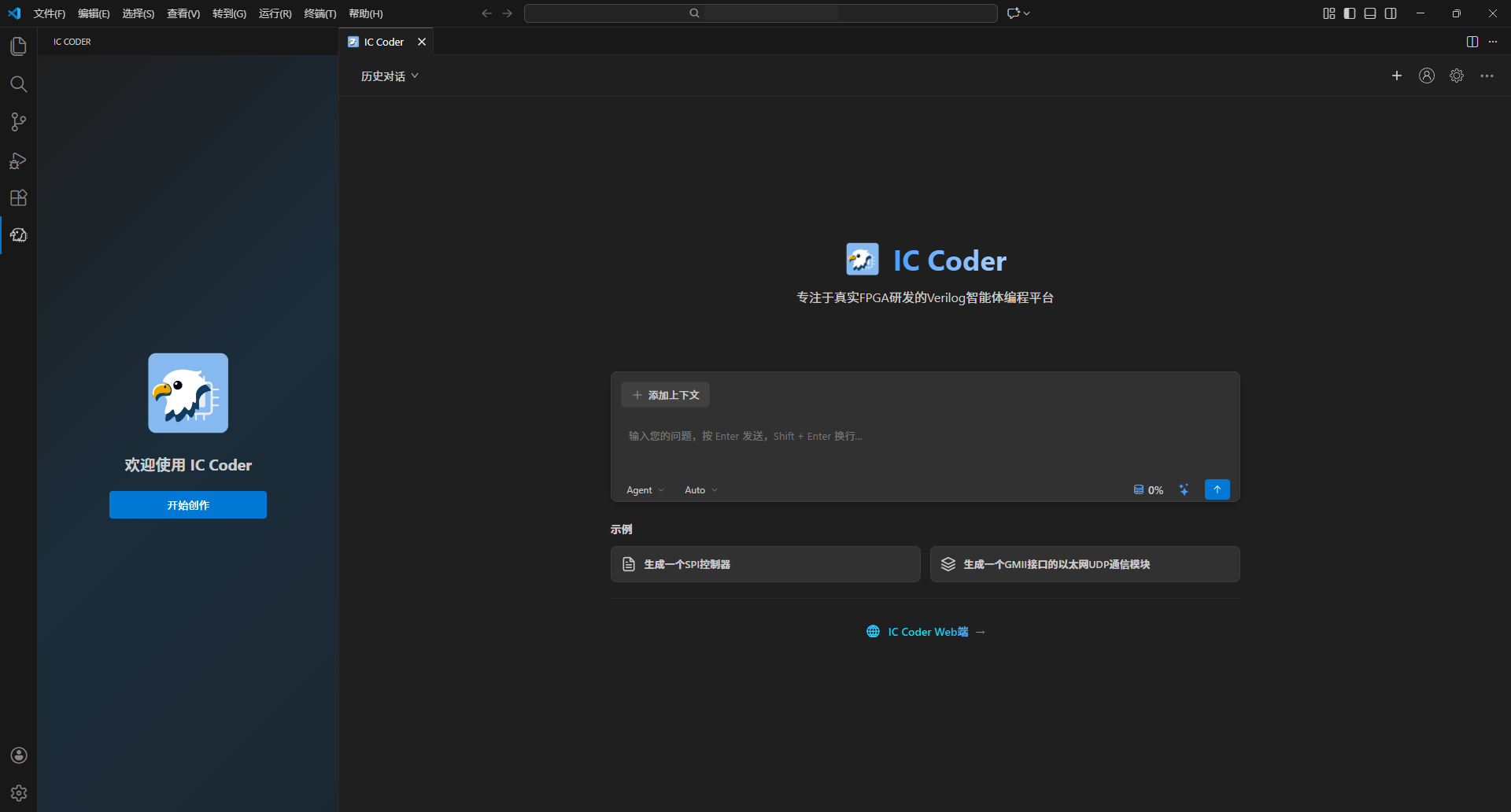
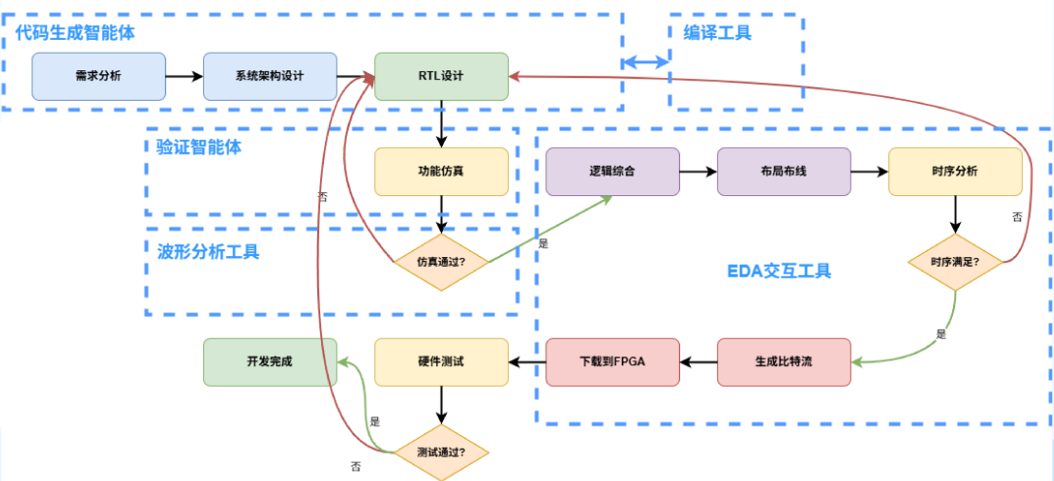
从 WEB 端到插件端,IC Coder 智能体架构完成了**全新升级**,采用当前主流的**层级架构**设计,这种高内聚、低耦合的架构特性,不仅支持更多功能扩展,更预留了充足的迭代空间。当前,插件端拥有了调用本地工具的能力,不再是单纯代码生成的智能体,升级为拥有**语法校验、波形逻辑检查**等工具的**全流程 Verilog 编程智能体平台**,给用户带来更沉浸的**Vibe Verilog Coding**体验。
|
||||
|
||||
|
||||
## 输入需求 对话补充需求
|
||||
### 核心技术架构
|
||||
|
||||
**无需**输入完整需求,放心交给智能体补充完善。
|
||||
**我们采用全球顶尖的大语言模型**,加上自研的针对芯片设计领域深度优化的微调模型,为代码生成提供强大的AI能力支撑。
|
||||
|
||||
## Plan 模型下确认设计文档
|
||||
**核心技术栈**包括:
|
||||
|
||||
**确定**好用户需求以及相关参数后,整理并输出一份 FPGA 开发**设计文档**。Plan 模式下用户可以**进一步**与 IC Coder 沟通需求,或**直接修改**设计文档。
|
||||
- **多智能体架构(Multi-Agent System)**:多个专业化AI智能体协同工作,分别负责架构设计、代码生成、验证测试等不同环节
|
||||
- **增强上下文引擎**:智能理解和管理大规模设计上下文,确保生成代码的一致性和准确性
|
||||
- **自研EDA工具集**:完整的仿真、综合、时序分析工具链,无缝集成到AI工作流中
|
||||
|
||||
这些技术共同支撑着从需求分析、架构设计、代码生成到验证调试的全流程智能化开发体验。
|
||||
|
||||
|
||||
|
||||
## 自动搭建电路架构
|
||||
|
||||
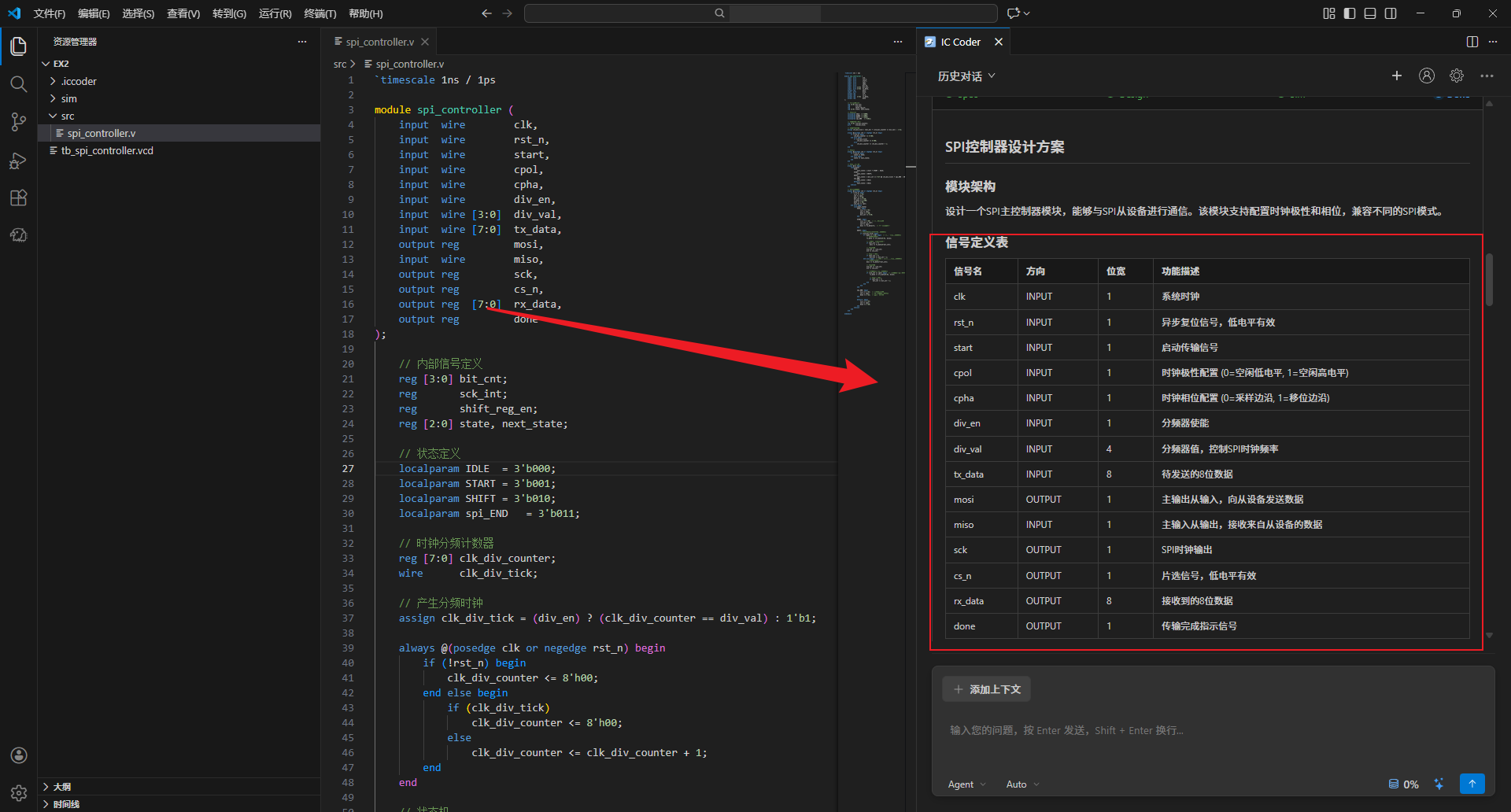
根据需求自动搭建电路架构,并将电路信号关系结构化
|
||||
IC Coder能够根据自然语言描述的设计需求,自动生成完整的电路架构。系统会:
|
||||
|
||||
## 自动仿真
|
||||
- **智能解析需求**:理解功能规格、性能指标、接口要求等设计约束
|
||||
- **自动模块划分**:根据功能将设计合理拆分为多个子模块,确保模块化和可复用性
|
||||
- **生成层次结构**:建立清晰的模块层次关系,自动处理模块间的信号连接
|
||||
- **结构化信号管理**:将所有电路信号关系进行结构化表示,包括数据流向、控制逻辑、时序关系等
|
||||
- **可视化展示**:以图形化方式展示整体架构,便于理解和审查设计方案
|
||||
|
||||
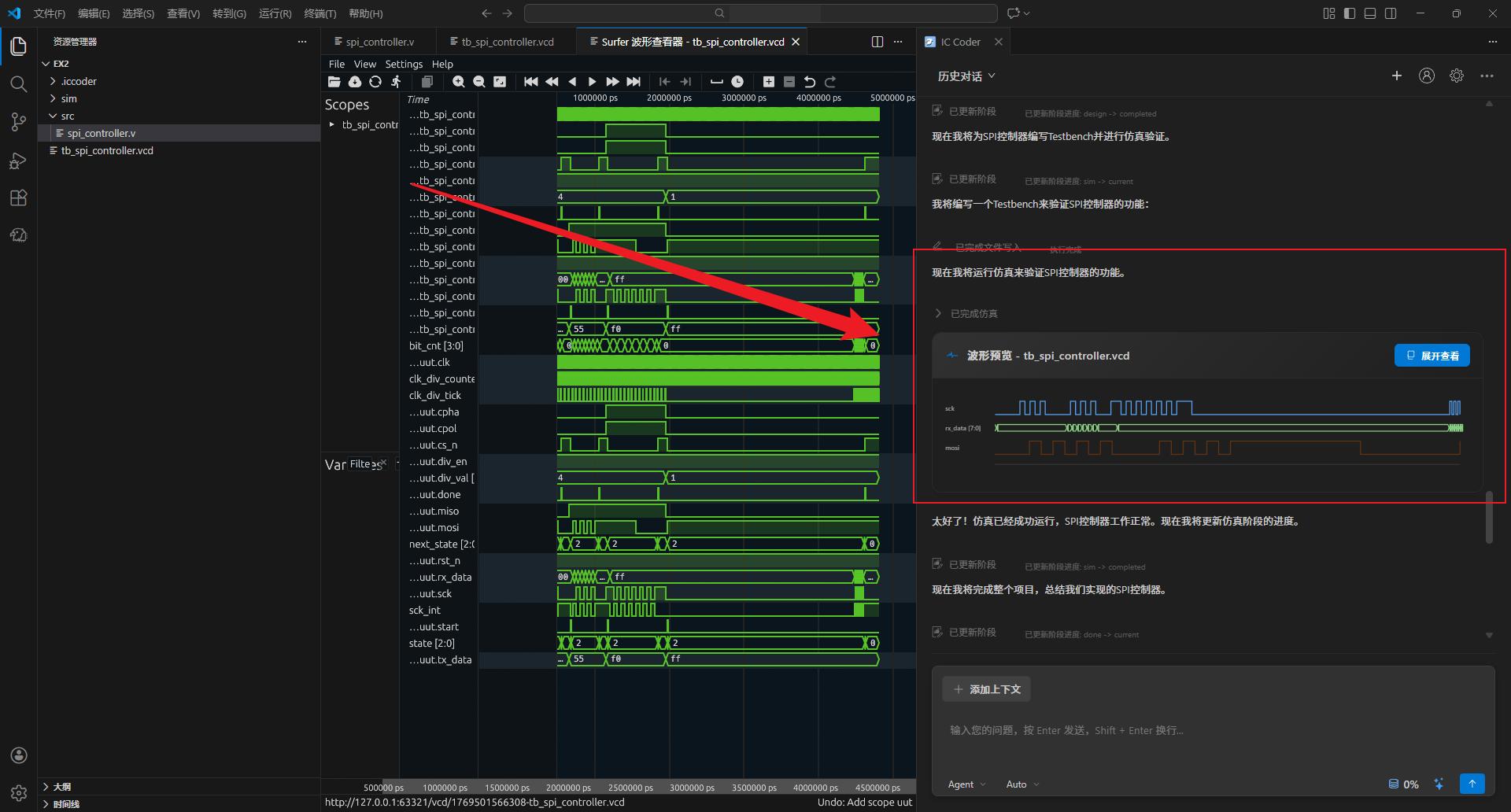
自主搭建 Testbench 仿真平台,自动运行仿真生成波形
|
||||
|
||||
|
||||
## 实时跟随
|
||||
## AI自主仿真
|
||||
|
||||
实时展示全流程执行细节,与智能体协同随时反馈,让 AI 开发更清晰、高效
|
||||
IC Coder提供完全自动化的仿真验证流程,无需手动编写测试代码:
|
||||
|
||||
## VCD 波形解析
|
||||
- **智能Testbench生成**:根据设计模块自动生成完整的测试平台,包括激励生成、时钟复位、接口驱动等
|
||||
- **测试用例自动化**:根据设计规格自动生成覆盖各种场景的测试用例,包括正常功能、边界条件、异常情况等
|
||||
- **一键运行仿真**:自动调用集成仿真器执行仿真
|
||||
- **波形自动生成**:仿真完成后自动生成VCD、波形文件,便于后续分析
|
||||
- **实时进度反馈**:仿真过程中实时显示执行状态和日志信息
|
||||
|
||||
自动解析 VCD 波形文件,自动根据需求,检查是否存在逻辑错误
|
||||
|
||||
|
||||
## 自主代码迭代
|
||||
## AI自主代码迭代
|
||||
|
||||
根据波形解析结果,自动对代码进行优化,然后重新仿真并解析波形,如此迭代,直到仿真无误
|
||||
IC Coder实现了真正的自主式开发循环,能够持续优化代码直到满足设计要求:
|
||||
|
||||
- **智能问题诊断**:根据波形分析结果,自动定位代码中的问题根源
|
||||
- **自动代码修复**:针对发现的问题自动生成修复方案并更新代码
|
||||
- **迭代验证循环**:修复后自动重新运行仿真和波形分析,验证问题是否解决
|
||||
- **持续优化**:如果仍存在问题,继续分析和修复,形成闭环迭代
|
||||
- **收敛保证**:智能判断迭代进展,避免无效循环,确保最终收敛到正确设计
|
||||
- **全程可追溯**:记录每次迭代的修改内容和验证结果,便于回溯和审查
|
||||
|
||||
这种自主迭代能力大幅减少了人工调试时间,让设计验证过程更加高效可靠。
|
||||
|
||||
## 随时可掌控
|
||||
|
||||
IC Coder提供透明化的开发过程,让用户始终掌握AI的工作状态:
|
||||
|
||||
- **实时流程展示**:可视化展示当前执行到哪个阶段(需求分析、架构设计、代码生成、仿真验证等)
|
||||
- **详细执行日志**:记录每一步操作的详细信息,包括AI的思考过程、决策依据、执行结果
|
||||
- **人机协同交互**:在关键决策点支持用户介入,可随时提供反馈、调整方向或修改参数
|
||||
- **进度实时追踪**:显示任务完成进度、预计剩余步骤,让开发过程更加可预期
|
||||
- **智能建议系统**:AI主动提供优化建议和替代方案,用户可选择采纳或自定义
|
||||
- **即时响应机制**:支持随时暂停、恢复或调整AI的工作流程
|
||||
|
||||
这种透明可控的设计理念,让AI开发不再是"黑盒",而是真正的智能协作伙伴。
|
||||
|
||||
## 多层次安全保障
|
||||
|
||||
默认本地存储与云端即时加密保障隐私,真正做到了代码全链路加密传输、云端零存储
|
||||
IC Coder将数据安全和隐私保护作为核心设计原则,提供企业级的安全保障:
|
||||
|
||||
- **本地优先存储**:所有设计文件默认存储在本地,用户完全掌控自己的代码资产
|
||||
- **全链路加密传输**:与云端通信采用TLS/SSL加密,确保数据传输过程中不被窃取或篡改
|
||||
- **云端零存储策略**:云端服务器不保存用户的源代码,仅处理加密后的临时数据,处理完成后立即销毁
|
||||
- **定制化部署选项**:支持企业私有云或本地部署,满足高安全等级需求
|
||||
|
||||
真正做到了代码全链路加密传输、云端零存储,让芯片设计企业可以放心使用AI工具。
|
||||
|
||||
## 反馈
|
||||
|
||||
|
||||
739
docs/invitation-code-design.md
Normal file
739
docs/invitation-code-design.md
Normal file
@ -0,0 +1,739 @@
|
||||
# 邀请码验证功能设计方案
|
||||
|
||||
## 一、整体流程
|
||||
|
||||
```
|
||||
用户首次使用 → 检查邀请码状态 → 未验证则弹窗输入 → 后端验证 → 验证通过后可正常对话
|
||||
```
|
||||
|
||||
## 二、前端设计
|
||||
|
||||
### 2.1 邀请码状态管理
|
||||
|
||||
在 `ExtensionContext.globalState` 中存储邀请码验证状态:
|
||||
|
||||
```typescript
|
||||
// 存储结构
|
||||
{
|
||||
"invitationCodeVerified": true,
|
||||
"invitationCode": "INVITE2024ABC",
|
||||
"verifiedTime": "2024-01-20T10:30:00"
|
||||
}
|
||||
```
|
||||
|
||||
### 2.2 UI 交互流程
|
||||
|
||||
#### 弹窗输入邀请码
|
||||
使用 `vscode.window.showInputBox` 实现:
|
||||
|
||||
```typescript
|
||||
const invitationCode = await vscode.window.showInputBox({
|
||||
prompt: '请输入邀请码以继续使用 IC Coder',
|
||||
placeHolder: '例如:INVITE2024ABC',
|
||||
ignoreFocusOut: true,
|
||||
validateInput: (value) => {
|
||||
if (!value || value.trim().length === 0) {
|
||||
return '邀请码不能为空';
|
||||
}
|
||||
if (value.length < 6) {
|
||||
return '邀请码格式不正确';
|
||||
}
|
||||
return null;
|
||||
}
|
||||
});
|
||||
```
|
||||
|
||||
#### 验证结果提示
|
||||
- 成功:`vscode.window.showInformationMessage('邀请码验证成功!')`
|
||||
- 失败:`vscode.window.showErrorMessage('邀请码无效或已过期,请重新输入')`
|
||||
|
||||
### 2.3 验证时机
|
||||
|
||||
在以下场景触发邀请码验证:
|
||||
|
||||
1. **用户首次发送消息时**(在 `handleUserMessage` 中检查)
|
||||
2. **用户登录后**(在登录成功回调中检查)
|
||||
3. **Token 过期重新登录后**
|
||||
|
||||
### 2.4 前端验证流程图
|
||||
|
||||
```
|
||||
发送消息前检查
|
||||
├─ 检查是否已登录
|
||||
│ └─ 未登录 → 提示登录
|
||||
├─ 检查邀请码是否已验证
|
||||
│ ├─ 未验证
|
||||
│ │ ├─ 弹窗输入邀请码
|
||||
│ │ ├─ 调用后端验证接口 POST /api/invitation/verify
|
||||
│ │ ├─ 验证成功
|
||||
│ │ │ ├─ 保存验证状态到 globalState
|
||||
│ │ │ └─ 继续发送消息
|
||||
│ │ └─ 验证失败
|
||||
│ │ ├─ 显示错误提示
|
||||
│ │ └─ 阻止发送消息
|
||||
│ └─ 已验证 → 继续发送消息
|
||||
```
|
||||
|
||||
### 2.5 前端文件修改清单
|
||||
|
||||
#### 新增文件
|
||||
|
||||
**`src/services/invitationService.ts`** - 邀请码服务
|
||||
```typescript
|
||||
/**
|
||||
* 邀请码验证服务
|
||||
*/
|
||||
export class InvitationService {
|
||||
/**
|
||||
* 检查用户是否已验证邀请码
|
||||
*/
|
||||
static async isVerified(context: vscode.ExtensionContext): Promise<boolean>
|
||||
|
||||
/**
|
||||
* 验证邀请码
|
||||
*/
|
||||
static async verifyCode(code: string): Promise<boolean>
|
||||
|
||||
/**
|
||||
* 保存验证状态
|
||||
*/
|
||||
static async saveVerificationStatus(
|
||||
context: vscode.ExtensionContext,
|
||||
code: string
|
||||
): Promise<void>
|
||||
|
||||
/**
|
||||
* 清除验证状态(用于退出登录)
|
||||
*/
|
||||
static async clearVerificationStatus(
|
||||
context: vscode.ExtensionContext
|
||||
): Promise<void>
|
||||
|
||||
/**
|
||||
* 显示邀请码输入弹窗
|
||||
*/
|
||||
static async showInputDialog(): Promise<string | undefined>
|
||||
}
|
||||
```
|
||||
|
||||
#### 修改文件
|
||||
|
||||
**`src/utils/messageHandler.ts`**
|
||||
- 在 `handleUserMessage` 函数开头添加邀请码验证检查
|
||||
|
||||
**`src/services/apiClient.ts`**
|
||||
- 添加 `verifyInvitationCode` 函数
|
||||
- 添加 `checkInvitationStatus` 函数
|
||||
|
||||
**`src/types/api.ts`**
|
||||
- 添加邀请码相关类型定义
|
||||
|
||||
**`src/panels/ICHelperPanel.ts`**
|
||||
- 在面板创建时检查邀请码状态(可选)
|
||||
|
||||
**`src/extension.ts`**
|
||||
- 在登录成功后检查邀请码状态
|
||||
|
||||
### 2.6 类型定义
|
||||
|
||||
在 `src/types/api.ts` 中添加:
|
||||
|
||||
```typescript
|
||||
// ============== 邀请码验证 ==============
|
||||
|
||||
/**
|
||||
* 邀请码验证请求
|
||||
* POST /api/invitation/verify
|
||||
*/
|
||||
export interface InvitationVerifyRequest {
|
||||
/** 邀请码 */
|
||||
code: string;
|
||||
}
|
||||
|
||||
/**
|
||||
* 邀请码验证响应
|
||||
*/
|
||||
export interface InvitationVerifyResponse {
|
||||
/** 响应代码 */
|
||||
code: number;
|
||||
/** 响应消息 */
|
||||
msg: string;
|
||||
/** 验证结果数据 */
|
||||
data?: {
|
||||
/** 是否验证成功 */
|
||||
verified: boolean;
|
||||
};
|
||||
}
|
||||
|
||||
/**
|
||||
* 邀请码状态响应
|
||||
* GET /api/invitation/status
|
||||
*/
|
||||
export interface InvitationStatusResponse {
|
||||
/** 响应代码 */
|
||||
code: number;
|
||||
/** 响应消息 */
|
||||
msg?: string;
|
||||
/** 状态数据 */
|
||||
data?: {
|
||||
/** 是否已验证 */
|
||||
verified: boolean;
|
||||
/** 使用的邀请码 */
|
||||
invitationCode?: string;
|
||||
/** 验证时间 */
|
||||
verifiedTime?: string;
|
||||
};
|
||||
}
|
||||
```
|
||||
|
||||
## 三、后端设计
|
||||
|
||||
### 3.1 数据库设计
|
||||
|
||||
#### 邀请码表 (invitation_codes)
|
||||
|
||||
```sql
|
||||
CREATE TABLE invitation_codes (
|
||||
id BIGINT PRIMARY KEY AUTO_INCREMENT COMMENT '主键ID',
|
||||
code VARCHAR(32) UNIQUE NOT NULL COMMENT '邀请码',
|
||||
max_uses INT DEFAULT 1 COMMENT '最大使用次数,-1表示无限制',
|
||||
used_count INT DEFAULT 0 COMMENT '已使用次数',
|
||||
expire_time DATETIME COMMENT '过期时间,NULL表示永不过期',
|
||||
created_by BIGINT COMMENT '创建者用户ID',
|
||||
created_time DATETIME DEFAULT CURRENT_TIMESTAMP COMMENT '创建时间',
|
||||
updated_time DATETIME DEFAULT CURRENT_TIMESTAMP ON UPDATE CURRENT_TIMESTAMP COMMENT '更新时间',
|
||||
status TINYINT DEFAULT 1 COMMENT '状态:1-有效,0-禁用',
|
||||
remark VARCHAR(500) COMMENT '备注',
|
||||
INDEX idx_code (code),
|
||||
INDEX idx_status (status),
|
||||
INDEX idx_expire_time (expire_time)
|
||||
) ENGINE=InnoDB DEFAULT CHARSET=utf8mb4 COMMENT='邀请码表';
|
||||
```
|
||||
|
||||
#### 用户邀请码关联表 (user_invitation)
|
||||
|
||||
```sql
|
||||
CREATE TABLE user_invitation (
|
||||
id BIGINT PRIMARY KEY AUTO_INCREMENT COMMENT '主键ID',
|
||||
user_id BIGINT NOT NULL COMMENT '用户ID',
|
||||
invitation_code VARCHAR(32) NOT NULL COMMENT '使用的邀请码',
|
||||
verified_time DATETIME DEFAULT CURRENT_TIMESTAMP COMMENT '验证时间',
|
||||
ip_address VARCHAR(50) COMMENT '验证时的IP地址',
|
||||
UNIQUE KEY uk_user_id (user_id),
|
||||
INDEX idx_invitation_code (invitation_code),
|
||||
INDEX idx_verified_time (verified_time)
|
||||
) ENGINE=InnoDB DEFAULT CHARSET=utf8mb4 COMMENT='用户邀请码关联表';
|
||||
```
|
||||
|
||||
### 3.2 API 接口设计
|
||||
|
||||
#### 3.2.1 验证邀请码
|
||||
|
||||
**接口地址**:`POST /api/invitation/verify`
|
||||
|
||||
**请求头**:
|
||||
```
|
||||
Authorization: Bearer {token}
|
||||
Content-Type: application/json
|
||||
```
|
||||
|
||||
**请求体**:
|
||||
```json
|
||||
{
|
||||
"code": "INVITE2024ABC"
|
||||
}
|
||||
```
|
||||
|
||||
**响应示例**:
|
||||
|
||||
成功:
|
||||
```json
|
||||
{
|
||||
"code": 200,
|
||||
"msg": "验证成功",
|
||||
"data": {
|
||||
"verified": true
|
||||
}
|
||||
}
|
||||
```
|
||||
|
||||
失败:
|
||||
```json
|
||||
{
|
||||
"code": 400,
|
||||
"msg": "邀请码无效或已过期"
|
||||
}
|
||||
```
|
||||
|
||||
```json
|
||||
{
|
||||
"code": 400,
|
||||
"msg": "邀请码使用次数已达上限"
|
||||
}
|
||||
```
|
||||
|
||||
```json
|
||||
{
|
||||
"code": 400,
|
||||
"msg": "您已验证过邀请码,无需重复验证"
|
||||
}
|
||||
```
|
||||
|
||||
#### 3.2.2 查询验证状态
|
||||
|
||||
**接口地址**:`GET /api/invitation/status`
|
||||
|
||||
**请求头**:
|
||||
```
|
||||
Authorization: Bearer {token}
|
||||
```
|
||||
|
||||
**响应示例**:
|
||||
|
||||
已验证:
|
||||
```json
|
||||
{
|
||||
"code": 200,
|
||||
"msg": "success",
|
||||
"data": {
|
||||
"verified": true,
|
||||
"invitationCode": "INVITE2024ABC",
|
||||
"verifiedTime": "2024-01-20T10:30:00"
|
||||
}
|
||||
}
|
||||
```
|
||||
|
||||
未验证:
|
||||
```json
|
||||
{
|
||||
"code": 200,
|
||||
"msg": "success",
|
||||
"data": {
|
||||
"verified": false
|
||||
}
|
||||
}
|
||||
```
|
||||
|
||||
#### 3.2.3 管理接口(管理员使用)
|
||||
|
||||
**生成邀请码**:`POST /api/admin/invitation/generate`
|
||||
|
||||
请求体:
|
||||
```json
|
||||
{
|
||||
"count": 10,
|
||||
"maxUses": 1,
|
||||
"expireTime": "2024-12-31T23:59:59",
|
||||
"remark": "2024年1月批次"
|
||||
}
|
||||
```
|
||||
|
||||
响应:
|
||||
```json
|
||||
{
|
||||
"code": 200,
|
||||
"msg": "生成成功",
|
||||
"data": {
|
||||
"codes": [
|
||||
"INVITE2024001",
|
||||
"INVITE2024002",
|
||||
"..."
|
||||
]
|
||||
}
|
||||
}
|
||||
```
|
||||
|
||||
**查询邀请码列表**:`GET /api/admin/invitation/list`
|
||||
|
||||
**禁用邀请码**:`PUT /api/admin/invitation/disable/{code}`
|
||||
|
||||
**查询使用记录**:`GET /api/admin/invitation/usage/{code}`
|
||||
|
||||
### 3.3 后端验证逻辑
|
||||
|
||||
#### 验证流程
|
||||
|
||||
```java
|
||||
public boolean verifyInvitationCode(Long userId, String code) {
|
||||
// 1. 检查邀请码是否存在
|
||||
InvitationCode invitationCode = invitationCodeMapper.selectByCode(code);
|
||||
if (invitationCode == null) {
|
||||
throw new BusinessException("邀请码不存在");
|
||||
}
|
||||
|
||||
// 2. 检查邀请码状态
|
||||
if (invitationCode.getStatus() != 1) {
|
||||
throw new BusinessException("邀请码已被禁用");
|
||||
}
|
||||
|
||||
// 3. 检查是否过期
|
||||
if (invitationCode.getExpireTime() != null
|
||||
&& invitationCode.getExpireTime().before(new Date())) {
|
||||
throw new BusinessException("邀请码已过期");
|
||||
}
|
||||
|
||||
// 4. 检查使用次数
|
||||
if (invitationCode.getMaxUses() != -1
|
||||
&& invitationCode.getUsedCount() >= invitationCode.getMaxUses()) {
|
||||
throw new BusinessException("邀请码使用次数已达上限");
|
||||
}
|
||||
|
||||
// 5. 检查用户是否已验证过
|
||||
UserInvitation existing = userInvitationMapper.selectByUserId(userId);
|
||||
if (existing != null) {
|
||||
throw new BusinessException("您已验证过邀请码,无需重复验证");
|
||||
}
|
||||
|
||||
// 6. 创建用户验证记录
|
||||
UserInvitation userInvitation = new UserInvitation();
|
||||
userInvitation.setUserId(userId);
|
||||
userInvitation.setInvitationCode(code);
|
||||
userInvitation.setVerifiedTime(new Date());
|
||||
userInvitationMapper.insert(userInvitation);
|
||||
|
||||
// 7. 增加邀请码使用次数
|
||||
invitationCodeMapper.incrementUsedCount(code);
|
||||
|
||||
return true;
|
||||
}
|
||||
```
|
||||
|
||||
### 3.4 权限拦截
|
||||
|
||||
在对话接口中添加邀请码验证拦截:
|
||||
|
||||
```java
|
||||
@PostMapping("/dialog/stream")
|
||||
public SseEmitter dialog(@RequestBody DialogRequest request) {
|
||||
// 获取当前用户ID
|
||||
Long userId = SecurityUtils.getUserId();
|
||||
|
||||
// 检查用户是否已验证邀请码
|
||||
if (!invitationService.isUserVerified(userId)) {
|
||||
throw new BusinessException("请先验证邀请码后再使用对话功能");
|
||||
}
|
||||
|
||||
// 继续处理对话请求
|
||||
// ...
|
||||
}
|
||||
```
|
||||
|
||||
或者使用拦截器统一处理:
|
||||
|
||||
```java
|
||||
@Component
|
||||
public class InvitationInterceptor implements HandlerInterceptor {
|
||||
|
||||
@Autowired
|
||||
private InvitationService invitationService;
|
||||
|
||||
@Override
|
||||
public boolean preHandle(HttpServletRequest request,
|
||||
HttpServletResponse response,
|
||||
Object handler) throws Exception {
|
||||
// 获取当前用户ID
|
||||
Long userId = SecurityUtils.getUserId();
|
||||
|
||||
// 检查是否需要验证邀请码的接口
|
||||
String uri = request.getRequestURI();
|
||||
if (needsInvitationVerification(uri)) {
|
||||
if (!invitationService.isUserVerified(userId)) {
|
||||
throw new BusinessException("请先验证邀请码");
|
||||
}
|
||||
}
|
||||
|
||||
return true;
|
||||
}
|
||||
|
||||
private boolean needsInvitationVerification(String uri) {
|
||||
// 需要验证邀请码的接口列表
|
||||
return uri.startsWith("/api/dialog/")
|
||||
|| uri.startsWith("/api/task/");
|
||||
}
|
||||
}
|
||||
```
|
||||
|
||||
### 3.5 后端文件清单
|
||||
|
||||
#### 实体类
|
||||
- `com.iccoder.entity.InvitationCode` - 邀请码实体
|
||||
- `com.iccoder.entity.UserInvitation` - 用户邀请码关联实体
|
||||
|
||||
#### Mapper
|
||||
- `com.iccoder.mapper.InvitationCodeMapper` - 邀请码数据访问
|
||||
- `com.iccoder.mapper.UserInvitationMapper` - 用户邀请码关联数据访问
|
||||
|
||||
#### Service
|
||||
- `com.iccoder.service.InvitationService` - 邀请码业务逻辑
|
||||
- `com.iccoder.service.impl.InvitationServiceImpl` - 实现类
|
||||
|
||||
#### Controller
|
||||
- `com.iccoder.controller.InvitationController` - 邀请码接口
|
||||
- `com.iccoder.controller.admin.InvitationAdminController` - 管理接口
|
||||
|
||||
#### 拦截器
|
||||
- `com.iccoder.interceptor.InvitationInterceptor` - 邀请码验证拦截器
|
||||
|
||||
## 四、用户体验优化
|
||||
|
||||
### 4.1 首次使用引导
|
||||
|
||||
在用户首次打开聊天面板时,如果未验证邀请码,显示友好的引导信息:
|
||||
|
||||
```typescript
|
||||
// 在 ICHelperPanel.ts 中
|
||||
if (!await InvitationService.isVerified(context)) {
|
||||
panel.webview.postMessage({
|
||||
command: 'showInvitationGuide',
|
||||
message: '欢迎使用 IC Coder!请先输入邀请码以开始使用。'
|
||||
});
|
||||
}
|
||||
```
|
||||
|
||||
### 4.2 状态持久化
|
||||
|
||||
验证状态保存在 `globalState` 中,避免重复验证:
|
||||
|
||||
```typescript
|
||||
// 保存验证状态
|
||||
await context.globalState.update('invitationCodeVerified', true);
|
||||
await context.globalState.update('invitationCode', code);
|
||||
await context.globalState.update('verifiedTime', new Date().toISOString());
|
||||
```
|
||||
|
||||
### 4.3 错误提示优化
|
||||
|
||||
根据不同的错误类型,提供清晰的提示信息:
|
||||
|
||||
| 错误类型 | 提示信息 |
|
||||
|---------|---------|
|
||||
| 邀请码不存在 | "邀请码不存在,请检查后重新输入" |
|
||||
| 邀请码已过期 | "邀请码已过期,请联系管理员获取新的邀请码" |
|
||||
| 使用次数已达上限 | "该邀请码使用次数已达上限,请使用其他邀请码" |
|
||||
| 已验证过 | "您已验证过邀请码,无需重复验证" |
|
||||
| 网络错误 | "网络连接失败,请检查网络后重试" |
|
||||
|
||||
### 4.4 支持重新验证
|
||||
|
||||
提供命令允许用户更换邀请码:
|
||||
|
||||
```typescript
|
||||
// 在 extension.ts 中注册命令
|
||||
context.subscriptions.push(
|
||||
vscode.commands.registerCommand('ic-coder.changeInvitationCode', async () => {
|
||||
const confirm = await vscode.window.showWarningMessage(
|
||||
'确定要更换邀请码吗?',
|
||||
'确定',
|
||||
'取消'
|
||||
);
|
||||
|
||||
if (confirm === '确定') {
|
||||
await InvitationService.clearVerificationStatus(context);
|
||||
vscode.window.showInformationMessage('已清除邀请码,请重新验证');
|
||||
}
|
||||
})
|
||||
);
|
||||
```
|
||||
|
||||
### 4.5 Webview 中显示状态(可选)
|
||||
|
||||
在聊天界面顶部显示邀请码验证状态:
|
||||
|
||||
```html
|
||||
<!-- 已验证 -->
|
||||
<div class="invitation-status verified">
|
||||
<span class="icon">✓</span>
|
||||
<span>邀请码已验证</span>
|
||||
</div>
|
||||
|
||||
<!-- 未验证 -->
|
||||
<div class="invitation-status unverified">
|
||||
<span class="icon">!</span>
|
||||
<span>请先验证邀请码</span>
|
||||
<button onclick="verifyInvitationCode()">立即验证</button>
|
||||
</div>
|
||||
```
|
||||
|
||||
## 五、安全考虑
|
||||
|
||||
### 5.1 邀请码生成规则
|
||||
|
||||
使用安全的随机算法生成邀请码:
|
||||
|
||||
```java
|
||||
public String generateInvitationCode() {
|
||||
// 使用 UUID + 时间戳 + 随机数
|
||||
String uuid = UUID.randomUUID().toString().replace("-", "");
|
||||
String timestamp = String.valueOf(System.currentTimeMillis());
|
||||
String random = RandomStringUtils.randomAlphanumeric(6);
|
||||
|
||||
// 组合并取前16位
|
||||
String combined = uuid + timestamp + random;
|
||||
String code = DigestUtils.sha256Hex(combined).substring(0, 16).toUpperCase();
|
||||
|
||||
return "IC" + code; // 添加前缀,例如:IC3F2A9B1C4D5E6F
|
||||
}
|
||||
```
|
||||
|
||||
### 5.2 防暴力破解
|
||||
|
||||
限制验证频率,添加验证失败次数限制:
|
||||
|
||||
```java
|
||||
// 使用 Redis 记录验证失败次数
|
||||
String key = "invitation:fail:" + userId;
|
||||
Integer failCount = redisTemplate.opsForValue().get(key);
|
||||
|
||||
if (failCount != null && failCount >= 5) {
|
||||
throw new BusinessException("验证失败次数过多,请1小时后再试");
|
||||
}
|
||||
|
||||
// 验证失败时增加计数
|
||||
if (!verifySuccess) {
|
||||
redisTemplate.opsForValue().increment(key);
|
||||
redisTemplate.expire(key, 1, TimeUnit.HOURS);
|
||||
}
|
||||
```
|
||||
|
||||
### 5.3 Token 绑定
|
||||
|
||||
邀请码验证状态与用户 Token 绑定,退出登录时清除:
|
||||
|
||||
```typescript
|
||||
// 在退出登录时清除验证状态
|
||||
vscode.commands.registerCommand('ic-coder.logout', async () => {
|
||||
// 清除 session
|
||||
await clearSession();
|
||||
|
||||
// 清除邀请码验证状态
|
||||
await InvitationService.clearVerificationStatus(context);
|
||||
|
||||
vscode.window.showInformationMessage('已退出登录');
|
||||
});
|
||||
```
|
||||
|
||||
### 5.4 日志记录
|
||||
|
||||
记录所有验证尝试,便于审计和分析:
|
||||
|
||||
```java
|
||||
@Slf4j
|
||||
public class InvitationServiceImpl implements InvitationService {
|
||||
|
||||
@Override
|
||||
public boolean verifyInvitationCode(Long userId, String code) {
|
||||
log.info("用户 {} 尝试验证邀请码: {}", userId, code);
|
||||
|
||||
try {
|
||||
// 验证逻辑
|
||||
// ...
|
||||
|
||||
log.info("用户 {} 验证邀请码成功: {}", userId, code);
|
||||
return true;
|
||||
} catch (Exception e) {
|
||||
log.warn("用户 {} 验证邀请码失败: {}, 原因: {}",
|
||||
userId, code, e.getMessage());
|
||||
throw e;
|
||||
}
|
||||
}
|
||||
}
|
||||
```
|
||||
|
||||
### 5.5 敏感信息保护
|
||||
|
||||
- 邀请码在数据库中可以考虑加密存储(可选)
|
||||
- API 响应中不暴露邀请码的详细信息(如剩余次数)
|
||||
- 前端不缓存邀请码明文,只保存验证状态
|
||||
|
||||
## 六、实施步骤
|
||||
|
||||
### 阶段一:后端开发(优先)
|
||||
|
||||
1. 创建数据库表
|
||||
2. 实现邀请码生成和管理功能
|
||||
3. 实现验证接口
|
||||
4. 添加权限拦截
|
||||
5. 测试接口功能
|
||||
|
||||
### 阶段二:前端开发
|
||||
|
||||
1. 添加类型定义
|
||||
2. 实现 `InvitationService`
|
||||
3. 修改 `apiClient.ts` 添加接口调用
|
||||
4. 修改 `messageHandler.ts` 添加验证检查
|
||||
5. 测试完整流程
|
||||
|
||||
### 阶段三:联调测试
|
||||
|
||||
1. 前后端联调
|
||||
2. 测试各种异常场景
|
||||
3. 优化用户体验
|
||||
4. 性能测试
|
||||
|
||||
### 阶段四:上线部署
|
||||
|
||||
1. 生成初始邀请码
|
||||
2. 更新用户文档
|
||||
3. 灰度发布
|
||||
4. 监控运行状态
|
||||
|
||||
## 七、测试用例
|
||||
|
||||
### 7.1 正常流程测试
|
||||
|
||||
| 测试场景 | 预期结果 |
|
||||
|---------|---------|
|
||||
| 首次使用,输入有效邀请码 | 验证成功,可以正常对话 |
|
||||
| 已验证用户再次打开面板 | 无需重复验证,直接使用 |
|
||||
| 退出登录后重新登录 | 需要重新验证邀请码 |
|
||||
|
||||
### 7.2 异常场景测试
|
||||
|
||||
| 测试场景 | 预期结果 |
|
||||
|---------|---------|
|
||||
| 输入不存在的邀请码 | 提示"邀请码不存在" |
|
||||
| 输入已过期的邀请码 | 提示"邀请码已过期" |
|
||||
| 输入使用次数已满的邀请码 | 提示"使用次数已达上限" |
|
||||
| 已验证用户尝试再次验证 | 提示"已验证过,无需重复验证" |
|
||||
| 网络断开时验证 | 提示"网络连接失败" |
|
||||
| 连续输入错误邀请码5次 | 提示"验证失败次数过多,请稍后再试" |
|
||||
|
||||
### 7.3 边界条件测试
|
||||
|
||||
| 测试场景 | 预期结果 |
|
||||
|---------|---------|
|
||||
| 邀请码为空 | 前端验证拦截,提示"邀请码不能为空" |
|
||||
| 邀请码长度不足 | 前端验证拦截,提示"邀请码格式不正确" |
|
||||
| 邀请码包含特殊字符 | 后端验证失败,提示"邀请码不存在" |
|
||||
| 同一邀请码多人同时使用 | 使用数据库锁,确保不超过最大次数 |
|
||||
|
||||
## 八、FAQ
|
||||
|
||||
### Q1: 用户忘记邀请码怎么办?
|
||||
A: 邀请码验证成功后,用户无需记住邀请码。如果需要查看,可以在设置中显示已验证的邀请码。
|
||||
|
||||
### Q2: 邀请码可以重复使用吗?
|
||||
A: 取决于邀请码的 `maxUses` 设置。可以设置为 1(一次性)、N(限定次数)或 -1(无限制)。
|
||||
|
||||
### Q3: 如何批量生成邀请码?
|
||||
A: 使用管理接口 `POST /api/admin/invitation/generate`,指定生成数量即可。
|
||||
|
||||
### Q4: 邀请码验证失败会影响登录吗?
|
||||
A: 不会。邀请码验证是独立的,只影响对话功能的使用,不影响登录。
|
||||
|
||||
### Q5: 可以为不同用户群体设置不同的邀请码吗?
|
||||
A: 可以。通过 `remark` 字段标记不同批次的邀请码,便于管理和统计。
|
||||
|
||||
## 九、后续优化方向
|
||||
|
||||
1. **邀请码分级**:不同等级的邀请码对应不同的权限(如对话次数、模型选择等)
|
||||
2. **邀请奖励**:邀请他人使用可获得积分或额外权限
|
||||
3. **邀请统计**:统计每个邀请码的使用情况和用户活跃度
|
||||
4. **自动过期**:根据使用情况自动延长或缩短邀请码有效期
|
||||
5. **白名单机制**:特定用户可以免邀请码使用
|
||||
|
||||
---
|
||||
|
||||
**文档版本**:v1.0
|
||||
**最后更新**:2026-01-27
|
||||
**维护者**:IC Coder Team
|
||||
911
docs/system-notification-implementation.md
Normal file
911
docs/system-notification-implementation.md
Normal file
@ -0,0 +1,911 @@
|
||||
# IC Coder 系统通知功能实现方案
|
||||
|
||||
## 目录
|
||||
|
||||
- [1. 需求背景](#1-需求背景)
|
||||
- [2. 技术方案对比](#2-技术方案对比)
|
||||
- [3. 推荐方案详解](#3-推荐方案详解)
|
||||
- [4. 实现步骤](#4-实现步骤)
|
||||
- [5. API 设计](#5-api-设计)
|
||||
- [6. 配置选项](#6-配置选项)
|
||||
- [7. 测试方案](#7-测试方案)
|
||||
- [8. 注意事项](#8-注意事项)
|
||||
- [9. 常见问题](#9-常见问题)
|
||||
|
||||
---
|
||||
|
||||
## 1. 需求背景
|
||||
|
||||
### 1.1 问题描述
|
||||
|
||||
当前 IC Coder 插件使用 VS Code 内置的通知 API (`vscode.window.showInformationMessage`) 来提示用户任务完成。这种方式存在以下问题:
|
||||
|
||||
- **可见性问题**: 用户切换到其他应用时,无法看到 VS Code 内部的通知
|
||||
- **错过通知**: 长时间运行的任务(如 iverilog 仿真)完成时,用户可能已经离开 VS Code
|
||||
- **用户体验**: 需要用户主动回到 VS Code 才能知道任务状态
|
||||
|
||||
### 1.2 目标
|
||||
|
||||
实现系统级通知功能,使得:
|
||||
|
||||
1. 用户在任何应用中都能收到任务完成通知
|
||||
2. 通知显示在操作系统的通知中心(Windows Action Center / macOS Notification Center / Linux notify-send)
|
||||
3. 支持自定义通知内容、图标、声音
|
||||
4. 用户可以配置是否启用系统通知
|
||||
|
||||
---
|
||||
|
||||
## 2. 技术方案对比
|
||||
|
||||
### 2.1 方案一:node-notifier(推荐)
|
||||
|
||||
**描述**: 使用 `node-notifier` 库,封装了各平台的原生通知 API
|
||||
|
||||
**优点**:
|
||||
- ✅ 跨平台支持(Windows/macOS/Linux)
|
||||
- ✅ API 简单易用
|
||||
- ✅ 支持自定义图标、声音、操作按钮
|
||||
- ✅ 活跃维护,社区支持良好
|
||||
- ✅ 支持通知点击回调
|
||||
|
||||
**缺点**:
|
||||
- ❌ 需要添加额外依赖(~500KB)
|
||||
- ❌ 首次使用需要用户授权
|
||||
|
||||
**适用场景**: 需要跨平台支持的生产环境
|
||||
|
||||
---
|
||||
|
||||
### 2.2 方案二:Windows PowerShell Toast 通知
|
||||
|
||||
**描述**: 使用 PowerShell 脚本调用 Windows 10/11 的 Toast 通知 API
|
||||
|
||||
**优点**:
|
||||
- ✅ 无需额外依赖
|
||||
- ✅ 支持丰富的 Toast 样式(按钮、输入框等)
|
||||
- ✅ 与 Windows 系统深度集成
|
||||
|
||||
**缺点**:
|
||||
- ❌ 仅支持 Windows 10/11
|
||||
- ❌ 需要执行 PowerShell 脚本,可能有安全限制
|
||||
- ❌ 实现复杂度较高
|
||||
|
||||
**适用场景**: 仅针对 Windows 平台的专用功能
|
||||
|
||||
---
|
||||
|
||||
### 2.3 方案三:Electron Notification API
|
||||
|
||||
**描述**: 使用 Electron 的 `Notification` API(VS Code 基于 Electron)
|
||||
|
||||
**优点**:
|
||||
- ✅ 无需额外依赖
|
||||
- ✅ 跨平台支持
|
||||
- ✅ API 简洁
|
||||
|
||||
**缺点**:
|
||||
- ❌ VS Code 扩展 API 未直接暴露 Electron API
|
||||
- ❌ 需要通过 `@vscode/webview-ui-toolkit` 或其他方式间接调用
|
||||
- ❌ 可能存在兼容性问题
|
||||
|
||||
**适用场景**: 理论可行,但实际受限于 VS Code 扩展沙箱
|
||||
|
||||
---
|
||||
|
||||
### 2.4 方案四:结合 VS Code 通知 + 系统通知
|
||||
|
||||
**描述**: 同时使用 VS Code 内置通知和系统通知
|
||||
|
||||
**优点**:
|
||||
- ✅ 双重保障,覆盖所有场景
|
||||
- ✅ 用户在 VS Code 内外都能看到
|
||||
|
||||
**缺点**:
|
||||
- ❌ 可能显得冗余
|
||||
- ❌ 需要处理两种通知的协调逻辑
|
||||
|
||||
**适用场景**: 对通知可靠性要求极高的场景
|
||||
|
||||
---
|
||||
|
||||
### 2.5 方案对比表
|
||||
|
||||
| 方案 | 跨平台 | 依赖大小 | 实现难度 | 用户体验 | 推荐度 |
|
||||
|------|--------|----------|----------|----------|--------|
|
||||
| node-notifier | ✅ | ~500KB | ⭐ 低 | ⭐⭐⭐⭐⭐ | ⭐⭐⭐⭐⭐ |
|
||||
| PowerShell Toast | ❌ Windows Only | 0 | ⭐⭐⭐ 高 | ⭐⭐⭐⭐ | ⭐⭐ |
|
||||
| Electron API | ✅ | 0 | ⭐⭐⭐⭐ 很高 | ⭐⭐⭐ | ⭐ |
|
||||
| 双重通知 | ✅ | ~500KB | ⭐⭐ 中 | ⭐⭐⭐⭐ | ⭐⭐⭐ |
|
||||
|
||||
---
|
||||
|
||||
## 3. 推荐方案详解
|
||||
|
||||
### 3.1 选择 node-notifier 的理由
|
||||
|
||||
1. **成熟稳定**: 被广泛使用(npm 周下载量 > 200 万)
|
||||
2. **跨平台**: 自动适配不同操作系统的通知机制
|
||||
3. **功能丰富**: 支持图标、声音、操作按钮、回调
|
||||
4. **易于集成**: 与 VS Code 扩展开发无缝集成
|
||||
|
||||
### 3.2 node-notifier 工作原理
|
||||
|
||||
```
|
||||
┌─────────────────────────────────────────────────────────────┐
|
||||
│ IC Coder Extension │
|
||||
│ ┌────────────────────────────────────────────────────────┐ │
|
||||
│ │ notificationService.ts │ │
|
||||
│ │ ┌──────────────────────────────────────────────────┐ │ │
|
||||
│ │ │ sendSystemNotification(title, message, options) │ │ │
|
||||
│ │ └──────────────────┬───────────────────────────────┘ │ │
|
||||
│ └────────────────────┼──────────────────────────────────┘ │
|
||||
└────────────────────────┼─────────────────────────────────────┘
|
||||
│
|
||||
▼
|
||||
┌──────────────────────┐
|
||||
│ node-notifier │
|
||||
│ (跨平台适配层) │
|
||||
└──────────┬───────────┘
|
||||
│
|
||||
┌───────────────┼───────────────┐
|
||||
│ │ │
|
||||
▼ ▼ ▼
|
||||
┌─────────┐ ┌──────────┐ ┌──────────┐
|
||||
│ Windows │ │ macOS │ │ Linux │
|
||||
│ Toast │ │ NSUser │ │ notify- │
|
||||
│ Notif. │ │ Notif. │ │ send │
|
||||
└─────────┘ └──────────┘ └──────────┘
|
||||
```
|
||||
|
||||
### 3.3 各平台通知效果
|
||||
|
||||
#### Windows 10/11
|
||||
- 显示在右下角 Action Center
|
||||
- 支持应用图标、标题、消息、操作按钮
|
||||
- 可以播放系统声音
|
||||
- 通知历史保存在通知中心
|
||||
|
||||
#### macOS
|
||||
- 显示在右上角 Notification Center
|
||||
- 支持应用图标、标题、副标题、消息
|
||||
- 可以播放系统声音
|
||||
- 支持回复和操作按钮
|
||||
|
||||
#### Linux
|
||||
- 使用 `notify-send` 或 `libnotify`
|
||||
- 显示位置取决于桌面环境(GNOME/KDE/XFCE)
|
||||
- 支持图标、标题、消息、紧急程度
|
||||
|
||||
---
|
||||
|
||||
## 4. 实现步骤
|
||||
|
||||
### 4.1 安装依赖
|
||||
|
||||
```bash
|
||||
# 安装 node-notifier
|
||||
pnpm add node-notifier
|
||||
|
||||
# 安装类型定义
|
||||
pnpm add -D @types/node-notifier
|
||||
```
|
||||
|
||||
### 4.2 创建通知服务模块
|
||||
|
||||
创建 `src/services/notificationService.ts`
|
||||
|
||||
```typescript
|
||||
import * as notifier from 'node-notifier';
|
||||
import * as path from 'path';
|
||||
import * as vscode from 'vscode';
|
||||
|
||||
/**
|
||||
* 通知类型枚举
|
||||
*/
|
||||
export enum NotificationType {
|
||||
INFO = 'info',
|
||||
SUCCESS = 'success',
|
||||
WARNING = 'warning',
|
||||
ERROR = 'error'
|
||||
}
|
||||
|
||||
/**
|
||||
* 通知选项接口
|
||||
*/
|
||||
export interface NotificationOptions {
|
||||
/** 通知标题 */
|
||||
title: string;
|
||||
/** 通知消息 */
|
||||
message: string;
|
||||
/** 通知类型 */
|
||||
type?: NotificationType;
|
||||
/** 是否播放声音 */
|
||||
sound?: boolean;
|
||||
/** 超时时间(秒),0 表示不自动消失 */
|
||||
timeout?: number;
|
||||
/** 自定义图标路径 */
|
||||
icon?: string;
|
||||
/** 点击通知时的回调 */
|
||||
onClick?: () => void;
|
||||
}
|
||||
|
||||
/**
|
||||
* 系统通知服务类
|
||||
*/
|
||||
export class NotificationService {
|
||||
private static instance: NotificationService;
|
||||
private readonly extensionPath: string;
|
||||
private readonly iconPath: string;
|
||||
|
||||
private constructor(context: vscode.ExtensionContext) {
|
||||
this.extensionPath = context.extensionPath;
|
||||
this.iconPath = path.join(this.extensionPath, 'resources', 'icon.png');
|
||||
}
|
||||
|
||||
/**
|
||||
* 获取单例实例
|
||||
*/
|
||||
public static getInstance(context?: vscode.ExtensionContext): NotificationService {
|
||||
if (!NotificationService.instance && context) {
|
||||
NotificationService.instance = new NotificationService(context);
|
||||
}
|
||||
return NotificationService.instance;
|
||||
}
|
||||
|
||||
/**
|
||||
* 检查是否启用系统通知
|
||||
*/
|
||||
private isSystemNotificationEnabled(): boolean {
|
||||
const config = vscode.workspace.getConfiguration('ic-coder');
|
||||
return config.get<boolean>('enableSystemNotification', true);
|
||||
}
|
||||
|
||||
/**
|
||||
* 发送系统通知
|
||||
*/
|
||||
public sendNotification(options: NotificationOptions): void {
|
||||
// 检查用户配置
|
||||
if (!this.isSystemNotificationEnabled()) {
|
||||
console.log('[NotificationService] 系统通知已禁用');
|
||||
return;
|
||||
}
|
||||
|
||||
const {
|
||||
title,
|
||||
message,
|
||||
type = NotificationType.INFO,
|
||||
sound = true,
|
||||
timeout = 10,
|
||||
icon,
|
||||
onClick
|
||||
} = options;
|
||||
|
||||
// 准备通知参数
|
||||
const notificationConfig: notifier.Notification = {
|
||||
title: title,
|
||||
message: message,
|
||||
icon: icon || this.iconPath,
|
||||
sound: sound,
|
||||
wait: false,
|
||||
timeout: timeout,
|
||||
appID: 'IC Coder' // Windows 10/11 需要
|
||||
};
|
||||
|
||||
// 发送通知
|
||||
notifier.notify(notificationConfig, (err, response, metadata) => {
|
||||
if (err) {
|
||||
console.error('[NotificationService] 通知发送失败:', err);
|
||||
// 降级到 VS Code 内置通知
|
||||
this.fallbackToVSCodeNotification(title, message, type);
|
||||
return;
|
||||
}
|
||||
|
||||
console.log('[NotificationService] 通知已发送:', response, metadata);
|
||||
});
|
||||
|
||||
// 监听通知点击事件
|
||||
if (onClick) {
|
||||
notifier.on('click', (notifierObject, options, event) => {
|
||||
onClick();
|
||||
});
|
||||
}
|
||||
}
|
||||
|
||||
/**
|
||||
* 降级到 VS Code 内置通知
|
||||
*/
|
||||
private fallbackToVSCodeNotification(
|
||||
title: string,
|
||||
message: string,
|
||||
type: NotificationType
|
||||
): void {
|
||||
const fullMessage = `${title}: ${message}`;
|
||||
|
||||
switch (type) {
|
||||
case NotificationType.ERROR:
|
||||
vscode.window.showErrorMessage(fullMessage);
|
||||
break;
|
||||
case NotificationType.WARNING:
|
||||
vscode.window.showWarningMessage(fullMessage);
|
||||
break;
|
||||
case NotificationType.SUCCESS:
|
||||
case NotificationType.INFO:
|
||||
default:
|
||||
vscode.window.showInformationMessage(fullMessage);
|
||||
break;
|
||||
}
|
||||
}
|
||||
|
||||
/**
|
||||
* 发送成功通知
|
||||
*/
|
||||
public success(title: string, message: string, onClick?: () => void): void {
|
||||
this.sendNotification({
|
||||
title,
|
||||
message,
|
||||
type: NotificationType.SUCCESS,
|
||||
sound: true,
|
||||
timeout: 10,
|
||||
onClick
|
||||
});
|
||||
}
|
||||
|
||||
/**
|
||||
* 发送错误通知
|
||||
*/
|
||||
public error(title: string, message: string, onClick?: () => void): void {
|
||||
this.sendNotification({
|
||||
title,
|
||||
message,
|
||||
type: NotificationType.ERROR,
|
||||
sound: true,
|
||||
timeout: 15,
|
||||
onClick
|
||||
});
|
||||
}
|
||||
|
||||
/**
|
||||
* 发送警告通知
|
||||
*/
|
||||
public warning(title: string, message: string, onClick?: () => void): void {
|
||||
this.sendNotification({
|
||||
title,
|
||||
message,
|
||||
type: NotificationType.WARNING,
|
||||
sound: true,
|
||||
timeout: 10,
|
||||
onClick
|
||||
});
|
||||
}
|
||||
|
||||
/**
|
||||
* 发送信息通知
|
||||
*/
|
||||
public info(title: string, message: string, onClick?: () => void): void {
|
||||
this.sendNotification({
|
||||
title,
|
||||
message,
|
||||
type: NotificationType.INFO,
|
||||
sound: false,
|
||||
timeout: 8,
|
||||
onClick
|
||||
});
|
||||
}
|
||||
}
|
||||
```
|
||||
|
||||
### 4.3 在扩展入口初始化服务
|
||||
|
||||
修改 `src/extension.ts`
|
||||
|
||||
```typescript
|
||||
import { NotificationService } from './services/notificationService';
|
||||
|
||||
export function activate(context: vscode.ExtensionContext) {
|
||||
// 初始化通知服务
|
||||
const notificationService = NotificationService.getInstance(context);
|
||||
|
||||
// ... 其他初始化代码
|
||||
}
|
||||
```
|
||||
|
||||
### 4.4 在消息处理器中使用
|
||||
|
||||
修改 `src/utils/messageHandler.ts`
|
||||
|
||||
```typescript
|
||||
import { NotificationService } from '../services/notificationService';
|
||||
|
||||
// 在适当的位置添加通知
|
||||
export async function handleMessage(message: any, panel: vscode.WebviewPanel) {
|
||||
const notificationService = NotificationService.getInstance();
|
||||
|
||||
// 示例:iverilog 仿真完成
|
||||
if (message.type === 'simulationComplete') {
|
||||
notificationService.success(
|
||||
'IC Coder - 仿真完成',
|
||||
'iverilog 仿真已成功完成,VCD 文件已生成',
|
||||
() => {
|
||||
// 点击通知时聚焦到 VS Code
|
||||
vscode.window.showTextDocument(vscode.window.activeTextEditor!.document);
|
||||
}
|
||||
);
|
||||
}
|
||||
|
||||
// 示例:仿真失败
|
||||
if (message.type === 'simulationError') {
|
||||
notificationService.error(
|
||||
'IC Coder - 仿真失败',
|
||||
`仿真过程中发生错误: ${message.error}`,
|
||||
() => {
|
||||
// 点击通知时打开输出面板
|
||||
panel.reveal();
|
||||
}
|
||||
);
|
||||
}
|
||||
}
|
||||
```
|
||||
|
||||
### 4.5 添加配置项
|
||||
|
||||
修改 `package.json`
|
||||
|
||||
```json
|
||||
{
|
||||
"contributes": {
|
||||
"configuration": {
|
||||
"title": "IC Coder",
|
||||
"properties": {
|
||||
"ic-coder.enableSystemNotification": {
|
||||
"type": "boolean",
|
||||
"default": true,
|
||||
"description": "启用系统级通知(任务完成时显示操作系统通知)"
|
||||
},
|
||||
"ic-coder.notificationSound": {
|
||||
"type": "boolean",
|
||||
"default": true,
|
||||
"description": "通知时播放系统声音"
|
||||
},
|
||||
"ic-coder.notificationTimeout": {
|
||||
"type": "number",
|
||||
"default": 10,
|
||||
"minimum": 0,
|
||||
"maximum": 60,
|
||||
"description": "通知自动消失时间(秒),0 表示不自动消失"
|
||||
}
|
||||
}
|
||||
}
|
||||
}
|
||||
}
|
||||
```
|
||||
|
||||
---
|
||||
|
||||
## 5. API 设计
|
||||
|
||||
### 5.1 核心 API
|
||||
|
||||
#### `NotificationService.getInstance(context?)`
|
||||
|
||||
获取通知服务单例实例
|
||||
|
||||
**参数**:
|
||||
- `context` (可选): `vscode.ExtensionContext` - 扩展上下文,首次调用时必须提供
|
||||
|
||||
**返回**: `NotificationService` 实例
|
||||
|
||||
**示例**:
|
||||
```typescript
|
||||
const notificationService = NotificationService.getInstance(context);
|
||||
```
|
||||
|
||||
---
|
||||
|
||||
#### `sendNotification(options)`
|
||||
|
||||
发送自定义通知
|
||||
|
||||
**参数**:
|
||||
- `options`: `NotificationOptions` - 通知选项对象
|
||||
|
||||
**返回**: `void`
|
||||
|
||||
**示例**:
|
||||
```typescript
|
||||
notificationService.sendNotification({
|
||||
title: 'IC Coder',
|
||||
message: '任务已完成',
|
||||
type: NotificationType.SUCCESS,
|
||||
sound: true,
|
||||
timeout: 10,
|
||||
onClick: () => {
|
||||
console.log('用户点击了通知');
|
||||
}
|
||||
});
|
||||
```
|
||||
|
||||
---
|
||||
|
||||
#### `success(title, message, onClick?)`
|
||||
|
||||
发送成功通知(快捷方法)
|
||||
|
||||
**参数**:
|
||||
- `title`: `string` - 通知标题
|
||||
- `message`: `string` - 通知消息
|
||||
- `onClick` (可选): `() => void` - 点击回调
|
||||
|
||||
**示例**:
|
||||
```typescript
|
||||
notificationService.success(
|
||||
'IC Coder',
|
||||
'VCD 文件生成成功',
|
||||
() => panel.reveal()
|
||||
);
|
||||
```
|
||||
|
||||
---
|
||||
|
||||
#### `error(title, message, onClick?)`
|
||||
|
||||
发送错误通知(快捷方法)
|
||||
|
||||
**参数**:
|
||||
- `title`: `string` - 通知标题
|
||||
- `message`: `string` - 通知消息
|
||||
- `onClick` (可选): `() => void` - 点击回调
|
||||
|
||||
**示例**:
|
||||
```typescript
|
||||
notificationService.error(
|
||||
'IC Coder',
|
||||
'编译失败: 语法错误',
|
||||
() => vscode.commands.executeCommand('workbench.action.showErrorsWarnings')
|
||||
);
|
||||
```
|
||||
|
||||
---
|
||||
|
||||
#### `warning(title, message, onClick?)`
|
||||
|
||||
发送警告通知(快捷方法)
|
||||
|
||||
---
|
||||
|
||||
#### `info(title, message, onClick?)`
|
||||
|
||||
发送信息通知(快捷方法)
|
||||
|
||||
---
|
||||
|
||||
### 5.2 类型定义
|
||||
|
||||
```typescript
|
||||
enum NotificationType {
|
||||
INFO = 'info',
|
||||
SUCCESS = 'success',
|
||||
WARNING = 'warning',
|
||||
ERROR = 'error'
|
||||
}
|
||||
|
||||
interface NotificationOptions {
|
||||
title: string;
|
||||
message: string;
|
||||
type?: NotificationType;
|
||||
sound?: boolean;
|
||||
timeout?: number;
|
||||
icon?: string;
|
||||
onClick?: () => void;
|
||||
}
|
||||
```
|
||||
|
||||
---
|
||||
|
||||
## 6. 配置选项
|
||||
|
||||
### 6.1 用户配置项
|
||||
|
||||
| 配置项 | 类型 | 默认值 | 说明 |
|
||||
|--------|------|--------|------|
|
||||
| `ic-coder.enableSystemNotification` | `boolean` | `true` | 是否启用系统通知 |
|
||||
| `ic-coder.notificationSound` | `boolean` | `true` | 是否播放通知声音 |
|
||||
| `ic-coder.notificationTimeout` | `number` | `10` | 通知自动消失时间(秒) |
|
||||
|
||||
### 6.2 配置方式
|
||||
|
||||
#### 方式 1: VS Code 设置界面
|
||||
|
||||
1. 打开 VS Code 设置 (`Ctrl+,` / `Cmd+,`)
|
||||
2. 搜索 "IC Coder"
|
||||
3. 找到 "Enable System Notification" 选项
|
||||
4. 勾选或取消勾选
|
||||
|
||||
#### 方式 2: settings.json
|
||||
|
||||
```json
|
||||
{
|
||||
"ic-coder.enableSystemNotification": true,
|
||||
"ic-coder.notificationSound": true,
|
||||
"ic-coder.notificationTimeout": 10
|
||||
}
|
||||
```
|
||||
|
||||
---
|
||||
|
||||
## 7. 测试方案
|
||||
|
||||
### 7.1 单元测试
|
||||
|
||||
创建 `src/test/suite/notificationService.test.ts`
|
||||
|
||||
```typescript
|
||||
import * as assert from 'assert';
|
||||
import * as vscode from 'vscode';
|
||||
import { NotificationService, NotificationType } from '../../services/notificationService';
|
||||
|
||||
suite('NotificationService Test Suite', () => {
|
||||
let notificationService: NotificationService;
|
||||
|
||||
suiteSetup(() => {
|
||||
const context = {
|
||||
extensionPath: __dirname
|
||||
} as vscode.ExtensionContext;
|
||||
notificationService = NotificationService.getInstance(context);
|
||||
});
|
||||
|
||||
test('应该成功创建单例实例', () => {
|
||||
const instance1 = NotificationService.getInstance();
|
||||
const instance2 = NotificationService.getInstance();
|
||||
assert.strictEqual(instance1, instance2);
|
||||
});
|
||||
|
||||
test('应该发送成功通知', (done) => {
|
||||
notificationService.success('测试标题', '测试消息');
|
||||
setTimeout(() => done(), 1000);
|
||||
});
|
||||
});
|
||||
```
|
||||
|
||||
### 7.2 手动测试清单
|
||||
|
||||
#### Windows 测试
|
||||
- [ ] 通知显示在 Action Center
|
||||
- [ ] 点击通知能够聚焦到 VS Code
|
||||
- [ ] 通知声音正常播放
|
||||
- [ ] 通知图标正确显示
|
||||
- [ ] 通知在设定时间后自动消失
|
||||
- [ ] 禁用系统通知后不再显示
|
||||
|
||||
---
|
||||
|
||||
## 8. 注意事项
|
||||
|
||||
### 8.1 权限问题
|
||||
|
||||
**Windows**:
|
||||
- 首次使用时,Windows 可能会弹出权限请求
|
||||
- 用户需要在"设置 > 系统 > 通知和操作"中允许应用通知
|
||||
|
||||
**macOS**:
|
||||
- 需要在"系统偏好设置 > 通知"中允许 VS Code 发送通知
|
||||
|
||||
**Linux**:
|
||||
- 需要安装 `libnotify-bin` 包
|
||||
- 不同桌面环境的通知样式可能不同
|
||||
|
||||
### 8.2 通知频率控制
|
||||
|
||||
为避免通知轰炸,建议实现防抖机制:
|
||||
|
||||
```typescript
|
||||
export class NotificationService {
|
||||
private lastNotificationTime: Map<string, number> = new Map();
|
||||
private readonly DEBOUNCE_INTERVAL = 3000; // 3 秒
|
||||
|
||||
private shouldSendNotification(key: string): boolean {
|
||||
const now = Date.now();
|
||||
const lastTime = this.lastNotificationTime.get(key) || 0;
|
||||
|
||||
if (now - lastTime < this.DEBOUNCE_INTERVAL) {
|
||||
return false;
|
||||
}
|
||||
|
||||
this.lastNotificationTime.set(key, now);
|
||||
return true;
|
||||
}
|
||||
}
|
||||
```
|
||||
|
||||
### 8.3 错误处理
|
||||
|
||||
通知发送失败时,自动降级到 VS Code 内置通知。
|
||||
|
||||
### 8.4 安全考虑
|
||||
|
||||
- **不要在通知中显示敏感信息**(如 token、密码)
|
||||
- **验证通知内容**,防止 XSS 攻击
|
||||
- **限制通知频率**,防止滥用
|
||||
|
||||
---
|
||||
|
||||
## 9. 常见问题
|
||||
|
||||
### 9.1 通知不显示
|
||||
|
||||
**问题**: 调用通知 API 后,系统没有显示通知
|
||||
|
||||
**可能原因**:
|
||||
1. 用户禁用了系统通知权限
|
||||
2. 操作系统的"勿扰模式"已启用
|
||||
3. `node-notifier` 安装失败或版本不兼容
|
||||
|
||||
**解决方案**:
|
||||
```typescript
|
||||
// 添加调试日志
|
||||
notifier.notify(notificationConfig, (err, response, metadata) => {
|
||||
if (err) {
|
||||
console.error('[NotificationService] 错误:', err);
|
||||
} else {
|
||||
console.log('[NotificationService] 响应:', response);
|
||||
}
|
||||
});
|
||||
```
|
||||
|
||||
### 9.2 通知点击回调不触发
|
||||
|
||||
**问题**: 点击通知后,`onClick` 回调没有执行
|
||||
|
||||
**解决方案**:
|
||||
```typescript
|
||||
// 设置 wait: true
|
||||
const notificationConfig: notifier.Notification = {
|
||||
title: title,
|
||||
message: message,
|
||||
wait: true, // 等待用户交互
|
||||
};
|
||||
```
|
||||
|
||||
### 9.3 通知图标不显示
|
||||
|
||||
**问题**: 通知显示时没有自定义图标
|
||||
|
||||
**解决方案**:
|
||||
```typescript
|
||||
import * as fs from 'fs';
|
||||
|
||||
// 检查图标是否存在
|
||||
if (!fs.existsSync(this.iconPath)) {
|
||||
console.warn(`图标文件不存在: ${this.iconPath}`);
|
||||
this.iconPath = ''; // 使用系统默认图标
|
||||
}
|
||||
```
|
||||
|
||||
### 9.4 Linux 上通知不工作
|
||||
|
||||
**问题**: 在 Linux 系统上通知无法显示
|
||||
|
||||
**解决方案**:
|
||||
```bash
|
||||
# Ubuntu/Debian
|
||||
sudo apt-get install libnotify-bin
|
||||
|
||||
# Fedora/RHEL
|
||||
sudo dnf install libnotify
|
||||
```
|
||||
|
||||
---
|
||||
|
||||
## 10. 最佳实践
|
||||
|
||||
### 10.1 通知时机
|
||||
|
||||
**推荐发送通知的场景**:
|
||||
- ✅ 长时间运行的任务完成(> 10 秒)
|
||||
- ✅ 后台任务完成(用户可能已切换到其他应用)
|
||||
- ✅ 发生错误需要用户关注
|
||||
- ✅ 重要状态变更
|
||||
|
||||
**不推荐发送通知的场景**:
|
||||
- ❌ 即时完成的操作(< 3 秒)
|
||||
- ❌ 用户主动触发且立即完成的操作
|
||||
- ❌ 频繁发生的事件(如自动保存)
|
||||
- ❌ 调试信息或日志
|
||||
|
||||
### 10.2 通知内容
|
||||
|
||||
**标题**:
|
||||
- 简洁明了,不超过 20 个字符
|
||||
- 包含应用名称(如 "IC Coder - 仿真完成")
|
||||
- 使用动作完成时态("已完成" 而不是 "完成中")
|
||||
|
||||
**消息**:
|
||||
- 提供具体信息,不超过 100 个字符
|
||||
- 包含关键细节(如文件名、错误类型)
|
||||
- 避免技术术语,使用用户友好的语言
|
||||
|
||||
**示例**:
|
||||
```typescript
|
||||
// ✅ 好的通知
|
||||
notificationService.success(
|
||||
'IC Coder - 仿真完成',
|
||||
'testbench.v 仿真成功,VCD 文件已生成'
|
||||
);
|
||||
|
||||
// ❌ 不好的通知
|
||||
notificationService.success('完成', '操作已完成');
|
||||
```
|
||||
|
||||
### 10.3 通知优先级
|
||||
|
||||
根据重要性设置不同的通知类型和超时时间:
|
||||
|
||||
```typescript
|
||||
// 高优先级:错误(15 秒)
|
||||
notificationService.error(
|
||||
'IC Coder - 编译失败',
|
||||
'发现 3 个语法错误,请检查代码'
|
||||
);
|
||||
|
||||
// 中优先级:警告(10 秒)
|
||||
notificationService.warning(
|
||||
'IC Coder - 警告',
|
||||
'仿真时间过长,可能存在死循环'
|
||||
);
|
||||
|
||||
// 低优先级:信息(8 秒,无声音)
|
||||
notificationService.info(
|
||||
'IC Coder - 提示',
|
||||
'已自动保存工作区'
|
||||
);
|
||||
```
|
||||
|
||||
---
|
||||
|
||||
## 11. 性能指标
|
||||
|
||||
### 11.1 预期性能
|
||||
|
||||
| 指标 | 目标值 | 说明 |
|
||||
|------|--------|------|
|
||||
| 通知发送延迟 | < 100ms | 从调用到系统显示 |
|
||||
| 内存占用 | < 5MB | 通知服务常驻内存 |
|
||||
| CPU 占用 | < 1% | 空闲时 CPU 使用率 |
|
||||
| 包体积增加 | ~500KB | node-notifier 依赖 |
|
||||
|
||||
---
|
||||
|
||||
## 12. 参考资料
|
||||
|
||||
### 12.1 官方文档
|
||||
|
||||
- [node-notifier GitHub](https://github.com/mikaelbr/node-notifier)
|
||||
- [VS Code Extension API](https://code.visualstudio.com/api)
|
||||
- [Windows Toast Notifications](https://docs.microsoft.com/en-us/windows/apps/design/shell/tiles-and-notifications/toast-notifications-overview)
|
||||
|
||||
### 12.2 相关文章
|
||||
|
||||
- [Best Practices for Desktop Notifications](https://web.dev/notifications/)
|
||||
- [Designing Better Notifications](https://uxdesign.cc/designing-better-notifications-36ba9c0b3e0e)
|
||||
|
||||
---
|
||||
|
||||
## 13. 总结
|
||||
|
||||
本文档详细介绍了在 IC Coder 插件中实现系统级通知功能的完整方案,包括:
|
||||
|
||||
✅ **技术选型**: 选择 `node-notifier` 作为跨平台通知解决方案
|
||||
✅ **架构设计**: 单例模式的通知服务类,支持多种通知类型
|
||||
✅ **实现细节**: 完整的代码示例和配置说明
|
||||
✅ **测试方案**: 单元测试、集成测试和手动测试清单
|
||||
✅ **最佳实践**: 通知时机、内容设计和用户体验优化
|
||||
✅ **故障排查**: 常见问题和解决方案
|
||||
|
||||
通过实现系统级通知,IC Coder 插件能够在用户切换到其他应用时仍然及时通知任务状态,显著提升用户体验。
|
||||
|
||||
---
|
||||
|
||||
**文档版本**: v1.0
|
||||
**最后更新**: 2026-01-26
|
||||
**作者**: IC Coder Team
|
||||
**许可**: MIT License
|
||||
|
||||
277
docs/token-expiration-check.md
Normal file
277
docs/token-expiration-check.md
Normal file
@ -0,0 +1,277 @@
|
||||
# Token 过期检查实现方案
|
||||
|
||||
## 1. 概述
|
||||
|
||||
实现三个关键时机的 Token 过期检查:
|
||||
- 插件激活时
|
||||
- 发起 API 请求前
|
||||
- 用户交互时(打开面板/侧边栏)
|
||||
|
||||
## 2. 数据存储
|
||||
|
||||
### 2.1 存储位置
|
||||
使用 VS Code 的 `globalState` 存储:
|
||||
```typescript
|
||||
context.globalState.update('tokenExp', exp);
|
||||
```
|
||||
|
||||
### 2.2 存储内容
|
||||
- `token`: 用户 token
|
||||
- `tokenExp`: 过期时间戳(秒)
|
||||
- `userInfo`: 用户信息
|
||||
|
||||
## 3. 核心函数设计
|
||||
|
||||
### 3.1 过期检查函数
|
||||
```typescript
|
||||
/**
|
||||
* 检查 token 是否过期
|
||||
* @param exp - 过期时间戳(秒)
|
||||
* @param bufferSeconds - 提前判断过期的缓冲时间(默认 60 秒)
|
||||
* @returns true 表示已过期或即将过期
|
||||
*/
|
||||
function isTokenExpired(exp: number | undefined, bufferSeconds: number = 60): boolean {
|
||||
if (!exp) {
|
||||
return true; // 没有过期时间,视为已过期
|
||||
}
|
||||
|
||||
const now = Math.floor(Date.now() / 1000); // 当前时间戳(秒)
|
||||
return now >= (exp - bufferSeconds); // 提前 60 秒判断过期
|
||||
}
|
||||
```
|
||||
|
||||
### 3.2 清除登录状态函数
|
||||
```typescript
|
||||
/**
|
||||
* 清除所有登录相关状态
|
||||
*/
|
||||
async function clearAuthState(context: vscode.ExtensionContext): Promise<void> {
|
||||
await context.globalState.update('token', undefined);
|
||||
await context.globalState.update('tokenExp', undefined);
|
||||
await context.globalState.update('userInfo', undefined);
|
||||
}
|
||||
```
|
||||
|
||||
### 3.3 统一过期处理函数
|
||||
```typescript
|
||||
/**
|
||||
* 处理 token 过期情况
|
||||
* @param context - 扩展上下文
|
||||
* @param showMessage - 是否显示提示消息
|
||||
*/
|
||||
async function handleTokenExpired(
|
||||
context: vscode.ExtensionContext,
|
||||
showMessage: boolean = true
|
||||
): Promise<void> {
|
||||
await clearAuthState(context);
|
||||
|
||||
if (showMessage) {
|
||||
const action = await vscode.window.showWarningMessage(
|
||||
'登录已过期,请重新登录',
|
||||
'立即登录'
|
||||
);
|
||||
|
||||
if (action === '立即登录') {
|
||||
// 触发登录流程(打开登录面板)
|
||||
vscode.commands.executeCommand('ic-coder.openPanel');
|
||||
}
|
||||
}
|
||||
}
|
||||
```
|
||||
|
||||
## 4. 三个检查时机实现
|
||||
|
||||
### 4.1 插件激活时检查
|
||||
|
||||
**位置**: `src/extension.ts` 的 `activate` 函数
|
||||
|
||||
**实现**:
|
||||
```typescript
|
||||
export async function activate(context: vscode.ExtensionContext) {
|
||||
console.log('IC Coder 插件正在激活...');
|
||||
|
||||
// 1. 检查 token 是否过期
|
||||
const tokenExp = context.globalState.get<number>('tokenExp');
|
||||
if (isTokenExpired(tokenExp)) {
|
||||
// 静默清除,不显示提示(避免启动时打扰用户)
|
||||
await handleTokenExpired(context, false);
|
||||
}
|
||||
|
||||
// ... 其他激活逻辑
|
||||
}
|
||||
```
|
||||
|
||||
**说明**: 启动时静默检查,如果过期则清除状态,但不弹窗提示
|
||||
|
||||
---
|
||||
|
||||
### 4.2 发起 API 请求前检查
|
||||
|
||||
**位置**: `src/utils/messageHandler.ts` 的 API 请求函数
|
||||
|
||||
**实现**:
|
||||
```typescript
|
||||
// 在发送消息到后端前检查
|
||||
async function sendMessageToBackend(message: string, context: vscode.ExtensionContext) {
|
||||
// 1. 检查 token 是否过期
|
||||
const tokenExp = context.globalState.get<number>('tokenExp');
|
||||
if (isTokenExpired(tokenExp)) {
|
||||
await handleTokenExpired(context, true); // 显示提示
|
||||
return; // 中断请求
|
||||
}
|
||||
|
||||
const token = context.globalState.get<string>('token');
|
||||
if (!token) {
|
||||
vscode.window.showWarningMessage('请先登录');
|
||||
return;
|
||||
}
|
||||
|
||||
// 2. 继续发送请求
|
||||
// ... 原有请求逻辑
|
||||
}
|
||||
```
|
||||
|
||||
**说明**: 每次 API 请求前检查,如果过期则提示用户并中断请求
|
||||
|
||||
---
|
||||
|
||||
### 4.3 用户交互时检查
|
||||
|
||||
**位置**:
|
||||
- `src/panels/ICHelperPanel.ts` - 打开聊天面板时
|
||||
- `src/views/ICViewProvider.ts` - 侧边栏视图加载时
|
||||
|
||||
**实现 - 聊天面板**:
|
||||
```typescript
|
||||
// ICHelperPanel.ts
|
||||
public static render(extensionUri: vscode.Uri, context: vscode.ExtensionContext) {
|
||||
// 1. 检查 token 是否过期
|
||||
const tokenExp = context.globalState.get<number>('tokenExp');
|
||||
if (isTokenExpired(tokenExp)) {
|
||||
handleTokenExpired(context, true); // 显示提示
|
||||
// 继续渲染面板,但会显示未登录状态
|
||||
}
|
||||
|
||||
// 2. 创建或显示面板
|
||||
// ... 原有逻辑
|
||||
}
|
||||
```
|
||||
|
||||
**实现 - 侧边栏视图**:
|
||||
```typescript
|
||||
// ICViewProvider.ts
|
||||
public resolveWebviewView(webviewView: vscode.WebviewView) {
|
||||
// 1. 检查 token 是否过期
|
||||
const tokenExp = this._context.globalState.get<number>('tokenExp');
|
||||
if (isTokenExpired(tokenExp)) {
|
||||
handleTokenExpired(this._context, false); // 静默清除
|
||||
// 继续渲染,显示未登录状态
|
||||
}
|
||||
|
||||
// 2. 渲染视图
|
||||
// ... 原有逻辑
|
||||
}
|
||||
```
|
||||
|
||||
**说明**: 打开面板时检查,聊天面板显示提示,侧边栏静默处理
|
||||
|
||||
## 5. 后端响应处理
|
||||
|
||||
### 5.1 保存 exp 字段
|
||||
|
||||
**位置**: `src/utils/messageHandler.ts` 处理登录响应的地方
|
||||
|
||||
**实现**:
|
||||
```typescript
|
||||
// 处理登录成功响应
|
||||
if (response.data.token) {
|
||||
await context.globalState.update('token', response.data.token);
|
||||
|
||||
// 保存过期时间
|
||||
if (response.data.exp) {
|
||||
await context.globalState.update('tokenExp', response.data.exp);
|
||||
}
|
||||
|
||||
// 保存用户信息
|
||||
if (response.data.userInfo) {
|
||||
await context.globalState.update('userInfo', response.data.userInfo);
|
||||
}
|
||||
}
|
||||
```
|
||||
|
||||
### 5.2 处理 401 响应
|
||||
|
||||
**实现**:
|
||||
```typescript
|
||||
// API 请求错误处理
|
||||
if (error.response?.status === 401) {
|
||||
// 后端返回 401,说明 token 无效或过期
|
||||
await handleTokenExpired(context, true);
|
||||
return;
|
||||
}
|
||||
```
|
||||
|
||||
## 6. 工具函数位置
|
||||
|
||||
建议创建新文件 `src/utils/authHelper.ts`:
|
||||
|
||||
```typescript
|
||||
import * as vscode from 'vscode';
|
||||
|
||||
export function isTokenExpired(exp: number | undefined, bufferSeconds: number = 60): boolean {
|
||||
if (!exp) {
|
||||
return true;
|
||||
}
|
||||
const now = Math.floor(Date.now() / 1000);
|
||||
return now >= (exp - bufferSeconds);
|
||||
}
|
||||
|
||||
export async function clearAuthState(context: vscode.ExtensionContext): Promise<void> {
|
||||
await context.globalState.update('token', undefined);
|
||||
await context.globalState.update('tokenExp', undefined);
|
||||
await context.globalState.update('userInfo', undefined);
|
||||
}
|
||||
|
||||
export async function handleTokenExpired(
|
||||
context: vscode.ExtensionContext,
|
||||
showMessage: boolean = true
|
||||
): Promise<void> {
|
||||
await clearAuthState(context);
|
||||
|
||||
if (showMessage) {
|
||||
const action = await vscode.window.showWarningMessage(
|
||||
'登录已过期,请重新登录',
|
||||
'立即登录'
|
||||
);
|
||||
|
||||
if (action === '立即登录') {
|
||||
vscode.commands.executeCommand('ic-coder.openPanel');
|
||||
}
|
||||
}
|
||||
}
|
||||
```
|
||||
|
||||
## 7. 测试场景
|
||||
|
||||
1. **启动测试**: 设置过期的 exp,重启插件,验证状态被清除
|
||||
2. **请求测试**: 设置即将过期的 exp,发送消息,验证被拦截
|
||||
3. **交互测试**: 设置过期的 exp,打开面板,验证提示显示
|
||||
4. **401 测试**: 模拟后端返回 401,验证状态清除
|
||||
|
||||
## 8. 注意事项
|
||||
|
||||
- 使用 60 秒缓冲时间,避免请求中途过期
|
||||
- 启动和侧边栏加载时静默处理,避免打扰用户
|
||||
- 主动操作(发消息、打开聊天面板)时显示提示
|
||||
- 所有时间戳使用秒为单位(与后端保持一致)
|
||||
- 过期检查应该在所有需要 token 的操作前执行
|
||||
|
||||
## 9. 修改文件清单
|
||||
|
||||
需要修改的文件:
|
||||
1. **新建**: `src/utils/authHelper.ts` - 认证辅助工具函数
|
||||
2. **修改**: `src/extension.ts` - 插件激活时检查
|
||||
3. **修改**: `src/utils/messageHandler.ts` - API 请求前检查 + 保存 exp + 处理 401
|
||||
4. **修改**: `src/panels/ICHelperPanel.ts` - 打开聊天面板时检查
|
||||
5. **修改**: `src/views/ICViewProvider.ts` - 侧边栏加载时检查
|
||||
|
||||

Binary file not shown.
|
Before Width: | Height: | Size: 160 KiB After Width: | Height: | Size: 252 KiB |
33
package.json
33
package.json
@ -2,7 +2,7 @@
|
||||
"name": "iccoder",
|
||||
"displayName": "IC Coder: Agentic Verilog Platform",
|
||||
"description": "Agentic Verilog Coding Platform for Real-World FPGAs",
|
||||
"version": "1.0.2",
|
||||
"version": "1.0.3",
|
||||
"publisher": "ICCoderAgenticVerilogPlatform",
|
||||
"engines": {
|
||||
"vscode": "^1.80.0"
|
||||
@ -49,6 +49,11 @@
|
||||
"command": "ic-coder.openVCDViewer",
|
||||
"title": "打开 VCD 波形查看器",
|
||||
"category": "IC Coder"
|
||||
},
|
||||
{
|
||||
"command": "ic-coder.testNotification",
|
||||
"title": "测试系统通知",
|
||||
"category": "IC Coder"
|
||||
}
|
||||
],
|
||||
"viewsContainers": {
|
||||
@ -86,7 +91,29 @@
|
||||
],
|
||||
"priority": "default"
|
||||
}
|
||||
]
|
||||
],
|
||||
"configuration": {
|
||||
"title": "IC Coder",
|
||||
"properties": {
|
||||
"ic-coder.enableSystemNotification": {
|
||||
"type": "boolean",
|
||||
"default": true,
|
||||
"description": "启用系统级通知(任务完成时显示操作系统通知)"
|
||||
},
|
||||
"ic-coder.notificationSound": {
|
||||
"type": "boolean",
|
||||
"default": true,
|
||||
"description": "通知时播放系统声音"
|
||||
},
|
||||
"ic-coder.notificationTimeout": {
|
||||
"type": "number",
|
||||
"default": 10,
|
||||
"minimum": 0,
|
||||
"maximum": 60,
|
||||
"description": "通知自动消失时间(秒),0 表示不自动消失"
|
||||
}
|
||||
}
|
||||
}
|
||||
},
|
||||
"scripts": {
|
||||
"vscode:prepublish": "pnpm run package",
|
||||
@ -103,6 +130,7 @@
|
||||
"devDependencies": {
|
||||
"@types/mocha": "^10.0.10",
|
||||
"@types/node": "22.x",
|
||||
"@types/node-notifier": "^8.0.5",
|
||||
"@types/vscode": "^1.80.0",
|
||||
"@vscode/test-cli": "^0.0.12",
|
||||
"@vscode/test-electron": "^2.5.2",
|
||||
@ -126,6 +154,7 @@
|
||||
"@wavedrom/doppler": "^1.14.0",
|
||||
"eventsource-parser": "^3.0.6",
|
||||
"iconv-lite": "^0.7.1",
|
||||
"node-notifier": "^10.0.1",
|
||||
"onml": "^2.1.0",
|
||||
"style-mod": "^4.1.3",
|
||||
"vcd-stream": "^1.5.0",
|
||||
|
||||
50
pnpm-lock.yaml
generated
50
pnpm-lock.yaml
generated
@ -17,6 +17,9 @@ importers:
|
||||
iconv-lite:
|
||||
specifier: ^0.7.1
|
||||
version: 0.7.1
|
||||
node-notifier:
|
||||
specifier: ^10.0.1
|
||||
version: 10.0.1
|
||||
onml:
|
||||
specifier: ^2.1.0
|
||||
version: 2.1.0
|
||||
@ -39,6 +42,9 @@ importers:
|
||||
'@types/node':
|
||||
specifier: 22.x
|
||||
version: 22.19.2
|
||||
'@types/node-notifier':
|
||||
specifier: ^8.0.5
|
||||
version: 8.0.5
|
||||
'@types/vscode':
|
||||
specifier: ^1.80.0
|
||||
version: 1.107.0
|
||||
@ -349,6 +355,9 @@ packages:
|
||||
'@types/mocha@10.0.10':
|
||||
resolution: {integrity: sha512-xPyYSz1cMPnJQhl0CLMH68j3gprKZaTjG3s5Vi+fDgx+uhG9NOXwbVt52eFS8ECyXhyKcjDLCBEqBExKuiZb7Q==}
|
||||
|
||||
'@types/node-notifier@8.0.5':
|
||||
resolution: {integrity: sha512-LX7+8MtTsv6szumAp6WOy87nqMEdGhhry/Qfprjm1Ma6REjVzeF7SCyvPtp5RaF6IkXCS9V4ra8g5fwvf2ZAYg==}
|
||||
|
||||
'@types/node@22.19.2':
|
||||
resolution: {integrity: sha512-LPM2G3Syo1GLzXLGJAKdqoU35XvrWzGJ21/7sgZTUpbkBaOasTj8tjwn6w+hCkqaa1TfJ/w67rJSwYItlJ2mYw==}
|
||||
|
||||
@ -1185,6 +1194,9 @@ packages:
|
||||
graceful-fs@4.2.11:
|
||||
resolution: {integrity: sha512-RbJ5/jmFcNNCcDV5o9eTnBLJ/HszWV0P73bc+Ff4nS/rJj+YaS6IGyiOL0VoBYX+l1Wrl3k63h/KrH+nhJ0XvQ==}
|
||||
|
||||
growly@1.3.0:
|
||||
resolution: {integrity: sha512-+xGQY0YyAWCnqy7Cd++hc2JqMYzlm0dG30Jd0beaA64sROr8C4nt8Yc9V5Ro3avlSUDTN0ulqP/VBKi1/lLygw==}
|
||||
|
||||
has-flag@4.0.0:
|
||||
resolution: {integrity: sha512-EykJT/Q1KjTWctppgIAgfSO0tKVuZUjhgMr17kqTumMl6Afv3EISleU7qZUzoXDFTAHTDC4NOoG/ZxU3EvlMPQ==}
|
||||
engines: {node: '>=8'}
|
||||
@ -1284,6 +1296,11 @@ packages:
|
||||
resolution: {integrity: sha512-UfoeMA6fIJ8wTYFEUjelnaGI67v6+N7qXJEvQuIGa99l4xsCruSYOVSQ0uPANn4dAzm8lkYPaKLrrijLq7x23w==}
|
||||
engines: {node: '>= 0.4'}
|
||||
|
||||
is-docker@2.2.1:
|
||||
resolution: {integrity: sha512-F+i2BKsFrH66iaUFc0woD8sLy8getkwTwtOBjvs56Cx4CgJDeKQeqfz8wAYiSb8JOprWhHH5p77PbmYCvvUuXQ==}
|
||||
engines: {node: '>=8'}
|
||||
hasBin: true
|
||||
|
||||
is-docker@3.0.0:
|
||||
resolution: {integrity: sha512-eljcgEDlEns/7AXFosB5K/2nCM4P7FQPkGc/DWLy5rmFEWvZayGrik1d9/QIY5nJ4f9YsVvBkA6kJpHn9rISdQ==}
|
||||
engines: {node: ^12.20.0 || ^14.13.1 || >=16.0.0}
|
||||
@ -1342,6 +1359,10 @@ packages:
|
||||
resolution: {integrity: sha512-mE00Gnza5EEB3Ds0HfMyllZzbBrmLOX3vfWoj9A9PEnTfratQ/BcaJOuMhnkhjXvb2+FkY3VuHqtAGpTPmglFQ==}
|
||||
engines: {node: '>=18'}
|
||||
|
||||
is-wsl@2.2.0:
|
||||
resolution: {integrity: sha512-fKzAra0rGJUUBwGBgNkHZuToZcn+TtXHpeCgmkMJMMYx1sQDYaCSyjJBSCa2nH1DGm7s3n1oBnohoVTBaN7Lww==}
|
||||
engines: {node: '>=8'}
|
||||
|
||||
is-wsl@3.1.0:
|
||||
resolution: {integrity: sha512-UcVfVfaK4Sc4m7X3dUSoHoozQGBEFeDC+zVo06t98xe8CzHSZZBekNXH+tu0NalHolcJ/QAGqS46Hef7QXBIMw==}
|
||||
engines: {node: '>=16'}
|
||||
@ -1622,6 +1643,9 @@ packages:
|
||||
node-addon-api@4.3.0:
|
||||
resolution: {integrity: sha512-73sE9+3UaLYYFmDsFZnqCInzPyh3MqIwZO9cw58yIqAZhONrrabrYyYe3TuIqtIiOuTXVhsGau8hcrhhwSsDIQ==}
|
||||
|
||||
node-notifier@10.0.1:
|
||||
resolution: {integrity: sha512-YX7TSyDukOZ0g+gmzjB6abKu+hTGvO8+8+gIFDsRCU2t8fLV/P2unmt+LGFaIa4y64aX98Qksa97rgz4vMNeLQ==}
|
||||
|
||||
node-releases@2.0.27:
|
||||
resolution: {integrity: sha512-nmh3lCkYZ3grZvqcCH+fjmQ7X+H0OeZgP40OierEaAptX4XofMh5kwNbWh7lBduUzCcV/8kZ+NDLCwm2iorIlA==}
|
||||
|
||||
@ -1919,6 +1943,9 @@ packages:
|
||||
resolution: {integrity: sha512-7++dFhtcx3353uBaq8DDR4NuxBetBzC7ZQOhmTQInHEd6bSrXdiEyzCvG07Z44UYdLShWUyXt5M/yhz8ekcb1A==}
|
||||
engines: {node: '>=8'}
|
||||
|
||||
shellwords@0.1.1:
|
||||
resolution: {integrity: sha512-vFwSUfQvqybiICwZY5+DAWIPLKsWO31Q91JSKl3UYv+K5c2QRPzn0qzec6QPu1Qc9eHYItiP3NdJqNVqetYAww==}
|
||||
|
||||
side-channel-list@1.0.0:
|
||||
resolution: {integrity: sha512-FCLHtRD/gnpCiCHEiJLOwdmFP+wzCmDEkc9y7NsYxeF4u7Btsn1ZuwgwJGxImImHicJArLP4R0yX4c2KCrMrTA==}
|
||||
engines: {node: '>= 0.4'}
|
||||
@ -2702,6 +2729,10 @@ snapshots:
|
||||
|
||||
'@types/mocha@10.0.10': {}
|
||||
|
||||
'@types/node-notifier@8.0.5':
|
||||
dependencies:
|
||||
'@types/node': 22.19.2
|
||||
|
||||
'@types/node@22.19.2':
|
||||
dependencies:
|
||||
undici-types: 6.21.0
|
||||
@ -3646,6 +3677,8 @@ snapshots:
|
||||
|
||||
graceful-fs@4.2.11: {}
|
||||
|
||||
growly@1.3.0: {}
|
||||
|
||||
has-flag@4.0.0: {}
|
||||
|
||||
has-symbols@1.1.0: {}
|
||||
@ -3737,6 +3770,8 @@ snapshots:
|
||||
dependencies:
|
||||
hasown: 2.0.2
|
||||
|
||||
is-docker@2.2.1: {}
|
||||
|
||||
is-docker@3.0.0: {}
|
||||
|
||||
is-extglob@2.1.1: {}
|
||||
@ -3771,6 +3806,10 @@ snapshots:
|
||||
|
||||
is-unicode-supported@2.1.0: {}
|
||||
|
||||
is-wsl@2.2.0:
|
||||
dependencies:
|
||||
is-docker: 2.2.1
|
||||
|
||||
is-wsl@3.1.0:
|
||||
dependencies:
|
||||
is-inside-container: 1.0.0
|
||||
@ -4074,6 +4113,15 @@ snapshots:
|
||||
node-addon-api@4.3.0:
|
||||
optional: true
|
||||
|
||||
node-notifier@10.0.1:
|
||||
dependencies:
|
||||
growly: 1.3.0
|
||||
is-wsl: 2.2.0
|
||||
semver: 7.7.3
|
||||
shellwords: 0.1.1
|
||||
uuid: 8.3.2
|
||||
which: 2.0.2
|
||||
|
||||
node-releases@2.0.27: {}
|
||||
|
||||
node-sarif-builder@3.3.1:
|
||||
@ -4395,6 +4443,8 @@ snapshots:
|
||||
|
||||
shebang-regex@3.0.0: {}
|
||||
|
||||
shellwords@0.1.1: {}
|
||||
|
||||
side-channel-list@1.0.0:
|
||||
dependencies:
|
||||
es-errors: 1.3.0
|
||||
|
||||
@ -7,10 +7,39 @@ import { ICCoderAuthenticationProvider } from "./services/icCoderAuthProvider";
|
||||
import { VCDFileServer } from "./services/vcdFileServer";
|
||||
import { initUserService } from "./services/userService";
|
||||
import { initCreditsService } from "./services/creditsService";
|
||||
import { isTokenExpired } from "./utils/jwtUtils";
|
||||
import { NotificationService } from "./services/notificationService";
|
||||
import { InvitationService } from "./services/invitationService";
|
||||
|
||||
export function activate(context: vscode.ExtensionContext) {
|
||||
export async function activate(context: vscode.ExtensionContext) {
|
||||
console.log("🎉 IC Coder 插件已激活!");
|
||||
|
||||
// 初始化通知服务
|
||||
const notificationService = NotificationService.getInstance(context);
|
||||
console.log('[Extension] 通知服务已初始化');
|
||||
|
||||
// 【关键】在创建 AuthProvider 之前,先检查并清除过期的 session
|
||||
const storedSessions = context.globalState.get<any[]>('icCoderSessions', []);
|
||||
console.log('[Extension] 检查 sessions 数量:', storedSessions.length);
|
||||
|
||||
if (storedSessions.length > 0) {
|
||||
const session = storedSessions[0];
|
||||
const token = session.accessToken;
|
||||
console.log('[Extension] 检查 token 是否过期...');
|
||||
|
||||
if (token) {
|
||||
const expired = isTokenExpired(token);
|
||||
console.log('[Extension] token 过期检查结果:', expired);
|
||||
|
||||
if (expired) {
|
||||
// 必须等待清除完成后再创建 AuthProvider
|
||||
await context.globalState.update('icCoderSessions', []);
|
||||
await context.globalState.update('icCoderUserInfo', undefined);
|
||||
console.log('[Extension] Token 已过期,已清除所有登录状态');
|
||||
}
|
||||
}
|
||||
}
|
||||
|
||||
// 初始化用户服务
|
||||
initUserService(context);
|
||||
|
||||
@ -30,7 +59,7 @@ export function activate(context: vscode.ExtensionContext) {
|
||||
dispose: () => vcdFileServer.stop()
|
||||
});
|
||||
|
||||
// 注册 Authentication Provider
|
||||
// 注册 Authentication Provider(此时 icCoderSessions 已经被清除)
|
||||
const authProvider = new ICCoderAuthenticationProvider(context);
|
||||
context.subscriptions.push(
|
||||
vscode.authentication.registerAuthenticationProvider(
|
||||
@ -159,6 +188,8 @@ export function activate(context: vscode.ExtensionContext) {
|
||||
if (session) {
|
||||
// 调用 authProvider 的 removeSession 方法
|
||||
await authProvider.removeSession(session.id);
|
||||
// 清除邀请码验证状态
|
||||
await InvitationService.clearVerificationStatus(context);
|
||||
} else {
|
||||
vscode.window.showInformationMessage("当前未登录");
|
||||
}
|
||||
@ -168,6 +199,45 @@ export function activate(context: vscode.ExtensionContext) {
|
||||
}
|
||||
);
|
||||
|
||||
// 注册命令:更换邀请码
|
||||
const changeInvitationCodeCommand = vscode.commands.registerCommand(
|
||||
"ic-coder.changeInvitationCode",
|
||||
async () => {
|
||||
const confirm = await vscode.window.showWarningMessage(
|
||||
'确定要更换邀请码吗?',
|
||||
'确定',
|
||||
'取消'
|
||||
);
|
||||
|
||||
if (confirm === '确定') {
|
||||
await InvitationService.clearVerificationStatus(context);
|
||||
vscode.window.showInformationMessage('已清除邀请码,请重新验证');
|
||||
}
|
||||
}
|
||||
);
|
||||
|
||||
// 注册命令:测试系统通知
|
||||
const testNotificationCommand = vscode.commands.registerCommand(
|
||||
"ic-coder.testNotification",
|
||||
() => {
|
||||
console.log('[Extension] ========== 测试通知命令被调用 ==========');
|
||||
|
||||
// 先显示 VS Code 通知确认命令执行
|
||||
vscode.window.showInformationMessage('正在测试系统通知...');
|
||||
|
||||
// 发送系统通知
|
||||
notificationService.success(
|
||||
'IC Coder - 测试通知',
|
||||
'系统通知功能正常工作!',
|
||||
() => {
|
||||
vscode.window.showInformationMessage('您点击了系统通知!');
|
||||
}
|
||||
);
|
||||
|
||||
console.log('[Extension] 测试通知命令执行完成');
|
||||
}
|
||||
);
|
||||
|
||||
// 注册命令:查看会话历史
|
||||
// TODO: 这些命令需要根据新的任务架构重新实现
|
||||
// 暂时注释掉,等待重新实现
|
||||
@ -233,6 +303,8 @@ export function activate(context: vscode.ExtensionContext) {
|
||||
openVCDViewerInBrowserCommand,
|
||||
loginCommand,
|
||||
logoutCommand,
|
||||
changeInvitationCodeCommand,
|
||||
testNotificationCommand,
|
||||
// TODO: 等待重新实现这些命令
|
||||
// viewHistoryCommand,
|
||||
// newSessionCommand,
|
||||
|
||||
@ -19,6 +19,7 @@ import { VCDViewerPanel } from "./VCDViewerPanel";
|
||||
import { ChatHistoryManager } from "../utils/chatHistoryManager";
|
||||
import { MessageType } from "../types/chatHistory";
|
||||
import { getCachedUserInfo } from "../services/userService";
|
||||
import { isTokenExpired } from "../utils/jwtUtils";
|
||||
|
||||
/**
|
||||
* 获取会员等级图标 URI
|
||||
@ -58,6 +59,30 @@ export async function showICHelperPanel(
|
||||
context: vscode.ExtensionContext,
|
||||
viewColumn?: vscode.ViewColumn
|
||||
) {
|
||||
// 检查 token 是否过期
|
||||
let token: string | undefined;
|
||||
try {
|
||||
const session = await vscode.authentication.getSession("iccoder", [], { createIfNone: false });
|
||||
token = session?.accessToken;
|
||||
} catch (error) {
|
||||
console.warn('[ICHelperPanel] 获取 session 失败:', error);
|
||||
}
|
||||
|
||||
if (token && isTokenExpired(token)) {
|
||||
// 清除过期的 session
|
||||
await context.globalState.update('icCoderSessions', []);
|
||||
await context.globalState.update('icCoderUserInfo', undefined);
|
||||
|
||||
const action = await vscode.window.showWarningMessage(
|
||||
'登录已过期,请重新登录',
|
||||
'立即登录'
|
||||
);
|
||||
if (action === '立即登录') {
|
||||
vscode.commands.executeCommand("ic-coder.login");
|
||||
}
|
||||
return;
|
||||
}
|
||||
|
||||
// 检查用户是否已登录
|
||||
try {
|
||||
const session = await vscode.authentication.getSession("iccoder", [], {
|
||||
@ -104,6 +129,7 @@ export async function showICHelperPanel(
|
||||
.toString(36)
|
||||
.substr(2, 9)}`;
|
||||
(panel as any).__uniqueId = panelId;
|
||||
(panel as any).__context = context;
|
||||
|
||||
// 设置标签页图标
|
||||
panel.iconPath = vscode.Uri.joinPath(
|
||||
@ -136,6 +162,11 @@ export async function showICHelperPanel(
|
||||
vscode.Uri.joinPath(context.extensionUri, "src", "assets", "QRCode", "wx.png")
|
||||
);
|
||||
|
||||
// 获取Logo URI
|
||||
const logoUri = panel.webview.asWebviewUri(
|
||||
vscode.Uri.joinPath(context.extensionUri, "media", "homepage-logo.png")
|
||||
);
|
||||
|
||||
// 设置HTML内容
|
||||
panel.webview.html = getWebviewContent(
|
||||
iconUri.toString(),
|
||||
@ -143,7 +174,8 @@ export async function showICHelperPanel(
|
||||
liteIconUri.toString(),
|
||||
syIconUri.toString(),
|
||||
maxIconUri.toString(),
|
||||
qrCodeUri.toString()
|
||||
qrCodeUri.toString(),
|
||||
logoUri.toString()
|
||||
);
|
||||
|
||||
// 获取并发送用户信息到 webview
|
||||
@ -190,6 +222,25 @@ export async function showICHelperPanel(
|
||||
console.error('[ICHelperPanel] 获取用户信息失败:', error);
|
||||
}
|
||||
|
||||
// 检查是否有待发送的消息
|
||||
const pendingMessage = context.globalState.get('pendingMessage') as any;
|
||||
if (pendingMessage) {
|
||||
console.log('[ICHelperPanel] 检测到待发送消息,准备自动发送');
|
||||
|
||||
// 清除待发送消息
|
||||
await context.globalState.update('pendingMessage', undefined);
|
||||
|
||||
// 延迟发送,确保面板已完全初始化
|
||||
setTimeout(() => {
|
||||
panel.webview.postMessage({
|
||||
command: 'autoSendMessage',
|
||||
text: pendingMessage.text,
|
||||
mode: pendingMessage.mode,
|
||||
serviceTier: pendingMessage.serviceTier
|
||||
});
|
||||
}, 500);
|
||||
}
|
||||
|
||||
// 处理消息
|
||||
panel.webview.onDidReceiveMessage(
|
||||
async (message) => {
|
||||
@ -351,6 +402,40 @@ export async function showICHelperPanel(
|
||||
// 退出登录
|
||||
vscode.commands.executeCommand("ic-coder.logout");
|
||||
break;
|
||||
case "checkInvitationCode":
|
||||
// 检查邀请码验证状态
|
||||
{
|
||||
const { InvitationService } = require("../services/invitationService");
|
||||
const isVerified = await InvitationService.isVerified(context);
|
||||
panel.webview.postMessage({
|
||||
command: "invitationCodeStatus",
|
||||
verified: isVerified
|
||||
});
|
||||
}
|
||||
break;
|
||||
case "verifyInvitationCode":
|
||||
// 验证邀请码
|
||||
{
|
||||
const { InvitationService } = require("../services/invitationService");
|
||||
const result = await InvitationService.verifyCode(message.code);
|
||||
|
||||
if (result.success) {
|
||||
// 验证成功,保存状态
|
||||
await InvitationService.saveVerificationStatus(context, message.code);
|
||||
panel.webview.postMessage({
|
||||
command: "invitationCodeVerified",
|
||||
success: true
|
||||
});
|
||||
} else {
|
||||
// 验证失败,返回错误信息
|
||||
panel.webview.postMessage({
|
||||
command: "invitationCodeVerified",
|
||||
success: false,
|
||||
message: result.message
|
||||
});
|
||||
}
|
||||
}
|
||||
break;
|
||||
case "openICCoder":
|
||||
// 跳转到 IC Coder 官网
|
||||
vscode.env.openExternal(vscode.Uri.parse("https://www.iccoder.com"));
|
||||
@ -524,7 +609,7 @@ export async function showICHelperPanel(
|
||||
break;
|
||||
case "logout":
|
||||
// 退出登录(前端已有确认对话框)
|
||||
vscode.commands.executeCommand('iccoder.logout');
|
||||
vscode.commands.executeCommand('ic-coder.logout');
|
||||
break;
|
||||
}
|
||||
},
|
||||
|
||||
@ -2,18 +2,28 @@
|
||||
* API 客户端
|
||||
* 封装与后端的 HTTP 通信
|
||||
*/
|
||||
import * as vscode from 'vscode';
|
||||
import * as https from 'https';
|
||||
import * as http from 'http';
|
||||
import { URL } from 'url';
|
||||
import { getApiUrl, getConfig } from '../config/settings';
|
||||
import type { ToolCallResult, AnswerRequest, ToolResultResponse, AnswerResponse, ToolConfirmResponse, UserInfoResponse } from '../types/api';
|
||||
import * as vscode from "vscode";
|
||||
import * as https from "https";
|
||||
import * as http from "http";
|
||||
import { URL } from "url";
|
||||
import { getApiUrl, getConfig } from "../config/settings";
|
||||
import type {
|
||||
ToolCallResult,
|
||||
AnswerRequest,
|
||||
ToolResultResponse,
|
||||
AnswerResponse,
|
||||
ToolConfirmResponse,
|
||||
UserInfoResponse,
|
||||
InvitationVerifyRequest,
|
||||
InvitationVerifyResponse,
|
||||
InvitationStatusResponse,
|
||||
} from "../types/api";
|
||||
|
||||
/**
|
||||
* HTTP 请求选项
|
||||
*/
|
||||
interface RequestOptions {
|
||||
method: 'GET' | 'POST' | 'PUT' | 'DELETE';
|
||||
method: "GET" | "POST" | "PUT" | "DELETE";
|
||||
headers?: Record<string, string>;
|
||||
body?: unknown;
|
||||
timeout?: number;
|
||||
@ -24,7 +34,9 @@ interface RequestOptions {
|
||||
*/
|
||||
async function getAuthToken(): Promise<string | undefined> {
|
||||
try {
|
||||
const session = await vscode.authentication.getSession('iccoder', [], { silent: true });
|
||||
const session = await vscode.authentication.getSession("iccoder", [], {
|
||||
silent: true,
|
||||
});
|
||||
return session?.accessToken;
|
||||
} catch {
|
||||
return undefined;
|
||||
@ -41,7 +53,7 @@ async function request<T>(path: string, options: RequestOptions): Promise<T> {
|
||||
// 自动获取 Token
|
||||
const token = await getAuthToken();
|
||||
|
||||
const isHttps = url.protocol === 'https:';
|
||||
const isHttps = url.protocol === "https:";
|
||||
const httpModule = isHttps ? https : http;
|
||||
|
||||
const requestOptions: http.RequestOptions = {
|
||||
@ -50,49 +62,84 @@ async function request<T>(path: string, options: RequestOptions): Promise<T> {
|
||||
path: url.pathname + url.search,
|
||||
method: options.method,
|
||||
headers: {
|
||||
'Content-Type': 'application/json',
|
||||
...(token ? { 'Authorization': `Bearer ${token}` } : {}),
|
||||
...options.headers
|
||||
"Content-Type": "application/json",
|
||||
...(token ? { Authorization: `Bearer ${token}` } : {}),
|
||||
...options.headers,
|
||||
},
|
||||
timeout: options.timeout || timeout
|
||||
timeout: options.timeout || timeout,
|
||||
};
|
||||
|
||||
console.log("[HTTP] 请求详情:", {
|
||||
url: url.toString(),
|
||||
method: options.method,
|
||||
headers: requestOptions.headers,
|
||||
hasToken: !!token,
|
||||
body: options.body,
|
||||
});
|
||||
|
||||
return new Promise((resolve, reject) => {
|
||||
const req = httpModule.request(requestOptions, (res) => {
|
||||
let data = '';
|
||||
let data = "";
|
||||
|
||||
res.on('data', (chunk) => {
|
||||
// console.log('[HTTP] 响应状态码:', res.statusCode);
|
||||
// console.log('[HTTP] 响应头:', res.headers);
|
||||
|
||||
res.on("data", (chunk) => {
|
||||
data += chunk;
|
||||
});
|
||||
|
||||
res.on('end', () => {
|
||||
res.on("end", () => {
|
||||
console.log("[HTTP] 响应体:", data);
|
||||
try {
|
||||
const json = JSON.parse(data);
|
||||
// console.log('[HTTP] 解析后的响应:', JSON.stringify(json, null, 2));
|
||||
|
||||
if (res.statusCode && res.statusCode >= 200 && res.statusCode < 300) {
|
||||
console.log("[HTTP] 请求成功");
|
||||
resolve(json as T);
|
||||
} else {
|
||||
reject(new Error(json.error || json.message || `HTTP ${res.statusCode}`));
|
||||
console.error("[HTTP] 请求失败:", {
|
||||
statusCode: res.statusCode,
|
||||
error: json.error,
|
||||
message: json.message,
|
||||
msg: json.msg,
|
||||
});
|
||||
reject(
|
||||
new Error(
|
||||
json.error ||
|
||||
json.message ||
|
||||
json.msg ||
|
||||
`HTTP ${res.statusCode}`,
|
||||
),
|
||||
);
|
||||
}
|
||||
} catch (e) {
|
||||
// console.error('[HTTP] 解析响应失败:', e);
|
||||
// console.error('[HTTP] 原始响应:', data);
|
||||
reject(new Error(`解析响应失败: ${data}`));
|
||||
}
|
||||
});
|
||||
});
|
||||
|
||||
req.on('error', (error) => {
|
||||
req.on("error", (error) => {
|
||||
// console.error('[HTTP] 请求错误:', error);
|
||||
reject(error);
|
||||
});
|
||||
|
||||
req.on('timeout', () => {
|
||||
req.on("timeout", () => {
|
||||
// console.error('[HTTP] 请求超时');
|
||||
req.destroy();
|
||||
reject(new Error('请求超时'));
|
||||
reject(new Error("请求超时"));
|
||||
});
|
||||
|
||||
if (options.body) {
|
||||
req.write(JSON.stringify(options.body));
|
||||
const bodyStr = JSON.stringify(options.body);
|
||||
// console.log('[HTTP] 发送请求体:', bodyStr);
|
||||
req.write(bodyStr);
|
||||
}
|
||||
|
||||
req.end();
|
||||
// console.log('[HTTP] 请求已发送');
|
||||
});
|
||||
}
|
||||
|
||||
@ -100,11 +147,13 @@ async function request<T>(path: string, options: RequestOptions): Promise<T> {
|
||||
* 提交工具执行结果
|
||||
* POST /api/tool/result
|
||||
*/
|
||||
export async function submitToolResult(result: ToolCallResult): Promise<ToolResultResponse> {
|
||||
export async function submitToolResult(
|
||||
result: ToolCallResult,
|
||||
): Promise<ToolResultResponse> {
|
||||
console.log(`[API] 提交工具结果: callId=${result.id}`);
|
||||
return request<ToolResultResponse>('/api/tool/result', {
|
||||
method: 'POST',
|
||||
body: result
|
||||
return request<ToolResultResponse>("/api/tool/result", {
|
||||
method: "POST",
|
||||
body: result,
|
||||
});
|
||||
}
|
||||
|
||||
@ -112,11 +161,13 @@ export async function submitToolResult(result: ToolCallResult): Promise<ToolResu
|
||||
* 提交用户回答
|
||||
* POST /api/task/answer
|
||||
*/
|
||||
export async function submitAnswer(answer: AnswerRequest): Promise<AnswerResponse> {
|
||||
export async function submitAnswer(
|
||||
answer: AnswerRequest,
|
||||
): Promise<AnswerResponse> {
|
||||
console.log(`[API] 提交用户回答: askId=${answer.askId}`);
|
||||
return request<AnswerResponse>('/api/task/answer', {
|
||||
method: 'POST',
|
||||
body: answer
|
||||
return request<AnswerResponse>("/api/task/answer", {
|
||||
method: "POST",
|
||||
body: answer,
|
||||
});
|
||||
}
|
||||
|
||||
@ -124,11 +175,15 @@ export async function submitAnswer(answer: AnswerRequest): Promise<AnswerRespons
|
||||
* 提交工具确认响应(Ask 模式)
|
||||
* POST /api/tool/confirm
|
||||
*/
|
||||
export async function submitToolConfirm(response: ToolConfirmResponse): Promise<ToolResultResponse> {
|
||||
console.log(`[API] 提交工具确认: confirmId=${response.confirmId}, approved=${response.approved}`);
|
||||
return request<ToolResultResponse>('/api/tool/confirm', {
|
||||
method: 'POST',
|
||||
body: response
|
||||
export async function submitToolConfirm(
|
||||
response: ToolConfirmResponse,
|
||||
): Promise<ToolResultResponse> {
|
||||
console.log(
|
||||
`[API] 提交工具确认: confirmId=${response.confirmId}, approved=${response.approved}`,
|
||||
);
|
||||
return request<ToolResultResponse>("/api/tool/confirm", {
|
||||
method: "POST",
|
||||
body: response,
|
||||
});
|
||||
}
|
||||
|
||||
@ -137,9 +192,9 @@ export async function submitToolConfirm(response: ToolConfirmResponse): Promise<
|
||||
* GET /api/dialog/health
|
||||
*/
|
||||
export async function healthCheck(): Promise<{ status: string }> {
|
||||
return request<{ status: string }>('/api/dialog/health', {
|
||||
method: 'GET',
|
||||
timeout: 5000
|
||||
return request<{ status: string }>("/api/dialog/health", {
|
||||
method: "GET",
|
||||
timeout: 5000,
|
||||
});
|
||||
}
|
||||
|
||||
@ -166,9 +221,9 @@ export interface StopDialogResponse {
|
||||
*/
|
||||
export async function stopDialog(taskId: string): Promise<StopDialogResponse> {
|
||||
console.log(`[API] 停止对话: taskId=${taskId}`);
|
||||
return request<StopDialogResponse>('/api/dialog/stop', {
|
||||
method: 'POST',
|
||||
body: { taskId }
|
||||
return request<StopDialogResponse>("/api/dialog/stop", {
|
||||
method: "POST",
|
||||
body: { taskId },
|
||||
});
|
||||
}
|
||||
|
||||
@ -184,11 +239,13 @@ export interface CompactDialogResponse {
|
||||
* 手动压缩对话历史
|
||||
* POST /api/dialog/compact
|
||||
*/
|
||||
export async function compactDialog(taskId: string): Promise<CompactDialogResponse> {
|
||||
export async function compactDialog(
|
||||
taskId: string,
|
||||
): Promise<CompactDialogResponse> {
|
||||
console.log(`[API] 压缩对话: taskId=${taskId}`);
|
||||
return request<CompactDialogResponse>('/api/dialog/compact', {
|
||||
method: 'POST',
|
||||
body: { taskId }
|
||||
return request<CompactDialogResponse>("/api/dialog/compact", {
|
||||
method: "POST",
|
||||
body: { taskId },
|
||||
});
|
||||
}
|
||||
|
||||
@ -197,37 +254,44 @@ export async function compactDialog(taskId: string): Promise<CompactDialogRespon
|
||||
*/
|
||||
export function createSuccessResult(id: number, text: string): ToolCallResult {
|
||||
return {
|
||||
jsonrpc: '2.0',
|
||||
jsonrpc: "2.0",
|
||||
id,
|
||||
result: {
|
||||
content: [{ type: 'text', text }],
|
||||
isError: false
|
||||
}
|
||||
content: [{ type: "text", text }],
|
||||
isError: false,
|
||||
},
|
||||
};
|
||||
}
|
||||
|
||||
/**
|
||||
* 创建业务错误的工具结果(如编译失败)
|
||||
*/
|
||||
export function createBusinessErrorResult(id: number, errorMessage: string): ToolCallResult {
|
||||
export function createBusinessErrorResult(
|
||||
id: number,
|
||||
errorMessage: string,
|
||||
): ToolCallResult {
|
||||
return {
|
||||
jsonrpc: '2.0',
|
||||
jsonrpc: "2.0",
|
||||
id,
|
||||
result: {
|
||||
content: [{ type: 'text', text: errorMessage }],
|
||||
isError: true
|
||||
}
|
||||
content: [{ type: "text", text: errorMessage }],
|
||||
isError: true,
|
||||
},
|
||||
};
|
||||
}
|
||||
|
||||
/**
|
||||
* 创建系统错误的工具结果
|
||||
*/
|
||||
export function createSystemErrorResult(id: number, code: number, message: string): ToolCallResult {
|
||||
export function createSystemErrorResult(
|
||||
id: number,
|
||||
code: number,
|
||||
message: string,
|
||||
): ToolCallResult {
|
||||
return {
|
||||
jsonrpc: '2.0',
|
||||
jsonrpc: "2.0",
|
||||
id,
|
||||
error: { code, message }
|
||||
error: { code, message },
|
||||
};
|
||||
}
|
||||
|
||||
@ -236,9 +300,9 @@ export function createSystemErrorResult(id: number, code: number, message: strin
|
||||
* GET /system/user/getInfo
|
||||
*/
|
||||
export async function getUserInfo(): Promise<UserInfoResponse> {
|
||||
console.log('[API] 获取用户信息');
|
||||
return request<UserInfoResponse>('/system/user/getInfo', {
|
||||
method: 'GET'
|
||||
console.log("[API] 获取用户信息");
|
||||
return request<UserInfoResponse>("/system/user/getInfo", {
|
||||
method: "GET",
|
||||
});
|
||||
}
|
||||
|
||||
@ -253,10 +317,79 @@ export interface CreditBalanceResponse {
|
||||
* 查询用户资源点余额
|
||||
* GET /api/dialog/balance?userId=xxx
|
||||
*/
|
||||
export async function getCreditBalance(userId: string): Promise<CreditBalanceResponse> {
|
||||
console.log('[API] 查询余额: userId=', userId);
|
||||
return request<CreditBalanceResponse>(`/api/dialog/balance?userId=${userId}`, {
|
||||
method: 'GET',
|
||||
timeout: 5000
|
||||
export async function getCreditBalance(
|
||||
userId: string,
|
||||
): Promise<CreditBalanceResponse> {
|
||||
console.log("[API] 查询余额: userId=", userId);
|
||||
return request<CreditBalanceResponse>(
|
||||
`/api/dialog/balance?userId=${userId}`,
|
||||
{
|
||||
method: "GET",
|
||||
timeout: 5000,
|
||||
},
|
||||
);
|
||||
}
|
||||
|
||||
/**
|
||||
* 验证邀请码
|
||||
* POST /api/invitation/verify
|
||||
*/
|
||||
export async function verifyInvitationCode(
|
||||
code: string,
|
||||
): Promise<InvitationVerifyResponse> {
|
||||
// console.log('[API] 验证邀请码 - 开始');
|
||||
console.log("[API] 邀请码:", code);
|
||||
const body: InvitationVerifyRequest = { code };
|
||||
console.log("[API] 请求体:", JSON.stringify(body));
|
||||
|
||||
try {
|
||||
const response = await request<InvitationVerifyResponse>(
|
||||
"/api/invitation/verify",
|
||||
{
|
||||
method: "POST",
|
||||
body,
|
||||
},
|
||||
);
|
||||
console.log("[API] 验证邀请码 - 响应:", JSON.stringify(response));
|
||||
return response;
|
||||
} catch (error) {
|
||||
console.error("[API] 验证邀请码 - 错误:", error);
|
||||
throw error;
|
||||
}
|
||||
}
|
||||
|
||||
/**
|
||||
* 查询邀请码验证状态
|
||||
* GET /api/invitation/status
|
||||
*/
|
||||
export async function checkInvitationStatus(): Promise<InvitationStatusResponse> {
|
||||
console.log("[API] 查询邀请码验证状态");
|
||||
return request<InvitationStatusResponse>("/api/invitation/status", {
|
||||
method: "GET",
|
||||
});
|
||||
}
|
||||
|
||||
/**
|
||||
* 重置邀请码验证状态(退出登录时调用)
|
||||
* POST /api/invitation/reset
|
||||
*/
|
||||
export async function resetInvitationVerification(): Promise<{
|
||||
code: number;
|
||||
msg: string;
|
||||
}> {
|
||||
console.log("[API] 重置邀请码验证状态");
|
||||
try {
|
||||
const response = await request<{ code: number; msg: string }>(
|
||||
"/api/invitation/reset",
|
||||
{
|
||||
method: "POST",
|
||||
},
|
||||
);
|
||||
console.log("[API] 重置邀请码验证状态 - 响应:", JSON.stringify(response));
|
||||
return response;
|
||||
} catch (error) {
|
||||
console.warn("[API] 重置邀请码验证状态 - 错误:", error);
|
||||
// 即使失败也不影响退出登录流程
|
||||
throw error;
|
||||
}
|
||||
}
|
||||
|
||||
@ -41,6 +41,7 @@ export interface MessageSegment {
|
||||
toolName?: string;
|
||||
toolStatus?: "running" | "success" | "error";
|
||||
toolResult?: string;
|
||||
toolDescription?: string;
|
||||
askId?: string;
|
||||
question?: string;
|
||||
options?: string[];
|
||||
@ -180,7 +181,8 @@ export class DialogSession {
|
||||
private updateToolSegment(
|
||||
toolName: string,
|
||||
status: "success" | "error",
|
||||
result?: string
|
||||
result?: string,
|
||||
description?: string
|
||||
): void {
|
||||
// 找到最后一个匹配的工具段落
|
||||
for (let i = this.segments.length - 1; i >= 0; i--) {
|
||||
@ -192,6 +194,9 @@ export class DialogSession {
|
||||
) {
|
||||
seg.toolStatus = status;
|
||||
seg.toolResult = result;
|
||||
if (description !== undefined) {
|
||||
seg.toolDescription = description;
|
||||
}
|
||||
break;
|
||||
}
|
||||
}
|
||||
@ -590,7 +595,7 @@ export class DialogSession {
|
||||
},
|
||||
|
||||
onToolComplete: (data) => {
|
||||
this.updateToolSegment(data.tool_name, "success", data.result);
|
||||
this.updateToolSegment(data.tool_name, "success", data.result, data.description);
|
||||
callbacks.onToolComplete?.(data.tool_name, data.result);
|
||||
// 实时发送段落更新
|
||||
callbacks.onSegmentUpdate?.(this.segments);
|
||||
|
||||
@ -4,6 +4,7 @@ import * as path from "path";
|
||||
import * as fs from "fs";
|
||||
import { onTokenReceived, type UserInfo, clearUserInfo } from "./userService";
|
||||
import { getConfig } from "../config/settings";
|
||||
import { resetInvitationVerification } from "./apiClient";
|
||||
|
||||
/**
|
||||
* IC Coder Authentication Provider
|
||||
@ -142,13 +143,24 @@ export class ICCoderAuthenticationProvider
|
||||
const sessionIndex = this._sessions.findIndex((s) => s.id === sessionId);
|
||||
if (sessionIndex > -1) {
|
||||
const session = this._sessions[sessionIndex];
|
||||
|
||||
// 1. 先调用后端重置邀请码验证状态
|
||||
try {
|
||||
await resetInvitationVerification();
|
||||
console.log("[AuthProvider] 邀请码验证状态已重置");
|
||||
} catch (error) {
|
||||
console.warn("[AuthProvider] 重置邀请码验证状态失败,但继续退出流程:", error);
|
||||
// 即使失败也继续退出流程
|
||||
}
|
||||
|
||||
// 2. 清除本地 session
|
||||
this._sessions.splice(sessionIndex, 1);
|
||||
await this.saveSessions();
|
||||
|
||||
// 清除用户信息缓存
|
||||
// 3. 清除用户信息缓存
|
||||
await clearUserInfo();
|
||||
|
||||
// 触发会话变化事件
|
||||
// 4. 触发会话变化事件
|
||||
this._onDidChangeSessions.fire({
|
||||
added: [],
|
||||
removed: [session],
|
||||
|
||||
113
src/services/invitationService.ts
Normal file
113
src/services/invitationService.ts
Normal file
@ -0,0 +1,113 @@
|
||||
/**
|
||||
* 邀请码验证服务
|
||||
*/
|
||||
import * as vscode from "vscode";
|
||||
import { verifyInvitationCode, checkInvitationStatus } from "./apiClient";
|
||||
|
||||
/**
|
||||
* 邀请码验证服务类
|
||||
*/
|
||||
export class InvitationService {
|
||||
/**
|
||||
* 检查用户是否已验证邀请码
|
||||
*/
|
||||
static async isVerified(context: vscode.ExtensionContext): Promise<boolean> {
|
||||
// 【临时】使用本地验证,不调用后端
|
||||
const localVerified = context.globalState.get<boolean>(
|
||||
"invitationCodeVerified",
|
||||
);
|
||||
return localVerified || false;
|
||||
}
|
||||
|
||||
/**
|
||||
* 验证邀请码
|
||||
*/
|
||||
static async verifyCode(
|
||||
code: string,
|
||||
): Promise<{ success: boolean; message: string }> {
|
||||
try {
|
||||
// console.log('[InvitationService] ========== 开始验证邀请码 ==========');
|
||||
// console.log('[InvitationService] 邀请码:', code);
|
||||
// console.log('[InvitationService] 邀请码长度:', code.length);
|
||||
|
||||
const response = await verifyInvitationCode(code);
|
||||
|
||||
// console.log('[InvitationService] 收到响应:', JSON.stringify(response, null, 2));
|
||||
// console.log('[InvitationService] 响应代码:', response.code);
|
||||
// console.log('[InvitationService] 响应消息:', response.msg);
|
||||
// console.log('[InvitationService] 验证结果:', response.data?.verified);
|
||||
|
||||
if (response.code === 200 && response.data?.verified) {
|
||||
console.log("[InvitationService] ✓ 验证成功");
|
||||
return {
|
||||
success: true,
|
||||
message: response.msg || "验证成功",
|
||||
};
|
||||
} else {
|
||||
console.log("[InvitationService] ✗ 验证失败");
|
||||
return {
|
||||
success: false,
|
||||
message: response.msg || "验证失败",
|
||||
};
|
||||
}
|
||||
} catch (error: any) {
|
||||
// console.error('[InvitationService] ========== 验证邀请码异常 ==========');
|
||||
// console.error('[InvitationService] 错误类型:', error.constructor.name);
|
||||
// console.error('[InvitationService] 错误消息:', error.message);
|
||||
// console.error('[InvitationService] 错误堆栈:', error.stack);
|
||||
return {
|
||||
success: false,
|
||||
message: error.message || "网络连接失败,请检查网络后重试",
|
||||
};
|
||||
}
|
||||
}
|
||||
|
||||
/**
|
||||
* 保存验证状态到本地
|
||||
*/
|
||||
static async saveVerificationStatus(
|
||||
context: vscode.ExtensionContext,
|
||||
code: string,
|
||||
verifiedTime?: string,
|
||||
): Promise<void> {
|
||||
await context.globalState.update("invitationCodeVerified", true);
|
||||
await context.globalState.update("invitationCode", code);
|
||||
await context.globalState.update(
|
||||
"invitationVerifiedTime",
|
||||
verifiedTime || new Date().toISOString(),
|
||||
);
|
||||
}
|
||||
|
||||
/**
|
||||
* 清除验证状态(用于退出登录或更换邀请码)
|
||||
*/
|
||||
static async clearVerificationStatus(
|
||||
context: vscode.ExtensionContext,
|
||||
): Promise<void> {
|
||||
await context.globalState.update("invitationCodeVerified", undefined);
|
||||
await context.globalState.update("invitationCode", undefined);
|
||||
await context.globalState.update("invitationVerifiedTime", undefined);
|
||||
}
|
||||
|
||||
/**
|
||||
* 显示邀请码输入弹窗
|
||||
*/
|
||||
static async showInputDialog(): Promise<string | undefined> {
|
||||
const code = await vscode.window.showInputBox({
|
||||
prompt: "请输入邀请码以继续使用 IC Coder",
|
||||
placeHolder: "例如:INVITE2024ABC",
|
||||
ignoreFocusOut: true,
|
||||
validateInput: (value) => {
|
||||
if (!value || value.trim().length === 0) {
|
||||
return "邀请码不能为空";
|
||||
}
|
||||
if (value.trim().length < 6) {
|
||||
return "邀请码格式不正确";
|
||||
}
|
||||
return null;
|
||||
},
|
||||
});
|
||||
|
||||
return code?.trim();
|
||||
}
|
||||
}
|
||||
257
src/services/notificationService.ts
Normal file
257
src/services/notificationService.ts
Normal file
@ -0,0 +1,257 @@
|
||||
import * as vscode from 'vscode';
|
||||
import * as path from 'path';
|
||||
|
||||
// 使用 require 导入 node-notifier
|
||||
const notifier = require('node-notifier');
|
||||
|
||||
/**
|
||||
* 通知类型枚举
|
||||
*/
|
||||
export enum NotificationType {
|
||||
INFO = 'info',
|
||||
SUCCESS = 'success',
|
||||
WARNING = 'warning',
|
||||
ERROR = 'error'
|
||||
}
|
||||
|
||||
/**
|
||||
* 通知选项接口
|
||||
*/
|
||||
export interface NotificationOptions {
|
||||
/** 通知标题 */
|
||||
title: string;
|
||||
/** 通知消息 */
|
||||
message: string;
|
||||
/** 通知类型 */
|
||||
type?: NotificationType;
|
||||
/** 是否播放声音 */
|
||||
sound?: boolean;
|
||||
/** 超时时间(秒),0 表示不自动消失 */
|
||||
timeout?: number;
|
||||
/** 自定义图标路径 */
|
||||
icon?: string;
|
||||
/** 点击通知时的回调 */
|
||||
onClick?: () => void;
|
||||
}
|
||||
|
||||
/**
|
||||
* 系统通知服务类
|
||||
*/
|
||||
export class NotificationService {
|
||||
private static instance: NotificationService;
|
||||
private readonly extensionPath: string;
|
||||
private readonly iconPath: string;
|
||||
private lastNotificationTime: Map<string, number> = new Map();
|
||||
private readonly DEBOUNCE_INTERVAL = 3000; // 3 秒防抖
|
||||
|
||||
private constructor(context: vscode.ExtensionContext) {
|
||||
this.extensionPath = context.extensionPath;
|
||||
this.iconPath = path.join(this.extensionPath, 'media', 'icon.png');
|
||||
console.log('[NotificationService] 初始化通知服务');
|
||||
console.log('[NotificationService] 扩展路径:', this.extensionPath);
|
||||
console.log('[NotificationService] 图标路径:', this.iconPath);
|
||||
}
|
||||
|
||||
/**
|
||||
* 获取单例实例
|
||||
*/
|
||||
public static getInstance(context?: vscode.ExtensionContext): NotificationService {
|
||||
if (!NotificationService.instance && context) {
|
||||
NotificationService.instance = new NotificationService(context);
|
||||
}
|
||||
return NotificationService.instance;
|
||||
}
|
||||
|
||||
/**
|
||||
* 检查是否启用系统通知
|
||||
*/
|
||||
private isSystemNotificationEnabled(): boolean {
|
||||
const config = vscode.workspace.getConfiguration('ic-coder');
|
||||
return config.get<boolean>('enableSystemNotification', true);
|
||||
}
|
||||
|
||||
/**
|
||||
* 检查是否应该发送通知(防抖)
|
||||
*/
|
||||
private shouldSendNotification(key: string): boolean {
|
||||
const now = Date.now();
|
||||
const lastTime = this.lastNotificationTime.get(key) || 0;
|
||||
|
||||
if (now - lastTime < this.DEBOUNCE_INTERVAL) {
|
||||
return false;
|
||||
}
|
||||
|
||||
this.lastNotificationTime.set(key, now);
|
||||
return true;
|
||||
}
|
||||
|
||||
/**
|
||||
* 发送系统通知
|
||||
*/
|
||||
public sendNotification(options: NotificationOptions): void {
|
||||
console.log('[NotificationService] ========== 开始发送通知 ==========');
|
||||
console.log('[NotificationService] 通知选项:', options);
|
||||
|
||||
// 检查用户配置
|
||||
if (!this.isSystemNotificationEnabled()) {
|
||||
console.log('[NotificationService] 系统通知已禁用');
|
||||
return;
|
||||
}
|
||||
console.log('[NotificationService] 系统通知已启用');
|
||||
|
||||
const {
|
||||
title,
|
||||
message,
|
||||
type = NotificationType.INFO,
|
||||
onClick
|
||||
} = options;
|
||||
|
||||
// 防抖检查
|
||||
const notificationKey = `${title}-${message}`;
|
||||
if (!this.shouldSendNotification(notificationKey)) {
|
||||
console.log('[NotificationService] 通知被防抖机制拦截');
|
||||
return;
|
||||
}
|
||||
console.log('[NotificationService] 通过防抖检查');
|
||||
|
||||
// 使用 node-notifier 发送系统通知
|
||||
console.log('[NotificationService] 使用 node-notifier 发送系统通知');
|
||||
|
||||
try {
|
||||
const notificationConfig: any = {
|
||||
title: title,
|
||||
message: message,
|
||||
sound: true,
|
||||
wait: false,
|
||||
timeout: 10,
|
||||
appID: 'IC Coder'
|
||||
};
|
||||
|
||||
// Windows 特定配置
|
||||
if (process.platform === 'win32') {
|
||||
notificationConfig.icon = this.iconPath;
|
||||
console.log('[NotificationService] Windows 平台,图标路径:', this.iconPath);
|
||||
}
|
||||
|
||||
console.log('[NotificationService] 通知配置:', notificationConfig);
|
||||
|
||||
notifier.notify(notificationConfig, (err: any, response: any, metadata: any) => {
|
||||
if (err) {
|
||||
console.error('[NotificationService] ❌ node-notifier 失败:', err);
|
||||
} else {
|
||||
console.log('[NotificationService] ✅ node-notifier 成功');
|
||||
console.log('[NotificationService] 响应:', response);
|
||||
console.log('[NotificationService] 元数据:', metadata);
|
||||
}
|
||||
});
|
||||
|
||||
if (onClick) {
|
||||
notifier.on('click', () => {
|
||||
console.log('[NotificationService] 用户点击了系统通知');
|
||||
onClick();
|
||||
});
|
||||
}
|
||||
} catch (error) {
|
||||
console.error('[NotificationService] ❌ node-notifier 异常:', error);
|
||||
// 如果系统通知失败,显示 VS Code 内置通知作为备用
|
||||
console.log('[NotificationService] 系统通知失败,显示 VS Code 内置通知');
|
||||
this.showVSCodeNotification(title, message, type, onClick);
|
||||
}
|
||||
}
|
||||
|
||||
/**
|
||||
* 显示 VS Code 内置通知
|
||||
*/
|
||||
private showVSCodeNotification(
|
||||
title: string,
|
||||
message: string,
|
||||
type: NotificationType,
|
||||
onClick?: () => void
|
||||
): void {
|
||||
const fullMessage = `${title}: ${message}`;
|
||||
console.log('[NotificationService] 显示 VS Code 通知:', fullMessage);
|
||||
|
||||
let notificationPromise: Thenable<string | undefined>;
|
||||
|
||||
switch (type) {
|
||||
case NotificationType.ERROR:
|
||||
notificationPromise = vscode.window.showErrorMessage(fullMessage, '查看详情');
|
||||
break;
|
||||
case NotificationType.WARNING:
|
||||
notificationPromise = vscode.window.showWarningMessage(fullMessage, '查看详情');
|
||||
break;
|
||||
case NotificationType.SUCCESS:
|
||||
case NotificationType.INFO:
|
||||
default:
|
||||
notificationPromise = vscode.window.showInformationMessage(fullMessage, '查看详情');
|
||||
break;
|
||||
}
|
||||
|
||||
// 处理点击事件
|
||||
if (onClick) {
|
||||
notificationPromise.then((selection) => {
|
||||
if (selection === '查看详情') {
|
||||
console.log('[NotificationService] 用户点击了通知');
|
||||
onClick();
|
||||
}
|
||||
});
|
||||
}
|
||||
}
|
||||
|
||||
/**
|
||||
* 发送成功通知
|
||||
*/
|
||||
public success(title: string, message: string, onClick?: () => void): void {
|
||||
this.sendNotification({
|
||||
title,
|
||||
message,
|
||||
type: NotificationType.SUCCESS,
|
||||
sound: true,
|
||||
timeout: 10,
|
||||
onClick
|
||||
});
|
||||
}
|
||||
|
||||
/**
|
||||
* 发送错误通知
|
||||
*/
|
||||
public error(title: string, message: string, onClick?: () => void): void {
|
||||
this.sendNotification({
|
||||
title,
|
||||
message,
|
||||
type: NotificationType.ERROR,
|
||||
sound: true,
|
||||
timeout: 15,
|
||||
onClick
|
||||
});
|
||||
}
|
||||
|
||||
/**
|
||||
* 发送警告通知
|
||||
*/
|
||||
public warning(title: string, message: string, onClick?: () => void): void {
|
||||
this.sendNotification({
|
||||
title,
|
||||
message,
|
||||
type: NotificationType.WARNING,
|
||||
sound: true,
|
||||
timeout: 10,
|
||||
onClick
|
||||
});
|
||||
}
|
||||
|
||||
/**
|
||||
* 发送信息通知
|
||||
*/
|
||||
public info(title: string, message: string, onClick?: () => void): void {
|
||||
this.sendNotification({
|
||||
title,
|
||||
message,
|
||||
type: NotificationType.INFO,
|
||||
sound: false,
|
||||
timeout: 8,
|
||||
onClick
|
||||
});
|
||||
}
|
||||
|
||||
}
|
||||
@ -96,6 +96,7 @@ export interface ToolStartEvent {
|
||||
export interface ToolCompleteEvent {
|
||||
tool_name: string;
|
||||
result: string;
|
||||
description?: string;
|
||||
}
|
||||
|
||||
/** tool_error 事件数据 */
|
||||
@ -581,3 +582,49 @@ export type ToolArgs =
|
||||
| WaveformTraceArgs
|
||||
| KnowledgeSaveArgs
|
||||
| KnowledgeLoadArgs;
|
||||
|
||||
// ============== 邀请码验证 ==============
|
||||
|
||||
/**
|
||||
* 邀请码验证请求
|
||||
* POST /api/invitation/verify
|
||||
*/
|
||||
export interface InvitationVerifyRequest {
|
||||
/** 邀请码 */
|
||||
code: string;
|
||||
}
|
||||
|
||||
/**
|
||||
* 邀请码验证响应
|
||||
*/
|
||||
export interface InvitationVerifyResponse {
|
||||
/** 响应代码 */
|
||||
code: number;
|
||||
/** 响应消息 */
|
||||
msg: string;
|
||||
/** 验证结果数据 */
|
||||
data?: {
|
||||
/** 是否验证成功 */
|
||||
verified: boolean;
|
||||
};
|
||||
}
|
||||
|
||||
/**
|
||||
* 邀请码状态响应
|
||||
* GET /api/invitation/status
|
||||
*/
|
||||
export interface InvitationStatusResponse {
|
||||
/** 响应代码 */
|
||||
code: number;
|
||||
/** 响应消息 */
|
||||
msg?: string;
|
||||
/** 状态数据 */
|
||||
data?: {
|
||||
/** 是否已验证 */
|
||||
verified: boolean;
|
||||
/** 使用的邀请码 */
|
||||
invitationCode?: string;
|
||||
/** 验证时间 */
|
||||
verifiedTime?: string;
|
||||
};
|
||||
}
|
||||
|
||||
@ -21,9 +21,9 @@ export interface JwtPayload {
|
||||
*/
|
||||
export function parseJwtPayload(token: string): JwtPayload | null {
|
||||
try {
|
||||
const parts = token.split('.');
|
||||
const parts = token.split(".");
|
||||
if (parts.length !== 3) {
|
||||
console.warn('[JWT] token 格式不正确,期望3部分,实际:', parts.length);
|
||||
console.warn("[JWT] token 格式不正确,期望3部分,实际:", parts.length);
|
||||
return null;
|
||||
}
|
||||
|
||||
@ -31,17 +31,17 @@ export function parseJwtPayload(token: string): JwtPayload | null {
|
||||
const payload = parts[1];
|
||||
|
||||
// base64url 转 base64
|
||||
const base64 = payload.replace(/-/g, '+').replace(/_/g, '/');
|
||||
const base64 = payload.replace(/-/g, "+").replace(/_/g, "/");
|
||||
|
||||
// 解码
|
||||
const jsonStr = Buffer.from(base64, 'base64').toString('utf-8');
|
||||
const jsonStr = Buffer.from(base64, "base64").toString("utf-8");
|
||||
const parsed = JSON.parse(jsonStr);
|
||||
|
||||
console.log('[JWT] 解析成功, payload 字段:', Object.keys(parsed));
|
||||
console.log('[JWT] payload 内容:', JSON.stringify(parsed));
|
||||
console.log("[JWT] 解析成功, payload 字段:", Object.keys(parsed));
|
||||
console.log("[JWT] payload 内容:", JSON.stringify(parsed));
|
||||
return parsed;
|
||||
} catch (error) {
|
||||
console.error('[JWT] 解析失败:', error);
|
||||
console.error("[JWT] 解析失败:", error);
|
||||
return null;
|
||||
}
|
||||
}
|
||||
@ -68,7 +68,7 @@ export function getUserIdFromToken(token: string): string | null {
|
||||
return String(payload.sub);
|
||||
}
|
||||
|
||||
console.warn('[JWT] payload 中没有 user_id, userId 或 sub 字段');
|
||||
console.warn("[JWT] payload 中没有 user_id, userId 或 sub 字段");
|
||||
return null;
|
||||
}
|
||||
|
||||
@ -78,14 +78,17 @@ export function getUserIdFromToken(token: string): string | null {
|
||||
* @param bufferSeconds 提前多少秒判定为过期(默认60秒)
|
||||
* @returns true 表示已过期,false 表示未过期,null 表示无法判断
|
||||
*/
|
||||
export function isTokenExpired(token: string, bufferSeconds: number = 60): boolean | null {
|
||||
export function isTokenExpired(
|
||||
token: string,
|
||||
bufferSeconds: number = 60,
|
||||
): boolean | null {
|
||||
const payload = parseJwtPayload(token);
|
||||
if (!payload) {
|
||||
return null;
|
||||
}
|
||||
|
||||
if (payload.exp === undefined) {
|
||||
console.warn('[JWT] payload 中没有 exp 字段,无法判断过期');
|
||||
console.warn("[JWT] payload 中没有 exp 字段,无法判断过期");
|
||||
return null;
|
||||
}
|
||||
|
||||
@ -94,7 +97,7 @@ export function isTokenExpired(token: string, bufferSeconds: number = 60): boole
|
||||
const isExpired = now >= expTime;
|
||||
|
||||
if (isExpired) {
|
||||
console.warn('[JWT] token 已过期,exp:', payload.exp, '当前:', now);
|
||||
console.warn("[JWT] token 已过期,exp:", payload.exp, "当前:", now);
|
||||
}
|
||||
|
||||
return isExpired;
|
||||
|
||||
@ -18,11 +18,13 @@ import { ChatHistoryManager } from "./chatHistoryManager";
|
||||
import { dialogManager, DialogSession } from "../services/dialogService";
|
||||
import { userInteractionManager } from "../services/userInteraction";
|
||||
import { healthCheck } from "../services/apiClient";
|
||||
import { isTokenExpired } from "./jwtUtils";
|
||||
import {
|
||||
checkBalanceBeforeSend,
|
||||
fetchBalance,
|
||||
} from "../services/creditsService";
|
||||
import { optimizePrompt } from "../services/promptOptimizeService";
|
||||
import { NotificationService } from "../services/notificationService";
|
||||
|
||||
import type { RunMode, ServiceTier } from "../types/api";
|
||||
|
||||
@ -47,6 +49,83 @@ export async function handleUserMessage(
|
||||
) {
|
||||
console.log("收到用户消息:", text);
|
||||
|
||||
// 检查 token 是否过期
|
||||
const context = (panel as any).__context;
|
||||
if (context) {
|
||||
// 从 session 中获取 token
|
||||
let token: string | undefined;
|
||||
try {
|
||||
const session = await vscode.authentication.getSession("iccoder", [], { createIfNone: false });
|
||||
token = session?.accessToken;
|
||||
} catch (error) {
|
||||
console.warn("[MessageHandler] 获取 session 失败:", error);
|
||||
}
|
||||
|
||||
if (!token) {
|
||||
console.warn("[MessageHandler] 未登录,阻止发送");
|
||||
|
||||
// 保存待发送的消息
|
||||
await context.globalState.update('pendingMessage', {
|
||||
text,
|
||||
mode,
|
||||
serviceTier,
|
||||
timestamp: Date.now()
|
||||
});
|
||||
|
||||
// 显示弹窗提示
|
||||
const action = await vscode.window.showWarningMessage(
|
||||
'请先登录后再发送消息',
|
||||
'立即登录'
|
||||
);
|
||||
|
||||
if (action === '立即登录') {
|
||||
vscode.commands.executeCommand("ic-coder.login");
|
||||
}
|
||||
|
||||
// 恢复输入状态
|
||||
panel.webview.postMessage({
|
||||
command: "updateSegments",
|
||||
segments: [],
|
||||
isComplete: true,
|
||||
});
|
||||
return;
|
||||
}
|
||||
|
||||
if (isTokenExpired(token)) {
|
||||
console.warn("[MessageHandler] Token 已过期,阻止发送");
|
||||
|
||||
// 保存待发送的消息
|
||||
await context.globalState.update('pendingMessage', {
|
||||
text,
|
||||
mode,
|
||||
serviceTier,
|
||||
timestamp: Date.now()
|
||||
});
|
||||
|
||||
// 清除过期的 session
|
||||
await context.globalState.update('icCoderSessions', []);
|
||||
await context.globalState.update('icCoderUserInfo', undefined);
|
||||
|
||||
// 显示弹窗提示
|
||||
const action = await vscode.window.showWarningMessage(
|
||||
'登录已过期,请重新登录',
|
||||
'立即登录'
|
||||
);
|
||||
|
||||
if (action === '立即登录') {
|
||||
vscode.commands.executeCommand("ic-coder.login");
|
||||
}
|
||||
|
||||
// 恢复输入状态
|
||||
panel.webview.postMessage({
|
||||
command: "updateSegments",
|
||||
segments: [],
|
||||
isComplete: true,
|
||||
});
|
||||
return;
|
||||
}
|
||||
}
|
||||
|
||||
// 记录用户消息到历史(允许失败,不阻塞主流程)
|
||||
try {
|
||||
const historyManager = ChatHistoryManager.getInstance();
|
||||
@ -255,6 +334,17 @@ async function handleUserMessageWithBackend(
|
||||
isComplete: true,
|
||||
});
|
||||
console.log("[MessageHandler] postMessage 返回值:", result);
|
||||
|
||||
// 发送系统通知 - AI 响应完成
|
||||
const notificationService = NotificationService.getInstance();
|
||||
notificationService.success(
|
||||
'IC Coder - AI 响应完成',
|
||||
'您的问题已得到回复,点击查看详情',
|
||||
() => {
|
||||
// 点击通知时聚焦到面板
|
||||
panel.reveal();
|
||||
}
|
||||
);
|
||||
} catch (error) {
|
||||
console.warn("[MessageHandler] 更新面板失败(面板可能已关闭):", error);
|
||||
}
|
||||
@ -767,6 +857,16 @@ export async function handleCreateFile(
|
||||
message: " 文件创建成功",
|
||||
});
|
||||
vscode.window.showInformationMessage(`文件创建成功: ${filePath}`);
|
||||
|
||||
// 发送系统通知
|
||||
const notificationService = NotificationService.getInstance();
|
||||
notificationService.success(
|
||||
'IC Coder - 文件创建',
|
||||
`文件已创建: ${path.basename(filePath)}`,
|
||||
() => {
|
||||
vscode.commands.executeCommand('vscode.open', vscode.Uri.file(filePath));
|
||||
}
|
||||
);
|
||||
} catch (error) {
|
||||
panel.webview.postMessage({
|
||||
command: "fileCreateError",
|
||||
@ -794,6 +894,13 @@ export async function handleUpdateFile(
|
||||
message: " 文件更新成功",
|
||||
});
|
||||
vscode.window.showInformationMessage(`文件更新成功: ${filePath}`);
|
||||
|
||||
// 发送系统通知
|
||||
const notificationService = NotificationService.getInstance();
|
||||
notificationService.info(
|
||||
'IC Coder - 文件更新',
|
||||
`文件已更新: ${path.basename(filePath)}`
|
||||
);
|
||||
} catch (error) {
|
||||
panel.webview.postMessage({
|
||||
command: "fileUpdateError",
|
||||
@ -1001,6 +1108,17 @@ async function handleVCDGeneration(
|
||||
});
|
||||
|
||||
vscode.window.showInformationMessage(`VCD 文件生成成功: ${fileName}`);
|
||||
|
||||
// 发送系统通知
|
||||
const notificationService = NotificationService.getInstance();
|
||||
notificationService.success(
|
||||
'IC Coder - 仿真完成',
|
||||
`VCD 文件已生成: ${fileName}`,
|
||||
() => {
|
||||
// 点击通知时打开 VCD 查看器
|
||||
vscode.commands.executeCommand('ic-coder.openVCDViewer', result.vcdFilePath);
|
||||
}
|
||||
);
|
||||
} else {
|
||||
panel.webview.postMessage({
|
||||
command: "receiveMessage",
|
||||
@ -1024,6 +1142,17 @@ async function handleVCDGeneration(
|
||||
});
|
||||
|
||||
vscode.window.showErrorMessage("VCD 文件生成失败");
|
||||
|
||||
// 发送系统通知
|
||||
const notificationService = NotificationService.getInstance();
|
||||
notificationService.error(
|
||||
'IC Coder - 仿真失败',
|
||||
'VCD 文件生成失败,请查看错误信息',
|
||||
() => {
|
||||
// 点击通知时聚焦到面板
|
||||
panel.reveal();
|
||||
}
|
||||
);
|
||||
}
|
||||
} catch (error) {
|
||||
const errorMsg = `❌ 生成 VCD 文件时出错: ${
|
||||
@ -1036,6 +1165,16 @@ async function handleVCDGeneration(
|
||||
});
|
||||
|
||||
vscode.window.showErrorMessage(errorMsg);
|
||||
|
||||
// 发送系统通知
|
||||
const notificationService = NotificationService.getInstance();
|
||||
notificationService.error(
|
||||
'IC Coder - 仿真错误',
|
||||
error instanceof Error ? error.message : '生成 VCD 文件时出错',
|
||||
() => {
|
||||
panel.reveal();
|
||||
}
|
||||
);
|
||||
}
|
||||
}
|
||||
|
||||
|
||||
@ -59,13 +59,25 @@ export function showICHelperPanel(context: vscode.ExtensionContext) {
|
||||
vscode.Uri.joinPath(context.extensionUri, "src", "assets", "model", "Max.png")
|
||||
);
|
||||
|
||||
// 获取二维码图片URI
|
||||
const qrCodeUri = panel.webview.asWebviewUri(
|
||||
vscode.Uri.joinPath(context.extensionUri, "src", "assets", "QRCode", "wx.png")
|
||||
);
|
||||
|
||||
// 获取Logo URI
|
||||
const logoUri = panel.webview.asWebviewUri(
|
||||
vscode.Uri.joinPath(context.extensionUri, "media", "homepage-logo.png")
|
||||
);
|
||||
|
||||
// 设置HTML内容
|
||||
panel.webview.html = getWebviewContent(
|
||||
iconUri.toString(),
|
||||
autoIconUri.toString(),
|
||||
liteIconUri.toString(),
|
||||
syIconUri.toString(),
|
||||
maxIconUri.toString()
|
||||
maxIconUri.toString(),
|
||||
qrCodeUri.toString(),
|
||||
logoUri.toString()
|
||||
);
|
||||
|
||||
// 处理消息
|
||||
@ -202,6 +214,20 @@ export class ICViewProvider implements vscode.WebviewViewProvider {
|
||||
localResourceRoots: [vscode.Uri.joinPath(this.extensionUri, "media")],
|
||||
};
|
||||
|
||||
// 异步检查 token 是否过期并清除
|
||||
vscode.authentication.getSession("iccoder", [], { createIfNone: false })
|
||||
.then((session) => {
|
||||
const token = session?.accessToken;
|
||||
if (token && isTokenExpired(token)) {
|
||||
// 静默清除过期的 session
|
||||
this.context.globalState.update('icCoderSessions', []);
|
||||
this.context.globalState.update('icCoderUserInfo', undefined);
|
||||
console.log('[ICViewProvider] Token 已过期,已清除所有登录状态');
|
||||
}
|
||||
}, () => {
|
||||
// 忽略错误
|
||||
});
|
||||
|
||||
// 检查是否已登录(使用 Authentication API)
|
||||
this.checkLoginStatus().then((isLoggedIn) => {
|
||||
webviewView.webview.html = this.getWebviewContent(
|
||||
|
||||
@ -231,10 +231,10 @@ export function getExampleShowcaseScript(): string {
|
||||
|
||||
// 直接发送示例消息
|
||||
function sendExample(index) {
|
||||
// 先检查工作区
|
||||
// 先检查邀请码验证状态
|
||||
pendingExampleIndex = index;
|
||||
vscode.postMessage({
|
||||
command: 'checkWorkspace'
|
||||
command: 'checkInvitationCode'
|
||||
});
|
||||
}
|
||||
|
||||
|
||||
@ -339,12 +339,14 @@ export function getInputAreaScript(): string {
|
||||
if (messageInput) {
|
||||
messageInput.addEventListener('input', autoResizeTextarea);
|
||||
|
||||
// 监听点击事件,检测工作区状态
|
||||
// 监听点击事件,检测工作区状态和邀请码验证状态
|
||||
messageInput.addEventListener('focus', () => {
|
||||
if (!hasCheckedWorkspace) {
|
||||
hasCheckedWorkspace = true;
|
||||
vscode.postMessage({ command: 'checkWorkspace' });
|
||||
}
|
||||
// 检查邀请码验证状态
|
||||
vscode.postMessage({ command: 'checkInvitationCode' });
|
||||
});
|
||||
|
||||
// 初始化时调整一次高度
|
||||
|
||||
457
src/views/invitationModal.ts
Normal file
457
src/views/invitationModal.ts
Normal file
@ -0,0 +1,457 @@
|
||||
/**
|
||||
* 邀请码验证弹窗
|
||||
*/
|
||||
|
||||
/**
|
||||
* 获取邀请码弹窗的 HTML 内容
|
||||
*/
|
||||
export function getInvitationModalContent(
|
||||
qrCodeUri?: string,
|
||||
logoUri?: string,
|
||||
): string {
|
||||
return `
|
||||
<!-- 邀请码验证弹窗 -->
|
||||
<div id="invitationModal" class="invitation-modal" style="display: none;">
|
||||
<div class="invitation-modal-overlay"></div>
|
||||
<div class="invitation-modal-content">
|
||||
${logoUri ? `<img src="${logoUri}" class="invitation-logo-corner" alt="IC Coder" />` : ""}
|
||||
<button id="invitationCloseBtn" class="invitation-close-btn" title="关闭">
|
||||
<svg width="14" height="14" viewBox="0 0 14 14" fill="none">
|
||||
<path d="M1 1L13 13M13 1L1 13" stroke="currentColor" stroke-width="2" stroke-linecap="round"/>
|
||||
</svg>
|
||||
</button>
|
||||
|
||||
<div class="invitation-modal-header">
|
||||
<!-- <div class="invitation-icon">🔐</div> -->
|
||||
<h2>欢迎使用 IC Coder</h2>
|
||||
<p class="invitation-modal-subtitle">目前IC Coder插件端仅供企业端付费用户使用,2026年3月起会逐步开放给所有用户使用~</p>
|
||||
</div>
|
||||
|
||||
<div class="invitation-modal-body">
|
||||
<div class="invitation-qrcode-section">
|
||||
<div class="invitation-qrcode-wrapper">
|
||||
<img src="${qrCodeUri}" alt="微信二维码" class="invitation-qrcode-image" />
|
||||
</div>
|
||||
<p class="invitation-qrcode-text">欢迎扫码添加微信,填写《企业试用申请表》获取邀请码,与我们一起加速芯片设计与验证吧!</p>
|
||||
</div>
|
||||
|
||||
<div class="invitation-divider">
|
||||
</div>
|
||||
|
||||
<div class="invitation-input-section">
|
||||
<label class="invitation-input-label">邀请码</label>
|
||||
<input
|
||||
type="text"
|
||||
id="invitationCodeInput"
|
||||
class="invitation-code-input"
|
||||
placeholder="请输入您的邀请码"
|
||||
maxlength="20"
|
||||
/>
|
||||
<div id="invitationError" class="invitation-error" style="display: none;"></div>
|
||||
<button id="invitationSubmitBtn" class="invitation-btn invitation-btn-primary">
|
||||
<span>立即验证</span>
|
||||
<svg width="16" height="16" viewBox="0 0 16 16" fill="none">
|
||||
<path d="M6 3L11 8L6 13" stroke="currentColor" stroke-width="2" stroke-linecap="round" stroke-linejoin="round"/>
|
||||
</svg>
|
||||
</button>
|
||||
</div>
|
||||
</div>
|
||||
</div>
|
||||
</div>
|
||||
`;
|
||||
}
|
||||
|
||||
/**
|
||||
* 获取邀请码弹窗的 CSS 样式
|
||||
*/
|
||||
export function getInvitationModalStyles(): string {
|
||||
return `
|
||||
/* 邀请码弹窗样式 */
|
||||
.invitation-modal {
|
||||
position: fixed;
|
||||
top: 0;
|
||||
left: 0;
|
||||
right: 0;
|
||||
bottom: 0;
|
||||
z-index: 10000;
|
||||
display: flex;
|
||||
align-items: center;
|
||||
justify-content: center;
|
||||
padding: 20px;
|
||||
font-family: var(--vscode-font-family, "Segoe UI", Tahoma, Geneva, Verdana, sans-serif);
|
||||
}
|
||||
|
||||
.invitation-modal-overlay {
|
||||
position: absolute;
|
||||
top: 0;
|
||||
left: 0;
|
||||
right: 0;
|
||||
bottom: 0;
|
||||
background: rgba(0, 0, 0, 0.7);
|
||||
backdrop-filter: blur(5px);
|
||||
animation: fadeIn 0.3s ease-out;
|
||||
}
|
||||
|
||||
@keyframes fadeIn {
|
||||
from { opacity: 0; }
|
||||
to { opacity: 1; }
|
||||
}
|
||||
|
||||
.invitation-modal-content {
|
||||
position: relative;
|
||||
background: var(--vscode-editor-background);
|
||||
border: 1px solid var(--vscode-widget-border);
|
||||
border-radius: 12px;
|
||||
width: 100%;
|
||||
max-width: 420px;
|
||||
box-shadow: 0 16px 48px rgba(0, 0, 0, 0.5);
|
||||
animation: modalSlideIn 0.3s cubic-bezier(0.2, 0.8, 0.2, 1);
|
||||
overflow: hidden;
|
||||
display: flex;
|
||||
flex-direction: column;
|
||||
}
|
||||
|
||||
.invitation-close-btn {
|
||||
position: absolute;
|
||||
top: 16px;
|
||||
right: 16px;
|
||||
width: 32px;
|
||||
height: 32px;
|
||||
border: none;
|
||||
background: transparent;
|
||||
color: var(--vscode-descriptionForeground);
|
||||
cursor: pointer;
|
||||
border-radius: 6px;
|
||||
display: flex;
|
||||
align-items: center;
|
||||
justify-content: center;
|
||||
transition: all 0.2s;
|
||||
z-index: 10;
|
||||
}
|
||||
|
||||
.invitation-logo-corner {
|
||||
position: absolute;
|
||||
top: 16px;
|
||||
left: 24px;
|
||||
height: 40px;
|
||||
width: auto;
|
||||
opacity: 0.9;
|
||||
z-index: 10;
|
||||
}
|
||||
|
||||
.invitation-close-btn:hover {
|
||||
background: var(--vscode-toolbar-hoverBackground);
|
||||
color: var(--vscode-foreground);
|
||||
}
|
||||
|
||||
.invitation-close-btn:active {
|
||||
transform: scale(0.95);
|
||||
}
|
||||
|
||||
@keyframes modalSlideIn {
|
||||
from {
|
||||
opacity: 0;
|
||||
transform: translateY(20px) scale(0.98);
|
||||
}
|
||||
to {
|
||||
opacity: 1;
|
||||
transform: translateY(0) scale(1);
|
||||
}
|
||||
}
|
||||
|
||||
.invitation-modal-header {
|
||||
padding: 60px 32px 20px;
|
||||
text-align: center;
|
||||
}
|
||||
|
||||
.invitation-modal-header h2 {
|
||||
margin: 0 0 12px;
|
||||
font-size: 20px;
|
||||
font-weight: 600;
|
||||
color: var(--vscode-foreground);
|
||||
}
|
||||
|
||||
.invitation-modal-subtitle {
|
||||
margin: 0;
|
||||
font-size: 13px;
|
||||
color: var(--vscode-descriptionForeground);
|
||||
line-height: 1.5;
|
||||
}
|
||||
|
||||
.invitation-modal-body {
|
||||
padding: 0 32px 32px;
|
||||
}
|
||||
|
||||
.invitation-qrcode-section {
|
||||
text-align: center;
|
||||
margin-bottom: 24px;
|
||||
background: var(--vscode-editor-inactiveSelectionBackground);
|
||||
padding: 20px;
|
||||
border-radius: 8px;
|
||||
margin-top: 10px;
|
||||
}
|
||||
|
||||
.invitation-qrcode-wrapper {
|
||||
display: inline-block;
|
||||
padding: 8px;
|
||||
background: #fff;
|
||||
border-radius: 8px;
|
||||
box-shadow: 0 4px 12px rgba(0,0,0,0.1);
|
||||
}
|
||||
|
||||
.invitation-qrcode-image {
|
||||
width: 150px;
|
||||
height: 150px;
|
||||
display: block;
|
||||
}
|
||||
|
||||
.invitation-qrcode-text {
|
||||
margin-top: 12px;
|
||||
font-size: 12px;
|
||||
color: var(--vscode-descriptionForeground);
|
||||
line-height: 1.5;
|
||||
}
|
||||
|
||||
.invitation-divider {
|
||||
display: flex;
|
||||
align-items: center;
|
||||
margin: 20px 0;
|
||||
color: var(--vscode-descriptionForeground);
|
||||
font-size: 12px;
|
||||
text-transform: uppercase;
|
||||
letter-spacing: 0.5px;
|
||||
}
|
||||
|
||||
.invitation-divider::before,
|
||||
.invitation-divider::after {
|
||||
content: '';
|
||||
flex: 1;
|
||||
height: 1px;
|
||||
background: var(--vscode-widget-border);
|
||||
opacity: 0.5;
|
||||
}
|
||||
|
||||
.invitation-divider span {
|
||||
padding: 0 12px;
|
||||
}
|
||||
|
||||
.invitation-input-section {
|
||||
display: flex;
|
||||
flex-direction: column;
|
||||
gap: 12px;
|
||||
}
|
||||
|
||||
.invitation-input-label {
|
||||
font-size: 13px;
|
||||
font-weight: 600;
|
||||
color: var(--vscode-foreground);
|
||||
}
|
||||
|
||||
.invitation-code-input {
|
||||
width: 100%;
|
||||
padding: 10px 12px;
|
||||
font-size: 14px;
|
||||
border: 1px solid var(--vscode-input-border);
|
||||
background: var(--vscode-input-background);
|
||||
color: var(--vscode-input-foreground);
|
||||
border-radius: 6px;
|
||||
outline: none;
|
||||
box-sizing: border-box;
|
||||
transition: border-color 0.2s;
|
||||
}
|
||||
|
||||
.invitation-code-input:focus {
|
||||
border-color: var(--vscode-focusBorder);
|
||||
/* box-shadow: 0 0 0 2px var(--vscode-focusBorder); */
|
||||
}
|
||||
|
||||
.invitation-code-input::placeholder {
|
||||
color: var(--vscode-input-placeholderForeground);
|
||||
}
|
||||
|
||||
.invitation-error {
|
||||
padding: 8px 12px;
|
||||
font-size: 12px;
|
||||
color: var(--vscode-errorForeground);
|
||||
background: var(--vscode-inputValidation-errorBackground);
|
||||
border: 1px solid var(--vscode-inputValidation-errorBorder);
|
||||
border-radius: 6px;
|
||||
animation: shakeError 0.4s ease-in-out;
|
||||
}
|
||||
|
||||
@keyframes shakeError {
|
||||
0%, 100% { transform: translateX(0); }
|
||||
25% { transform: translateX(-6px); }
|
||||
75% { transform: translateX(6px); }
|
||||
}
|
||||
|
||||
.invitation-btn {
|
||||
width: 100%;
|
||||
padding: 10px 16px;
|
||||
font-size: 14px;
|
||||
font-weight: 600;
|
||||
border: none;
|
||||
border-radius: 6px;
|
||||
cursor: pointer;
|
||||
display: flex;
|
||||
align-items: center;
|
||||
justify-content: center;
|
||||
gap: 8px;
|
||||
background: var(--vscode-button-background);
|
||||
color: var(--vscode-button-foreground);
|
||||
transition: all 0.2s;
|
||||
}
|
||||
|
||||
.invitation-btn:hover {
|
||||
background: var(--vscode-button-hoverBackground);
|
||||
transform: translateY(-1px);
|
||||
box-shadow: 0 2px 8px rgba(0,0,0,0.2);
|
||||
}
|
||||
|
||||
.invitation-btn:active {
|
||||
transform: translateY(0);
|
||||
}
|
||||
|
||||
.invitation-btn:disabled {
|
||||
opacity: 0.5;
|
||||
cursor: not-allowed;
|
||||
transform: none;
|
||||
box-shadow: none;
|
||||
}
|
||||
|
||||
.invitation-btn svg {
|
||||
width: 16px;
|
||||
height: 16px;
|
||||
}
|
||||
`;
|
||||
}
|
||||
|
||||
/**
|
||||
* 获取邀请码弹窗的 JavaScript 逻辑
|
||||
*/
|
||||
export function getInvitationModalScript(): string {
|
||||
return `
|
||||
// 邀请码弹窗逻辑
|
||||
(function() {
|
||||
const modal = document.getElementById('invitationModal');
|
||||
const input = document.getElementById('invitationCodeInput');
|
||||
const submitBtn = document.getElementById('invitationSubmitBtn');
|
||||
const closeBtn = document.getElementById('invitationCloseBtn');
|
||||
const errorDiv = document.getElementById('invitationError');
|
||||
|
||||
// 显示邀请码弹窗
|
||||
window.showInvitationModal = function() {
|
||||
modal.style.display = 'flex';
|
||||
setTimeout(() => {
|
||||
input.focus();
|
||||
}, 100);
|
||||
};
|
||||
|
||||
// 隐藏邀请码弹窗
|
||||
window.hideInvitationModal = function() {
|
||||
modal.style.display = 'none';
|
||||
input.value = '';
|
||||
errorDiv.style.display = 'none';
|
||||
errorDiv.textContent = '';
|
||||
submitBtn.disabled = false;
|
||||
};
|
||||
|
||||
// 显示错误信息
|
||||
window.showInvitationError = function(message) {
|
||||
errorDiv.textContent = message;
|
||||
errorDiv.style.display = 'block';
|
||||
submitBtn.disabled = false;
|
||||
};
|
||||
|
||||
// 提交邀请码
|
||||
function submitInvitationCode() {
|
||||
const code = input.value.trim();
|
||||
|
||||
if (!code) {
|
||||
showInvitationError('邀请码不能为空');
|
||||
return;
|
||||
}
|
||||
|
||||
if (code.length < 6) {
|
||||
showInvitationError('邀请码格式不正确');
|
||||
return;
|
||||
}
|
||||
|
||||
// 禁用按钮,防止重复提交
|
||||
submitBtn.disabled = true;
|
||||
errorDiv.style.display = 'none';
|
||||
|
||||
// 发送验证请求到后端
|
||||
vscode.postMessage({
|
||||
command: 'verifyInvitationCode',
|
||||
code: code
|
||||
});
|
||||
}
|
||||
|
||||
// 点击提交按钮
|
||||
submitBtn.addEventListener('click', submitInvitationCode);
|
||||
|
||||
// 点击关闭按钮
|
||||
if (closeBtn) {
|
||||
closeBtn.addEventListener('click', function(e) {
|
||||
console.log('[InvitationModal] Close button clicked');
|
||||
e.preventDefault();
|
||||
e.stopPropagation();
|
||||
hideInvitationModal();
|
||||
});
|
||||
}
|
||||
|
||||
// 回车键提交
|
||||
input.addEventListener('keypress', function(e) {
|
||||
if (e.key === 'Enter') {
|
||||
submitInvitationCode();
|
||||
}
|
||||
});
|
||||
|
||||
// 点击遮罩层关闭弹窗
|
||||
document.querySelector('.invitation-modal-overlay').addEventListener('click', function() {
|
||||
hideInvitationModal();
|
||||
});
|
||||
|
||||
// 阻止点击弹窗内容时关闭
|
||||
document.querySelector('.invitation-modal-content').addEventListener('click', function(e) {
|
||||
e.stopPropagation();
|
||||
});
|
||||
|
||||
// 监听来自后端的消息
|
||||
window.addEventListener('message', function(event) {
|
||||
const message = event.data;
|
||||
|
||||
// 处理邀请码验证状态
|
||||
if (message.command === 'invitationCodeStatus') {
|
||||
if (!message.verified) {
|
||||
// 未验证,显示弹窗
|
||||
showInvitationModal();
|
||||
} else {
|
||||
// 已验证,继续执行待处理的操作
|
||||
if (typeof pendingExampleIndex !== 'undefined' && pendingExampleIndex >= 0) {
|
||||
// 如果有待发送的示例,先检查工作区
|
||||
vscode.postMessage({ command: 'checkWorkspace' });
|
||||
}
|
||||
}
|
||||
}
|
||||
|
||||
// 处理邀请码验证结果
|
||||
if (message.command === 'invitationCodeVerified') {
|
||||
if (message.success) {
|
||||
// 验证成功,隐藏弹窗
|
||||
hideInvitationModal();
|
||||
// 继续执行待处理的操作
|
||||
if (typeof pendingExampleIndex !== 'undefined' && pendingExampleIndex >= 0) {
|
||||
// 如果有待发送的示例,先检查工作区
|
||||
vscode.postMessage({ command: 'checkWorkspace' });
|
||||
}
|
||||
} else {
|
||||
// 验证失败,显示错误信息
|
||||
showInvitationError(message.message || '验证失败,请重试');
|
||||
}
|
||||
}
|
||||
});
|
||||
})();
|
||||
`;
|
||||
}
|
||||
@ -542,6 +542,12 @@ export function getMessageAreaStyles(): string {
|
||||
.tool-segment-content.collapsed {
|
||||
max-height: 0;
|
||||
}
|
||||
.tool-segment-description {
|
||||
margin: 2px 0 0 0px;
|
||||
font-size: 12px;
|
||||
color: #fff;
|
||||
line-height: 1.4;
|
||||
}
|
||||
/* 低调显示的工具调用样式 */
|
||||
.segment-tool.low-profile .tool-segment-header {
|
||||
opacity: 0.65;
|
||||
@ -1064,6 +1070,7 @@ export function getMessageAreaScript(): string {
|
||||
const toolResult = segment.toolResult || '';
|
||||
const toolCount = segment.toolCount || 1;
|
||||
const countSuffix = toolCount > 1 ? \` x\${toolCount}\` : '';
|
||||
const toolDescription = segment.toolDescription || '';
|
||||
|
||||
// 检查工具结果是否过长(超过一行显示不下)
|
||||
const shouldCollapse = toolResult && toolResult.length > 60;
|
||||
@ -1081,6 +1088,7 @@ export function getMessageAreaScript(): string {
|
||||
\${toolResult && !shouldCollapse ? \`<span class="tool-segment-result">\${toolResult}</span>\` : ''}
|
||||
</div>
|
||||
\${shouldCollapse ? \`<div class="tool-segment-content\${isCollapsed ? ' collapsed' : ''}" style="max-height:\${isCollapsed ? '0' : 'none'}"><span class="tool-segment-result" style="display:block;white-space:pre-wrap;max-width:100%;margin-top:8px;margin-left:18px;">\${toolResult}</span></div>\` : ''}
|
||||
\${toolDescription ? \`<p class="tool-segment-description">\${toolDescription}</p>\` : ''}
|
||||
\`;
|
||||
|
||||
// 如果是仿真工具且成功完成,尝试添加波形预览
|
||||
@ -1328,6 +1336,7 @@ export function getMessageAreaScript(): string {
|
||||
const toolResult = segment.toolResult || '';
|
||||
const toolCount = segment.toolCount || 1;
|
||||
const countSuffix = toolCount > 1 ? \` x\${toolCount}\` : '';
|
||||
const toolDescription = segment.toolDescription || '';
|
||||
|
||||
// 检查工具结果是否过长(超过一行显示不下)
|
||||
const shouldCollapse = toolResult && toolResult.length > 60;
|
||||
@ -1339,6 +1348,7 @@ export function getMessageAreaScript(): string {
|
||||
\${toolResult && !shouldCollapse ? \`<span class="tool-segment-result">\${toolResult}</span>\` : ''}
|
||||
</div>
|
||||
\${shouldCollapse ? \`<div class="tool-segment-content collapsed"><span class="tool-segment-result" style="display:block;white-space:pre-wrap;max-width:100%;margin-top:8px;margin-left:18px;">\${toolResult}</span></div>\` : ''}
|
||||
\${toolDescription ? \`<p class="tool-segment-description">\${toolDescription}</p>\` : ''}
|
||||
\`;
|
||||
|
||||
// 如果是仿真工具且成功完成,尝试添加波形预览
|
||||
|
||||
@ -25,6 +25,11 @@ import {
|
||||
} from "./progressBar";
|
||||
import { getHighlightJsLinks } from "../components/codeHighlight";
|
||||
import { getCurrentEnv } from "../config/settings";
|
||||
import {
|
||||
getInvitationModalContent,
|
||||
getInvitationModalStyles,
|
||||
getInvitationModalScript,
|
||||
} from "./invitationModal";
|
||||
/**
|
||||
* 获取 WebView 面板的 HTML 内容
|
||||
*/
|
||||
@ -34,7 +39,8 @@ export function getWebviewContent(
|
||||
liteIconUri?: string,
|
||||
syIconUri?: string,
|
||||
maxIconUri?: string,
|
||||
qrCodeUri?: string
|
||||
qrCodeUri?: string,
|
||||
logoUri?: string,
|
||||
): string {
|
||||
// 获取当前环境,只在 dev 和 test 环境下显示快速操作按钮
|
||||
const currentEnv = getCurrentEnv();
|
||||
@ -93,6 +99,7 @@ export function getWebviewContent(
|
||||
${getConversationHistoryBarStyles()}
|
||||
${getProgressBarStyles()}
|
||||
${getInputAreaStyles()}
|
||||
${getInvitationModalStyles()}
|
||||
|
||||
.file-editor-section {
|
||||
margin-bottom: 15px;
|
||||
@ -393,17 +400,80 @@ export function getWebviewContent(
|
||||
.quick-btn:hover {
|
||||
background: var(--vscode-button-secondaryHoverBackground);
|
||||
}
|
||||
|
||||
/* 响应式调整 */
|
||||
@media (max-height: 600px) {
|
||||
.header {
|
||||
/* 使用 clamp 动态调整内边距: 最小值 5px, 理想值 2vh, 最大值 20px */
|
||||
padding: clamp(5px, 2vh, 20px) 20px;
|
||||
flex: 0 0 auto;
|
||||
min-height: auto;
|
||||
}
|
||||
.header img {
|
||||
/* 使用 clamp 动态调整图片高度: 最小值 40px, 理想值 10vh, 最大值 60px */
|
||||
max-height: clamp(40px, 10vh, 60px) !important;
|
||||
}
|
||||
.header p {
|
||||
/* 使用 clamp 动态调整字体大小 */
|
||||
font-size: clamp(12px, 2.5vh, 14px) !important;
|
||||
margin-top: clamp(4px, 1.5vh, 8px) !important;
|
||||
line-height: 1.2 !important;
|
||||
margin-bottom: clamp(4px, 1.5vh, 8px) !important;
|
||||
}
|
||||
.quick-actions {
|
||||
margin-bottom: 5px;
|
||||
gap: 5px;
|
||||
}
|
||||
.quick-btn {
|
||||
padding: 4px 8px;
|
||||
font-size: 12px;
|
||||
}
|
||||
.chat-container {
|
||||
padding: 0 10px 10px 10px;
|
||||
}
|
||||
}
|
||||
|
||||
/* 高度极小时隐藏描述文本 */
|
||||
@media (max-height: 450px) {
|
||||
.header p {
|
||||
display: none !important;
|
||||
}
|
||||
.header {
|
||||
padding: 4px;
|
||||
}
|
||||
.quick-actions {
|
||||
margin-bottom: 4px;
|
||||
}
|
||||
}
|
||||
|
||||
@media (max-width: 480px) {
|
||||
.header h1 {
|
||||
font-size: 24px;
|
||||
}
|
||||
.header p {
|
||||
font-size: 14px;
|
||||
}
|
||||
.quick-actions {
|
||||
justify-content: center;
|
||||
}
|
||||
.chat-container {
|
||||
padding: 0 10px 10px 10px;
|
||||
}
|
||||
}
|
||||
</style>
|
||||
</head>
|
||||
<body>
|
||||
${getConversationHistoryBarContent()}
|
||||
${getProgressBarContent()}
|
||||
${getInvitationModalContent(qrCodeUri, logoUri)}
|
||||
<div class="header">
|
||||
<div style="display: flex; align-items: center; justify-content: center; gap: 15px;">
|
||||
<img src="${iconUri}" alt="IC Coder" style="width: 48px; height: 48px;" />
|
||||
<h1 style="margin: 0; font-size: 36px;">IC Coder</h1>
|
||||
<div style="display: flex; align-items: center; justify-content: center;">
|
||||
<img src="${logoUri}" alt="IC Coder" style="max-width: 100%; height: auto; max-height: 80px;" />
|
||||
</div>
|
||||
<p style="font-size: 16px; margin-top: 12px;">专注于真实FPGA研发的Verilog智能体编程平台</p>
|
||||
<p style="font-size: 16px; margin-top: 12px; line-height: 1.5;">
|
||||
The <span style="background: linear-gradient(to right, #42bcff, #4A9EFF); -webkit-background-clip: text; -webkit-text-fill-color: transparent; font-weight: bold;">Agentic AI</span> Verilog Coding Platform,
|
||||
<span style="display: block; margin-top: 8px;">将芯片设计与验证的效率提升至少20倍!</span>
|
||||
</p>
|
||||
</div>
|
||||
|
||||
<div class="chat-container">
|
||||
@ -624,6 +694,19 @@ export function getWebviewContent(
|
||||
}
|
||||
break;
|
||||
|
||||
case 'autoSendMessage':
|
||||
// 自动发送待发送的消息(登录后)
|
||||
console.log('[WebView] 自动发送待发送消息:', message.text);
|
||||
const inputElement = document.getElementById('userInput');
|
||||
if (inputElement) {
|
||||
inputElement.value = message.text;
|
||||
// 触发发送
|
||||
if (typeof sendMessage === 'function') {
|
||||
sendMessage();
|
||||
}
|
||||
}
|
||||
break;
|
||||
|
||||
case 'showFeedbackQRCode':
|
||||
// 显示用户反馈二维码弹窗
|
||||
console.log('[WebView] 显示用户反馈二维码弹窗');
|
||||
@ -789,6 +872,7 @@ export function getWebviewContent(
|
||||
${getConversationHistoryBarScript()}
|
||||
${getProgressBarScript()}
|
||||
${getInputAreaScript()}
|
||||
${getInvitationModalScript()}
|
||||
</script></body>
|
||||
</html>`;
|
||||
}
|
||||
|
||||
@ -20,7 +20,8 @@ const extensionConfig = {
|
||||
libraryTarget: 'commonjs2'
|
||||
},
|
||||
externals: {
|
||||
vscode: 'commonjs vscode' // the vscode-module is created on-the-fly and must be excluded. Add other modules that cannot be webpack'ed, 📖 -> https://webpack.js.org/configuration/externals/
|
||||
vscode: 'commonjs vscode', // the vscode-module is created on-the-fly and must be excluded. Add other modules that cannot be webpack'ed, 📖 -> https://webpack.js.org/configuration/externals/
|
||||
'node-notifier': 'commonjs node-notifier' // node-notifier 依赖原生模块,必须排除
|
||||
// modules added here also need to be added in the .vscodeignore file
|
||||
},
|
||||
resolve: {
|
||||
|
||||
Reference in New Issue
Block a user